
Last updated on
Nov 9, 2026
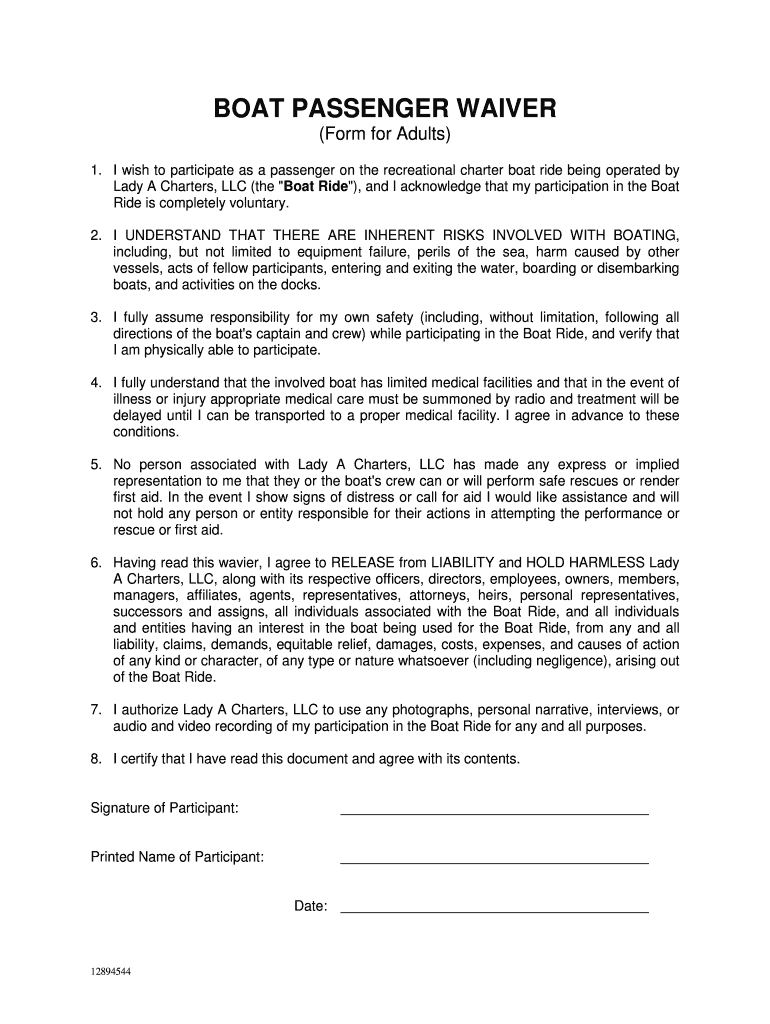
MI Lady A Charters Boat Passenger Waiver (Form for Adults) 2010-2026 free printable template
pdfFiller is not affiliated with any government organization

Fill out
Complete the form online in a simple drag-and-drop editor.

eSign
Add your legally binding signature or send the form for signing.

Share
Share the form via a link, letting anyone fill it out from any device.

Export
Download, print, email, or move the form to your cloud storage.
Why pdfFiller is the best tool for your documents and forms


End-to-end document management
From editing and signing to collaboration and tracking, pdfFiller has everything you need to get your documents done quickly and efficiently.
Accessible from anywhere
pdfFiller is fully cloud-based. This means you can edit, sign, and share documents from anywhere using your computer, smartphone, or tablet.
Secure and compliant
pdfFiller lets you securely manage documents following global laws like ESIGN, CCPA, and GDPR. It's also HIPAA and SOC 2 compliant.
What is MI Lady A Charters Boat Passenger Waiver (Form for Adults)
The Boat Passenger Waiver is a legal document used by Lady A Charters, LLC to release the company from liability for injuries during recreational boat rides.
pdfFiller scores top ratings on review platforms




Who needs MI Lady A Charters Boat Passenger Waiver (Form for Adults)?
Explore how professionals across industries use pdfFiller.

MI Lady A Charters Boat Passenger Waiver (Form for Adults) is needed by:
-
Individuals planning to participate in boating activities
-
Charter companies offering recreational boat rides
-
Event organizers coordinating group boat trips
-
Legal advisors preparing liability documents for boating
-
Safety officers ensuring compliance with boating regulations
Comprehensive Guide to MI Lady A Charters Boat Passenger Waiver (Form for Adults)
What is the Boat Passenger Waiver?
The Boat Passenger Waiver is a legal document that serves as a liability release for Lady A Charters, LLC. This waiver is essential for participants to acknowledge the inherent risks associated with recreational boating, which can lead to accidents or injuries. By signing the waiver, both the company and the participant are protected; the company is shielded from liability claims, while participants recognize their responsibility for safety.
Purpose and Benefits of the Boat Passenger Waiver
The primary purpose of the Boat Passenger Waiver is to inform participants about the importance of acknowledging risks involved in boating. This document facilitates safer boating experiences by ensuring that participants are aware of and accept these risks. Moreover, it encourages responsible boating practices, fostering a culture of safety during recreational outings.
Who Needs the Boat Passenger Waiver?
Individuals who plan to participate in boating activities with Lady A Charters must complete the waiver. This includes solo participants as well as groups engaged in private charters. It is important to understand that signing the waiver is mandatory before embarking on any boating trip. Certain unique circumstances may exempt individuals from this requirement, but generally, the waiver applies to all participants.
How to Fill Out the Boat Passenger Waiver Online (Step-by-Step)
To successfully fill out the Boat Passenger Waiver online, follow these steps:
-
Access the waiver form via the provided link.
-
Enter the required participant information, including name and contact details.
-
Complete the sections that require your signature, printed name, and date.
-
Review the form for accuracy, ensuring all fields are filled correctly.
-
Utilize pdfFiller’s online editing features to make modifications, if necessary.
Common Errors to Avoid When Completing the Waiver
When filling out the Boat Passenger Waiver, be mindful of the following common errors:
-
Failing to provide required information in the designated fields.
-
Signing the form without printing your name, which may invalidate the waiver.
-
Overlooking the review process before submission to ensure all entries are correct.
-
Neglecting to check validation features within pdfFiller for accuracy.
How to Sign and Submit the Boat Passenger Waiver
Signing the Boat Passenger Waiver is a straightforward process. Participants can choose between digital signatures and traditional wet signatures. Once signed, the completed waiver can be saved or printed for submission.
Submission methods include:
-
Online via the pdfFiller platform.
-
In-person delivery to Lady A Charters’ office.
What Happens After You Submit the Boat Passenger Waiver?
After submitting the Boat Passenger Waiver, participants may receive follow-up communications or confirmations from Lady A Charters. Processing times can vary, so it's beneficial to inquire about any tracking options available for your submission. Keep a copy of the waiver for your personal records to refer to if needed.
Security and Compliance Considerations for the Boat Passenger Waiver
Participants can rest assured regarding the security and compliance of their Boat Passenger Waiver. pdfFiller employs robust security features such as 256-bit encryption to safeguard personal data. Additionally, the platform adheres to HIPAA and GDPR regulations, ensuring safe handling and processing of sensitive documents throughout the waiver execution process.
Enhance Your Experience with pdfFiller for Boat Passenger Waiver Management
Using pdfFiller greatly enhances the experience of managing the Boat Passenger Waiver. This platform simplifies the editing and eSigning process for legal forms, making it user-friendly and accessible. Not only can users create fillable forms, but they can also take advantage of collaborative features for sharing waivers with others, ensuring a smooth and efficient workflow during the boating preparation process.
How to fill out the MI Lady A Charters Boat Passenger Waiver (Form for Adults)
-
1.Start by accessing the Boat Passenger Waiver on pdfFiller. Use the search function or any provided link to locate the form.
-
2.Once the form is open, review the fields that require completion, including those for participants' names and signatures.
-
3.Before filling out the form, gather necessary information such as the full names, contact details, and any relevant medical considerations of all participants.
-
4.Utilize pdfFiller's interface to click on each blank field and enter the required information. Ensure names are spelled correctly and any selected options are accurate.
-
5.As you fill out the form, pay close attention to the areas where participants need to sign. Each person must read and acknowledge the waiver terms before signing.
-
6.After completing the form, take the time to review all filled-in fields for accuracy. Ensure that every participant's required information is included and correct.
-
7.Once satisfied with the document, proceed to save your changes. You can choose to download the completed form directly to your device or submit it via email or cloud storage services.
-
8.Finally, keep a copy of the finalized Boat Passenger Waiver for your records, as well as for any participants who may request it.

Who needs to sign the Boat Passenger Waiver?
All participants planning to engage in the boating activity must sign the Boat Passenger Waiver. This ensures they acknowledge the risks involved and release Lady A Charters, LLC from liability.
Are there any age restrictions for signing the waiver?
Typically, participants under the age of 18 cannot sign the waiver themselves. A parent or guardian must sign on their behalf to ensure legal compliance.
What happens if I submit the waiver after the boating trip?
It's crucial to submit the Boat Passenger Waiver before participating in any boating activity. Submitting it afterward may result in claims not being honored in the event of an accident.
Is notarization required for this waiver?
No, notarization is not required for the Boat Passenger Waiver. However, it must be signed by all participants to be considered valid.
How can I retrieve a completed copy of the waiver?
After completing and saving the waiver on pdfFiller, you can download it directly to your device. You may also print a copy directly from the platform for your records.
Can I edit the waiver after I've saved it?
Yes, you can reopen the saved Boat Passenger Waiver on pdfFiller to make edits. Just access your documents and select the file you want to modify.
What should I avoid when filling out the waiver?
To avoid common mistakes, ensure all required fields are filled accurately. Double-check the names and signatures before submitting to prevent any disputes later.
Related Forms





Get the latest insights from our blog


If you believe that this page should be taken down, please follow our DMCA take down process
here
.
This form may include fields for payment information. Data entered in these fields is not covered by PCI DSS compliance.