
Last updated on
Nov 6, 2026

AU WorkSafe Victoria FOR553 2017 free printable template
We are not affiliated with any brand or entity on this form

Fill out
Complete the form online in a simple drag-and-drop editor.

eSign
Add your legally binding signature or send the form for signing.

Share
Share the form via a link, letting anyone fill it out from any device.

Export
Download, print, email, or move the form to your cloud storage.
Why pdfFiller is the best tool for your documents and forms


End-to-end document management
From editing and signing to collaboration and tracking, pdfFiller has everything you need to get your documents done quickly and efficiently.
Accessible from anywhere
pdfFiller is fully cloud-based. This means you can edit, sign, and share documents from anywhere using your computer, smartphone, or tablet.
Secure and compliant
pdfFiller lets you securely manage documents following global laws like ESIGN, CCPA, and GDPR. It's also HIPAA and SOC 2 compliant.
What is AU WorkSafe Victoria FOR553
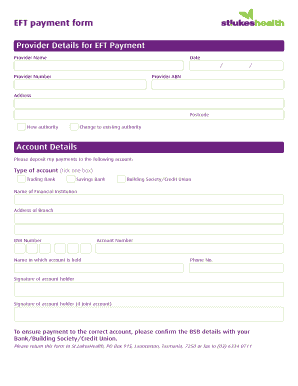
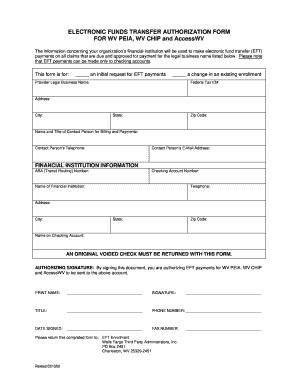
The Electronic Funds Transfer Application Form is a financial document used by providers in Victoria, Australia, to set up direct deposit payments from WorkSafe Victoria.
pdfFiller scores top ratings on review platforms




Who needs AU WorkSafe Victoria FOR553?
Explore how professionals across industries use pdfFiller.

AU WorkSafe Victoria FOR553 is needed by:
-
Providers needing direct deposit payments
-
Account holders managing banking details
-
Businesses partnering with WorkSafe Victoria
-
Financial institutions processing EFT transactions
-
Employees receiving wages via EFT
-
Accounting professionals handling financial reports
Comprehensive Guide to AU WorkSafe Victoria FOR553
Understanding the Electronic Funds Transfer Application Form
The Electronic Funds Transfer Application Form is crucial for providers in Victoria, Australia, to facilitate direct deposit payments from WorkSafe Victoria. This form streamlines the payment process, helping to ensure timely and accurate payments. Providers utilize the electronic funds transfer application form to manage their banking information effectively.
Purpose and Benefits of the Electronic Funds Transfer Application Form
Using the Electronic Funds Transfer Application Form presents several advantages for providers in Australia. The primary benefits include:
-
Efficient payment processing without delays.
-
Increased security for handling financial information.
-
Reliable payment methods, ensuring providers receive their funds promptly.
The provider payment form australia aids in setting up direct deposit payments seamlessly, thus benefiting both providers and their clients in managing financial transactions.
Key Features of the Electronic Funds Transfer Application Form
This form is designed with user-friendliness in mind, incorporating essential fields such as:
-
Provider Number
-
Company Name
-
Bank Account Details
Clear instructions are provided for filling out each field, enhancing the user experience and reducing errors in submissions.
Eligibility Criteria for the Electronic Funds Transfer Application Form
To qualify for using this form, specific criteria must be met. Eligible users include account holders and providers who:
-
Possess the necessary qualifications as a registered provider.
-
Meet any restrictions applicable based on their service type.
Understanding these eligibility requirements ensures that only qualified individuals utilize the provider payment form australia.
How to Fill Out the Electronic Funds Transfer Application Form Online
Filling out the Electronic Funds Transfer Application Form online can be done effectively by following these steps:
-
Access the form from the designated website.
-
Fill in each field accurately, including 'Provider Number' and 'Bank Account Details.'
-
Review all entries for accuracy and completeness.
-
Submit the form electronically as instructed.
Be mindful of common pitfalls, such as inputting incorrect bank details or missing signatures, to ensure a smooth submission.
Required Documents and Information You'll Need to Gather
Before starting the application process, gather the following essential documents:
-
Proof of identification
-
Bank details
-
Required signatures from both the account holder and provider
A pre-filing checklist can assist in streamlining your preparation, ensuring you have all necessary information on hand.
How to Submit the Electronic Funds Transfer Application Form
Once completed, the Electronic Funds Transfer Application Form can be submitted using various methods:
-
Online through the designated submission portal.
-
By mail to the specified address.
-
In-person at designated locations.
It's advisable to track your submission status and familiarize yourself with the expected processing time to stay informed.
Security and Compliance Considerations for the Electronic Funds Transfer Application Form
Ensuring the security of sensitive information is paramount when handling the Electronic Funds Transfer Application Form. Compliance with local regulations and data protection standards is critical. pdfFiller offers robust security features, including:
-
256-bit encryption
-
Compliance with SOC 2 Type II, HIPAA, and GDPR standards
This level of security safeguards user data during the submission process.
How pdfFiller Can Help You with the Electronic Funds Transfer Application Form
pdfFiller enhances the experience of completing the Electronic Funds Transfer Application Form by providing various tools:
-
eSigning capabilities for quick approvals
-
Edit features for making necessary changes easily
-
Secure document sharing options to protect your information
Utilizing pdfFiller's services can save time and simplify the overall process.
Next Steps for Completing Your Electronic Funds Transfer Application Form
Utilize pdfFiller to assist in completing the Electronic Funds Transfer Application Form effectively. Additional resources and support are available should you require assistance. Explore the various features offered by pdfFiller for PDF editing and e-signing to maximize your experience.
How to fill out the AU WorkSafe Victoria FOR553
-
1.To access the Electronic Funds Transfer Application Form on pdfFiller, visit the pdfFiller website and search for the form using the title or keywords related to it.
-
2.Once located, click on the form to open it in the pdfFiller interface, where you’ll see the interactive fields and instructions.
-
3.Before completing the form, gather the necessary information including your provider number, company name, complete bank account details, and the signatures of both the account holder and the provider.
-
4.Begin filling out the form by clicking on each required field. The pdfFiller interface allows you to type directly into the fields provided.
-
5.Use the blank spaces for entering your information accurately, following the instructions for each section carefully to avoid mistakes.
-
6.Pay special attention to the signature fields; both the account holder and the provider will need to provide their signatures to validate the form.
-
7.After populating all necessary fields, review the completed form for accuracy. Confirm that all information is correct and that all required fields are filled.
-
8.Once satisfied with the information, pdfFiller offers options to save, download, or submit the form electronically. Choose your preferred method to finalize the process.

Who is eligible to use the Electronic Funds Transfer Application Form?
Any provider doing business in Victoria, Australia, with WorkSafe Victoria can use the Electronic Funds Transfer Application Form to set up direct deposit payments.
What information is needed to fill out the form?
You will need your provider number, company name, bank account details, and signatures from both the account holder and the provider.
How do I submit the completed form?
After completing the form on pdfFiller, you can submit it electronically via their platform or download it to email directly to the relevant office.
Are there any deadlines for submitting this form?
There are no specific deadlines associated with the Electronic Funds Transfer Application Form; however, timely submission is recommended to ensure prompt processing of payments.
Can I make changes to my direct deposit information after submission?
Yes, any changes to bank details must be communicated in writing, following the submission of the original form.
What are common mistakes to avoid when filling out the form?
Double-check that all fields are filled out correctly and completely. Make sure your signatures are clear, and bank account details are accurate to avoid delays in processing.
How long does processing take for this form?
Processing times can vary, but once submitted, it typically takes a few business days to be reviewed and processed by WorkSafe Victoria.
AU WorkSafe Victoria FOR553 Form Versions
Related Content
Related Forms



Get the latest insights from our blog


If you believe that this page should be taken down, please follow our DMCA take down process
here
.
This form may include fields for payment information. Data entered in these fields is not covered by PCI DSS compliance.