
Last updated on
Nov 9, 2026

WCJC Class Schedule Approval Form free printable template
pdfFiller is not affiliated with any government organization

Fill out
Complete the form online in a simple drag-and-drop editor.

eSign
Add your legally binding signature or send the form for signing.

Share
Share the form via a link, letting anyone fill it out from any device.

Export
Download, print, email, or move the form to your cloud storage.
Why pdfFiller is the best tool for your documents and forms


End-to-end document management
From editing and signing to collaboration and tracking, pdfFiller has everything you need to get your documents done quickly and efficiently.
Accessible from anywhere
pdfFiller is fully cloud-based. This means you can edit, sign, and share documents from anywhere using your computer, smartphone, or tablet.
Secure and compliant
pdfFiller lets you securely manage documents following global laws like ESIGN, CCPA, and GDPR. It's also HIPAA and SOC 2 compliant.
What is WCJC Class Schedule Approval Form
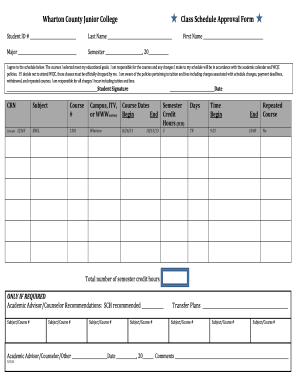
The Wharton County Junior College Class Schedule Approval Form is an essential document used by students to approve their class schedule for registration.
pdfFiller scores top ratings on review platforms




Who needs WCJC Class Schedule Approval Form?
Explore how professionals across industries use pdfFiller.

WCJC Class Schedule Approval Form is needed by:
-
Current students at Wharton County Junior College
-
Prospective students planning to enroll
-
Advisors assisting with course selection
-
Office of Admission and Registration staff
-
Educational institutions in Texas requiring scheduling
-
Parents helping students with registration
Comprehensive Guide to WCJC Class Schedule Approval Form
Overview of the Wharton County Junior College Class Schedule Approval Form
The Wharton County Junior College Class Schedule Approval Form is essential in the class registration process at WCJC. This form requires students to approve their class schedules, ensuring that they are accurately enrolled in their desired courses. The primary audience for this form comprises current students who must engage with it to officially record their course selections.
-
Defines the form's purpose in the context of class registration.
-
Discusses the necessity of student approval for their schedules.
-
Identifies students as the key users of this form.
Purpose and Benefits of the Wharton County Junior College Class Schedule Approval Form
Completing the Wharton County Junior College Class Schedule Approval Form accurately and on time offers several benefits. This form streamlines the registration process, allowing students to efficiently finalize their class schedules without unnecessary delays. Without proper approval, students may face challenges related to class enrollment and academic planning that could hinder their educational journey.
-
Highlights how the form aids in smooth registration.
-
Discusses potential issues arising from lack of approval.
-
Describes the relationship between form submission and optimal academic planning.
Key Features of the Wharton County Junior College Class Schedule Approval Form
The Wharton County Junior College Class Schedule Approval Form incorporates various key features designed to collect necessary information from students. Required personal information fields include the Student ID, name, and major to properly identify the applicant. The form also contains a section for course details that emphasizes the importance of course selection and includes a signature line as an essential part of the submission process.
-
Lists required personal information fields.
-
Explains the significance of the course details section.
-
Mention the necessity of a signature and any accompanying instructions.
Eligibility Criteria for Using the Wharton County Junior College Class Schedule Approval Form
Eligibility for filling out the Wharton County Junior College Class Schedule Approval Form is crucial in determining who can submit it. Current enrollment status is a primary requirement, ensuring that only active students engage with the form. Additionally, certain majors or programs may have specific prerequisites related to course selection, which must be adhered to for successful enrollment.
-
Defines student eligibility requirements for form submission.
-
Discusses prerequisite courses that may apply.
-
Outlines any special conditions that pertain to specific majors.
How to Fill Out the Wharton County Junior College Class Schedule Approval Form Online
Filling out the Wharton County Junior College Class Schedule Approval Form online is a straightforward process. Students should follow detailed instructions for each fillable field, ensuring that all requested data is provided accurately to prevent errors. Before submission, it’s advisable to review the completed form for completeness and correctness to facilitate a smooth registration experience.
-
Step-by-step guidance on filling the form online.
-
Emphasis on accurate data entry to avoid issues.
-
Suggestion to review the form thoroughly before submission.
Common Errors in Filling Out the Wharton County Junior College Class Schedule Approval Form
Being aware of common errors when completing the Wharton County Junior College Class Schedule Approval Form can help students avoid pitfalls. Missing fields or sections can lead to processing delays, so it's imperative to double-check all entries for accuracy. In case mistakes occur after submission, students should know the necessary steps to rectify those issues promptly.
-
Identifies frequently overlooked fields in the form.
-
Offers tips for verifying the accuracy of submitted information.
-
Guides what to do if revisions are needed post-submission.
Submitting the Wharton County Junior College Class Schedule Approval Form
Understanding the submission process for the Wharton County Junior College Class Schedule Approval Form is essential for students. Completed forms should be submitted to the designated office, adhering to specified timelines and deadlines. Additionally, students can inquire about confirmation procedures or tracking options after they submit their forms.
-
Details how and where to submit the completed form.
-
Discusses timelines and deadlines crucial for submission.
-
Explains confirmation processes available post-submission.
What to Expect After Submitting the Wharton County Junior College Class Schedule Approval Form
After submitting the Wharton County Junior College Class Schedule Approval Form, students should be prepared for the follow-up process. Processing times may vary, so managing expectations regarding response times is crucial. Students can check the status of their submissions and should be aware of possible outcomes, including approved schedules or the need for revisions before finalizing their classes.
-
Outlines expected processing time and response expectations.
-
Guides on checking the status of the submitted form.
-
Mention possible outcomes, such as approval or needed revisions.
Privacy and Security When Using the Wharton County Junior College Class Schedule Approval Form
Ensuring user privacy and data security is paramount when utilizing the Wharton County Junior College Class Schedule Approval Form. pdfFiller employs robust security measures, including data encryption and compliance with privacy regulations, to protect users' sensitive information. These measures provide students with peace of mind regarding the confidentiality of their submitted forms.
-
Describes pdfFiller’s security protocols like encryption.
-
Discusses the importance of protecting personal data during submission.
-
Assures confidentiality regarding submitted forms.
Get Started with the Wharton County Junior College Class Schedule Approval Form Using pdfFiller
Utilizing pdfFiller simplifies the process of completing the Wharton County Junior College Class Schedule Approval Form. This platform provides easy-to-use features such as eSigning and editing capabilities that assist students in efficiently filling out and submitting their forms. Students are encouraged to start their form submissions today to experience a seamless registration process.
-
Highlights the user-friendly nature of pdfFiller for document completion.
-
Mention specific features that streamline the form-filling process.
-
Invites users to commence their form completion for smooth registration.
How to fill out the WCJC Class Schedule Approval Form
-
1.To start, access the Wharton County Junior College Class Schedule Approval Form on the pdfFiller platform by searching for the form name or navigating through the education forms category.
-
2.Open the form by clicking on the template, which will launch the pdfFiller interface where you can begin editing.
-
3.Prepare your necessary personal information, including your Student ID, First Name, Last Name, and Major, before filling out the form to ensure a smooth completion process.
-
4.Fill in each required field on the form, ensuring that all details are accurate and up-to-date. Utilize pdfFiller's text boxes to enter information easily.
-
5.Incorporate checkboxes where applicable to indicate your chosen courses for the upcoming semester, following the specific instructions provided on the form.
-
6.After completing all fields, review the information thoroughly to avoid any errors. Check that your name and Student ID are correct, and ensure that all courses are accurately selected.
-
7.Once reviewed, navigate to the signature line in the form, and use pdfFiller’s signature feature to add your electronic signature.
-
8.Finally, save your completed form by selecting the 'Save' option. You can download a copy for your records or submit the form directly to the Office of Admission and Registration through pdfFiller’s submission options.

Who is eligible to use the Wharton County Junior College Class Schedule Approval Form?
The form is primarily designed for currently enrolled students at Wharton County Junior College who need to approve their class schedules for upcoming semesters.
Is there a deadline for submitting the Class Schedule Approval Form?
Yes, students should submit the form before the registration deadline for the semester they are enrolling in. Check the college's academic calendar for specific dates.
How do I submit the Class Schedule Approval Form?
The completed form can be submitted directly through pdfFiller, or you may print it and submit it in person or via email to the Office of Admission and Registration as per your preference.
Are there any supporting documents required for this form?
Typically, supporting documentation is not required for the Class Schedule Approval Form. However, ensure that all requested personal information is accurately provided.
What common mistakes should I avoid when filling out this form?
Ensure to double-check your course selections, Student ID, and contact details. Failing to sign the form or not submitting it by the deadline are common errors to avoid.
How long does it take to process the Class Schedule Approval Form?
Processing times can vary, but you should expect confirmation within a few days after submission. For timely updates, contact the Office of Admission and Registration.
Can I make changes to my schedule after submitting the form?
Changes to your schedule must be approved through the proper channels. Contact your academic advisor for assistance regarding any modifications post-submission.
Related Forms



Related Catalogs
Get the latest insights from our blog


If you believe that this page should be taken down, please follow our DMCA take down process
here
.
This form may include fields for payment information. Data entered in these fields is not covered by PCI DSS compliance.