
Last updated on
Nov 9, 2026

NC DMA-5093 2002-2026 free printable template
pdfFiller is not affiliated with any government organization

Fill out
Complete the form online in a simple drag-and-drop editor.

eSign
Add your legally binding signature or send the form for signing.

Share
Share the form via a link, letting anyone fill it out from any device.

Export
Download, print, email, or move the form to your cloud storage.
Why pdfFiller is the best tool for your documents and forms


End-to-end document management
From editing and signing to collaboration and tracking, pdfFiller has everything you need to get your documents done quickly and efficiently.
Accessible from anywhere
pdfFiller is fully cloud-based. This means you can edit, sign, and share documents from anywhere using your computer, smartphone, or tablet.
Secure and compliant
pdfFiller lets you securely manage documents following global laws like ESIGN, CCPA, and GDPR. It's also HIPAA and SOC 2 compliant.
What is NC DMA-5093
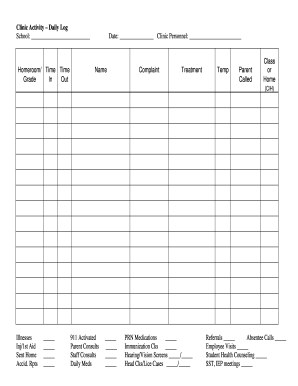
The Daily Reception Log for Medical and Financial Assistance is a healthcare form used by offices to track client visits for medical and financial services.
pdfFiller scores top ratings on review platforms




Who needs NC DMA-5093?
Explore how professionals across industries use pdfFiller.

NC DMA-5093 is needed by:
-
Healthcare providers documenting patient interactions
-
Social workers assisting clients with service applications
-
Administrative staff managing patient intake processes
-
Non-profit organizations providing financial aid
-
Government agencies overseeing health assistance programs
Comprehensive Guide to NC DMA-5093
What is the Daily Reception Log for Medical and Financial Assistance?
The Daily Reception Log is an essential form used in healthcare settings to track client visits. This log helps healthcare offices systematically record crucial client information such as the client's name, address, purpose of visit, and the outcome of the visit. Additionally, it plays a vital role in managing the intake processes for various assistance programs, ensuring effective service delivery to clients in need.
Purpose and Benefits of the Daily Reception Log for Medical and Financial Assistance
This form significantly aids healthcare providers and clients alike. For healthcare offices, the Daily Reception Log organizes client data efficiently and tracks services provided over time. Clients benefit from improved access to assistance and enhanced service outcomes. Furthermore, this log enhances compliance and ensures that documentation is efficiently maintained, leading to better operational workflow in healthcare institutions.
Key Features of the Daily Reception Log for Medical and Financial Assistance
The Daily Reception Log boasts several key features that contribute to its effectiveness:
-
A comprehensive set of fields, including client name and address, purpose of visit, and outcome.
-
User-friendly layout with clear instructions to facilitate accurate completion.
-
Flexibility to cater to various healthcare services and assistance programs.
Who Needs the Daily Reception Log for Medical and Financial Assistance?
This log is primarily utilized by healthcare professionals including receptionists, intake coordinators, and case managers. Various healthcare institutions such as clinics, hospitals, and community health centers rely on this form to facilitate service delivery efficiently. Clients also play an important part in this process, benefiting from structured assistance and improved data management.
How to Fill Out the Daily Reception Log for Medical and Financial Assistance Online (Step-by-Step)
Filling out the Daily Reception Log correctly is crucial. Here’s a practical guide:
-
Begin by entering the client's name and address in the designated fields.
-
Specify the purpose of the visit; this should be clear and concise.
-
Record the outcome of the visit to ensure complete documentation.
-
Double-check for spelling errors and ensure all fields are filled accurately.
-
Submit the log according to your facility’s submission procedures.
How to Download and Save the Daily Reception Log for Medical and Financial Assistance PDF
To acquire the Daily Reception Log, follow these steps:
-
Access the pdfFiller platform to download the log.
-
Save the form in an organized manner on your device for future use.
-
Consider storing the document in a cloud-based system for easy access and retrieval.
How to Submit the Daily Reception Log for Medical and Financial Assistance
Submitting the Daily Reception Log involves a few key steps:
-
Choose your preferred submission method; options may include online submission or physical delivery.
-
Be aware of any potential fees or deadlines associated with the submission.
-
Confirm receipt of the document to ensure successful submission.
Security and Compliance for the Daily Reception Log for Medical and Financial Assistance
When handling the Daily Reception Log, users can be assured of robust security measures provided by pdfFiller. The platform implements 256-bit encryption and adheres to HIPAA and GDPR compliance, ensuring that sensitive client information remains confidential. Best practices for data retention are also highlighted to protect client details effectively.
Engage with pdfFiller for Your Daily Reception Log Needs
Utilizing pdfFiller simplifies the process of completing the Daily Reception Log. The platform provides user-friendly tools for editing and eSigning PDFs without the need for downloads. Additionally, its cloud-based capabilities facilitate effective document management, allowing users to explore a variety of other features that enhance their experience in managing important forms.
How to fill out the NC DMA-5093
-
1.Access the Daily Reception Log for Medical and Financial Assistance on pdfFiller by searching for the form title or by using a direct link provided.
-
2.Once the form is open, carefully review the layout and identify each field that needs to be filled in, including the client's name, address, and purpose of the visit.
-
3.Gather necessary information such as the client's personal details, the purpose of their visit, and any relevant outcomes from previous visits before beginning to fill out the form.
-
4.Click into each blank field to enter the required details. Use pdfFiller’s tools to adjust text size if necessary, ensuring clarity and readability.
-
5.Pay attention to specific instructions highlighted within the form, especially for sections like 'County' or 'Client Name and Address,' ensuring all data is accurate.
-
6.Once all fields are filled, review the entire form for completeness and accuracy. Utilize the preview feature on pdfFiller to check how the final document will appear.
-
7.To save your work, click the save option in pdfFiller, allowing you to keep a digital copy for future use. You can also choose to download the form in various formats if needed.
-
8.If submitting electronically, ensure you complete any required fields for submission to the designated healthcare office or agency, following pdfFiller’s directives for submission procedures.

Who is eligible to use the Daily Reception Log for Medical and Financial Assistance?
The form is designed for use by healthcare offices, social workers, and administrative staff involved in client intake for medical and financial services.
What information do I need to gather before filling out the form?
Before starting, collect the client's name, address, purpose of their visit, and any outcomes if applicable from previous interactions. This will facilitate accurate completion of the form.
How do I submit the Daily Reception Log after completing it?
After filling out the form, you can submit it electronically through pdfFiller or save and download it to send via email or print for hand-delivery.
Can I edit the form after filling it out?
Yes, pdfFiller allows you to edit the form anytime before final submission. Ensure you save any changes made to the completed fields.
What are common mistakes to avoid when filling out this form?
Common mistakes include leaving fields blank, incorrect client details, and failing to follow specific field instructions. Always double-check for accuracy and completeness.
How long does it take to process the Daily Reception Log after submission?
Processing times can vary by office or agency. It’s best to inquire directly with the recipient for specific timelines related to handling the submitted form.
Are there any fees associated with using the Daily Reception Log?
Typically, there are no fees for using the Daily Reception Log itself, but submission fees may apply depending on the agency or services requested.





Get the latest insights from our blog



If you believe that this page should be taken down, please follow our DMCA take down process
here
.
This form may include fields for payment information. Data entered in these fields is not covered by PCI DSS compliance.