
Last updated on
Oct 31, 2026

Get the free Annual Leave and Long Service Leave Application Form
We are not affiliated with any brand or entity on this form

Fill out
Complete the form online in a simple drag-and-drop editor.

eSign
Add your legally binding signature or send the form for signing.

Share
Share the form via a link, letting anyone fill it out from any device.

Export
Download, print, email, or move the form to your cloud storage.
Why pdfFiller is the best tool for your documents and forms


End-to-end document management
From editing and signing to collaboration and tracking, pdfFiller has everything you need to get your documents done quickly and efficiently.
Accessible from anywhere
pdfFiller is fully cloud-based. This means you can edit, sign, and share documents from anywhere using your computer, smartphone, or tablet.
Secure and compliant
pdfFiller lets you securely manage documents following global laws like ESIGN, CCPA, and GDPR. It's also HIPAA and SOC 2 compliant.
What is Leave Application Form
The Annual Leave and Long Service Leave Application Form is a document used by employees in Australia to request annual or long service leave from their employer.
pdfFiller scores top ratings on review platforms




Who needs Leave Application Form?
Explore how professionals across industries use pdfFiller.

Leave Application Form is needed by:
-
Employees seeking to apply for leave
-
Managers approving leave requests
-
HR personnel handling leave records
-
Payroll departments processing leave payments
-
Labor representatives advising on employee rights
Comprehensive Guide to Leave Application Form
What is the Annual Leave and Long Service Leave Application Form?
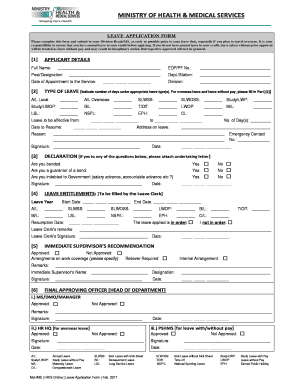
The Annual Leave and Long Service Leave Application Form is a crucial document for employees in Australia who wish to request leave from their job. This form enables individuals to formally apply for their annual leave or long service leave, ensuring that both parties—employee and manager—can provide necessary signatures for approval. Proper use of this application form is vital for maintaining workplace compliance with regards to employee entitlements and obligations.
Purpose and Benefits of the Annual Leave and Long Service Leave Application Form
This application form plays a significant role in ensuring that leave requests are handled correctly. The standardized process for employees makes it easier for management to review applications efficiently. Some of the key benefits include:
-
Ensures proper documentation of leave requests.
-
Facilitates compliance with legal requirements regarding employee entitlements.
-
Streamlines the approval process between employees and managers.
Key Features of the Annual Leave and Long Service Leave Application Form
The form consists of various sections designed to capture essential information. Key features include:
-
Employee details including name and position.
-
Specification of leave type and duration.
-
A designated area for signatures from both the employee and manager.
-
Notes concerning leave entitlements and references to the Fair Work Ombudsman.
Who Needs the Annual Leave and Long Service Leave Application Form?
All employees looking to take leave must complete this application form. Managers and supervisors play a pivotal role in the approval process, ensuring that leave requests align with company policies. Furthermore, Human Resources departments benefit from this documentation for accurate recordkeeping and compliance monitoring.
How to Fill Out the Annual Leave and Long Service Leave Application Form Online
Filling out the application form online can be straightforward if you follow these steps:
-
Access the form through your organization’s designated portal.
-
Complete all mandatory fields, paying close attention to leave dates and type.
-
Review your details for accuracy before submission.
It's important to validate the information to avoid potential issues with your leave request.
What Happens After You Submit the Annual Leave and Long Service Leave Application Form?
Once the form is submitted, employees can anticipate a processing period during which their request is evaluated. Typical processing timelines vary, but employees should keep an eye on:
-
Tracking the status of their application through the company’s system.
-
Common reasons for rejections, such as insufficient leave balance.
Security and Compliance for the Annual Leave and Long Service Leave Application Form
Ensuring the security of personal information on the application form is paramount. pdfFiller implements strong measures, including 256-bit encryption and compliance with legal standards such as HIPAA and GDPR. Protecting sensitive employee information serves both the company’s integrity and the trust of its employees.
How to Download and Print the Annual Leave and Long Service Leave Application Form
To effectively access and utilize the form, follow these instructions:
-
Download the form in PDF format from the designated portal.
-
Print the document ensuring all details are legible to minimize miscommunication during the approval process.
Enhance Your Experience with pdfFiller
Utilizing pdfFiller can significantly simplify the form management process. Benefits include:
-
Easy completion of forms thanks to fillable fields.
-
eSigning capabilities for quicker approvals.
-
Cloud storage options for storing completed forms securely.
By leveraging these tools, users can streamline their leave application process, making it more efficient.
Sample Completed Annual Leave and Long Service Leave Application Form
For users looking to understand how to fill out the form correctly, a sample completed application is available for download. This example will illustrate key sections and choices made when completing the form, providing tips on adhering to required standards based on the displayed example.
How to fill out the Leave Application Form
-
1.To access the Annual Leave and Long Service Leave Application Form, visit pdfFiller's website and use the search function to find the form.
-
2.Once located, click on the form to open it in pdfFiller's interface, providing an interactive workspace for completion.
-
3.Before starting, gather necessary information such as your employee details, type of leave requested, and the period for which the leave is being requested.
-
4.Begin filling out the form by entering your personal details in the designated fields, ensuring accuracy for timely processing.
-
5.Select the type of leave you are applying for from the provided options using the checkboxes.
-
6.Specify the exact dates for your leave period in the provided fields, noting both the start and end dates.
-
7.Review the information you've entered carefully to ensure it is correct and complete, as inaccuracies may delay approval.
-
8.Once you are satisfied with the form, locate the signature fields for both you and your manager, and ensure both signatures are obtained.
-
9.After signing, check to see if pdfFiller provides a review feature to double-check all filled details.
-
10.To save your progress, click on the save button, then select your desired download format or opt to submit the form directly through pdfFiller.

What are the eligibility requirements for applying for leave?
Employees must have accrued leave balance and must be employed under the terms that allow for annual or long service leave as outlined in company policy.
Are there deadlines I should be aware of for submitting this form?
It is best to submit your application as far in advance as possible, typically at least two weeks prior to the desired leave start date, to enable proper planning.
How do I submit the completed application form?
You can submit the completed form by downloading it from pdfFiller and emailing it to your manager or HR, or use pdfFiller’s submission tools if provided.
What supporting documents are required with this form?
Generally, supporting documents may not be required. However, check your workplace policy for any specific requirements related to leave requests.
What common mistakes should I avoid when filling out this form?
Avoid omitting required fields, such as your signature or correct leave dates. Double-check for typos and ensure all selections are done accurately.
What is the processing time for leave applications?
Processing times vary, but it typically takes several days to a week for managers or HR to review and approve the leave application.
Where can I find more information about my leave entitlements?
For detailed information about leave entitlements, refer to the Fair Work Ombudsman website or your company's employee handbook regarding leave policies.
Related Forms





Related Catalogs
Get the latest insights from our blog


If you believe that this page should be taken down, please follow our DMCA take down process
here
.
This form may include fields for payment information. Data entered in these fields is not covered by PCI DSS compliance.