
Last updated on
Nov 6, 2026

Pathfinder Application & Health Record 2012 free printable template
pdfFiller is not affiliated with any government organization

Fill out
Complete the form online in a simple drag-and-drop editor.

eSign
Add your legally binding signature or send the form for signing.

Share
Share the form via a link, letting anyone fill it out from any device.

Export
Download, print, email, or move the form to your cloud storage.
Why pdfFiller is the best tool for your documents and forms


End-to-end document management
From editing and signing to collaboration and tracking, pdfFiller has everything you need to get your documents done quickly and efficiently.
Accessible from anywhere
pdfFiller is fully cloud-based. This means you can edit, sign, and share documents from anywhere using your computer, smartphone, or tablet.
Secure and compliant
pdfFiller lets you securely manage documents following global laws like ESIGN, CCPA, and GDPR. It's also HIPAA and SOC 2 compliant.
What is Pathfinder Application & Health Record
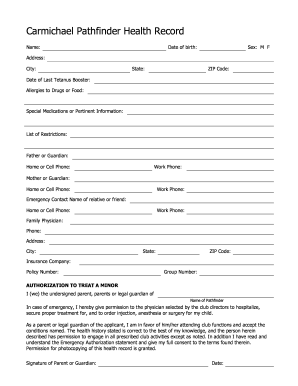
The Pathfinder Application & Health Record is a medical consent form used by the Potomac Conference to officially recognize Pathfinder applicants and collect necessary health information.
pdfFiller scores top ratings on review platforms




Who needs Pathfinder Application & Health Record?
Explore how professionals across industries use pdfFiller.

Pathfinder Application & Health Record is needed by:
-
Parents/Guardians of Pathfinder applicants
-
Youth participating in Pathfinder activities
-
Church organizers coordinating Pathfinder clubs
-
Healthcare providers requiring medical history
-
Event leaders managing youth activities
-
Volunteer staff involved in Pathfinder events
Comprehensive Guide to Pathfinder Application & Health Record
What is the Pathfinder Application & Health Record?
The Pathfinder Application & Health Record is an official document used by the Potomac Conference to recognize Pathfinder applicants. This form serves multiple purposes, primarily gathering essential information necessary for participation in activities. Key components include demographic information, detailed medical history, and specific authorization requirements necessary for the program.
One critical aspect is the annual signing requirement for parents and guardians. This requirement ensures continuous consent for participation and medical treatment, which is essential for maintaining safety in various activities.
Purpose and Benefits of the Pathfinder Application & Health Record
The Pathfinder Application & Health Record plays a vital role in enhancing participant safety and facilitating effective communication between the organization and parents or guardians. By providing a comprehensive medical history, the form simplifies activity planning and ensures preparedness for any medical emergencies during events.
Furthermore, the importance of legal liability waivers and permissions granted through the form cannot be overstated. These elements help protect the organization while affirming parental authorization for various activities and medical interventions.
Who Needs the Pathfinder Application & Health Record?
The form is essential for all participants in the Pathfinder program. A Pathfinder applicant must meet specific eligibility criteria, which include being part of a designated age group and having parental or guardian consent.
Parents and guardians play a crucial role in the process by signing and submitting the form on behalf of their children, ensuring that all necessary information is provided. This step is mandatory for every participating youth in the Pathfinder program.
How to Fill Out the Pathfinder Application & Health Record Online
To complete the Pathfinder Application & Health Record, users can utilize the pdfFiller platform, which greatly simplifies the form completion process. Start by accessing the platform, where you’ll find an intuitive interface that guides you through filling in key fields.
Ensure to accurately complete sections for demographic details and medical history. After filling out these critical areas, follow the instructions for signing and submitting the form digitally to ensure a smooth submission process.
Common Errors and How to Avoid Them
While filling out the Pathfinder Application & Health Record, common errors can lead to processing delays. Frequent mistakes include missing signatures or providing incomplete medical information, both of which can hinder participation. To avoid these issues, consider checking each completed section thoroughly before submission.
Strategies to validate information include double-checking for inconsistent details and ensuring that all required fields are filled accurately. This diligence can prevent unnecessary delays and complications.
After Submission: What to Expect
Once the Pathfinder Application & Health Record has been submitted, it enters a processing phase in which the organization reviews the information provided. Users can expect confirmation of receipt and should be aware of the processing timelines associated with their submissions.
There are measures in place to track submission status, and anyone encountering issues or having questions post-submission is encouraged to reach out for assistance. Understanding this process can reduce anxiety and enhance overall participation.
Security and Compliance when Using the Pathfinder Application & Health Record
Ensuring the security of sensitive information contained in the Pathfinder Application & Health Record is paramount. The pdfFiller platform employs robust security features, including 256-bit encryption, to protect users' data while remaining compliant with regulations such as HIPAA and GDPR.
This commitment to security is crucial for managing medical and personal data safely, reassuring users that their information is handled with the utmost care and confidentiality. Such measures play a vital role in fostering trust among users.
How pdfFiller Supports Your Pathfinder Application & Health Record Needs
pdfFiller presents a wide array of capabilities designed to support users in completing the Pathfinder Application & Health Record. From editing and signing to managing and tracking submissions, its user-friendly features enhance the overall document preparation experience.
Users benefit from fillable fields and straightforward navigation that simplify the form completion process, ensuring efficiency and clarity at every step.
Final Thoughts: Ensure Your Pathfinder Journey is Smooth
Completing the Pathfinder Application & Health Record accurately and on time is essential for streamlining a participant's journey in the program. Utilizing pdfFiller can greatly enhance the efficiency of this process, allowing users to focus on the fun and educational aspects of the Pathfinder experience.
Starting the form with pdfFiller today will facilitate a seamless application process, highlighting the benefits of using a trusted platform for handling sensitive documents.
How to fill out the Pathfinder Application & Health Record
-
1.To begin, visit pdfFiller's website and use the search feature to find the Pathfinder Application & Health Record form. Click on the form to open it in the editor.
-
2.Once the form is open, navigate through the fillable fields. Use the tab key to move from one field to the next, and click on checkboxes to select options as needed.
-
3.Before starting the form, gather all necessary information, including the applicant's demographic details, medical history, and emergency contact information to ensure an efficient completion.
-
4.Carefully fill in each section, following any specific instructions provided for each field. Make sure to include the Parent/Guardian's signature where indicated, as this is required for submission.
-
5.After filling out all required fields, review the entire form for accuracy. Double-check that all information is complete and all necessary boxes are checked.
-
6.Once satisfied with your entries, utilize pdfFiller’s 'Save' option to keep a copy of your completed form. You can also download it directly to your device in PDF format.
-
7.To submit the form, you can either print it and deliver it in person or follow any specific submission procedures indicated by your local Pathfinder club or organization.

Who is eligible to complete the Pathfinder Application & Health Record?
Eligibility to complete the Pathfinder Application & Health Record is typically limited to Parents/Guardians of youth applying to the Pathfinder program. Each applicant must have a designated Parent/Guardian sign the form.
When should the Pathfinder Application & Health Record be submitted?
The form should be submitted annually in advance of the Pathfinder activities. It is best to check with your local Pathfinder organization for specific deadlines.
How can the Pathfinder Application & Health Record be submitted?
You can submit the completed form by printing it and delivering it to your Pathfinder club. Some organizations may also allow digital submission; check with your local club for procedures.
What supporting documents are required with the Pathfinder Application & Health Record?
Typically, no additional documents are required aside from the completed Pathfinder Application & Health Record form. However, confirm with your local Pathfinder club for any specific requirements.
What are common mistakes to avoid when completing this form?
Common mistakes include omitting required fields, forgetting to have the Parent/Guardian sign the form, and submitting it after the deadline. Always double-check the form for completeness before submission.
How long does it take to process the Pathfinder Application & Health Record after submission?
Processing times can vary, but typically allow a few days for the Pathfinder organization to review and confirm the application. It's advisable to submit well in advance of any planned activities.
What if I need to make changes after submitting the Pathfinder Application & Health Record?
If changes are necessary after submission, contact your local Pathfinder club directly to explain the situation and seek guidance on how to amend your application.
Pathfinder Application & Health Record Form Versions
Related Forms






Get the latest insights from our blog



If you believe that this page should be taken down, please follow our DMCA take down process
here
.
This form may include fields for payment information. Data entered in these fields is not covered by PCI DSS compliance.