
Last updated on
Nov 7, 2026
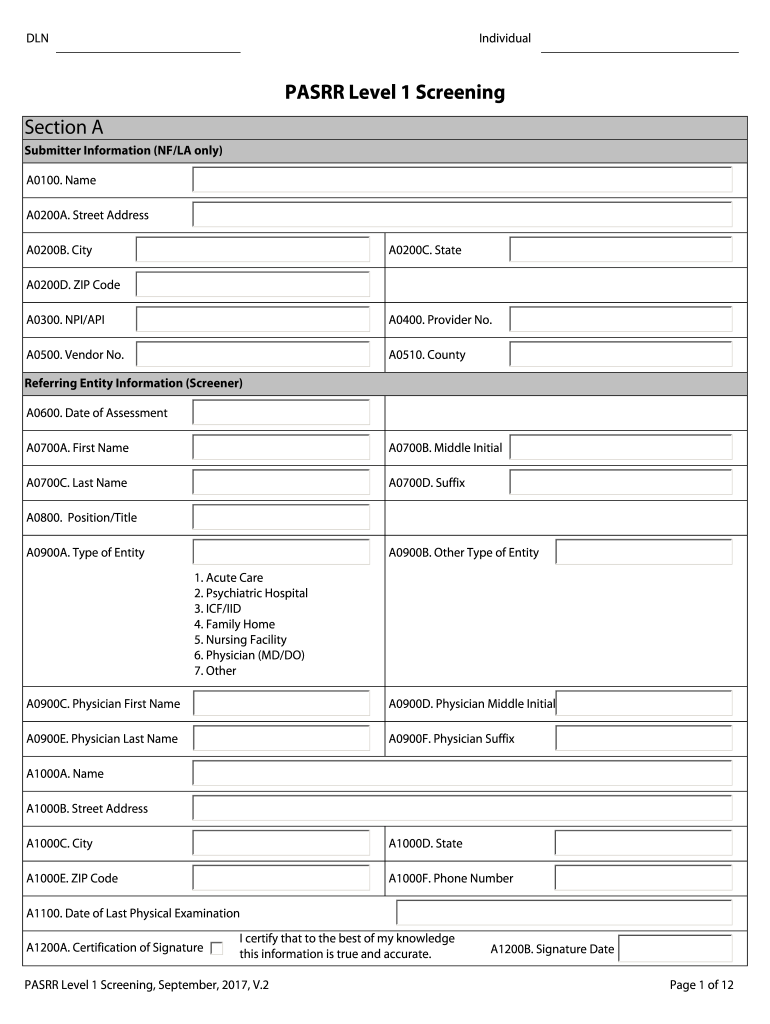
TX PASRR Level 1 Screening 2017 free printable template
We are not affiliated with any brand or entity on this form

Fill out
Complete the form online in a simple drag-and-drop editor.

eSign
Add your legally binding signature or send the form for signing.

Share
Share the form via a link, letting anyone fill it out from any device.

Export
Download, print, email, or move the form to your cloud storage.
Why pdfFiller is the best tool for your documents and forms


End-to-end document management
From editing and signing to collaboration and tracking, pdfFiller has everything you need to get your documents done quickly and efficiently.
Accessible from anywhere
pdfFiller is fully cloud-based. This means you can edit, sign, and share documents from anywhere using your computer, smartphone, or tablet.
Secure and compliant
pdfFiller lets you securely manage documents following global laws like ESIGN, CCPA, and GDPR. It's also HIPAA and SOC 2 compliant.
What is TX PASRR Level 1 Screening
The PASRR Level 1 Screening Form is a healthcare document used by nursing facilities to assess individuals for mental illness, intellectual disability, or developmental disability during admissions.
pdfFiller scores top ratings on review platforms




excellent, simple and easy to use
liking it so far
Karl was great to work with
Quick but helpful
good
very convenient and dummy proof
very convenient and dummy proof. I will use it regularly. I love it!!
Who needs TX PASRR Level 1 Screening?
Explore how professionals across industries use pdfFiller.

TX PASRR Level 1 Screening is needed by:
-
Nursing facilities assessing patient eligibility
-
Healthcare professionals completing screenings
-
Individuals undergoing mental health evaluations
-
Family members providing information for screening
-
Mental health providers assisting in documentation
-
State agencies reviewing patient assessments
Comprehensive Guide to TX PASRR Level 1 Screening
Understanding the PASRR Level 1 Screening Form
The PASRR Level 1 Screening Form is a healthcare assessment tool designed to evaluate individuals for mental illness, intellectual disabilities, or developmental disabilities. This form plays a pivotal role in nursing facility admissions, ensuring that individuals receive the appropriate care needed based on their mental health and developmental status. Understanding its purpose and importance is essential for all stakeholders in the admissions process.
-
It provides a comprehensive definition of the form and its applications.
-
Essential for identifying individuals who may require specialized care upon admission to nursing facilities.
Purpose and Benefits of the PASRR Level 1 Screening Form
The primary purpose of the PASRR Level 1 Screening Form is to facilitate the identification of mental illnesses and disabilities among applicants for nursing home admission. By accurately completing this form, healthcare professionals can streamline the process of determining an individual's care needs, ultimately leading to enhanced patient outcomes.
-
Identifies individuals with mental illness and disabilities, ensuring tailored care.
-
Streamlines the admissions process, reducing paperwork and delays.
Key Features of the PASRR Level 1 Screening Form
This form is structured to include fillable fields and checkboxes that allow for easy completion. Each section is designed to capture critical information, which is vital for the assessment process. Additionally, the form requires the screener to certify the accuracy of the information provided, which enhances its reliability and validity.
-
Fillable fields and checkboxes for efficient data entry.
-
Certification section for reviewers ensures accurate information.
Who Needs the PASRR Level 1 Screening Form
Individuals applying for admission to nursing facilities must complete the PASRR Level 1 Screening Form, as it is essential for determining eligibility. Healthcare professionals, acting as screeners, play a crucial role in this process, ensuring that all relevant information is accurately filled out.
-
Individuals applying for nursing facility admission must use the form.
-
Healthcare professionals should serve as certified screeners.
How to Fill Out the PASRR Level 1 Screening Form Online (Step-by-Step)
Completing the PASRR Level 1 Screening Form online requires gathering essential information beforehand. Below are the step-by-step instructions for efficient completion:
-
Gather personal information: full name, date of birth, and contact details.
-
Fill out the sections related to mental health history and disability status.
-
Review the filled form for completeness before submission.
Submission Methods for the PASRR Level 1 Screening Form
Once the PASRR Level 1 Screening Form is completed, it is crucial to submit it promptly to ensure timely processing. There are multiple methods available for submission, and each has its own associated guidelines.
-
Submit online through designated portals for immediate processing.
-
Mailing addresses for physical submissions may be provided by nursing facilities.
Common Errors and How to Avoid Them
When completing the PASRR Level 1 Screening Form, certain errors can lead to delays or rejection of applications. Familiarizing oneself with these common mistakes can enhance accuracy during the submission process.
-
Omitting required fields can hinder the processing of the application.
-
Failing to validate information before submission may result in a need for corrections.
Security and Compliance of the PASRR Level 1 Screening Form
Handling the PASRR Level 1 Screening Form involves strict adherence to data security and compliance regulations. This ensures that sensitive patient information is safeguarded throughout the screening process.
-
Forms utilize 256-bit encryption to protect data security.
-
Compliance with HIPAA and GDPR regulations for patient information privacy.
Utilizing pdfFiller to Streamline Your PASRR Level 1 Screening Process
By using pdfFiller, individuals and healthcare professionals can improve their experience in completing the PASRR Level 1 Screening Form. This platform offers various features designed to enhance form management and completion efficiency.
-
Fillable forms and eSigning capabilities simplify the process.
-
Secure document management ensures the safety of sensitive information.
Final Steps and Follow-Up After Submission
After submitting the PASRR Level 1 Screening Form, it's essential to take specific follow-up actions. Ensure that you are informed about the status of your application and understand what to expect in the subsequent steps.
-
Track the submission status to know when to expect a response.
-
Familiarize yourself with procedures for correcting or amending any submitted forms.
How to fill out the TX PASRR Level 1 Screening
-
1.Access the PASRR Level 1 Screening Form on pdfFiller by searching the form name in the search bar or by using a direct link.
-
2.Once the form opens, use the navigation pane on the left to jump to different sections or scroll through the document.
-
3.Gather all necessary personal information, such as the individual's name, date of birth, and contact details, as well as any medical records that may be required.
-
4.Complete each field carefully, using the cursor to select checkboxes and fill in text fields with the required information.
-
5.As you fill out the form, ensure that all information is accurate to avoid delays, as you will need to confirm the certification of accuracy.
-
6.Once you have filled in all fields, review the completed form for any missing or incorrect information.
-
7.Finalize your form by signing electronically in the designated certification section on pdfFiller.
-
8.After making sure all fields are complete and accurate, save the form on pdfFiller by clicking the save icon.
-
9.Download or submit the completed PASRR Level 1 Screening Form by selecting the appropriate option from the menu—choose to send it via email, print it, or save it to your device.

Who is eligible to fill out the PASRR Level 1 Screening Form?
The form is typically completed by nursing facilities, healthcare providers, or authorized individuals involved in the admissions process for individuals requiring mental or developmental disability assessments.
Is there a deadline for submitting the PASRR Level 1 Screening Form?
While specific deadlines can vary by state, it is recommended to submit the form as soon as the assessment is required to ensure timely processing for facility admissions.
How should I submit the completed PASRR Level 1 Screening Form?
Submission methods may vary; generally, you can submit the form electronically via email, print and fax it to the designated agency, or submit it directly at the facility of admission.
What supporting documents are needed with the PASRR Level 1 Screening Form?
Typically, you may need to include recent medical records, identification documents, and any prior assessments or treatment summaries relevant to the individual undergoing evaluation.
What are common mistakes to avoid when completing the form?
Ensure that all required fields are filled out completely, check for spelling errors, and avoid leaving out necessary supporting documents to prevent processing delays.
How long does it usually take to process the PASRR Level 1 Screening Form?
Processing times can vary, but in general, you should expect to receive feedback or a decision within a few business days after submission, depending on your state's regulations.
What should I do if I have questions about the PASRR Level 1 Screening Form?
If you have questions or require assistance, it’s best to contact the nursing facility or the agency responsible for managing PASRR screenings in your state for guidance.
TX PASRR Level 1 Screening Form Versions
Related Forms




Related Catalogs
Get the latest insights from our blog


If you believe that this page should be taken down, please follow our DMCA take down process
here
.
This form may include fields for payment information. Data entered in these fields is not covered by PCI DSS compliance.