
Last updated on
Nov 15, 2026

ME WCB-2C 2008 free printable template
pdfFiller is not affiliated with any government organization

Fill out
Complete the form online in a simple drag-and-drop editor.

eSign
Add your legally binding signature or send the form for signing.

Share
Share the form via a link, letting anyone fill it out from any device.

Export
Download, print, email, or move the form to your cloud storage.
Why pdfFiller is the best tool for your documents and forms


End-to-end document management
From editing and signing to collaboration and tracking, pdfFiller has everything you need to get your documents done quickly and efficiently.
Accessible from anywhere
pdfFiller is fully cloud-based. This means you can edit, sign, and share documents from anywhere using your computer, smartphone, or tablet.
Secure and compliant
pdfFiller lets you securely manage documents following global laws like ESIGN, CCPA, and GDPR. It's also HIPAA and SOC 2 compliant.
What is ME WCB-2C
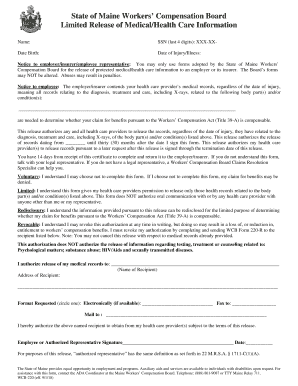
The Maine Workers' Compensation Waiver is a legal document used by employees in Maine to waive their benefits under the Workers' Compensation Act.
pdfFiller scores top ratings on review platforms




Who needs ME WCB-2C?
Explore how professionals across industries use pdfFiller.

ME WCB-2C is needed by:
-
Employees in Maine considering waiving their workers' compensation benefits
-
Human Resource professionals managing employee compensation issues
-
Employers in Maine needing to process employee waivers
-
Legal representatives advising clients on employment rights
-
Workers' compensation consultants assessing individual waivers
Comprehensive Guide to ME WCB-2C
What is the Maine Workers' Compensation Waiver?
The Maine Workers' Compensation Waiver is an official document utilized by employees in Maine to waive their benefits under the Workers' Compensation Act. Its primary purpose is to formalize the decision of an employee to relinquish certain protections that the law provides.
By waiving these benefits, employees may clarify their intentions regarding workers' compensation claims, ensuring that both they and their employers understand the implications of this choice. Understanding the significance of this waiver is crucial as it can impact the rights and obligations of both parties in the event of a workplace injury.
Purpose and Benefits of the Maine Workers' Compensation Waiver
Employees in Maine may opt to complete the Maine Workers' Compensation Waiver for several reasons. One common motivation is to avoid unnecessary claims, which can lead to a smoother employment relationship. Furthermore, waiving benefits can bring clarity to employers regarding an employee's expectations and intentions.
Among the potential benefits of submitting a waiver are reduced administrative burdens for employers and streamlined processes for employees. Employees can proactively manage their situations, ensuring that they do not unintentionally trigger claims that may complicate their employment status.
Key Features of the Maine Workers' Compensation Waiver
-
Essential components include personal and employer information, along with required fields.
-
The document requires explicit consent and must be signed by the employee.
-
Approval by the Maine Workers' Compensation Board is necessary for the waiver to be valid.
-
Fields for entering details typically involve name, address, and employment relationship.
Understanding these key features is vital for ensuring compliance and proper submission of the waiver. Any missing information can delay processing and could render the waiver invalid.
Who Needs the Maine Workers' Compensation Waiver?
The Maine Workers' Compensation Waiver is specifically intended for employees deciding to waive their benefits. Those contemplating this option should carefully consider their circumstances to make an informed choice.
To be eligible for filling out the waiver, employees must meet certain criteria, which may include their current employment status and the nature of their work. It is essential for employees to understand their rights and obligations before initiating this process.
How to Fill Out the Maine Workers' Compensation Waiver Online (Step-by-Step)
-
Access the Maine Workers' Compensation Waiver form on the pdfFiller platform.
-
Begin by entering your full name in the designated field.
-
Provide your current address, including city and ZIP code.
-
Complete all other required fields accurately, ensuring correct information.
-
Review the form for completeness before submitting it.
Each section of the waiver form is designed to capture specific details about the employee and their employer's relationship, aiding in proper identification and validation.
Common Errors and How to Avoid Them
-
Incomplete information in required fields can lead to delays.
-
Errors in personal details may result in the form being rejected.
-
Failing to obtain necessary signatures can invalidate the waiver.
To ensure the form is completed correctly and submitted on time, applicants should double-check their entries and follow the provided instructions meticulously. Utilizing available resources for assistance can also help prevent common pitfalls.
How to Sign the Maine Workers' Compensation Waiver
Signing the Maine Workers' Compensation Waiver is an essential step in the process. There are two signing options available: digital signatures and wet signatures. Digital signing provides convenience and efficiency, especially when using platforms like pdfFiller.
The eSigning feature on pdfFiller offers a user-friendly interface for signing documents electronically, making it straightforward for employees to complete the waiver securely and promptly.
Submission Methods and Confirmation Tracking
Once the waiver is completed, there are various methods for submission, typically including electronic options through platforms like pdfFiller or traditional mailed copies. Employees should be aware of any associated deadlines for submitting the form to avoid complications.
Tracking submissions is crucial to ensure that the waiver has been received and processed. Employees may receive confirmation when their waiver is submitted, providing peace of mind regarding their application status.
Security and Compliance in Filing the Maine Workers' Compensation Waiver
When filing sensitive documents such as the Maine Workers' Compensation Waiver, understanding the security measures in place is vital. Platforms like pdfFiller employ advanced 256-bit encryption to protect user information throughout the process.
Moreover, compliance with data protection regulations, including HIPAA and GDPR, ensures that applicants’ sensitive information is handled securely while maintaining their privacy rights during the waiver process.
Maximize Your Efficiency with pdfFiller
Utilizing pdfFiller for filling out the Maine Workers' Compensation Waiver streamlines the process significantly. This platform simplifies form completion, allowing users to edit, eSign, and manage their documents efficiently—all without the need for downloads.
With its user-friendly features, pdfFiller enhances the experience of filling out not only the waiver but other forms as well, enabling users to focus on their tasks with greater efficiency and confidence.
How to fill out the ME WCB-2C
-
1.Access pdfFiller through your web browser and log in to your account.
-
2.Use the search bar to find 'Maine Workers' Compensation Waiver' and select the form from the results.
-
3.Open the form to navigate through the required fields for input. Familiarize yourself with the structure of the document.
-
4.Gather necessary information before filling out the form, such as your personal details, employer information, and any relationship details pertinent to the waiver.
-
5.Begin by entering your name clearly in the designated field. Make sure to follow the required format.
-
6.Next, fill in the address section, ensuring you include all relevant details like street, city, state, and ZIP code.
-
7.Use the checkboxes provided to indicate your choices clearly. This step reduces potential errors during processing.
-
8.Continue entering information in the sequential fields as indicated. Pay close attention to any instructions provided on the form.
-
9.After completing all necessary fields, review your input carefully. Check for spelling errors and ensure all information is accurate.
-
10.Once you are satisfied with the filled-out form, save your changes within pdfFiller.
-
11.You can either download the completed form to your device or choose to submit it electronically according to your employer's guidelines.

Who is eligible to complete the Maine Workers' Compensation Waiver?
Employees working in Maine who wish to waive their benefits under the Maine Workers' Compensation Act are eligible to complete this waiver.
What information do I need to gather before filling out the form?
Before beginning, you will need your personal information, employer details, and any relevant relationship information related to the waiver.
How do I submit the completed Maine Workers' Compensation Waiver?
You can submit the completed waiver directly through your employer or, if allowed, via pdfFiller's submission options after downloading it.
Are there any deadlines I should be aware of?
It is essential to check with your employer regarding any deadlines for submitting the waiver, as this can affect your benefits.
What are common mistakes to avoid while completing this waiver?
Common mistakes include failing to provide all required information, not signing the form, or incorrect use of checkboxes. Ensure everything is complete before submission.
How long does it take to process the Maine Workers' Compensation Waiver?
Processing times can vary depending on the employer's policies and workload, so it's advisable to inquire about timelines directly with your employer.
Is notarization required for this form?
No, the Maine Workers' Compensation Waiver does not require notarization to be valid.
ME WCB-2C Form Versions
Related Content
Related Forms




Related Catalogs
Get the latest insights from our blog


If you believe that this page should be taken down, please follow our DMCA take down process
here
.
This form may include fields for payment information. Data entered in these fields is not covered by PCI DSS compliance.