
Last updated on
Oct 31, 2026
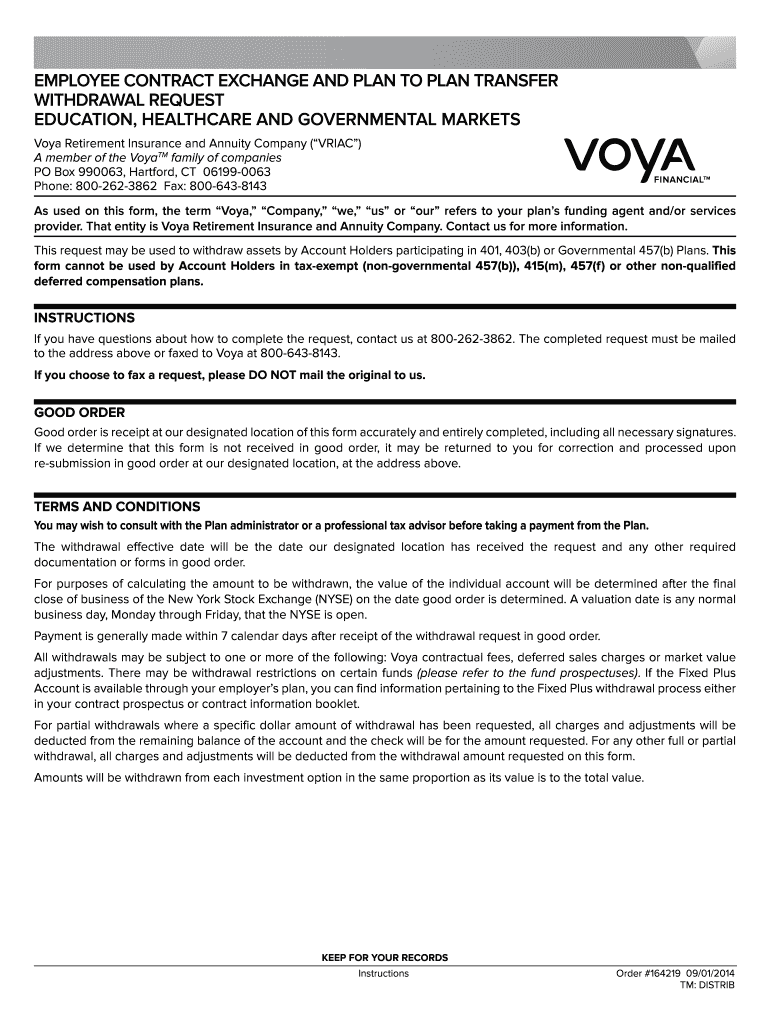
Voya Financial 164219 2014-2026 free printable template
pdfFiller is not affiliated with any government organization

Fill out
Complete the form online in a simple drag-and-drop editor.

eSign
Add your legally binding signature or send the form for signing.

Share
Share the form via a link, letting anyone fill it out from any device.

Export
Download, print, email, or move the form to your cloud storage.
Why pdfFiller is the best tool for your documents and forms


End-to-end document management
From editing and signing to collaboration and tracking, pdfFiller has everything you need to get your documents done quickly and efficiently.
Accessible from anywhere
pdfFiller is fully cloud-based. This means you can edit, sign, and share documents from anywhere using your computer, smartphone, or tablet.
Secure and compliant
pdfFiller lets you securely manage documents following global laws like ESIGN, CCPA, and GDPR. It's also HIPAA and SOC 2 compliant.
What is Voya Financial 164219
The Employee Contract Exchange and Plan to Plan Transfer Withdrawal Request is a withdrawal request form used by account holders to withdraw assets from 401, 403(b), or governmental 457(b) plans.
pdfFiller scores top ratings on review platforms




Who needs Voya Financial 164219?
Explore how professionals across industries use pdfFiller.

Voya Financial 164219 is needed by:
-
Account holders seeking to withdraw funds from their retirement plans
-
Third-party administrators managing retirement accounts
-
Employers or plan sponsors authorizing employee withdrawal requests
-
Financial advisors assisting clients with fund transfers
-
Individuals considering tax-free transfers between retirement plans
Comprehensive Guide to Voya Financial 164219
What is the Employee Contract Exchange and Plan to Plan Transfer Withdrawal Request?
The Employee Contract Exchange and Plan to Plan Transfer Withdrawal Request form is essential for individuals participating in retirement plans such as 401(k), 403(b), and governmental 457(b). Its primary function is to facilitate the withdrawal of funds from these plans, allowing account holders to exchange or transfer their assets seamlessly.
This form is critical for managing assets within retirement plans, ensuring that withdrawals comply with regulatory requirements. It includes necessary fields such as account holder details, the withdrawal amount, and signature sections for both the account holder and the verifying parties.
Benefits of Using the Employee Contract Exchange and Plan to Plan Transfer Withdrawal Request
Using the Employee Contract Exchange and Plan to Plan Transfer Withdrawal Request offers several advantages, including tax-free transfers and a simplified withdrawal process. Accurate and timely submissions are vital, as they help avoid penalties associated with late or incorrect filings.
Additionally, utilizing pdfFiller significantly enhances the form-filling experience, making it easier for users to manage their retirement benefits withdrawal efficiently. The platform streamlines the entire process, ensuring a smooth transition between plans.
Who Should Use This Form?
This form is intended for account holders, third-party administrators, and employers involved in the management of retirement plans. The eligibility to complete the form typically includes individuals directly engaged with the retirement accounts and their respective administrative services.
Each role carries specific responsibilities; for example, account holders must provide accurate data regarding their withdrawal amounts, while third-party administrators and employers are responsible for verifying and authorizing the withdrawal.
How to Complete the Employee Contract Exchange and Plan to Plan Transfer Withdrawal Request Online?
-
Social Security Number (SSN)
-
Withdrawal amount
-
Account Holder Signature
Additionally, users must ensure that any required signatures from third parties and employers are obtained for the request to be valid. Following these steps ensures a comprehensive and accurate submission of the form.
Common Errors in Completing the Withdrawal Request Form and How to Avoid Them
Frequently made mistakes in completing the withdrawal request include omitting crucial information or mislabeling fields. Users can avoid these pitfalls by carefully reviewing their entries and adhering to detailed instructions outlined within the form.
A validation checklist can be beneficial and should include checking for completeness and accuracy in all fields. Proper preparation and attention to detail will enhance the likelihood of successful form submission.
Submission of the Employee Contract Exchange and Plan to Plan Transfer Withdrawal Request
Submitting the form can be accomplished through various methods, including online submissions and traditional mail. Staying mindful of submission deadlines is essential to prevent penalties that could arise from late filings.
After submission, tracking the status of the request is recommended. Users should ensure they understand the processing times associated with their submission method to confirm receipt and follow up accordingly.
What Happens After You Submit the Withdrawal Request?
Once the withdrawal request is submitted, the account holder can expect several follow-up actions. Users are encouraged to check the application status frequently for updates on approval or potential issues.
Common reasons for application rejections may include incomplete information or missing signatures. Understanding these factors can help users mitigate risks and ensure smoother processing for future withdrawal requests.
Security and Compliance When Using the Employee Contract Exchange and Plan to Plan Transfer Withdrawal Request
Handling sensitive information securely is paramount when using the Employee Contract Exchange and Plan to Plan Transfer Withdrawal Request. Utilizing platforms like pdfFiller ensures high standards of data protection, including encryption and compliance with regulations.
Adopting best practices for safeguarding personal information, such as regularly updating passwords and avoiding shared devices, contributes to maintaining the privacy and security of user data throughout the submission process.
Sample Completed Employee Contract Exchange and Plan to Plan Transfer Withdrawal Request
A visual and textual sample of a completed Employee Contract Exchange and Plan to Plan Transfer Withdrawal Request can serve as an excellent reference for users. This guide demonstrates how each section of the form should be filled based on varying user scenarios.
Reviewing a sample can reduce errors and enhance understanding of the required information, ultimately easing the completion process.
Transform Your Form Experience with pdfFiller
Leveraging pdfFiller is an excellent way to simplify the form-filling experience for the Employee Contract Exchange and Plan to Plan Transfer Withdrawal Request. By utilizing tools such as eSigning and secure sharing, users can enhance their workflow and ensure that all forms are completed accurately and efficiently.
Employing pdfFiller’s capabilities eliminates many cumbersome aspects of form management and provides users with a streamlined process for their retirement plan needs.
How to fill out the Voya Financial 164219
-
1.To begin, access pdfFiller and search for the Employee Contract Exchange and Plan to Plan Transfer Withdrawal Request form in the templates section.
-
2.Once you open the form, familiarize yourself with the layout and available fillable fields using pdfFiller's intuitive interface.
-
3.Gather necessary information including your full name, Social Security Number, desired withdrawal amount, and any documentation required for verification.
-
4.Navigate through the form and complete each section by entering your information into the designated fields.
-
5.Ensure all information is accurate and that you have signed in the 'Account Holder Signature' field as required.
-
6.Review your completed form for any missing information or errors to avoid processing delays.
-
7.Once satisfied with your form, save your changes through pdfFiller and choose to either download the document, email it directly, or submit through your email provider.

Who is eligible to use the Employee Contract Exchange and Plan to Plan Transfer Withdrawal Request form?
Eligible users include account holders participating in 401, 403(b), or governmental 457(b) plans who wish to withdraw assets or transfer funds.
What documents do I need to submit with this form?
Typically, you will need to provide identification verification such as a Social Security Number and possibly additional documentation depending on your plan's specific requirements.
What is the processing time for the withdrawal request?
Processing times can vary by institution, but typically you should expect a response within 7-10 business days after submitting the form.
How do I submit this completed form?
You can submit the completed form by downloading it and mailing it to your plan administrator, or using pdfFiller’s email function to send it directly.
Are there any fees associated with submitting this request?
Fees can vary by plan provider, so it is advisable to check directly with your retirement plan administrator for any applicable charges related to the withdrawal.
What common mistakes should I avoid while filling out this form?
Ensure all information is complete, use the correct legal name format, double-check your Social Security Number, and remember to sign and date the form to avoid delays.
What happens if I make a mistake on the form after submission?
If a mistake is made, contact your plan administrator immediately to correct the issue. They will guide you on the necessary steps to rectify the submission.
Related Forms



Get the latest insights from our blog


If you believe that this page should be taken down, please follow our DMCA take down process
here
.
This form may include fields for payment information. Data entered in these fields is not covered by PCI DSS compliance.