
Last updated on
Oct 31, 2026
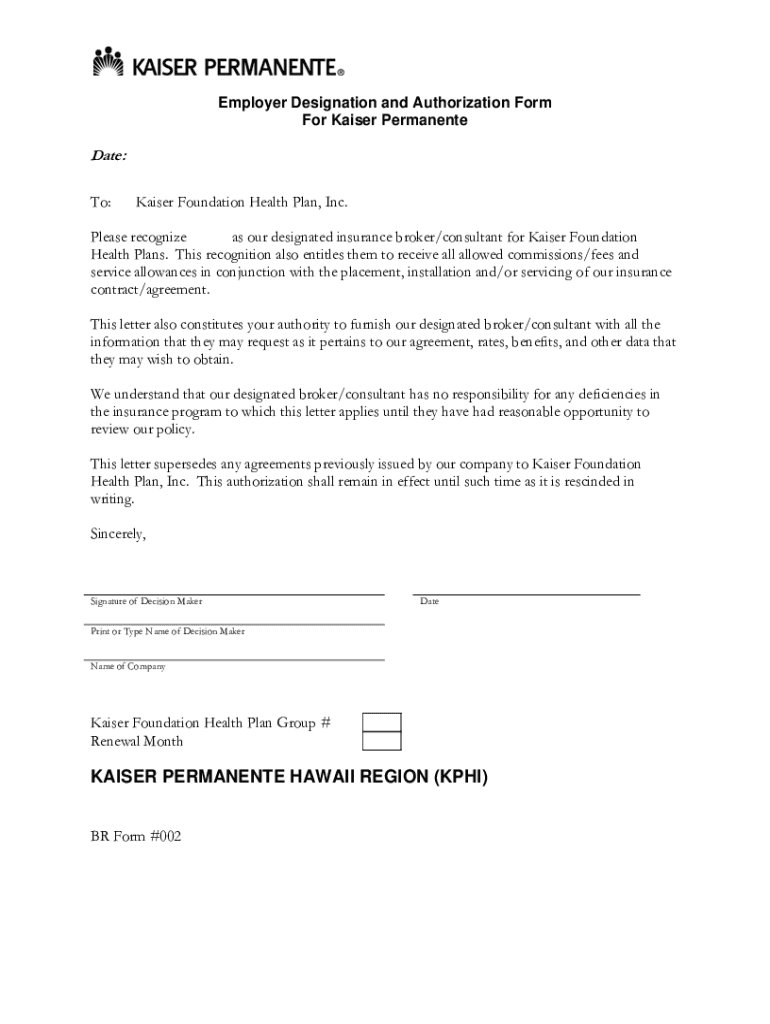
HI Kaiser Permanente BR Form 002 2012 free printable template
pdfFiller is not affiliated with any government organization

Fill out
Complete the form online in a simple drag-and-drop editor.

eSign
Add your legally binding signature or send the form for signing.

Share
Share the form via a link, letting anyone fill it out from any device.

Export
Download, print, email, or move the form to your cloud storage.
Why pdfFiller is the best tool for your documents and forms


End-to-end document management
From editing and signing to collaboration and tracking, pdfFiller has everything you need to get your documents done quickly and efficiently.
Accessible from anywhere
pdfFiller is fully cloud-based. This means you can edit, sign, and share documents from anywhere using your computer, smartphone, or tablet.
Secure and compliant
pdfFiller lets you securely manage documents following global laws like ESIGN, CCPA, and GDPR. It's also HIPAA and SOC 2 compliant.
What is HI Kaiser Permanente BR Form 002
The Employer Designation and Authorization Form is a business document used by companies to designate a new broker representative for their health plan with Kaiser Permanente Hawaii.
pdfFiller scores top ratings on review platforms




Who needs HI Kaiser Permanente BR Form 002?
Explore how professionals across industries use pdfFiller.

HI Kaiser Permanente BR Form 002 is needed by:
-
Business owners needing broker representation
-
HR managers responsible for employee benefits
-
Insurance brokers seeking authorization
-
Companies changing their broker affiliation
-
Decision makers in healthcare procurement
-
Administrators managing health insurance documents
Comprehensive Guide to HI Kaiser Permanente BR Form 002
What is the Employer Designation and Authorization Form?
The Employer Designation and Authorization Form is a crucial document used to designate a broker for Kaiser Permanente Hawaii. This form serves to empower a selected broker, granting them authority to manage specific tasks on behalf of the employer. Designating a broker is significant because it centralizes communication and ensures that a dedicated representative manages insurance matters effectively. It is important that this form includes a signature from a decision-maker within the organization to validate the brokerage relationship.
Benefits of Using the Employer Designation and Authorization Form
Completing and submitting the Employer Designation and Authorization Form comes with several advantages for businesses. Firstly, it allows the designated broker to access important commission and company information, facilitating better service delivery. Additionally, this form streamlines communication with Kaiser Permanente Hawaii, minimizing delays and misunderstandings. Companies will also find that designating a broker can save time, as all insurance queries and tasks can be handled by a knowledgeable representative.
Key Features of the Employer Designation and Authorization Form
Users should take note of several key features when filling out the Employer Designation and Authorization Form. The form includes various required fillable fields, notably 'Date:', 'Signature of Decision Maker', 'Print or Type Name of Decision Maker', 'Name of Company', and 'Kaiser Foundation Health Plan Group #'. Additionally, it contains specific sections geared towards seamless completion, including guidelines and notes that help users understand how to properly fill out and submit the form.
Who Needs the Employer Designation and Authorization Form?
This form is primarily aimed at businesses in Hawaii. Decision-makers within these companies, such as owners or those in executive roles, are the key individuals responsible for completing it. Situations may arise where a new broker representative needs to be designated—this is essential for businesses of all sizes to ensure compliance and efficient management of their insurance needs. The need to complete this form is integral for any organization that seeks effective representation in healthcare matters.
How to Fill Out the Employer Designation and Authorization Form Online (Step-by-Step)
Filling out the Employer Designation and Authorization Form online can be done effectively by following these steps:
-
Access the form through pdfFiller.
-
Enter the required fields: 'Date', 'Signature of Decision Maker', 'Print or Type Name of Decision Maker', 'Name of Company', and 'Kaiser Foundation Health Plan Group #'.
-
Review the instructions provided within the form to ensure all necessary information is included.
-
Double-check each section for accuracy against your company’s details.
-
Submit the completed form online or via your chosen submission method.
Checking this validation checklist will help ensure the accuracy and completeness of the form before submission, enhancing efficiency in processing.
Submission Methods for the Employer Designation and Authorization Form
When it comes to submitting the Employer Designation and Authorization Form, Kaiser Permanente Hawaii offers multiple methods to accommodate users. Completed forms can be submitted via mail or online through their web portal. It is essential to be aware of any relevant deadlines and processing times associated with submissions, as late filings can lead to complications. Companies should prioritize timely submissions to avoid any disruptions in their insurance coverage or broker services.
Security and Compliance for the Employer Designation and Authorization Form
Data protection is a significant concern when handling the Employer Designation and Authorization Form. pdfFiller employs advanced security protocols, including 256-bit encryption, to ensure that sensitive information is safeguarded throughout the process. Users must also comply with local regulations regarding data handling and storage. Guidance on how to retain records for submitted forms is crucial to maintaining compliance and protecting company data.
Example of a Completed Employer Designation and Authorization Form
Providing users with a visual guide can help ease the process of filling out the Employer Designation and Authorization Form. Examples may include screenshots showcasing the filled form along with annotations that explain each section in detail. Additionally, users will find helpful tips for avoiding common mistakes during the completion process, ensuring a smoother submission experience.
Leveraging pdfFiller for Your Employer Designation and Authorization Form
Utilizing pdfFiller for completing the Employer Designation and Authorization Form enhances the experience significantly. The platform offers key features such as easy editing, eSigning, and document sharing, which simplify the form process. Testimonials from businesses that have successfully utilized pdfFiller underscore its effectiveness. Starting with pdfFiller is straightforward, and users can begin filling out the form within moments, streamlining their documentation efforts.
How to fill out the HI Kaiser Permanente BR Form 002
-
1.Start by accessing pdfFiller and search for 'Employer Designation and Authorization Form' in the template library.
-
2.Once you find the form, click on it to open in the pdfFiller workspace.
-
3.Before you begin filling the form, ensure you have all necessary information, such as the name of the designated broker, company details, and the Kaiser Foundation Health Plan Group number.
-
4.Navigate through the fillable fields. Enter the date in the designated area and complete the 'Signature of Decision Maker' field.
-
5.Proceed to fill in the 'Print or Type Name of Decision Maker' and 'Name of Company' sections, ensuring accuracy in all entries.
-
6.Once all fields are completed, carefully review the form for any errors. Check that every required field is filled correctly.
-
7.After finalizing the entries, click on the save icon to keep a copy of the form on pdfFiller.
-
8.To download the completed form, select the download option from the menu, and choose your preferred format.
-
9.If ready to submit, follow the prompts to send the form directly to Kaiser Permanente Hawaii via pdfFiller's submission features.

What are the eligibility requirements for using this form?
The Employer Designation and Authorization Form is intended for businesses that need to formally designate a new broker representative with Kaiser Permanente Hawaii. The signatory must be an authorized decision-maker within the company.
Are there deadlines for submitting the form?
While specific deadlines can vary, it is advisable to submit the Employer Designation and Authorization Form promptly to ensure uninterrupted broker services. Check directly with Kaiser Permanente Hawaii for any time-sensitive updates.
How do I submit the completed form?
You can submit the completed Employer Designation and Authorization Form directly through pdfFiller using the submission options available in the platform. Alternatively, you can download and email it to Kaiser Permanente Hawaii.
What supporting documents are needed?
Generally, no additional documents are required to submit the Employer Designation and Authorization Form. However, it's wise to have relevant company identification and prior broker information available if requested.
What common mistakes should I avoid when completing this form?
Ensure that all fields are filled out accurately and legibly. Common mistakes include incomplete fields, missing signatures, and incorrect company information, which could delay processing.
How long does it take to process the form?
Processing times for the Employer Designation and Authorization Form can vary. Typically, expect a response within a few business days after submission. Direct inquiries with Kaiser Permanente Hawaii can provide more precise timelines.
What should I do if I need to make changes after submitting the form?
If changes are necessary after submission, it is best to contact Kaiser Permanente Hawaii directly to discuss how to proceed with revisions or updates to your designation.
HI Kaiser Permanente BR Form 002 Form Versions
Related Forms




Related Catalogs
Get the latest insights from our blog


If you believe that this page should be taken down, please follow our DMCA take down process
here
.
This form may include fields for payment information. Data entered in these fields is not covered by PCI DSS compliance.