
Last updated on
Oct 31, 2026

ZA PSIRA 47 B 2017-2026 free printable template
We are not affiliated with any brand or entity on this form

Fill out
Complete the form online in a simple drag-and-drop editor.

eSign
Add your legally binding signature or send the form for signing.

Share
Share the form via a link, letting anyone fill it out from any device.

Export
Download, print, email, or move the form to your cloud storage.
Why pdfFiller is the best tool for your documents and forms


End-to-end document management
From editing and signing to collaboration and tracking, pdfFiller has everything you need to get your documents done quickly and efficiently.
Accessible from anywhere
pdfFiller is fully cloud-based. This means you can edit, sign, and share documents from anywhere using your computer, smartphone, or tablet.
Secure and compliant
pdfFiller lets you securely manage documents following global laws like ESIGN, CCPA, and GDPR. It's also HIPAA and SOC 2 compliant.
What is ZA PSIRA 47 B
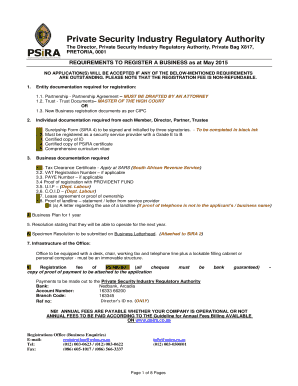
The PSIRA 47 B Re-Accreditation Application is a government form used by security training providers in South Africa to renew their accreditation with the Private Security Industry Regulatory Authority (PSIRA).
pdfFiller scores top ratings on review platforms




A no-nonsense PDF editor that does what it promises
PDFfiller is a straight-forward, easy to use PDF editing solution, and the greatest pro is the online drag and drop interface!
It obviously lacks the features of Bluebeam and Adobe, however if you know that going in, you won't be disappointed as it does exactly what most people need.
Perfect for my needs!
I found it super easy to use - was looking for a product like this and it really met my needs! I have used it for basic tasks and it works great.
I feel like if I ever want to do more creative documents that I will need more training. This feature is a bit complicated to me.
Who needs ZA PSIRA 47 B?
Explore how professionals across industries use pdfFiller.

ZA PSIRA 47 B is needed by:
-
Security Training Providers seeking re-accreditation
-
Directors and Owners of security training organizations
-
Managers of accredited security training facilities
-
Trustees involved in security training operations
-
Members responsible for compliance in security education
-
Partners in security training partnerships
Comprehensive Guide to ZA PSIRA 47 B
What is the PSIRA 47 B Re-Accreditation Application?
The PSIRA 47 B Re-Accreditation Application is a fundamental document for security training providers in South Africa. This form serves to renew the accreditation status granted by the Private Security Industry Regulatory Authority (PSIRA). Completing this application is critical for ensuring that security training providers maintain their compliance with PSIRA regulations, which is essential for the legitimacy of their services.
This application is not only a bureaucratic requirement but also a reflection of the provider's commitment to upholding industry standards. Through this process, security training providers can demonstrate their ongoing qualifications and adherence to the evolving regulations in the security sector.
Purpose and Benefits of the PSIRA 47 B Re-Accreditation Application
The completion of the PSIRA 47 B Re-Accreditation Application offers several significant benefits for security training providers. Firstly, it helps in maintaining compliance with evolving PSIRA regulations, which is crucial for legal operation. Timely re-accreditation safeguards the provider's market reputation and ensures that training programs offered adhere to required standards.
Furthermore, neglecting to submit this application on time can lead to serious risks, including potential penalties or disruptions in training services. Ensuring re-accreditation can help avoid these consequences, allowing providers to focus on delivering quality training while staying compliant with regulatory requirements.
Who Needs the PSIRA 47 B Re-Accreditation Application?
The PSIRA 47 B Re-Accreditation Application must be completed by several key roles within security training organizations. Directors, owners, managers, and other management personnel are mandated to fulfill this requirement to maintain the organization's accreditation status. Eligibility criteria require these individuals to possess authorized capacities within the organization.
Organizations that fall under this requirement include any security training provider operating in South Africa that is registered with PSIRA. These may range from independent training facilities to larger organizations offering diverse security training programs.
How to Fill Out the PSIRA 47 B Re-Accreditation Application Online
Filling out the PSIRA 47 B Re-Accreditation Application online can be done efficiently using pdfFiller. Follow these steps for a seamless experience:
-
Access the PSIRA 47 B form through the pdfFiller platform.
-
Input the required information, including the security training provider's registration number and accreditation number.
-
Ensure that proof of payment is attached, and all fields are properly completed.
-
Provide the necessary signature in the designated field.
-
Review the form for accuracy before submission.
Proper attention to these essential fields is paramount to avoid delays in the accreditation process.
Common Errors and How to Avoid Them
When submitting the PSIRA 47 B Re-Accreditation Application, applicants often encounter common errors that can lead to application rejection. These mistakes may include entering incorrect registration numbers and failing to provide required signatures. To enhance the chances of approval, consider the following tips:
-
Carefully review all information for accuracy prior to submission.
-
Utilize pdfFiller features, such as validation prompts, to prevent typical mistakes.
Taking these precautions can significantly reduce the likelihood of application errors and facilitate a smooth re-accreditation process.
Fees, Deadlines, and Processing Time
Understanding the fees and timelines associated with the PSIRA 47 B Re-Accreditation Application is crucial for planning. Application fees are required upon submission, and various payment methods are accepted, ensuring a range of options for applicants. Key deadlines must be adhered to in order to avoid late submissions, which can lead to penalties or delays in processing.
Processing times for applications usually vary; therefore, it is advisable to submit applications well before the expiration of existing accreditations. Being proactive helps ensure that security training providers maintain their operational credibility without interruptions.
Where to Submit the PSIRA 47 B Re-Accreditation Application
Submissions of the PSIRA 47 B Re-Accreditation Application can be made both online and physically. When submitting online, use the designated electronic submission portal provided by PSIRA. Alternatively, for physical submissions, documents should be sent to the appropriate address specified by the authority.
Once the application is submitted, applicants should keep track of confirmation receipts and utilize the tracking options available to monitor the application status effectively.
What Happens After You Submit the PSIRA 47 B Re-Accreditation Application?
After submitting the PSIRA 47 B Re-Accreditation Application, applicants enter the evaluation stage conducted by PSIRA. During this period, the application is reviewed for completeness and compliance with all prescribed regulations. It is recommended that applicants regularly check their application status to remain informed.
In the event that additional information is requested, applicants should be prepared to submit the necessary documentation promptly to avoid any delays in the re-accreditation process.
Enhance Your Application Experience with pdfFiller
Leveraging pdfFiller to complete the PSIRA 47 B Re-Accreditation Application can significantly simplify the process. With its user-friendly interface, applicants can access various features designed to streamline form filling, including editing text, creating fillable fields, and signing electronically.
Additionally, pdfFiller prioritizes security and compliance, ensuring that sensitive documents are handled safely. Users are encouraged to start their online application process with pdfFiller, benefiting from its robust capabilities to enhance their overall application experience.
How to fill out the ZA PSIRA 47 B
-
1.Access pdfFiller and search for 'PSIRA 47 B Re-Accreditation Application'.
-
2.Once you find the form, click on it to open the document in the pdfFiller interface.
-
3.Before filling the form, gather essential information like your PSIRA registration number, organization name, and accreditation number.
-
4.Begin by entering your Security Training Provider PSIRA Registration Number in the designated field.
-
5.Next, input your Security Training Provider Name accurately as registered.
-
6.Fill in the Application fee making sure to review payment details for accuracy.
-
7.Locate the date field and enter the date of submission to avoid delays.
-
8.Complete the required signature line using an e-signature if possible, or leave space for a manual signature.
-
9.Review all filled fields carefully to ensure all information is correct and complete.
-
10.Save your work frequently to prevent data loss, using the 'Save' option in pdfFiller.
-
11.Once all fields are filled, click on the 'Download' button to save a copy of your completed application.
-
12.Submit your completed form along with proof of payment as per the instructions on the form.

What are the eligibility requirements to submit this form?
To submit the PSIRA 47 B Re-Accreditation Application, the applicant must be a registered Security Training Provider with PSIRA, holding a valid accreditation necessitating renewal.
Are there any deadlines for submitting this application?
Yes, it is crucial to submit the application before the expiration of your current accreditation to avoid a lapse in your status as a Security Training Provider.
How should I submit my completed application?
Completed applications should be submitted via the designated submission method outlined in the form, typically via email or physical mail along with proof of payment.
What supporting documents are required with this application?
Along with the PSIRA 47 B form, you must provide proof of payment for the application fee as per the guidelines specified within the form.
What are common mistakes to avoid when completing the application?
Ensure all fields are filled out accurately, especially the registration number and name. Double-check that the payment details match the fee amount required by PSIRA.
How long does processing take after submitting the form?
Processing times can vary but typically range from a few weeks to a couple of months, depending on the volume of applications.
Is notarization necessary for this application?
No, notarization is not required for the PSIRA 47 B Re-Accreditation Application according to the form's guidelines.
ZA PSIRA 47 B Form Versions
Related Forms

Get the latest insights from our blog


If you believe that this page should be taken down, please follow our DMCA take down process
here
.
This form may include fields for payment information. Data entered in these fields is not covered by PCI DSS compliance.