
Last updated on
Oct 31, 2026

Get the free XELSOURCE Enrollment Form
We are not affiliated with any brand or entity on this form

Fill out
Complete the form online in a simple drag-and-drop editor.

eSign
Add your legally binding signature or send the form for signing.

Share
Share the form via a link, letting anyone fill it out from any device.

Export
Download, print, email, or move the form to your cloud storage.
Why pdfFiller is the best tool for your documents and forms


End-to-end document management
From editing and signing to collaboration and tracking, pdfFiller has everything you need to get your documents done quickly and efficiently.
Accessible from anywhere
pdfFiller is fully cloud-based. This means you can edit, sign, and share documents from anywhere using your computer, smartphone, or tablet.
Secure and compliant
pdfFiller lets you securely manage documents following global laws like ESIGN, CCPA, and GDPR. It's also HIPAA and SOC 2 compliant.
What is XELJANZ Enrollment Form
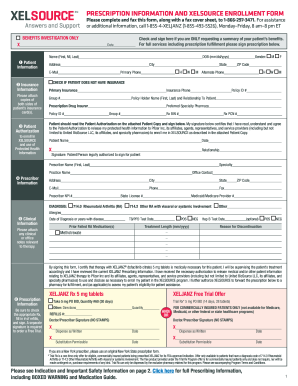
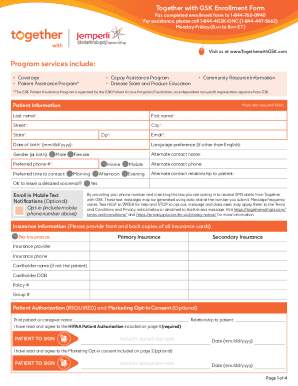
The XELSOURCE Enrollment Form is a healthcare document used by patients and prescribers to enroll in the XELSOURCE program for prescription fulfillment and benefit verification services related to XELJANZ (tofacitinib) medication.
pdfFiller scores top ratings on review platforms




Who needs XELJANZ Enrollment Form?
Explore how professionals across industries use pdfFiller.

XELJANZ Enrollment Form is needed by:
-
Patients seeking medication assistance for XELJANZ.
-
Prescribers wanting to submit prescriptions for XELJANZ.
-
Healthcare providers involved in patient enrollment.
-
Pharmacies that facilitate the prescription fulfillment process.
-
Insurance companies verifying patient benefits for medications.
Comprehensive Guide to XELJANZ Enrollment Form
What is the XELSOURCE Enrollment Form?
The XELSOURCE Enrollment Form is a critical document for patients enrolling in the XELSOURCE program, facilitating the prescription fulfillment process for XELJANZ medication. This form serves as a vital tool for patients to access necessary prescription and benefit verification services.
Completing the XELSOURCE Enrollment Form is essential for patient enrollment, ensuring participants receive the support needed throughout their treatment journey. It plays a pivotal role in connecting patients with their healthcare providers and pharmacies, streamlining the process for prescription fulfillment.
Purpose and Benefits of the XELSOURCE Enrollment Form
This form offers numerous advantages to both patients and prescribers. Patients benefit from enrolling in the XELSOURCE program, gaining access to resources that assist with medication management and potential financial support.
-
Patients experience a more straightforward prescription process.
-
Prescribers can enhance efficiency by utilizing this form to manage prescriptions better.
-
Completing the form accurately is vital for ensuring swift fulfillment of prescriptions.
Key Features of the XELSOURCE Enrollment Form
The XELSOURCE Enrollment Form comprises various essential components that help users understand what information is required. The form includes fillable fields for personal details, insurance information, and relevant clinical data.
Sections designated for prescriber information and authorization ensure clarity in the process. Additionally, there are clearly labeled sections for patient consent and signature requirements, ensuring compliance and accuracy throughout the enrollment procedure.
Who Needs to Complete the XELSOURCE Enrollment Form?
The XELSOURCE Enrollment Form must be completed by individuals qualifying as patients needing the medication assistance it provides. Primarily, patients prescribed XELJANZ are required to fill out this form to initiate their enrollment.
-
Prescribers play an essential role in guiding patients through the enrollment process.
-
Patients may need to provide the completed form to their pharmacies at the time of prescription filling.
How to Fill Out the XELSOURCE Enrollment Form Online (Step-by-Step)
Filling out the XELSOURCE Enrollment Form online can be accomplished through a straightforward process. Here’s a step-by-step guide for completing the form using pdfFiller:
-
Access the form on pdfFiller.
-
Fill in all required fields, ensuring accurate personal and clinical information.
-
Gather necessary information, such as insurance details, before starting the completion.
-
Double-check all entries for accuracy to avoid delays in processing.
Completing the form with precision is crucial for timely submission and fulfillment of prescriptions.
Submission Methods for the XELSOURCE Enrollment Form
After filling out the XELSOURCE Enrollment Form, users should submit it using the prescribed methods. Typical submission methods include faxing the form to the specified number to ensure secure handling.
-
Check the submission status after filing to confirm receipt.
-
Keep copies of all submitted documents for personal records.
Common Errors to Avoid When Filling Out the XELSOURCE Enrollment Form
When completing the XELSOURCE Enrollment Form, it is essential to avoid common pitfalls that can hinder the enrollment process. Users often make mistakes such as forgetting to include signatures or providing incorrect information.
-
Double-check the form to ensure all fields are filled accurately before submission.
-
Review every section to minimize delays that arise from incomplete information.
Security and Compliance in Filling Out the XELSOURCE Enrollment Form
Users can confidently fill out the XELSOURCE Enrollment Form, knowing that their sensitive information is protected. pdfFiller incorporates advanced security features, ensuring encrypted data transmission and adherence to HIPAA compliance.
-
Data protection is crucial in the healthcare context, and pdfFiller secures personal health information effectively.
-
The platform provides a reliable framework for handling these sensitive documents securely.
Engage with pdfFiller for a Seamless Enrollment Process
Utilizing pdfFiller to complete and submit the XELSOURCE Enrollment Form enhances the user experience significantly. The platform offers advantages such as easy editing and the ability to eSign documents efficiently.
Users are encouraged to begin the enrollment process today and take advantage of the cloud-based convenience that pdfFiller provides. The inherent compliance and security features further reinforce the benefits of using this platform for healthcare-related documentation.
How to fill out the XELJANZ Enrollment Form
-
1.To access the XELSOURCE Enrollment Form on pdfFiller, begin by visiting the website and searching for the document using its official name. Once located, click on the form to open it in the editing interface.
-
2.In the pdfFiller interface, use the toolbar to navigate through the document. Click on each fillable field to input necessary information, such as your name, date of birth, address, and contact details.
-
3.Before beginning, gather all required information. This includes your personal details, insurance policy information, clinical history relevant to your condition, and any specifics your prescriber needs to fill out.
-
4.As you complete the form, ensure you carefully fill in all parts and check the boxes as needed. Review each section thoroughly to confirm that all information is accurate and complete prior to finalization.
-
5.Once you have filled out the form, review it completely. Make any necessary edits, ensuring that all fields are correctly filled and legible, particularly the signature line that requires the patient's consent.
-
6.After reviewing, save your progress frequently. Once satisfied with the completed form, use the download option to save it on your device. You can also submit or fax it directly through pdfFiller if this feature is available.

Who is eligible to use the XELSOURCE Enrollment Form?
Patients who require medication assistance for XELJANZ and their prescribers are eligible to use the XELSOURCE Enrollment Form. It is designed to facilitate enrollment in the XELSOURCE program.
What supporting documents are required to submit this form?
Along with the completed XELSOURCE Enrollment Form, you may need to provide insurance information, a prescription from a healthcare provider, and medical history related to your condition for processing.
How do I submit the completed XELSOURCE Enrollment Form?
Once completed, the XELSOURCE Enrollment Form can be faxed to the designated number provided on the document. Ensure all information is correct before submission.
What common mistakes should I avoid while filling out this form?
Common mistakes include omitting essential personal or insurance details, failing to sign the form, and not checking if all sections are completed. Double-check to avoid delays in processing.
What is the processing time for the enrollment form?
Processing times may vary depending on the healthcare provider or pharmacy but typically take several business days. It’s advisable to check directly with the XELSOURCE program for specific timelines.
Can I fill out this form in a language other than English?
The XELSOURCE Enrollment Form is currently available in English. If you require assistance, it is recommended to seek help from someone fluent in English to ensure accurate completion.
Related Forms





Get the latest insights from our blog


If you believe that this page should be taken down, please follow our DMCA take down process
here
.
This form may include fields for payment information. Data entered in these fields is not covered by PCI DSS compliance.