
Last updated on
Nov 7, 2026
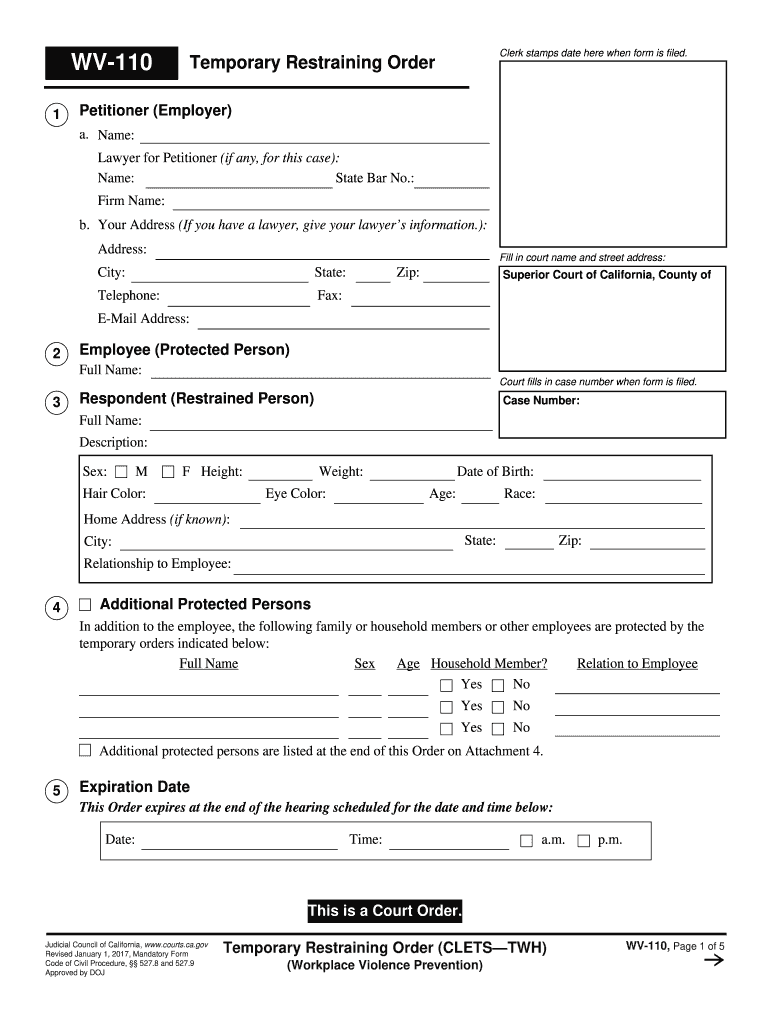
CA WV-110 2017 free printable template
pdfFiller is not affiliated with any government organization

Fill out
Complete the form online in a simple drag-and-drop editor.

eSign
Add your legally binding signature or send the form for signing.

Share
Share the form via a link, letting anyone fill it out from any device.

Export
Download, print, email, or move the form to your cloud storage.
Why pdfFiller is the best tool for your documents and forms


End-to-end document management
From editing and signing to collaboration and tracking, pdfFiller has everything you need to get your documents done quickly and efficiently.
Accessible from anywhere
pdfFiller is fully cloud-based. This means you can edit, sign, and share documents from anywhere using your computer, smartphone, or tablet.
Secure and compliant
pdfFiller lets you securely manage documents following global laws like ESIGN, CCPA, and GDPR. It's also HIPAA and SOC 2 compliant.
What is CA WV-110
The California Temporary Restraining Order WV-110 is a legal document used by employers to protect employees from workplace violence.
pdfFiller scores top ratings on review platforms




I use PDFfiller to create and sign military and employment documents. It is fairly easy to use. I love being able to save docs to my Google Drive. And the electronic signature is awesome.
It helps greatly for completing my task. It is a wonderful asset.
Who needs CA WV-110?
Explore how professionals across industries use pdfFiller.

CA WV-110 is needed by:
-
Employers seeking protection for their employees
-
Human resources professionals handling workplace safety
-
Legal representatives advising businesses
-
Employees facing threats or harassment at work
-
Safety officers implementing legal safeguards
Comprehensive Guide to CA WV-110
What is the California Temporary Restraining Order WV-110?
The California Temporary Restraining Order WV-110 is a legal form designed to protect employees from workplace violence. This form plays a crucial role in the legal context by allowing employers to request protection for their staff.
Employers (petitioners) typically file this form when they feel their employees are at risk. The WV-110 provides legal comprehensiveness, enabling workplaces to implement immediate safety measures to address potential threats.
Purpose and Benefits of the California Temporary Restraining Order WV-110
The primary intention behind the California Temporary Restraining Order WV-110 is to enhance workplace safety. The order provides significant legal protections for both employers and employees.
Among the benefits offered by this form are personal conduct orders, stay-away orders, and restrictions on firearm possession. These measures work together to create a safer environment and mitigate risks associated with workplace violence.
Key Features of the California Temporary Restraining Order WV-110
The WV-110 form contains essential components, including fields for personal information, contact restrictions, and conduct orders. Understanding these field types is crucial for effective completion of the form.
This form is integrated with the California Restraining and Protective Order System (CARPOS), ensuring that all necessary parties are informed of the order's stipulations. Each section of the form is designed to support the legal process effectively.
Who Needs the California Temporary Restraining Order WV-110?
This form should be considered by employers responsible for maintaining a safe workplace. It serves as an essential tool for identifying key stakeholders, including employers (petitioners), employees (protected persons), and respondents.
Situations warranting the filing of this form may include threats made by individuals within or outside the workplace, which pose risks to employee safety.
How to Fill Out the California Temporary Restraining Order WV-110 Online
Filling out the California Temporary Restraining Order WV-110 online involves several critical steps:
-
Collect required documents and information.
-
Begin by identifying the court name and street address.
-
Enter personal details for all relevant parties in the designated fields.
-
Specify the nature of the threat and the requested restrictions.
-
Submit the completed form electronically or print it for manual submission.
Field-by-field instructions guide users through completing the sections accurately, ensuring all necessary information is included.
Important Considerations Before Filing the California Temporary Restraining Order WV-110
Before submitting the WV-110 form, it is important to review several critical factors:
-
Gather all necessary documents for filing.
-
Check for compliance with filing deadlines to avoid penalties.
-
Understand potential repercussions of late submissions.
This checklist helps ensure preparedness and adherence to procedural requirements.
Where and How to Submit the California Temporary Restraining Order WV-110
Submission of the California Temporary Restraining Order WV-110 can be done through various methods:
-
In-person submissions at the designated courthouse.
-
Online submissions via authorized platforms.
-
Mailing the completed form to the relevant court office.
Be mindful of associated fees and available payment methods, including options for fee waivers depending on circumstances.
What Happens After You Submit the California Temporary Restraining Order WV-110?
Once the form is submitted, users can track the status of their application. Understanding the subsequent processes helps set appropriate expectations regarding approvals or potential denials.
If the order is denied, there are options for appealing the decision. Clarifying these next steps ensures users remain informed throughout the legal process.
Security and Privacy Considerations for the California Temporary Restraining Order WV-110
Confidentiality and data protection are paramount when handling legal documents like the WV-110 form. Security measures, including 256-bit encryption and compliance with regulations such as HIPAA and GDPR, are essential.
Utilizing reputable platforms that prioritize security helps in safeguarding sensitive information, providing peace of mind for all parties involved.
Begin Filling Out Your California Temporary Restraining Order WV-110 Today!
Taking the first step to fill out the California Temporary Restraining Order WV-110 can be made easier using pdfFiller. The platform offers security features that protect your documents while providing support for accurate form completion.
Using pdfFiller ensures that the form is filled out correctly, increasing the likelihood of achieving the desired outcomes related to workplace safety.
How to fill out the CA WV-110
-
1.Access pdfFiller and log in to your account. Navigate to the search bar and enter 'California Temporary Restraining Order WV-110' to find the form.
-
2.Once you locate the form, click on it to open it in the pdfFiller editor. Familiarize yourself with the interface, including the toolbar and available features.
-
3.Gather necessary information such as names, addresses, and any relevant details you want to include about the incident or relationship between parties. Ensure you have all personal conduct orders and evidence ready.
-
4.Start filling out the form by clicking on each blank field. Use the text tools to enter information like the petitioner's name and address. For checkboxes, simply click on the box to mark your selection.
-
5.Review each section to ensure accuracy. Pay particular attention to the respondent’s information and orders you wish to request, such as stay-away orders or restrictions.
-
6.Once all fields are filled out, proofread the form for clarity and completeness. Make any necessary corrections before finalizing.
-
7.When you are satisfied with the form, choose to save it. You can also download a copy to your device or directly submit it through pdfFiller if a submission option is available.

Who is eligible to file the California Temporary Restraining Order WV-110?
Employers who are facing workplace violence issues and need legal protection for their employees are eligible to file this form. It's intended for use when there is a credible threat to an employee's safety.
What is the filing deadline for submitting this restraining order?
There is no strict deadline for filing this form; however, it should be completed and submitted as soon as possible after an incident occurs to ensure timely protection for the employee.
How do I submit the WV-110 form once it’s filled out?
After completing the form, you can submit it to the appropriate court in California. Verify the specific court's submission protocols, as they may differ, especially concerning e-filing or in-person submission.
What supporting documents do I need to submit with the form?
You should include any evidence of harassment or threats, such as emails, messages, or witness statements. This information supports your reason for requesting the restraining order.
What common mistakes should I avoid while filling out the WV-110 form?
Common mistakes include inaccuracies in the contact information, failing to provide sufficient detail about the incidents, and neglecting to review the form before submission. Double-check all entries and ensure clarity.
How long does it take to process the California Temporary Restraining Order?
Processing times can vary depending on the court’s workload. Generally, it may take a few days to a couple of weeks. Check with your local court for specific timelines.
Can I make changes to the form after it has been submitted?
Yes, if you need to amend your order after submission, you must file an application for modification with the court. Consult with a legal professional for assistance in this process.
CA WV-110 Form Versions
Related Content
Related Forms



Get the latest insights from our blog


If you believe that this page should be taken down, please follow our DMCA take down process
here
.
This form may include fields for payment information. Data entered in these fields is not covered by PCI DSS compliance.