
Last updated on
Oct 31, 2026

Get the free Form 16 Accident Report from Employer
We are not affiliated with any brand or entity on this form

Fill out
Complete the form online in a simple drag-and-drop editor.

eSign
Add your legally binding signature or send the form for signing.

Share
Share the form via a link, letting anyone fill it out from any device.

Export
Download, print, email, or move the form to your cloud storage.
Why pdfFiller is the best tool for your documents and forms


End-to-end document management
From editing and signing to collaboration and tracking, pdfFiller has everything you need to get your documents done quickly and efficiently.
Accessible from anywhere
pdfFiller is fully cloud-based. This means you can edit, sign, and share documents from anywhere using your computer, smartphone, or tablet.
Secure and compliant
pdfFiller lets you securely manage documents following global laws like ESIGN, CCPA, and GDPR. It's also HIPAA and SOC 2 compliant.
What is Form 16
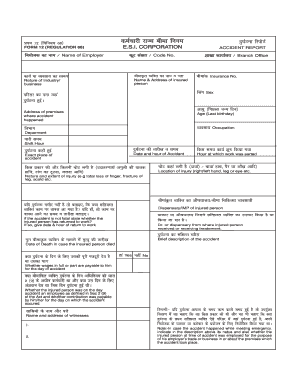
The Form 16 Accident Report from Employer is a document used by employers in India to formally report workplace accidents and injuries.
pdfFiller scores top ratings on review platforms




its made things so easy for my business which requires alot of form filling
Great program! Love it! Totally worth every penny paid for subscription. This should be a must-have in any business that handle a lot of documents. Thank you.
Who needs Form 16?
Explore how professionals across industries use pdfFiller.

Form 16 is needed by:
-
Employers reporting workplace incidents
-
Health and safety officers
-
HR managers and personnel
-
Insurance claim processors
-
Legal representatives handling employment claims
Comprehensive Guide to Form 16
What is the Form 16 Accident Report from Employer?
Form 16 serves as an essential accident report mandated for employers in India, crucial for ensuring workplace safety. This report plays a vital role in documenting incidents accurately, which is important for both safety and legal compliance. Employers must recognize the significance of submitting a detailed form 16 accident report to uphold workplace safety standards and meet regulatory obligations.
Providing precise information within this form not only aids in legal adherence but also enhances overall workplace safety by identifying areas needing improvement.
Purpose and Benefits of the Form 16 Accident Report from Employer
Completing the Form 16 accident report yields numerous advantages for both employers and employees. Submitting accurate accident reports safeguards employers from potential liability issues by documenting incidents appropriately. Furthermore, this form assists in a thorough assessment of workplace safety, which is instrumental in preventing future accidents.
Employers can leverage this information to enhance safety protocols, ultimately benefiting the workforce. Utilizing a workplace accident report template can streamline this process for better results.
Who Needs to Complete the Form 16 Accident Report from Employer?
The responsibility for filling out the Form 16 accident report lies primarily with employers. In the Indian context, an employer encompasses individuals or entities that employ workers. Specific scenarios dictate when an employer must file this report, including any workplace accident resulting in injury or significant damage.
-
Employers with registered workplaces.
-
Situations involving accidents necessitating medical attention.
Eligibility Criteria for Submitting the Form 16 Accident Report from Employer
To submit the Form 16 accident report, employers must meet certain eligibility criteria. This includes being a registered employer under Indian labor laws and ensuring that the accident is documented appropriately. Understanding these criteria is essential to avoiding legal pitfalls associated with incomplete or improperly filed reports.
-
Registered employer status.
-
Accidents that meet reporting thresholds.
How to Fill Out the Form 16 Accident Report from Employer Online (Step-by-Step)
Employers must follow specific instructions when filling out the Form 16 accident report online. Here’s a step-by-step guide to facilitate accurate completion:
-
Provide the name of the employer along with the address.
-
Describe the circumstances of the accident, including date and time.
-
Document the nature of the injury and details of the affected employee.
-
Sign the document, certifying all information is accurate to the best of your knowledge.
Prior to filling out the form, gather all pertinent information to ensure a smooth reporting process.
Common Errors to Avoid When Completing the Form 16 Accident Report from Employer
Filing mistakes can lead to complications down the road. Here are some common errors to avoid when completing the Form 16 accident report:
-
Incomplete or unclear descriptions of the accident.
-
Failure to sign the form, which validates the report.
Double-check all entries before final submission to minimize the risk of errors affecting the report.
Submission Methods for the Form 16 Accident Report from Employer
The submission of the Form 16 accident report can be accomplished through various channels. Employers can choose to submit their reports online, in person, or via mail. It is crucial to be aware of any deadlines and potential fees that could apply when submitting this form.
-
Online submission through designated portals.
-
In-person delivery to relevant authorities.
-
Mailing the form to official addresses.
What Happens After Submitting the Form 16 Accident Report from Employer?
Once the Form 16 accident report is submitted, employers can expect certain follow-up actions. Typically, the processing time will vary, and potential outcomes include further investigations or follow-up queries from the authorities. Additionally, employers can track the status of their submission for transparency.
Maintaining Compliance and Security with the Form 16 Accident Report from Employer
Ensuring compliance while managing Form 16 accident reports is critical for employers. Confidentiality and secure management of submitted forms must be prioritized. Utilizing platforms like pdfFiller provides robust security measures, ensuring sensitive documents are maintained in compliance with applicable regulations.
Why Use pdfFiller to Complete the Form 16 Accident Report from Employer?
Using pdfFiller simplifies the process of completing the Form 16 accident report, as its online tools are designed for ease of use. The platform not only offers editing capabilities but also ensures users comply with necessary regulations. By choosing pdfFiller, employers can effectively streamline their form-filling process, while prioritizing security for sensitive information.
How to fill out the Form 16
-
1.Start by accessing pdfFiller’s website and log in to your account or create one if you don’t have an account yet.
-
2.Once logged in, use the search bar to find 'Form 16 Accident Report from Employer' and select it from the list of available forms.
-
3.The form will open in an interactive interface where you can navigate through the fields. Familiarize yourself with the layout, including sections that require employer information, accident details, and employee injury specifics.
-
4.Before beginning, gather necessary details such as the employer's name, employee's name, description of the accident, and any witness accounts. This information is crucial for completing the form accurately.
-
5.Complete each field by clicking on it and entering the required information. Use the tooltips and prompts to guide you through filling out the form thoroughly.
-
6.Make sure to fill in all mandatory fields and check the entries for completeness and accuracy as you progress.
-
7.After finishing, review the entire form to ensure all information is correct and complete, emphasizing the accuracy of details related to the accident and injury.
-
8.Once reviewed, you can use the signature tool in pdfFiller to add your signature. It is important to certify that the information provided is correct as per the legal requirements.
-
9.Following this, save your work by clicking on the 'Save' option, and select a format you prefer for download or submission. You can also choose to submit the form directly to the relevant authorities through pdfFiller, if that option is available.

Who is required to complete the Form 16 Accident Report?
Employers in India are required to complete the Form 16 Accident Report whenever a workplace accident occurs involving an employee. The form must be signed by the employer, reflecting the seriousness of the report.
What details are needed for completing this accident report?
You will need to gather comprehensive details such as the employer's name, the injured employee's information, descriptions of the accident and injury, any witnesses present, and relevant dates to complete the Form 16 accurately.
Is there a deadline for submitting the accident report?
While specific submission deadlines can vary, it is generally advisable to submit the Form 16 Accident Report as soon as possible after the incident occurs to comply with workplace safety regulations and to ensure proper documentation.
How should I submit the Form 16 Accident Report?
The completed Form 16 can be submitted directly to the relevant authorities either digitally through platforms like pdfFiller or as a printed copy. Check with local regulations for specific submission methods.
What supporting documents are needed when submitting this form?
While not explicitly mentioned, it’s advisable to include any supporting documents such as medical reports, witness statements, or investigation reports alongside your Form 16 to provide comprehensive context for the accident.
What are common mistakes to avoid when completing this form?
Common mistakes include omitting required details, not providing accurate descriptions of the incident, and failing to secure a signature. Always double-check for completeness and correctness before submission.
How long does it take for the report to be processed?
Processing times can vary depending on the local authority handling the report. It's best to follow up soon after submission to ensure your report is being processed and to resolve any potential issues.
Related Content
Related Forms







Related Catalogs
Get the latest insights from our blog


If you believe that this page should be taken down, please follow our DMCA take down process
here
.
This form may include fields for payment information. Data entered in these fields is not covered by PCI DSS compliance.