
Last updated on
Nov 6, 2026
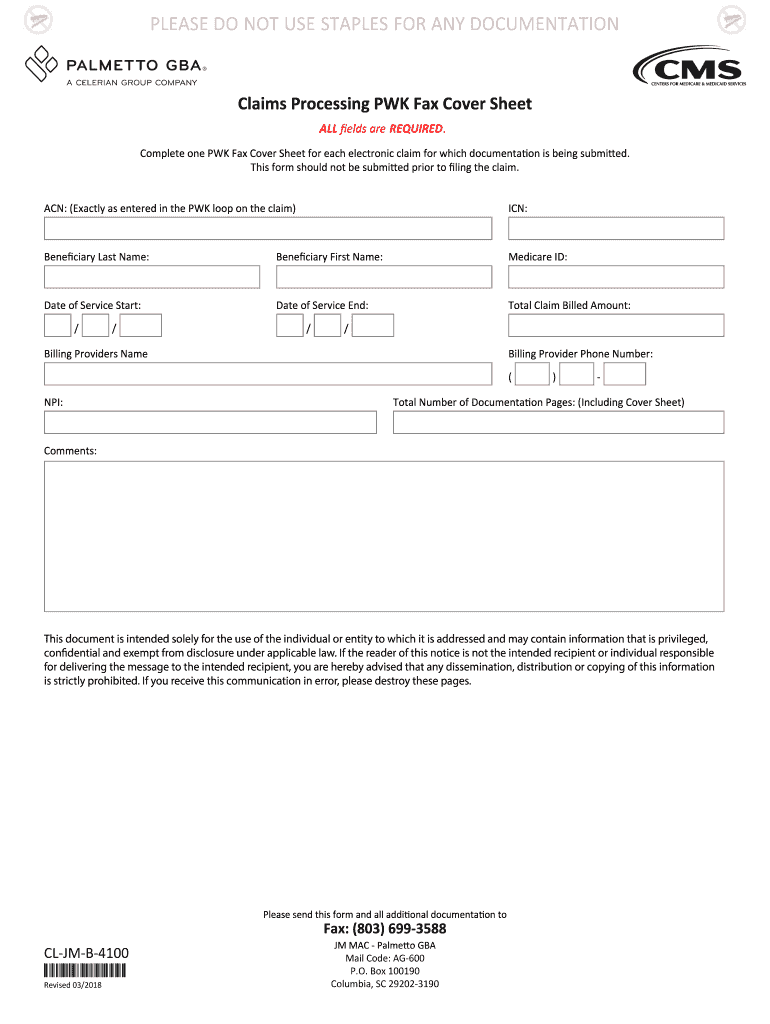
Palmetto GBA Claims Processing PWK Fax Cover Sheet 2018 free printable template
pdfFiller is not affiliated with any government organization

Fill out
Complete the form online in a simple drag-and-drop editor.

eSign
Add your legally binding signature or send the form for signing.

Share
Share the form via a link, letting anyone fill it out from any device.

Export
Download, print, email, or move the form to your cloud storage.
Why pdfFiller is the best tool for your documents and forms


End-to-end document management
From editing and signing to collaboration and tracking, pdfFiller has everything you need to get your documents done quickly and efficiently.
Accessible from anywhere
pdfFiller is fully cloud-based. This means you can edit, sign, and share documents from anywhere using your computer, smartphone, or tablet.
Secure and compliant
pdfFiller lets you securely manage documents following global laws like ESIGN, CCPA, and GDPR. It's also HIPAA and SOC 2 compliant.
What is Palmetto GBA Claims Processing PWK Fax Cover Sheet
The PWK Fax Cover Sheet is a healthcare form used by providers to submit documentation for electronic claims to Medicare.
pdfFiller scores top ratings on review platforms




Who needs Palmetto GBA Claims Processing PWK Fax Cover Sheet?
Explore how professionals across industries use pdfFiller.

Palmetto GBA Claims Processing PWK Fax Cover Sheet is needed by:
-
Healthcare providers submitting claims to Medicare
-
Billing specialists managing medical billing
-
Administrative staff coordinating claim documentation
-
Medicare beneficiaries needing claim support
-
Insurance companies reviewing claims
-
Medicare audit teams verifying submitted documents
Comprehensive Guide to Palmetto GBA Claims Processing PWK Fax Cover Sheet
What is the PWK Fax Cover Sheet?
The PWK Fax Cover Sheet is a crucial document in healthcare, specifically designed to facilitate the submission of documentation for Medicare electronic claims. This standard medical claim submission form plays a significant role in ensuring that healthcare providers in South Carolina can submit necessary information accurately. Key fields on this form include the ACN, ICN, and essential beneficiary information, which are vital for processing claims efficiently.
Purpose and Benefits of the PWK Fax Cover Sheet
The PWK Fax Cover Sheet offers several advantages that streamline the Medicare claims process. By providing a standardized format, it enables healthcare providers to submit claims consistently and efficiently, reducing errors and omissions. Its use enhances accuracy in medical claim submissions, ultimately supporting prompt reimbursement and improved financial management for healthcare professionals.
Key Features of the PWK Fax Cover Sheet
This form includes several essential, fillable fields that must be completed for every electronic claim submission. Key fields on the PWK Fax Cover Sheet comprise:
-
Beneficiary details (Last Name, First Name, Medicare ID)
-
Claim amount
-
Billing provider information (Name, Phone Number, NPI)
-
Total number of documentation pages
-
Comments section for additional information
Completing every required field is imperative to avoid delays in the processing of claims.
When to Use the PWK Fax Cover Sheet
Understanding the appropriate instances for utilizing the PWK Fax Cover Sheet is crucial for healthcare providers. This form is required when:
-
Submitting claims that need additional documentation for review
-
A claim is contested and needs clarification
Timely submissions are essential; filing the PWK Fax Cover Sheet promptly can help prevent processing delays, ensuring claims are reviewed without unnecessary hold-ups.
How to Fill Out the PWK Fax Cover Sheet Online (Step-by-Step Guide)
Filling out the PWK Fax Cover Sheet online can be done efficiently by following these steps:
-
Access the form through a PDF editing platform.
-
Enter the beneficiary's last name and first name along with their Medicare ID.
-
Complete the claim amount and billing provider information.
-
Include the total number of documentation pages and additional comments if necessary.
-
Review all filled fields for accuracy before submission.
Common mistakes to avoid include leaving fields incomplete or incorrect beneficiary details, which could lead to claim rejection.
Tips for Successful Submission of the PWK Fax Cover Sheet
To ensure effective submission of the PWK Fax Cover Sheet, adhere to the following best practices:
-
Utilize correct methods for sending the form, ensuring it reaches the designated fax number or mailing address.
-
Double-check all information for accuracy and completeness prior to submission, as this can significantly affect processing time.
Securing Your Data When Using the PWK Fax Cover Sheet
Your data security is paramount when filling out sensitive forms like the PWK Fax Cover Sheet. pdfFiller offers robust security features, including 256-bit encryption to protect your information. Additionally, the platform is HIPAA compliant, ensuring that sensitive data is safeguarded throughout the form completion process.
How pdfFiller Can Simplify Your PWK Fax Cover Sheet Experience
pdfFiller enhances your PWK Fax Cover Sheet experience by providing an intuitive interface for completing the form. Users can enjoy editable features for seamless data entry, in addition to the benefits of eSigning and secure document sharing. Its usability has led to extensive adoption among healthcare providers, streamlining their claim submission processes.
Next Steps After Submitting the PWK Fax Cover Sheet
Once the PWK Fax Cover Sheet has been submitted, it’s important to follow up on the claim. Tracking claims involves monitoring for confirmation of receipt and understanding the processing timeline. In the event of a claim rejection or request for amendments, promptly addressing any issues will facilitate resolution and enhance future submissions.
Experience Seamless Form Filling with pdfFiller
Using pdfFiller for your form needs not only simplifies filling out the PWK Fax Cover Sheet but also provides an overall efficient document management experience. Users can access this and other healthcare forms easily through a user-friendly portal, benefiting from features designed to protect their sensitive information.
How to fill out the Palmetto GBA Claims Processing PWK Fax Cover Sheet
-
1.To access the PWK Fax Cover Sheet on pdfFiller, navigate to the pdfFiller website and use the search bar to find the form by name.
-
2.Once you locate the form, click on it to open the fillable PDF in the pdfFiller interface.
-
3.Before completing the form, gather the necessary information including the ACN, ICN, beneficiary details, dates of service, claim amount, and billing provider details.
-
4.Begin filling in the form by entering the ACN and ICN in their respective fields. Ensure you input correct information to avoid delays.
-
5.Continue filling in beneficiary details such as their last name, first name, and Medicare ID accurately in the designated fields.
-
6.Specify the date range of service by entering the start and end dates clearly in their corresponding sections.
-
7.Enter the total claim billed amount and confirm that the number of documentation pages matches your records.
-
8.Once all fields are complete, review the entire form for accuracy, ensuring there are no missing details as all fields are required.
-
9.Finalizing the form includes checking for any areas that may need corrections or additional information.
-
10.To save or submit the form through pdfFiller, click on the save button. You can then download the completed form or send it directly to the specified fax number.
-
11.If you choose to submit via fax, make sure you have the correct fax number for Medicare in South Carolina.

Who is required to submit the PWK Fax Cover Sheet?
Healthcare providers and billing specialists submit the PWK Fax Cover Sheet when making electronic claims to Medicare, ensuring all necessary documentation is included.
Are there specific submission deadlines for this form?
While the PWK Fax Cover Sheet does not have strict deadlines specified, it is advisable to submit claims promptly to avoid delays in reimbursement from Medicare.
What methods are available for submitting the form?
The PWK Fax Cover Sheet can be submitted via fax to the designated Medicare fax number or mailed to the appropriate mailing address in South Carolina.
What supporting documents must accompany the PWK Fax Cover Sheet?
When submitting the PWK Fax Cover Sheet, ensure all necessary documentation supporting the claim is included, such as charts, notes, or any other relevant paperwork.
What are common mistakes to avoid when filling out this form?
Common mistakes include leaving required fields blank, entering inaccurate information, and failing to verify the fax number before submission. Double-check all entries to avoid processing delays.
How long does it take for claims to be processed after submission?
Processing time for claims submitted using the PWK Fax Cover Sheet can vary, but typically it takes a few weeks. It’s important to follow up with Medicare for updates.
Can this form be notarized before submission?
No, the PWK Fax Cover Sheet does not require notarization. However, ensure that all fields are filled correctly before submission.
Palmetto GBA Claims Processing PWK Fax Cover Sheet Form Versions
Related Forms




Get the latest insights from our blog


If you believe that this page should be taken down, please follow our DMCA take down process
here
.
This form may include fields for payment information. Data entered in these fields is not covered by PCI DSS compliance.