
Last updated on
Nov 9, 2026

OH Electronic Filing Registration Form - Cuyahoga County 2016-2026 free printable template
pdfFiller is not affiliated with any government organization

Fill out
Complete the form online in a simple drag-and-drop editor.

eSign
Add your legally binding signature or send the form for signing.

Share
Share the form via a link, letting anyone fill it out from any device.

Export
Download, print, email, or move the form to your cloud storage.
Why pdfFiller is the best tool for your documents and forms


End-to-end document management
From editing and signing to collaboration and tracking, pdfFiller has everything you need to get your documents done quickly and efficiently.
Accessible from anywhere
pdfFiller is fully cloud-based. This means you can edit, sign, and share documents from anywhere using your computer, smartphone, or tablet.
Secure and compliant
pdfFiller lets you securely manage documents following global laws like ESIGN, CCPA, and GDPR. It's also HIPAA and SOC 2 compliant.
What is OH Electronic Filing Registration Form - Cuyahoga County
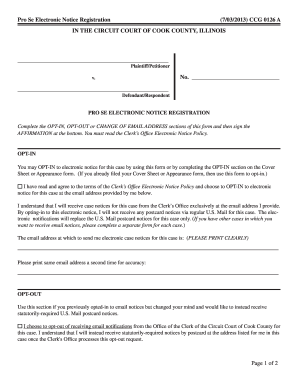
The Cuyahoga County Electronic Filing Registration Form is a legal document used by attorneys, firm support staff, and pro se litigants to register for the Clerk of Courts' Electronic Filing System in Cuyahoga County, Ohio.
pdfFiller scores top ratings on review platforms




Who needs OH Electronic Filing Registration Form - Cuyahoga County?
Explore how professionals across industries use pdfFiller.

OH Electronic Filing Registration Form - Cuyahoga County is needed by:
-
Attorneys seeking to file electronically in Ohio
-
Legal support staff coordinating electronic submissions
-
Pro se litigants managing their own court filings
-
Law firms expanding their eFiling capabilities
-
Court clerks processing electronic filings
-
Students studying legal document preparation
Comprehensive Guide to OH Electronic Filing Registration Form - Cuyahoga County
What is the Cuyahoga County Electronic Filing Registration Form?
The Cuyahoga County Electronic Filing Registration Form is crucial for attorneys and pro se litigants in Cuyahoga County, Ohio. This form allows users to register for the Ohio court efiling registration system, streamlining the process of submitting legal documents electronically. The electronic filing system simplifies legal processes by enabling submissions without the need for physical documents, reducing delays and improving efficiency.
Purpose and Benefits of the Cuyahoga County Electronic Filing Registration Form
Individuals must register for the electronic filing system to access its numerous benefits. Firstly, using the legal efiling registration form enhances convenience, allowing users to file documents from anywhere without visiting the courthouse. Additionally, electronic filing minimizes the risk of paperwork loss and provides immediate confirmation upon submission.
Who Needs the Cuyahoga County Electronic Filing Registration Form?
The form is essential for a variety of users, including attorneys, firm support staff, and pro se litigants. Each of these individuals may need to complete the electronic filing account form in various scenarios, such as initiating a case, submitting pleadings, or filing motions.
Eligibility Criteria for the Cuyahoga County Electronic Filing Registration Form
To qualify for the Cuyahoga County Electronic Filing Registration Form, registrants must meet specific requirements. Eligibility typically includes being a licensed attorney in Ohio, part of a law firm, or a self-represented litigant. There may be additional restrictions, depending on the type of case being filed.
How to Fill Out the Cuyahoga County Electronic Filing Registration Form Online (Step-by-Step)
-
Visit the Cuyahoga County Electronic Filing registration page.
-
Access the electronic filing account form.
-
Complete all mandatory fields with accurate information.
-
Review the terms of service and payment details.
-
Sign the form electronically before submission.
Field-by-Field Instructions for the Cuyahoga County Electronic Filing Registration Form
Each field in the registration form has specific requirements that users must follow. Mandatory fields must be completed accurately, while optional fields provide additional context to applications. Common mistakes to avoid include entering inaccurate contact details and failing to properly agree to the terms of service.
How to Sign the Cuyahoga County Electronic Filing Registration Form
eSigning is a valid method of signing documents in Ohio, including the Cuyahoga County Electronic Filing Registration Form. Users should understand the difference between a digital signature and a wet signature, as both may have different requirements depending on the context of the filing.
Submission Methods for the Cuyahoga County Electronic Filing Registration Form
Registrants have several options when submitting the registration form. Submission can be done online through the electronic filing system, or in-person at designated locations. It is vital to be aware of any deadlines for submission to ensure a smooth registration process.
What Happens After You Submit the Cuyahoga County Electronic Filing Registration Form?
Once the registration form is submitted, users can expect a confirmation of their application. The process includes tracking the status of the registration and understanding potential outcomes, which may involve approval or requests for additional information regarding their electronic filing account form.
Your Partner in Completing the Cuyahoga County Electronic Filing Registration Form
pdfFiller serves as an excellent resource for filling out and submitting the Cuyahoga County Electronic Filing Registration Form. With robust features focused on user security and ease of use, pdfFiller helps ensure your forms are completed accurately and submitted on time, ultimately enhancing your legal filing experience.
How to fill out the OH Electronic Filing Registration Form - Cuyahoga County
-
1.To access the Cuyahoga County Electronic Filing Registration Form, go to pdfFiller's website and search for the form by its name or category.
-
2.Once the form is located, click on it to open the document in the pdfFiller interface.
-
3.Before you begin filling out the form, gather all necessary information, including personal details, professional credentials, and payment information.
-
4.Navigate through the form using pdfFiller's tools, clicking on each fillable field to enter your details accurately.
-
5.Be sure to read any instructions provided in the form to understand what information is required for each section.
-
6.If checkboxes are required, click them to select the appropriate options based on the terms and conditions you're agreeing to.
-
7.After filling in all the fields, carefully review all entries for accuracy and completeness.
-
8.Once satisfied with the information entered, electronically sign the form by following the on-screen prompts for signature capture.
-
9.You may include the date of signing as required in the designated field.
-
10.To save your completed form, use the 'Save' feature in pdfFiller, which allows you to download the form in your preferred format.
-
11.If you need to submit the form, follow the submission guidelines specified on the Cuyahoga County Clerk's website or in the form's instructions.

Who is eligible to use the Cuyahoga County Electronic Filing Registration Form?
The form is intended for attorneys, firm support staff, and pro se litigants who wish to register for electronic filing with the Cuyahoga County Clerk of Courts. Anyone involved in a legal case within Cuyahoga County can utilize this form.
What is the deadline for submitting the electronic filing registration?
While there is generally no hard deadline for registration, it is advisable to complete the Cuyahoga County Electronic Filing Registration Form well in advance of your court filing to ensure your registration is processed in time.
How can I submit the Cuyahoga County Electronic Filing Registration Form?
After completing your form on pdfFiller, you can submit it electronically according to Cuyahoga County's submission procedures, which may include uploading directly to their filing system or emailing it to the Clerk's office.
What supporting documents are required for the registration?
Typically, you will need to provide personal identification and any professional credentials if applicable. It's best to check the latest requirements on the Cuyahoga County Clerk's website for any specific documents needed.
What are common mistakes to avoid when filling out this form?
Ensure all information is complete and accurate before submission. Common mistakes include leaving required fields blank, failing to sign electronically, and providing outdated contact information.
How long does it take to process the Cuyahoga County Electronic Filing Registration Form?
Processing times can vary, but generally, expect to receive confirmation of your registration status within a few business days. For urgent needs, contact the Clerk's office directly.
What if I encounter problems while filling out the form?
If you run into issues on pdfFiller, consult their help resources or customer support. Additionally, check the Cuyahoga County Clerk's website for guidance specific to electronic filing.
OH Electronic Filing Registration Form - Cuyahoga County Form Versions
Related Forms





Get the latest insights from our blog


If you believe that this page should be taken down, please follow our DMCA take down process
here
.
This form may include fields for payment information. Data entered in these fields is not covered by PCI DSS compliance.