
Last updated on
Nov 9, 2026

WI DOA Form DOA-6460 2018 free printable template
pdfFiller is not affiliated with any government organization

Fill out
Complete the form online in a simple drag-and-drop editor.

eSign
Add your legally binding signature or send the form for signing.

Share
Share the form via a link, letting anyone fill it out from any device.

Export
Download, print, email, or move the form to your cloud storage.
Why pdfFiller is the best tool for your documents and forms


End-to-end document management
From editing and signing to collaboration and tracking, pdfFiller has everything you need to get your documents done quickly and efficiently.
Accessible from anywhere
pdfFiller is fully cloud-based. This means you can edit, sign, and share documents from anywhere using your computer, smartphone, or tablet.
Secure and compliant
pdfFiller lets you securely manage documents following global laws like ESIGN, CCPA, and GDPR. It's also HIPAA and SOC 2 compliant.
What is WI DOA Form DOA-6460
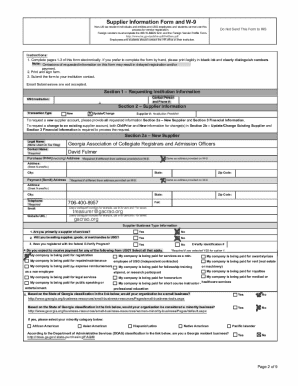
The Wisconsin New Supplier Form is a vendor registration document used by businesses to register as new suppliers with the Wisconsin Department of Administration.
pdfFiller scores top ratings on review platforms




Who needs WI DOA Form DOA-6460?
Explore how professionals across industries use pdfFiller.

WI DOA Form DOA-6460 is needed by:
-
Businesses registering as suppliers in Wisconsin
-
Vendors seeking payment setup through direct deposit
-
Entities applying for Wisconsin procurement opportunities
-
Compliance officers handling vendor registrations
-
Accounting departments requiring vendor information
-
Authorized representatives managing supplier forms
Comprehensive Guide to WI DOA Form DOA-6460
What is the Wisconsin New Supplier Form?
The Wisconsin New Supplier Form, technically designated as DOA-6460, serves as a crucial document for businesses seeking to register as suppliers in Wisconsin. This form is essential for maintaining accurate supplier records and ensuring smooth payment processes. It requires signatures from authorized representatives to validate the information provided, enhancing the accountability of the submissions.
Purpose and Benefits of the Wisconsin New Supplier Form
Registering as a supplier offers numerous advantages for businesses, including eligibility for direct payments and participation in procurement opportunities. The Wisconsin New Supplier Form plays a vital role in facilitating these benefits by ensuring that all necessary details are accurately captured. Properly completing this form is necessary for setting up direct deposits and streamlining payment transactions.
Additionally, utilizing this form helps to simplify procurement processes, making it easier for businesses to engage with state agencies efficiently.
Who Needs to Fill Out the Wisconsin New Supplier Form?
New suppliers and businesses operating within Wisconsin are the primary audience for the Wisconsin New Supplier Form. To be eligible for registration, entities must meet specific criteria that may depend on their business type or operations. International suppliers should be aware that additional requirements may apply for their registration.
How to Fill Out the Wisconsin New Supplier Form Online
To complete the Wisconsin New Supplier Form online using pdfFiller, follow these steps:
-
Access the form on pdfFiller’s platform.
-
Gather all necessary information, including business and payment details.
-
Fill out the required fields accurately, ensuring compliance with all instructions.
-
Review the form for completeness and accuracy before submission.
This digital process streamlines the registration and allows for easy corrections, ensuring that your submission meets all requirements.
Common Errors and How to Avoid Them When Filling Out the Form
When filling out the Wisconsin New Supplier Form, several common errors can lead to delays or rejection of submissions. Frequent mistakes include:
-
Omitting required fields, such as business or payment information.
-
Failing to obtain necessary signatures from authorized representatives.
To avoid these pitfalls, carefully review the form against the provided guidelines and verify that all sections are completed accurately.
How to Submit the Wisconsin New Supplier Form
Once the Wisconsin New Supplier Form is completed, it can be submitted through various methods. Options include electronic submission via pdfFiller, which offers a convenient and secure way to send your form directly. If opting for paper submission, ensure you send the form to the appropriate office within the Wisconsin Department of Administration.
What Happens After You Submit the Wisconsin New Supplier Form?
After submitting the Wisconsin New Supplier Form, the approval process typically begins with confirmation of receipt. Suppliers can expect to receive notification about the status of their application. The timeline for approval can vary, and suppliers may be contacted for additional information if needed.
Security and Compliance When Using the Wisconsin New Supplier Form
Handling sensitive business information is critical when submitting the Wisconsin New Supplier Form. pdfFiller employs robust security features, including 256-bit encryption, to ensure data protection. Compliance with regulations such as HIPAA and GDPR further guarantees that your information remains secure throughout the submission process.
Why Choose pdfFiller to Complete the Wisconsin New Supplier Form?
pdfFiller offers numerous advantages for users completing the Wisconsin New Supplier Form. Its user-friendly interface allows for easy navigation and completion of the form. Additional features include digital signatures and form editing capabilities, making it a comprehensive solution for form management.
Getting Started with the Wisconsin New Supplier Form on pdfFiller
Begin filling out your Wisconsin New Supplier Form today using pdfFiller's platform. The straightforward process and helpful resources available ensure that businesses can efficiently manage their form submissions and registrations.
How to fill out the WI DOA Form DOA-6460
-
1.To access the Wisconsin New Supplier Form on pdfFiller, go to the pdfFiller website and use the search function to locate the form by its official name or form number.
-
2.Once you find the form, click on it to open it in the pdfFiller interface. This will allow you to view and edit the document as needed.
-
3.Before you start filling out the form, gather all necessary information. This includes your legal business name, contact details, bank account information for direct deposit, and any other requested data.
-
4.Start completing the form by clicking on each field within the document. Use the text boxes provided to input your information, ensuring accuracy and clarity in all entries.
-
5.If there are checkboxes in the form, click to select the options that apply to your business. Make sure nothing is left blank if it's a required field.
-
6.As you fill out the form, take a moment to review each section for accuracy. Double-check that your legal name and payment details are correct to avoid processing delays.
-
7.Once you have completed all required sections of the form, find the signature field. Click to add your signature and provide the date, ensuring that an authorized representative signs the form.
-
8.After signing, perform a final review of the entire form to confirm that all entries are complete and accurate.
-
9.To save your work, click on the save icon in the pdfFiller interface. You can also choose to download a copy of the completed form in PDF format if required.
-
10.Finally, submit the completed form as directed. If you need to submit it electronically, follow the specified submission instructions by the Wisconsin Department of Administration.

Who is eligible to fill out the Wisconsin New Supplier Form?
Any business or vendor looking to register as a supplier with the Wisconsin Department of Administration can fill out the Wisconsin New Supplier Form.
What are the submission methods for the New Supplier Form?
The Wisconsin New Supplier Form can typically be submitted electronically or by mail. Check the Wisconsin Department of Administration's guidelines for specific submission instructions.
Is there a deadline for submitting the Wisconsin New Supplier Form?
While there may not be a strict deadline, it is recommended to submit the form as soon as possible to ensure timely processing for vendor registration and procurement opportunities.
What documents are needed to complete the form?
Before filling out the form, ensure you have your legal business name, contact information, and banking details for direct deposit setup.
What common mistakes should I avoid when filling out the form?
Common mistakes include leaving required fields blank, entering incorrect banking details, and failing to sign the document. Always double-check your entries before submission.
How long does it take to process the Wisconsin New Supplier Form?
Processing times can vary based on the volume of submissions. Typically, expect a response within a few weeks, but check with the Wisconsin Department of Administration for updates.
WI DOA Form DOA-6460 Form Versions
Related Forms




Get the latest insights from our blog


If you believe that this page should be taken down, please follow our DMCA take down process
here
.
This form may include fields for payment information. Data entered in these fields is not covered by PCI DSS compliance.