
Last updated on
Nov 6, 2026

Get the free CAMS Common Mandate Form
We are not affiliated with any brand or entity on this form

Fill out
Complete the form online in a simple drag-and-drop editor.

eSign
Add your legally binding signature or send the form for signing.

Share
Share the form via a link, letting anyone fill it out from any device.

Export
Download, print, email, or move the form to your cloud storage.
Why pdfFiller is the best tool for your documents and forms


End-to-end document management
From editing and signing to collaboration and tracking, pdfFiller has everything you need to get your documents done quickly and efficiently.
Accessible from anywhere
pdfFiller is fully cloud-based. This means you can edit, sign, and share documents from anywhere using your computer, smartphone, or tablet.
Secure and compliant
pdfFiller lets you securely manage documents following global laws like ESIGN, CCPA, and GDPR. It's also HIPAA and SOC 2 compliant.
What is CAMS Mandate
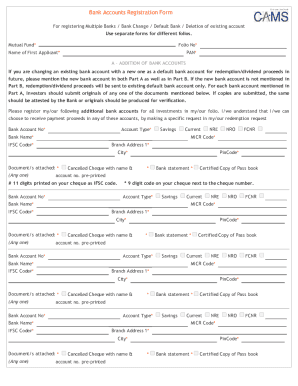
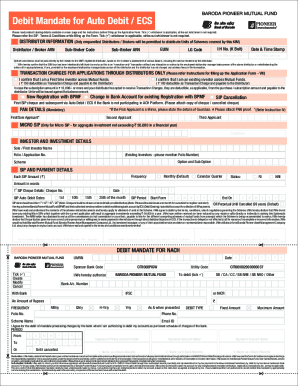
The CAMS Common Mandate Form is a financial document used by investors in India to authorize Computer Age Management Services Pvt. Ltd. to debit their bank accounts for mutual fund investments.
pdfFiller scores top ratings on review platforms




excellent software, helped me a lot in filling some forms, adjusting documents, adding pages...etc.
excellent software, helped me a lot
It was free and it only cost me a lil…
It was free and it only cost me a lil over a buck to save to my computer for first time purchase of the 30 day free trial
Who needs CAMS Mandate?
Explore how professionals across industries use pdfFiller.

CAMS Mandate is needed by:
-
Individual investors in mutual funds
-
Financial advisors managing client accounts
-
Account holders seeking automatic debit for investments
-
Banks processing mutual fund transactions
-
CAMS service users for mutual fund administration
Comprehensive Guide to CAMS Mandate
What is the CAMS Common Mandate Form?
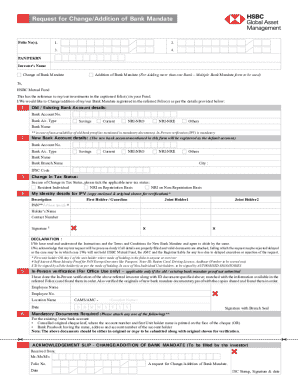
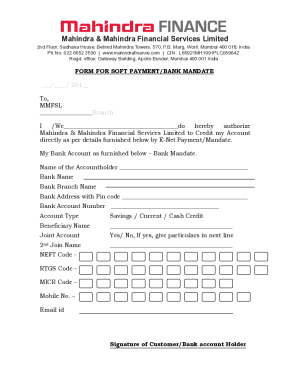
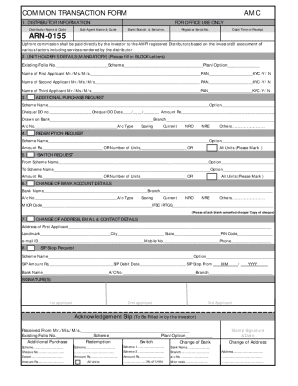
The CAMS Common Mandate Form serves a crucial role in authorizing Computer Age Management Services Pvt. Ltd. to withdraw funds directly from an investor's bank account for mutual fund investments in India. By streamlining this process, the form enhances the ease of making regular investments through the Automated Clearing House (ACH) facility. This facilitates a user-friendly experience for both individual and institutional investors looking to engage in India's mutual fund market.
Purpose and Benefits of the CAMS Common Mandate Form
Utilizing the CAMS Common Mandate Form presents several advantages for investors. Primarily, it simplifies the investment process, making transactions more efficient by automating payments. This automation encourages consistent investment behavior without the hassle of manual transactions. Additionally, it serves as a reliable authorization tool—eliminating the need for repetitive submissions of investment instructions for each transaction.
-
Streamlined investment process through automatic debit.
-
Facilitates regular investments and systematic growth mechanisms.
Key Features of the CAMS Common Mandate Form
Essential components of the CAMS Common Mandate Form include various fields necessary for investment setup. Investors must provide their bank account details, including the bank account number and the Permanent Account Number (PAN). The form also features fillable sections and requires signatures from all account holders, ensuring proper authorization for transactions.
-
Bank account details including account number.
-
PAN number as identification.
-
Fillable fields for efficient completion.
-
Signature requirements for accountability.
Who Needs the CAMS Common Mandate Form?
The CAMS Common Mandate Form is essential for a diverse audience, encompassing both individual and institutional investors. Its usage ensures that account holders can initiate automatic debit processes for their mutual fund investments seamlessly. Understanding the investor’s needs is vital for ensuring widespread participation in mutual funds.
Eligibility Criteria and Requirements for the CAMS Common Mandate Form
To effectively complete the CAMS Common Mandate Form, investors must meet specific criteria. This includes having an active bank account and valid identification documents like a PAN card. Additionally, proper documentation is crucial for the verification of the account holder's identity and investment eligibility.
-
Active bank account in India.
-
Permanent Account Number (PAN) for identification.
How to Fill Out the CAMS Common Mandate Form Online (Step-by-Step Guide)
Filling out the CAMS Common Mandate Form online involves a straightforward process. Here’s how to do it effectively:
-
Access the form via the CAMS website or your mutual fund’s portal.
-
Input your bank account number, ensuring it is correct to avoid transaction issues.
-
Provide your PAN number in the designated field.
-
Complete all other required fields with accurate information.
-
Sign the form electronically, confirming your authorization.
Following these steps will ensure that you submit a properly filled out form, minimizing potential delays.
Common Errors and How to Avoid Them When Filling the Form
Investors frequently make mistakes while filling out the CAMS Common Mandate Form. Some common errors include providing incorrect bank details or leaving required fields blank. To ensure the accuracy of the submission, investors should double-check all entries before submission and validate against their personal documents.
-
Check for accuracy in bank account numbers.
-
Ensure all mandatory fields are filled before submission.
Where and How to Submit the CAMS Common Mandate Form
The submission of the CAMS Common Mandate Form can be done through both online and offline channels. For online submissions, digital interfaces provided by mutual funds can be utilized, while offline options involve mailing or personally delivering the forms to the relevant offices. It's also advisable to review any potential processing charges associated with the submission method chosen.
What Happens After You Submit the CAMS Common Mandate Form?
Once the CAMS Common Mandate Form is submitted, investors can expect a follow-up process that includes status tracking of their application. It's essential to store any confirmation details received to facilitate inquiries. Should there be any amendments or corrections needed post-submission, a clear understanding of the procedure will help address these issues promptly.
-
Keep track of your application status for updates.
-
Know the common reasons for application rejection to avoid pitfalls.
Secure Your CAMS Common Mandate Form Submission with pdfFiller
pdfFiller enhances the CAMS Common Mandate Form submission experience with its secure environment for filling, signing, and managing documents. The platform ensures the protection and compliance of sensitive data through advanced security features, including encryption. With pdfFiller, you can ensure your investment forms are handled with the utmost confidentiality and professionalism.
How to fill out the CAMS Mandate
-
1.Access the CAMS Common Mandate Form on pdfFiller by searching for the form name in the pdfFiller search bar.
-
2.Once the form appears, click to open it in the pdfFiller editor.
-
3.Before starting, gather the necessary information: your bank account details, PAN number, and any other required personal information.
-
4.Use the fillable fields on the form to input your bank account number, PAN number, mobile number, and any other relevant details.
-
5.Make sure to check the boxes that apply to you, indicating your agreement to the terms, such as the authorization for debit and agreement to processing charges.
-
6.Move through the form using pdfFiller’s navigation tools, ensuring you complete all required fields.
-
7.After filling in all necessary information, review the form carefully to check for accuracy and completeness.
-
8.If you're satisfied with the information provided, proceed to finalize your form.
-
9.To save, download, or submit the form, use the options available in the pdfFiller interface.
-
10.Choose 'Save' to store a copy on your device, or 'Submit' if you're ready to send it to the relevant service provider.

Who can use the CAMS Common Mandate Form?
The form is specifically designed for individual investors in mutual funds, financial advisors managing client funds, and account holders who wish to set up automatic debits for mutual fund investments.
Are there any deadlines for submitting this form?
While there are no specific deadlines mentioned for the CAMS Common Mandate Form, it is advisable to submit it before the investment cut-off to avoid any delays in fund transactions.
How do I submit the CAMS Common Mandate Form?
You can submit the completed CAMS Common Mandate Form electronically through pdfFiller, or you may print it and deliver it to your bank or the mutual fund company directly.
What supporting documents do I need to provide?
Along with the CAMS Common Mandate Form, you will generally need to provide a copy of your PAN card and proof of bank account ownership, such as a cancelled cheque.
What are common mistakes to avoid when filling out this form?
Ensure that all fields are completed accurately, especially your bank account number and PAN. Double-check your signatures, and remember to read and agree to the mandate processing charges.
How long does it take to process the CAMS Common Mandate Form?
The processing time can vary, but typically, it takes a few business days for the form to be processed. Check with your bank or CAMS for specific timelines.
What if I need to make changes after submitting the form?
If you need to make changes after submission, you will have to fill out a new CAMS Common Mandate Form and submit it again, as changes cannot be made post-processing.



Get the latest insights from our blog


If you believe that this page should be taken down, please follow our DMCA take down process
here
.
This form may include fields for payment information. Data entered in these fields is not covered by PCI DSS compliance.