
Last updated on
Oct 31, 2026

Get the free Glass Checklist Form
We are not affiliated with any brand or entity on this form

Fill out
Complete the form online in a simple drag-and-drop editor.

eSign
Add your legally binding signature or send the form for signing.

Share
Share the form via a link, letting anyone fill it out from any device.

Export
Download, print, email, or move the form to your cloud storage.
Why pdfFiller is the best tool for your documents and forms


End-to-end document management
From editing and signing to collaboration and tracking, pdfFiller has everything you need to get your documents done quickly and efficiently.
Accessible from anywhere
pdfFiller is fully cloud-based. This means you can edit, sign, and share documents from anywhere using your computer, smartphone, or tablet.
Secure and compliant
pdfFiller lets you securely manage documents following global laws like ESIGN, CCPA, and GDPR. It's also HIPAA and SOC 2 compliant.
What is Glass Checklist
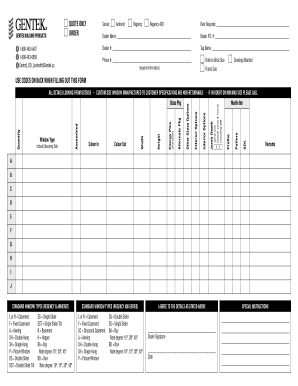
The Glass Checklist Form is a vendor registration document used by window film dealers and customers to document building specifications and window details.
pdfFiller scores top ratings on review platforms




Who needs Glass Checklist?
Explore how professionals across industries use pdfFiller.

Glass Checklist is needed by:
-
Window film dealers who need to register and verify specifications.
-
Customers looking to provide their building and window information.
-
Contractors needing detailed glass specifications for projects.
-
Real estate developers requiring building documentation.
-
Interior designers involved in window treatment decision-making.
-
Building inspectors needing compliance documentation.
Comprehensive Guide to Glass Checklist
What is the Glass Checklist Form?
The Glass Checklist Form is an essential tool in the window film industry, designed to document crucial details regarding window specifications and dealer information. Its primary function is to standardize the data collected from customers and dealers, ensuring that both parties have a clear understanding of the required information and specifications. This form includes documentation of various elements, such as window types, glass thickness, and dealer contact details, making it a vital resource in facilitating successful installations.
Purpose and Benefits of the Glass Checklist Form
The Glass Checklist Form serves multiple purposes, benefiting both customers and dealers. Firstly, it provides clarity and accuracy when recording window specifications, which is essential in preventing mistakes during installations. Furthermore, by having a documented agreement, both customers and dealers can refer back to the form to resolve any discrepancies. This ensures a smoother transaction and fosters trust in the relationship between the two parties.
Key Features of the Glass Checklist Form
The Glass Checklist Form is equipped with various features that enhance its usability. These include:
-
Multiple fillable fields for detailed information input.
-
Check boxes to provide quick and clear selections.
-
Step-by-step instructions to guide users through completion.
-
Requirements for dealer and customer signatures to validate the document.
These features collectively improve the efficiency of form completion and ensure all necessary details are captured.
Who Needs the Glass Checklist Form?
This form is essential for window film dealers and customers alike. Common scenarios where the Glass Checklist Form is necessary include renovations and new installations. Dealers should use the form to collect all relevant specifications and customer preferences, thereby simplifying the process and minimizing the likelihood of errors.
How to Fill Out the Glass Checklist Form Online
Filling out the Glass Checklist Form online involves several simple steps:
-
Access the form on your preferred online platform.
-
Complete each section with the required information, ensuring accuracy.
-
Double-check entries to avoid incomplete fields.
-
Submit the form electronically upon completion.
Taking these steps will help ensure a smooth experience and minimize common mistakes.
Common Errors and How to Avoid Them
While completing the Glass Checklist Form, users often encounter several common errors. To prevent these pitfalls, keep an eye out for:
-
Incomplete or incorrect fields that may delay processing.
-
Missing signatures from either the dealer or customer.
Before submitting the form, it's advisable to conduct a thorough review to ensure all information is accurate and complete.
How to Sign and Submit the Glass Checklist Form
Signing and submitting the Glass Checklist Form can involve different methods, including:
-
Digital signatures, which offer a convenient option for remote completion.
-
Traditional wet signatures, required in specific cases.
-
Various submission methods, such as online submission or traditional mail.
Understanding these options allows users to choose the method that best fits their circumstances.
Security and Compliance of the Glass Checklist Form
Handling the Glass Checklist Form securely is paramount. The document adheres to strict security measures, such as:
-
256-bit encryption to protect sensitive information.
-
Compliance with privacy regulations like HIPAA and GDPR.
Users can be assured that their data remains confidential throughout the completion and submission processes.
Next Steps After Completing the Glass Checklist Form
Once the Glass Checklist Form is filled out and submitted, users should follow up by:
-
Receiving a confirmation of submission, which verifies that the form has been accepted.
-
Tracking the status of their submission to ensure timely processing.
This follow-up is crucial for maintaining an efficient workflow and addressing any potential issues promptly.
Unlock the Full Potential with pdfFiller
pdfFiller empowers users to maximize their form completion experience through a user-friendly platform. With robust features designed for editing and managing PDF forms, pdfFiller ensures a secure and efficient process for completing forms like the Glass Checklist Form. Explore how pdfFiller's capabilities can simplify your documentation needs in a few easy steps.
How to fill out the Glass Checklist
-
1.Access the Glass Checklist Form by visiting pdfFiller's website and searching for the document title.
-
2.Open the form from your pdfFiller dashboard once located to begin editing.
-
3.Familiarize yourself with the layout, noting all required fields including dealer name, building details, and window specifications.
-
4.Gather necessary information prior to starting, such as measurements of windows, glass types, and customer details.
-
5.Fill in the form's fillable fields following the prompts closely; for instance, input dealer names and circle choices as instructed.
-
6.Ensure you have both signatures ready for the customer and window film dealer at the end of the form.
-
7.Review all entries for accuracy, making sure all mandatory fields are completed.
-
8.Once completed, save your changes. You can download the filled form for your records or submit it through pdfFiller's options.

Who is eligible to complete the Glass Checklist Form?
The Glass Checklist Form must be completed by authorized representatives of window film dealers and customers. Both parties need to provide accurate building and window information to ensure compliance and effective processing.
Is there a deadline for submitting this form?
The Glass Checklist Form generally does not have a specific deadline unless specified by project requirements. Always check with your contractor or relevant authority for any time-sensitive needs related to your project.
How do I submit the completed form?
Upon finalizing the form on pdfFiller, you can either download a copy for your records or submit it directly through the platform. Ensure signatures are included before submitting.
What supporting documents are required?
While the Glass Checklist Form itself does not typically require additional documents, it is advisable to have related building specifications and prior agreements available for reference during completion.
What common mistakes should I avoid when filling out the form?
Ensure all necessary fields are filled accurately and avoid skipping any required signature. Double-check for typos and miscalculations in glass dimensions and customer information.
What are the processing times for the submitted form?
Processing times can vary based on the dealer's internal procedures. It is recommended to follow up with the dealer directly after submission for an estimated timeline.
Can I edit the form after saving it on pdfFiller?
Yes, you can return to the Glass Checklist Form on pdfFiller to make edits. Just locate the saved document in your dashboard and make your changes before final submission.
Related Forms




Get the latest insights from our blog


If you believe that this page should be taken down, please follow our DMCA take down process
here
.
This form may include fields for payment information. Data entered in these fields is not covered by PCI DSS compliance.