
Last updated on
Oct 31, 2026

Get the free Medical Fitness Certificate
We are not affiliated with any brand or entity on this form

Fill out
Complete the form online in a simple drag-and-drop editor.

eSign
Add your legally binding signature or send the form for signing.

Share
Share the form via a link, letting anyone fill it out from any device.

Export
Download, print, email, or move the form to your cloud storage.
Why pdfFiller is the best tool for your documents and forms


End-to-end document management
From editing and signing to collaboration and tracking, pdfFiller has everything you need to get your documents done quickly and efficiently.
Accessible from anywhere
pdfFiller is fully cloud-based. This means you can edit, sign, and share documents from anywhere using your computer, smartphone, or tablet.
Secure and compliant
pdfFiller lets you securely manage documents following global laws like ESIGN, CCPA, and GDPR. It's also HIPAA and SOC 2 compliant.
What is Fitness Certificate
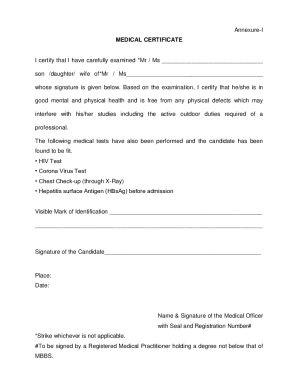
The Medical Fitness Certificate is a healthcare form used by individuals to certify their medical fitness and identify any allergies or chronic diseases requiring a signature from a registered medical practitioner.
pdfFiller scores top ratings on review platforms




Who needs Fitness Certificate?
Explore how professionals across industries use pdfFiller.

Fitness Certificate is needed by:
-
Individuals applying for employment requiring a fitness certificate
-
Students needing medical fitness clearance for school admission
-
Athletes undergoing health assessments for sports participation
-
Patients needing documentation for medical procedures
-
Travelers requiring health certifications for certain destinations
Comprehensive Guide to Fitness Certificate
What is a Medical Fitness Certificate?
A Medical Fitness Certificate is an essential document that certifies an individual's medical fitness. It validates a person's physical health status and is critical for various activities such as participating in sports or settling employment requirements.
This certificate is issued by registered medical practitioners, ensuring that the assessment is conducted by qualified healthcare professionals. The significance of the medical fitness certificate cannot be overstated, as it serves to confirm an individual's fitness for duty, sports activities, or other health-related prerequisites.
Purpose and Benefits of the Medical Fitness Certificate
The Medical Fitness Certificate not only provides peace of mind but also complies with regulations that govern numerous industries. Individuals may require this certificate for different scenarios, including:
-
Job applications that mandate health validations
-
Participation in sports events or competitions
-
Enrollment in educational institutions requiring health confirmations
-
Health assessments for insurance purposes
Having this certificate helps confirm an individual’s health status, making it a vital component of many professional and athletic endeavors.
Key Features of the Medical Fitness Certificate
Several essential components make up a Medical Fitness Certificate. Typically, the document includes:
-
Individual's name and parent’s name
-
Signature of the medical officer
-
Registration number of the issuing practitioner
-
Official seal of the medical officer
Additionally, blank fields will be present for necessary user input. Authenticity is paramount, and this document must be completed accurately to maintain its validity.
Who Needs a Medical Fitness Certificate?
A variety of individuals and groups require a Medical Fitness Certificate to ensure compliance with specific health regulations. This includes:
-
Students applying for schools or universities
-
Athletes competing in sports events
-
Employees in sectors where health certifications are mandatory
Occupations that mandate this certificate often include those related to healthcare, transportation, and athletics, serving to validate health assessments critical to various roles.
How to Fill Out the Medical Fitness Certificate Online (Step-by-Step)
Completing the Medical Fitness Certificate online is a straightforward process. Here are the steps to ensure correct submissions:
-
Access the form through your preferred online platform.
-
Input required details such as name and health information.
-
Ensure the medical officer’s information is included correctly.
-
Review the completed form for any errors.
-
Submit the form electronically.
Common pitfalls include missing required fields or providing incorrect information, which can lead to delays in certification. Utilizing platforms like pdfFiller simplifies this process by providing user-friendly functionalities for form completion.
Digital Signature vs. Wet Signature Requirements
When it comes to signing the Medical Fitness Certificate, understanding the difference between digital and wet signatures is essential. Digital signatures are often accepted for online submissions in many cases, while wet signatures may still be required for certain official reports or documentation.
pdfFiller facilitates eSigning, providing a secure and efficient method to sign documents digitally, thereby ensuring compliance with both types of signature requirements.
How to Submit the Medical Fitness Certificate
Once you have completed your Medical Fitness Certificate, the next step is submission. Various options are available:
-
Online submission through authorized platforms
-
In-person submission at designated health facilities
Instructions for submission typically include details regarding any applicable fees and expected processing times, which can vary based on the submission method.
Security and Compliance for the Medical Fitness Certificate
Ensuring the safety and compliance of the Medical Fitness Certificate is crucial. Platforms such as pdfFiller implement robust security measures, including 256-bit encryption. Adherence to GDPR compliance is also a standard practice, safeguarding personal health data during processing.
Handling medical documents securely is vital to protecting individual privacy and upholding trust in the certification process.
Common Errors and How to Avoid Them
To ensure that submissions of the Medical Fitness Certificate are accurate, it's important to avoid frequent mistakes that can occur, including:
-
Neglecting to fill in all required fields
-
Inaccurate information that could lead to rejections
Reviewing the certificate thoroughly before submission is essential. Errors on the certificate can result in delays or complications in document approval.
Why Choose pdfFiller for Your Medical Fitness Certificate Needs
Choosing pdfFiller for managing your Medical Fitness Certificate comes with numerous benefits. The platform offers a comprehensive suite of features, including easy editing and form filling, eSigning capabilities, and secure document management.
User testimonials reflect high satisfaction rates, demonstrating how pdfFiller simplifies the process and enhances efficiency. Ease of use, significant time savings, and a commitment to secure handling of documents make pdfFiller an excellent choice for your medical fitness certification needs.
How to fill out the Fitness Certificate
-
1.Access pdfFiller and search for 'Medical Fitness Certificate' in the template library.
-
2.Open the form and familiarize yourself with the layout, noting the fields that require your information.
-
3.Gather all necessary personal information, including your name, parent’s name, and details about your medical history, allergies, or chronic conditions.
-
4.Start filling in the fields by clicking on them and typing or selecting relevant information using pdfFiller's typing tools.
-
5.Ensure that you accurately input your medical history, and leave spaces for the medical officer's signature, registration number, and seal.
-
6.After completing the form, review all entered information for accuracy to avoid any mistakes.
-
7.Use the options at the top of the interface to finalize and save your document. You can preview it before downloading.
-
8.Once satisfied with the form, select 'Download' to save it to your device or use the 'Send' option to submit it directly to the required recipient.

Who is eligible to obtain a Medical Fitness Certificate?
Any individual needing to certify their medical fitness for employment, school admission, sports participation, or medical procedures can obtain a Medical Fitness Certificate, provided they visit a registered medical practitioner for evaluation.
Is there a deadline for obtaining the Medical Fitness Certificate?
While there is generally no fixed deadline, individuals should acquire the Medical Fitness Certificate well before any mandatory submission dates for jobs, school enrollments, or sporting events to ensure timely processing.
What documents are needed to complete this form?
You may need to provide personal identification, such as a government-issued ID, and any previous medical records concerning allergies or chronic diseases to facilitate an accurate assessment by the medical officer.
How do I submit the Medical Fitness Certificate after completing it?
After finalizing the Medical Fitness Certificate, you can submit it by downloading it to your device and sending it via email or printed copy to the required organization or institution that requested it.
What are common mistakes to avoid when filling out this form?
Common mistakes include providing incorrect personal details, failing to obtain a signature from a registered medical practitioner, or neglecting to review the completed form before submission. Double-check all fields to avoid errors.
How long does it take to process the Medical Fitness Certificate?
Processing times can vary, but it generally takes a few days to get your Medical Fitness Certificate signed and sealed by the medical officer. It's advisable to check directly with your healthcare provider for specific timelines.
Related Forms





Related Catalogs
Get the latest insights from our blog


If you believe that this page should be taken down, please follow our DMCA take down process
here
.
This form may include fields for payment information. Data entered in these fields is not covered by PCI DSS compliance.