
Last updated on
Nov 7, 2026

IRS 9465 2018 free printable template
pdfFiller is not affiliated with IRS

Fill out
Complete the form online in a simple drag-and-drop editor.

eSign
Add your legally binding signature or send the form for signing.

Share
Share the form via a link, letting anyone fill it out from any device.

Export
Download, print, email, or move the form to your cloud storage.
Why pdfFiller is the best tool for your documents and forms


End-to-end document management
From editing and signing to collaboration and tracking, pdfFiller has everything you need to get your documents done quickly and efficiently.
Accessible from anywhere
pdfFiller is fully cloud-based. This means you can edit, sign, and share documents from anywhere using your computer, smartphone, or tablet.
Secure and compliant
pdfFiller lets you securely manage documents following global laws like ESIGN, CCPA, and GDPR. It's also HIPAA and SOC 2 compliant.
What is IRS 9465
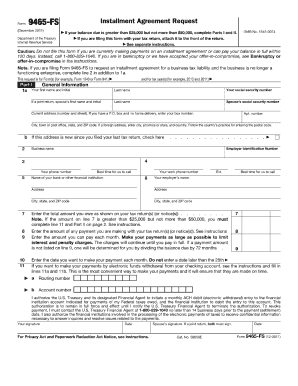
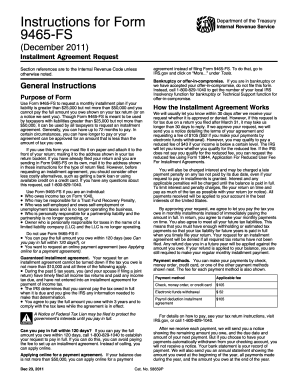
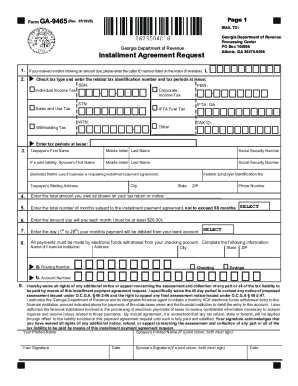
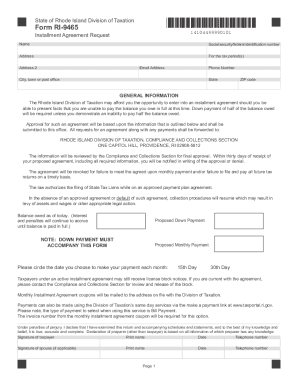
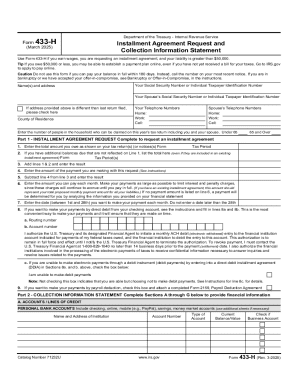
The IRS Form 9465 Installment Agreement Request is a tax document used by individuals or businesses in the United States to request a payment plan for federal tax debts.
pdfFiller scores top ratings on review platforms




I feel this is just what I've been looking for and it's not to complicated like some of the other sites and you still don't get what your looking for . I didn't get get what I wanted on other sites. That's why I purchased for a year because this works good with my busness.
Just started using a program like this and I find it easy and not complicated to use. well done
Who needs IRS 9465?
Explore how professionals across industries use pdfFiller.

IRS 9465 is needed by:
-
Individuals owing federal taxes
-
Businesses with tax obligations
-
Taxpayers requiring payment arrangements
-
Spouses of primary taxpayers filing jointly
-
Accountants assisting clients with tax debt
-
Financial advisors recommending payment plans
-
Tax professionals preparing forms for clients
Comprehensive Guide to IRS 9465
What is the IRS Form 9465 Installment Agreement Request?
The IRS Form 9465 is a crucial document used to request an installment agreement for paying federal tax debts. This form serves as a means for individuals and businesses to establish a tax payment plan with the Internal Revenue Service (IRS). When taxpayers owe money to the IRS, the installment agreement request can help them manage their liabilities effectively.
This form is particularly useful for those who may not be able to pay their tax debt in full immediately. By using IRS Form 9465, taxpayers can potentially avoid severe penalties like tax liens or wage garnishments.
Purpose and Benefits of IRS Form 9465 Installment Agreement Request
The primary purpose of the IRS Form 9465 is to assist taxpayers in dealing with their tax debt in a manageable way. Filing this request allows individuals and businesses to negotiate a payment plan that fits their financial situation.
-
Helps manage tax debt by spreading payments over time.
-
Prevents serious repercussions such as tax liens, which can affect credit scores.
-
Avoids wage garnishments and bank levies by setting up timely payments.
Overall, an IRS payment agreement can provide peace of mind and a more structured approach to tax repayment.
Eligibility Criteria for IRS Form 9465 Installment Agreement Request
To qualify for an installment agreement via the IRS Form 9465, certain criteria must be met. Taxpayers must ensure they adhere to the eligibility requirements specified by the IRS.
-
Individuals or businesses must owe less than a specific threshold amount.
-
Filers must have filed all required tax returns.
-
Tax liability must be due and not currently being contested.
Examples of situations that may qualify include owing tax for previous years without active collections. Conversely, significant tax delinquency might lead to ineligibility.
When and How to File the IRS Form 9465 Installment Agreement Request
Deciding when to file the IRS Form 9465 is important for taxpayers who wish to arrange a payment plan efficiently. The form should be submitted as soon as possible once the tax debt is realized.
-
Review your total tax liability and financial situation.
-
Complete the IRS Form 9465 accurately.
-
Submit the form according to your preferred submission method.
By following these steps, taxpayers can effectively initiate their tax installment request in a timely manner.
How to Fill Out the IRS Form 9465 Installment Agreement Request Online
Completing the IRS Form 9465 online is an efficient way to manage tax obligations. Familiarizing oneself with each section of the form will ensure all necessary information is included.
-
Enter personal details: your name, Social Security number, and current address.
-
Provide a summary of your tax debts and suggest a monthly payment amount.
-
Select payment options such as direct debit.
Using tools like pdfFiller can simplify the process and help ensure that all information is accurately filled out and submitted.
Submission Methods for IRS Form 9465
Taxpayers have various options when it comes to submitting the IRS Form 9465. The submission method can depend on individual circumstances, including the urgency of the tax debt situation.
-
E-file through the IRS website for quick processing.
-
Mail the completed form to the designated IRS address for your area.
Choosing the most appropriate submission method may impact the speed at which your installment agreement is processed.
Common Mistakes When Filing IRS Form 9465
Filing the IRS Form 9465 can lead to errors if not approached carefully. Some common mistakes can delay processing or lead to rejection of the request.
-
Omitting required information or fields.
-
Providing inaccurate financial details.
To improve the chances of approval, taxpayers should review their submission using a validation checklist before sending it off.
What Happens After Submitting the IRS Form 9465 Installment Agreement Request?
After the IRS Form 9465 is submitted, taxpayers enter the IRS review process. Understanding this phase is important for managing expectations regarding responses from the IRS.
-
The typical timeframe for receiving a response can range from several weeks to a couple of months.
-
Taxpayers can track their application status online or via IRS customer service.
If the request is rejected, follow-up actions including appeal processes should be considered.
Security and Compliance When Using IRS Form 9465
Handling sensitive tax information must be done securely to protect personal data and comply with federal regulations. Using reliable platforms for document handling is vital.
-
Ensure the platform offers data encryption and is compliant with regulations like GDPR.
-
Consider using pdfFiller for secure online form filling.
Taking these precautions aids in safeguarding personal and financial information during the submission process.
Utilizing pdfFiller for IRS Form 9465 Completion
pdfFiller offers valuable features that enhance the experience of filling out and submitting IRS Form 9465. Its tools simplify the entire process.
-
Edit text and images within the form easily.
-
Use the eSigning feature to sign documents electronically and securely.
Utilizing pdfFiller can lead to a more efficient and secure completion of the IRS Form 9465.
How to Fill Out Small Business Tax Forms Online with pdfFiller
Struggling with your Schedule C or not sure how to file business taxes as a sole proprietor, LLC, or self-employed professional? This step-by-step pdfFiller tutorial walks you through completing IRS Schedule C quickly and accurately — no printing, no scanning, no stress. Whether you're handling small business tax deductions, tracking self-employed taxes, or preparing your full business tax return, pdfFiller makes it simple right in your browser.

How to fill out the IRS 9465
-
1.Access pdfFiller and search for 'IRS Form 9465' to locate the form quickly.
-
2.Open the form using pdfFiller's user-friendly interface, allowing you to edit directly in your browser.
-
3.Gather necessary information such as your legal name, Social Security number, current address, and total tax owed before you begin filling out the form.
-
4.Start filling the form by carefully inputting your personal details in the designated fields, ensuring accuracy to prevent processing delays.
-
5.For 'Your total tax amount owed', refer to your tax return and enter the exact figure as required.
-
6.If applicable, indicate your preference for payment methods such as direct debit or payroll deduction by checking the appropriate boxes.
-
7.Review each field for completeness, making sure all necessary information is included and correctly filled.
-
8.Once satisfied with your entries, utilize the review tool on pdfFiller to double-check for any possible errors.
-
9.Save your progress to avoid losing any entered data as you finalize the form.
-
10.When ready, download the completed form in PDF format or submit it electronically through pdfFiller's submission options.

Who is eligible to use IRS Form 9465?
IRS Form 9465 is available for individuals and businesses in the United States that owe federal taxes and wish to establish an installment agreement to pay off their tax debt over time.
What is the deadline to submit Form 9465?
It's advisable to submit Form 9465 as soon as you realize you cannot pay your tax liability in full. Timing can vary based on your tax situation, but do it before the tax deadline to avoid penalties.
How can I submit Form 9465?
You can submit IRS Form 9465 either electronically through the IRS website or by mailing it to the address specified in the form instructions. Using pdfFiller allows for online submission directly to the IRS.
What supporting documents do I need for Form 9465?
While specific supporting documents aren't required with Form 9465, it's essential to have your tax returns, details about your tax debt, and payment plan proposals ready to ensure accurate completion.
What are common mistakes to avoid when filling out Form 9465?
Common mistakes include entering incorrect amounts, forgetting to sign the form, and not providing all necessary personal information. Double-check your entries to minimize errors.
How long does it take to process Form 9465?
Processing times for IRS Form 9465 can vary, but typically it takes around 30 days to receive a response from the IRS after submission, depending on their workload and your specific situation.
Can I modify my installment agreement after submitting Form 9465?
Yes, you can request changes to your installment agreement after it’s established. Contact the IRS directly to discuss modifications or adjustments based on your financial situation.
IRS 9465 Form Versions
Related Content
Related Forms




Get the latest insights from our blog


If you believe that this page should be taken down, please follow our DMCA take down process
here
.
This form may include fields for payment information. Data entered in these fields is not covered by PCI DSS compliance.