
Last updated on
Oct 31, 2026

Get the free Food Delivery Receipt
We are not affiliated with any brand or entity on this form

Fill out
Complete the form online in a simple drag-and-drop editor.

eSign
Add your legally binding signature or send the form for signing.

Share
Share the form via a link, letting anyone fill it out from any device.

Export
Download, print, email, or move the form to your cloud storage.
Why pdfFiller is the best tool for your documents and forms


End-to-end document management
From editing and signing to collaboration and tracking, pdfFiller has everything you need to get your documents done quickly and efficiently.
Accessible from anywhere
pdfFiller is fully cloud-based. This means you can edit, sign, and share documents from anywhere using your computer, smartphone, or tablet.
Secure and compliant
pdfFiller lets you securely manage documents following global laws like ESIGN, CCPA, and GDPR. It's also HIPAA and SOC 2 compliant.
What is CACFP Receipt
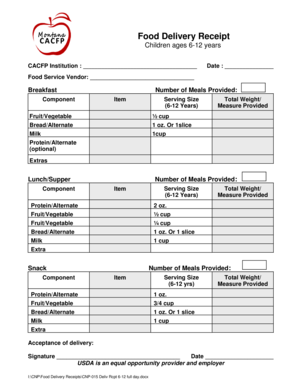
The Food Delivery Receipt is a document used by food service vendors to confirm the delivery of meals provided under the Child and Adult Care Food Program (CACFP).
pdfFiller scores top ratings on review platforms




Who needs CACFP Receipt?
Explore how professionals across industries use pdfFiller.

CACFP Receipt is needed by:
-
Food service vendors delivering meals to institutions
-
Child and Adult Care Food Program (CACFP) participants
-
Schools providing preschool meal programs
-
Nutrition program administrators
-
Childcare facilities
-
Government agencies overseeing food distribution
Comprehensive Guide to CACFP Receipt
What is the Food Delivery Receipt?
The Food Delivery Receipt is a critical document used by food service vendors to record meal deliveries to institutions participating in the Child and Adult Care Food Program (CACFP). This form is essential for maintaining accurate meal delivery documentation, ensuring compliance with USDA regulations, and supporting reimbursement processes. Proper documentation is vital for food service vendors as it validates meal counting and ensures that institutions meet the criteria set forth by the program.
Accurate record-keeping through this receipt not only facilitates efficient operations but also minimizes the risk of errors during compliance audits. The Food Delivery Receipt serves as a key tool for enhancing accountability within meal service programs.
Purpose and Benefits of the Food Delivery Receipt
The primary purpose of the Food Delivery Receipt is to establish an accurate record of meal deliveries from food service vendors to various institutions. This documentation provides several benefits, including:
-
Ensuring accurate meal delivery records for compliance with regulations.
-
Supporting adherence to USDA requirements for meal service programs.
-
Enhancing organizational efficiency through structured record-keeping.
By utilizing this form, vendors can streamline their operations and improve their service delivery, which is especially crucial for institutions catering to children's nutritional needs.
Key Features of the Food Delivery Receipt
Users should be aware of several prominent features included in the Food Delivery Receipt. Important aspects are:
-
Detailed fields for specifying meal components, serving sizes, and total weight for accountability.
-
Designated areas for vendor signatures and dates, confirming delivery completion.
-
Inclusion of the USDA equal opportunity statement to align with federal requirements.
These features collectively ensure that the information contained in the receipt is comprehensive and compliant with food service regulations.
Who Needs the Food Delivery Receipt?
The Food Delivery Receipt is essential for various stakeholders within the food service sector. This includes:
-
Food service vendors responsible for supplying meals under the CACFP.
-
Early childhood education providers who serve meals to children in daycare settings.
-
Childcare facilities that participate in the program and require precise documentation for reimbursement.
For these stakeholders, the receipt is integral to maintaining compliance and ensuring proper reimbursement from funding sources.
How to Fill Out the Food Delivery Receipt Online
Filling out the Food Delivery Receipt online can be done efficiently via pdfFiller. Follow these steps to complete the form:
-
Access the Food Delivery Receipt template on pdfFiller.
-
Fill in the required sections with information about meal components and servings.
-
Ensure all mandatory fields, including the signature and date, are completed.
Taking time to input accurate meal component details is essential for compliance and successful documentation of deliveries.
Review and Validation Checklist
Before submitting the Food Delivery Receipt, it is advisable to conduct a thorough review. Important review points include:
-
Check all fields for accuracy, ensuring no information is omitted.
-
Verify that all required signatures are present on the document.
-
Ensure meal component details align with delivery records to avoid discrepancies.
Spotting common errors at this stage can save time and prevent issues during compliance checks.
Submission Methods and Delivery of the Food Delivery Receipt
After completing the Food Delivery Receipt, vendors can submit the form through various methods, including:
-
Online submission via pdfFiller for immediate processing.
-
Printing and mailing the form to designated authorities.
-
Tracking submissions, if tracking features are available, to ensure timely delivery.
Choosing the right submission method will enhance the efficiency of the documentation process.
Security and Compliance for the Food Delivery Receipt
Understanding security and compliance is paramount when handling the Food Delivery Receipt. Key points include:
-
pdfFiller ensures document security through features like 256-bit encryption.
-
The importance of adhering to CDC and USDA guidelines in all documentation processes.
-
How pdfFiller's functionalities help maintain confidentiality of sensitive information related to meal services.
Ensuring these measures are in place protects both the vendor and the institutions served.
Example of a Completed Food Delivery Receipt
Having an example of a completed Food Delivery Receipt can significantly assist users. A filled-out sample highlights key information such as:
-
The number of meals delivered, including specific component details.
-
Signature and date fields that authenticate the delivery process.
-
Annotations pointing out essential areas to be filled in for clarity.
Access to templates allows users to streamline their document completion process, ensuring every necessary detail is included.
Unlock Your Efficiency with pdfFiller
Utilizing pdfFiller can vastly improve the efficiency of managing documents like the Food Delivery Receipt. Benefits include:
-
Easy editing of text and images directly within the PDF platform.
-
Cloud-based access for immediate document management without downloads.
-
Seamless sharing capabilities that enhance collaboration among users.
pdfFiller's versatile platform encourages users to explore features that can support their document management workflows.
How to fill out the CACFP Receipt
-
1.Begin by accessing pdfFiller and searching for the Food Delivery Receipt template.
-
2.Once opened, familiarize yourself with the layout and available fields for data entry.
-
3.Before you start filling out the form, gather necessary information such as meal counts, component items, serving sizes, and total weight of meals delivered.
-
4.In the designated areas, accurately input details regarding the number of meals and components delivered.
-
5.If applicable, add information regarding the vendor’s name, contact details, and any required signatures in the provided fields.
-
6.Ensure you review all entries for accuracy, paying attention to meal counts and vendor information.
-
7.Use pdfFiller’s tools to adjust any fields as needed or to add any comments or special notes relevant to the delivery.
-
8.Once the form is complete and verified for accuracy, save or download your completed receipt directly from pdfFiller.
-
9.If you need to submit the form, you can easily do so via pdfFiller’s submission features, ensuring that it reaches the intended recipient.

Who needs to sign the Food Delivery Receipt?
The Food Delivery Receipt must be signed by the food service vendor to acknowledge the delivery. This ensures accountability and serves as proof of service completion.
What information is required to complete the Food Delivery Receipt?
Key information includes the number of meals provided, component items, serving sizes, total weight, and the vendor’s signature along with the date of delivery.
Is notarization required for the Food Delivery Receipt?
No, notarization is not required for the Food Delivery Receipt. However, ensure it is signed by the vendor to validate the delivery.
How can I submit the Food Delivery Receipt after filling it out?
After completing the form on pdfFiller, you can save, download, or directly submit it through the platform. Select your preferred submission method for effective delivery.
Can the Food Delivery Receipt be filled out electronically?
Yes, the Food Delivery Receipt is a fillable form available on pdfFiller, allowing for easy electronic completion and submission.
What are common mistakes to avoid when filling out the Food Delivery Receipt?
Common mistakes include omitting required fields, incorrect meal counts, and failing to obtain a signature. Always double-check all entries for accuracy.
What is the purpose of the USDA equal opportunity statement included in the form?
The USDA equal opportunity statement ensures compliance with federal laws prohibiting discrimination. It's important for maintaining transparency in food service programs.
Related Forms




Related Catalogs
Get the latest insights from our blog


If you believe that this page should be taken down, please follow our DMCA take down process
here
.
This form may include fields for payment information. Data entered in these fields is not covered by PCI DSS compliance.