
Last updated on
Nov 4, 2026

Canada Safety Trainers Scaffold Inspection Checklist 2015-2026 free printable template
We are not affiliated with any brand or entity on this form

Fill out
Complete the form online in a simple drag-and-drop editor.

eSign
Add your legally binding signature or send the form for signing.

Share
Share the form via a link, letting anyone fill it out from any device.

Export
Download, print, email, or move the form to your cloud storage.
Why pdfFiller is the best tool for your documents and forms


End-to-end document management
From editing and signing to collaboration and tracking, pdfFiller has everything you need to get your documents done quickly and efficiently.
Accessible from anywhere
pdfFiller is fully cloud-based. This means you can edit, sign, and share documents from anywhere using your computer, smartphone, or tablet.
Secure and compliant
pdfFiller lets you securely manage documents following global laws like ESIGN, CCPA, and GDPR. It's also HIPAA and SOC 2 compliant.
What is Canada Safety Trainers Scaffold Inspection Checklist
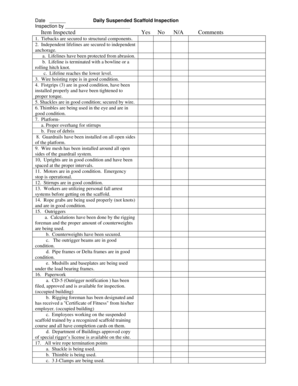
The Scaffold Inspection Checklist is a safety document used by construction professionals to ensure scaffolding structures meet safety standards before use.
pdfFiller scores top ratings on review platforms




Excited to see what I can use this product
I fill out a lot of forms from different organizations. Found PDF Filler after searching for a federal form. It was the top result and I started using it from there. Some organizations do not even realize how they have deployed PFD files. When you show up, or fax them their completed PDF file you get some odd reactions.
Who needs Canada Safety Trainers Scaffold Inspection Checklist?
Explore how professionals across industries use pdfFiller.

Canada Safety Trainers Scaffold Inspection Checklist is needed by:
-
Safety Inspectors reviewing scaffolding setups
-
Construction site supervisors responsible for safety compliance
-
Contractors managing scaffold installations
-
Competent Persons conducting safety assessments
-
Workers involved in scaffold assembly and inspection
Comprehensive Guide to Canada Safety Trainers Scaffold Inspection Checklist
What is the Scaffold Inspection Checklist?
The Scaffold Inspection Checklist is a critical safety document designed to ensure that scaffolding structures align with established safety standards. This checklist must be completed by a competent person who possesses the necessary skills and knowledge to identify potential hazards. By utilizing this checklist, organizations can guarantee compliance with safety regulations, ultimately safeguarding workers and the public during scaffolding operations.
Employing the scaffold inspection checklist not only streamlines the inspection process but also reinforces a commitment to workplace safety. This scaffold safety form serves as a vital tool in proactive risk management, ensuring that all scaffolding components undergo thorough evaluation before use.
Purpose and Benefits of the Scaffold Inspection Checklist
The primary purpose of the scaffold inspection checklist is to maintain safety standards prior to the utilization of scaffolding. Regular inspections play a pivotal role in preventing accidents that could arise from structural failures or inadequate safety measures. Additionally, adhering to this checklist ensures compliance with relevant regulatory frameworks and safety standards.
Key benefits include:
-
Prevention of workplace accidents related to scaffolding.
-
Streamlined safety inspections to enhance operational efficiency.
-
Increased overall safety awareness among workers and management.
Key Features of the Scaffold Inspection Checklist
The scaffold inspection checklist is structured for efficiency and clarity, incorporating yes/no questions to facilitate quick assessments. Furthermore, it allows space for comments to provide detailed feedback regarding each inspection component. A crucial feature of the checklist is the requirement for a signature, which certifies that the inspection has been completed accurately.
Another significant advantage is that this checklist is available in a fillable PDF format, making it user-friendly and accessible for all parties involved in scaffold inspections. This feature enhances usability, simplifying data entry and review processes.
Who Needs the Scaffold Inspection Checklist?
This checklist is essential for various professionals and organizations involved in construction and scaffolding operations. Key stakeholders include:
-
Construction site managers responsible for maintaining site safety.
-
Competent persons who conduct safety inspections.
-
Companies that provide scaffolding services and setups.
Each of these roles relies on the scaffold inspection checklist to uphold safety standards throughout the construction process.
How to Fill Out the Scaffold Inspection Checklist Online (Step-by-Step)
Filling out the scaffold inspection checklist online using pdfFiller is a straightforward process. Follow these steps to complete your checklist:
-
Access the scaffold inspection checklist in pdfFiller.
-
Carefully read the instructions included within the document.
-
Fill in each section, answering the yes/no questions based on the inspection results.
-
Add comments where necessary to provide additional context.
-
Sign the document electronically to certify its completion.
This platform offers features such as autofill and easy document sharing, enhancing the filling process and ensuring quick access for all team members.
Common Errors and How to Avoid Them When Using the Scaffold Inspection Checklist
Many users encounter specific errors when completing the scaffold inspection checklist. Frequent mistakes include:
-
Failing to complete all sections of the checklist.
-
Omitting signatures or dates, leading to incomplete documentation.
-
Providing vague comments that do not specify issues clearly.
To improve accuracy, it is essential to double-check entries and ensure clarity in comments and required signatures. A thorough review process can help maintain the integrity of the inspection report.
Requirements for Signing the Scaffold Inspection Checklist
Signing the scaffold inspection checklist involves understanding the distinctions between digital and wet signatures. A digital signature offers a secure method of signing documents electronically, while a wet signature requires physical signing with a pen.
It is vital that the person signing the checklist has the necessary qualifications and authority to certify the inspection. Compliance with legal considerations is also crucial, as improper signing could lead to liability issues.
How to Download and Save the Scaffold Inspection Checklist PDF
Downloading the scaffold inspection checklist from pdfFiller involves a few simple steps:
-
Navigate to the checklist on pdfFiller.
-
Click the download button to save the PDF to your device.
-
Choose a secure location for storing the document, whether digitally or for printing.
This process also offers options for paper-saving methods, allowing users to either print directly or share documents digitally to reduce resource consumption.
Security and Compliance When Handling the Scaffold Inspection Checklist
When managing the scaffold inspection checklist, it is crucial to consider document security and compliance with regulations. pdfFiller ensures the protection of your documents through 256-bit encryption and compliance with best practices, including HIPAA and GDPR, providing users with peace of mind regarding data handling.
Incorporating secure document management techniques safeguards sensitive information related to construction safety and builds trust among all stakeholders involved.
Experience Seamless Document Management with pdfFiller
Utilizing pdfFiller for the scaffold inspection checklist enhances your document management experience. This cloud-based platform simplifies the process of editing, completing, and sharing documents, making it an efficient solution for safety inspections. The ease of use and capabilities of pdfFiller allow organizations to manage their scaffolding safety documentation effectively.
By leveraging cloud technology, users can access their documents anywhere, thereby supporting their organizational needs with reliability and efficiency.
How to fill out the Canada Safety Trainers Scaffold Inspection Checklist
-
1.Access pdfFiller and search for 'Scaffold Inspection Checklist' to locate the form.
-
2.Open the form in the pdfFiller interface to start filling it out.
-
3.Review the checklist carefully and gather any necessary information about the scaffolding components that need inspection.
-
4.Complete the yes/no questions by checking the appropriate boxes for each scaffold element, such as planking and guard rails.
-
5.Use the comments section to provide additional details or observations about the inspection results.
-
6.Ensure that a competent person reviews the checklist items for accuracy before signing.
-
7.Check the completion date field and enter the date of the inspection.
-
8.Have the competent person sign the form to certify that the inspection was completed.
-
9.Review all entries to verify that all necessary fields are filled out correctly before saving.
-
10.Once finalized, save the document to your pdfFiller account or download it to your device as a PDF.
-
11.Submit the form electronically through pdfFiller or print it for physical submission, as needed.

Who is eligible to complete the Scaffold Inspection Checklist?
The Scaffold Inspection Checklist should be completed by a competent person who has the necessary training and experience in scaffold safety inspections.
Are there deadlines for completing the checklist?
It is best to complete the Scaffold Inspection Checklist before each use of scaffolding to ensure safety compliance. Regular inspections are recommended.
How do I submit the completed form?
You can submit the completed Scaffold Inspection Checklist through the pdfFiller platform electronically or print it out for manual submission based on your project requirements.
What supporting documents are needed with this checklist?
Typically, no additional supporting documents are needed to complete the Scaffold Inspection Checklist, but recent safety training certificates may enhance compliance.
What common mistakes should I avoid when filling out the form?
Ensure all checklist items are thoroughly inspected and accurately documented. Avoid skipping questions and remember to include the signature and date.
How long does it take to process the Scaffold Inspection Checklist?
Processing time for the Scaffold Inspection Checklist is immediate once completed. Ensure timely submission to accommodate project timelines.
What should I do if I need to make changes to the checklist after signing?
If changes are needed after signing, you may need to void the current form and complete a new one to ensure accurate documentation of the inspection.
Related Forms



Related Catalogs
Get the latest insights from our blog


If you believe that this page should be taken down, please follow our DMCA take down process
here
.
This form may include fields for payment information. Data entered in these fields is not covered by PCI DSS compliance.