
Last updated on
Nov 7, 2026

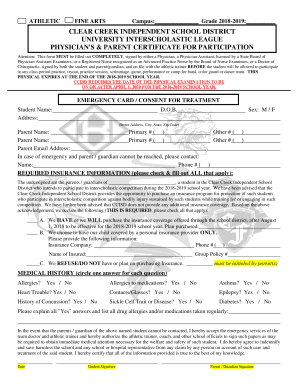
Clear Creek Independent School District Athletic Physical Form 2019-2026 free printable template
pdfFiller is not affiliated with any government organization

Fill out
Complete the form online in a simple drag-and-drop editor.

eSign
Add your legally binding signature or send the form for signing.

Share
Share the form via a link, letting anyone fill it out from any device.

Export
Download, print, email, or move the form to your cloud storage.
Why pdfFiller is the best tool for your documents and forms


End-to-end document management
From editing and signing to collaboration and tracking, pdfFiller has everything you need to get your documents done quickly and efficiently.
Accessible from anywhere
pdfFiller is fully cloud-based. This means you can edit, sign, and share documents from anywhere using your computer, smartphone, or tablet.
Secure and compliant
pdfFiller lets you securely manage documents following global laws like ESIGN, CCPA, and GDPR. It's also HIPAA and SOC 2 compliant.
What is Clear Creek Independent School District Athletic Physical Form
The Physician's & Parent Certificate for Participation is a medical consent form used by Clear Creek Independent School District in Texas to certify a student's eligibility for interscholastic athletic activities or fine arts performances.
pdfFiller scores top ratings on review platforms




Impressed with the speed and capability of the program in dealing with PDF forms and files.
This is an awesome resource of unavailable forms.
Who needs Clear Creek Independent School District Athletic Physical Form?
Explore how professionals across industries use pdfFiller.

Clear Creek Independent School District Athletic Physical Form is needed by:
-
Students participating in interscholastic athletics
-
Parents or guardians of student athletes
-
Physicians conducting medical evaluations
-
Athletic trainers at schools
-
School administrators in charge of athletic programs
Comprehensive Guide to Clear Creek Independent School District Athletic Physical Form
What is the Physician's & Parent Certificate for Participation?
The Physician's & Parent Certificate for Participation serves as a critical document within the Clear Creek Independent School District. This form is essential for students who wish to participate in athletic activities or fine arts performances.
Completion of this form involves three key roles: the student, the parent or guardian, and the physician. All parties must provide their respective information and signatures to validate the form's contents. For the 2 school year, submission of the form is mandatory before participation is allowed.
Purpose and Benefits of the Physician's & Parent Certificate for Participation
This form is significant for multiple reasons. Firstly, it plays a vital role in ensuring the medical safety of students engaged in school programs. By requiring detailed health information, it protects both students and the school from potential liabilities.
Moreover, having timely medical consent can expedite preparations for athletic participation, ensuring that any health concerns are documented beforehand. Overall, the form enhances the safety and wellbeing of student athletes.
Who Needs the Physician's & Parent Certificate for Participation?
The completion of this important certificate involves three main individuals: the student, their parent or guardian, and the physician. Each party has specific responsibilities to ensure the form is filled out correctly.
Students participating in interscholastic activities must have medical documentation and consent from their healthcare provider. Each signature on the form is crucial, validating the information provided and confirming the student’s readiness to participate.
Key Features of the Physician's & Parent Certificate for Participation
The Physician's & Parent Certificate for Participation includes several essential fields aimed at providing comprehensive medical information. Key features of the form include:
-
Medical history questions detailing previous health issues.
-
Emergency contact information to ensure swift communication in case of emergencies.
-
Authorization for medical treatment, allowing the school to act swiftly if required.
-
Required digital and/or wet signatures from all involved parties.
These features are designed to capture all necessary medical details, safeguarding student welfare during school-sponsored activities.
How to Fill Out the Physician's & Parent Certificate for Participation Online
Completing the Physician's & Parent Certificate for Participation online is a straightforward process. Follow these steps to ensure accurate completion:
-
Access the form electronically via the designated platform.
-
Fill in fields systematically, ensuring all requested information is accurate.
-
Review each section for completeness and correctness before submission.
To avoid mistakes, double-check entries and utilize any available validation tools promptly. This proactive approach helps minimize errors and enhance overall submission quality.
Submitting the Physician's & Parent Certificate for Participation
Once the Physician's & Parent Certificate for Participation is completed, there are various submission methods available:
-
Online submission via the designated portal.
-
In-person submission directly to the athletic trainer.
Be mindful of any applicable deadlines for submissions to ensure on-time processing. Following up after submission is important to confirm that the form has been received and approved.
Common Errors to Avoid When Completing the Physician's & Parent Certificate for Participation
To ensure a smooth completion of the Physician's & Parent Certificate, avoiding common mistakes is key. Some frequent errors include:
-
Missing signatures from the student, parent, or physician.
-
Incomplete sections that can lead to delays in processing.
To counteract these pitfalls, thoroughly double-check all entries before submission. Utilizing pdfFiller’s validation tools can help ensure the information is accurate and complete.
How pdfFiller Helps You with the Physician's & Parent Certificate for Participation
pdfFiller greatly enhances the process of completing and managing the Physician's & Parent Certificate for Participation. Key capabilities of pdfFiller include:
-
eSigning features that allow for quick and secure signature collection.
-
Comprehensive form filling and editing options at your convenience.
-
Secure sharing of completed documents, maintaining the confidentiality of sensitive information.
The platform's commitment to data security, including 256-bit encryption, ensures compliance with standards that protect sensitive medical information.
Sample of a Completed Physician's & Parent Certificate for Participation
For reference, a sample of a completed Physician's & Parent Certificate is available for viewing. This example illustrates:
-
The correct filling out of key sections.
-
Highlighted fields to guide users in completing their forms accurately.
Please note any specific disclaimers regarding the sample form, as it serves solely as a guide for proper completion.
How to fill out the Clear Creek Independent School District Athletic Physical Form
-
1.Access the form by visiting pdfFiller's website and searching for the Physician's & Parent Certificate for Participation using the search bar.
-
2.Once opened, familiarize yourself with the layout of the document. You will see interactive fields, checkboxes, and signature lines.
-
3.Before completing the form, gather necessary information such as the student's name, date of birth, emergency contact details, insurance information, and your physician's contact details.
-
4.Begin filling in the student's information in the designated fields, starting with the 'Student Name' and 'Date of Birth' fields.
-
5.Next, proceed to the parent/guardian section, where you will enter your name and contact information. Make sure to review this section for accuracy.
-
6.After completing the parent/guardian fields, continue to the physician's section. It is important to have your physician fill in their information to validate the medical history and consent.
-
7.Complete the checkboxes that pertain to medical history questions, if applicable, carefully reading each question to provide accurate answers.
-
8.Finalize the document by reviewing all entered information for accuracy. Ensure all required signatures are in place: student, parent/guardian, and physician.
-
9.Once you have completed the review, save your work by clicking the save icon, then choose to download the form or submit it directly, depending on your needs.

Who is required to sign the Physician's & Parent Certificate for Participation?
The form must be signed by the student, the parent or guardian, and a physician. This ensures that all parties acknowledge the medical history and consent prior to participation in activities.
What information do I need before filling out this form?
Before completing the form, gather the student's personal details, emergency contact information, insurance information, and any pertinent medical history that the physician will review.
Are there any deadlines for submitting this form?
The form must be completed and submitted before the student can participate in athletic activities or performances for the 2019-2020 school year. Check with the school for specific deadlines.
How can I submit the completed form?
After filling out the Physician's & Parent Certificate for Participation, you can submit it directly through pdfFiller or download it and deliver it to the school's athletic trainer. Ensure it's submitted on time!
What mistakes should I avoid when completing this form?
Common mistakes include missing signatures, incorrect personal information, or failing to complete all medical history questions. Double-check your entries before submission to avoid delays.
What happens after I submit the form?
Once submitted, the athletic trainer will process the form and verify that all necessary information and signatures are included. You will be informed if any additional information is needed.
Is notarization required for the Physician's & Parent Certificate?
No, notarization is not required for this form. The necessary signatures from the student, parent/guardian, and physician are sufficient for submission.
Clear Creek Independent School District Athletic Physical Form Form Versions
Related Content
Related Forms





Related Catalogs
Get the latest insights from our blog


If you believe that this page should be taken down, please follow our DMCA take down process
here
.
This form may include fields for payment information. Data entered in these fields is not covered by PCI DSS compliance.