
Last updated on
Nov 6, 2026

Access Securepak Order Form GEO Karnes 2018-2026 free printable template
pdfFiller is not affiliated with any government organization

Fill out
Complete the form online in a simple drag-and-drop editor.

eSign
Add your legally binding signature or send the form for signing.

Share
Share the form via a link, letting anyone fill it out from any device.

Export
Download, print, email, or move the form to your cloud storage.
Why pdfFiller is the best tool for your documents and forms


End-to-end document management
From editing and signing to collaboration and tracking, pdfFiller has everything you need to get your documents done quickly and efficiently.
Accessible from anywhere
pdfFiller is fully cloud-based. This means you can edit, sign, and share documents from anywhere using your computer, smartphone, or tablet.
Secure and compliant
pdfFiller lets you securely manage documents following global laws like ESIGN, CCPA, and GDPR. It's also HIPAA and SOC 2 compliant.
What is Access Securepak Order Form GEO Karnes
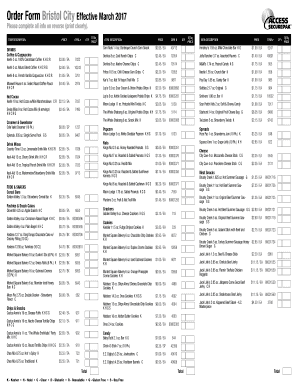
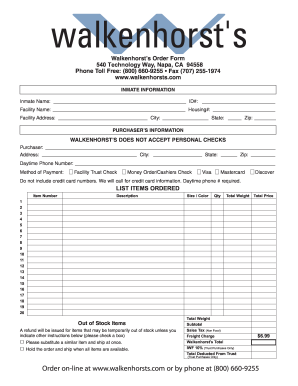
The GEO Karnes Order Form is a business document used by organizations to place orders for various food and snack items.
pdfFiller scores top ratings on review platforms




Who needs Access Securepak Order Form GEO Karnes?
Explore how professionals across industries use pdfFiller.

Access Securepak Order Form GEO Karnes is needed by:
-
Catering services needing to fulfill food orders
-
Businesses looking to invoice customers for snacks
-
Event planners coordinating food-related services
-
Local restaurants managing food item requests
-
Schools organizing snack orders for events
Comprehensive Guide to Access Securepak Order Form GEO Karnes
What is the GEO Karnes Order Form?
The GEO Karnes Order Form serves as a vital tool for placing food and snack orders. This form is structured to include essential blank fields that request specific item details, ensuring clarity and thoroughness. Effective from November 2018, the form remains relevant for current users seeking an organized method for food ordering.
Purpose and Benefits of the GEO Karnes Order Form
The GEO Karnes Order Form significantly streamlines the ordering process, making it easier for users to ensure accuracy in their food orders. Key benefits include:
-
Efficient organization of food and snack items
-
Clear item descriptions and pricing to avoid confusion
-
Facilitation of accurate record-keeping and invoicing
These advantages position the form as an invaluable resource for users in various food service industries.
Key Features of the GEO Karnes Order Form
This order form is designed with several features that enhance usability. Users will find detailed fields for:
-
Item descriptions
-
Quantities
-
Prices
-
Totals
Additionally, instructions for completing the form are conveniently placed on the reverse side, ensuring ease of use during processing.
Who Needs the GEO Karnes Order Form?
The GEO Karnes Order Form is particularly beneficial for various groups, including:
-
Restaurants requiring organized food orders
-
Caterers managing large events
-
Event planners coordinating menu selections
These users find the form especially useful in scenarios where clear documentation of food orders is essential for operational efficiency.
How to Fill Out the GEO Karnes Order Form Online
Filling out the GEO Karnes Order Form is straightforward if users follow these steps:
-
Gather necessary information needed for item details.
-
Input details accurately in the designated fields on the form.
-
Review the entire form to ensure all fields are correctly filled out and complete.
-
Submit the form through the preferred method.
By following these guidelines, users can minimize common mistakes associated with form completion.
Submission Methods for the GEO Karnes Order Form
Users can submit the completed GEO Karnes Order Form through various methods, including:
-
Online submission via designated platforms
-
Mailing the printed form to the appropriate address
It is essential to be aware of submission deadlines to ensure timely processing, as well as any fees that may be associated with each submission method.
Consequences of Not Using or Late Submissions of the GEO Karnes Order Form
Failing to submit the GEO Karnes Order Form on time can lead to significant implications. Users may encounter:
-
Delayed orders that affect service delivery
-
Potential inaccuracies from incomplete submissions
Consequently, timely and accurate submission is crucial for maintaining smooth operations within food service environments.
Security and Compliance with the GEO Karnes Order Form
The GEO Karnes Order Form adheres to stringent security and compliance standards to protect user information. Features include:
-
256-bit encryption for secure data transmission
-
Compliance with privacy regulations, such as HIPAA and GDPR
By utilizing pdfFiller, users can be assured that their documents and data are handled with the utmost care.
Completing and Managing Your GEO Karnes Order Form with pdfFiller
pdfFiller enhances the experience of completing the GEO Karnes Order Form by providing tools for:
-
Filling out the order form easily and efficiently
-
Saving and eSigning the document
-
Managing and sharing documents effectively
This platform offers a streamlined approach to document processing, encouraging users to leverage its capabilities for optimal efficiency.
Try pdfFiller for Your GEO Karnes Order Form Today!
By engaging with pdfFiller, users can fully realize the benefits of using the GEO Karnes Order Form. This platform streamlines the process of filling out, saving, and managing vital documents effectively. Exploring the pdfFiller website can significantly enhance users' experience with order forms and document handling.
How to fill out the Access Securepak Order Form GEO Karnes
-
1.Access the GEO Karnes Order Form on pdfFiller by visiting the website and searching for the form name in the search bar.
-
2.Open the form by clicking on the desired document from the search results. Ensure that you have a pdfFiller account or sign up for one if you don't.
-
3.Gather necessary information including item descriptions, quantities, and prices before starting to fill in the form.
-
4.Navigate to the fields on the form using your mouse or keyboard. Click on the blank fields to activate them.
-
5.Fill in the item descriptions, ensuring you specify each food or snack item accurately for clarity.
-
6.Input the quantities for each item in the corresponding field to match your order needs.
-
7.Enter the prices next to each item to reflect the total cost accurately.
-
8.Review all completed fields for correctness. Ensure there are no missing information or errors.
-
9.After finalizing the details, save your work by clicking the 'Save' button or download the finished form to your device.
-
10.If required, submit the completed form through the designated channels provided on pdfFiller, or print it to submit via traditional mail.

Who can use the GEO Karnes Order Form?
The GEO Karnes Order Form is suitable for businesses, caterers, event planners, and any organization needing to place food or snack orders.
Are there deadlines for submitting the order form?
While specific deadlines may vary, it is advisable to submit the GEO Karnes Order Form as early as possible to ensure timely processing and delivery of your orders.
What are the common mistakes to avoid when filling out the form?
Common mistakes include missing item descriptions, entering incorrect quantities or prices, and failing to double-check the total calculation before submission.
How can I submit my GEO Karnes Order Form?
You can submit the completed form via email, through a specific submission portal, or by printing and mailing it, depending on the instructions associated with your order process.
Can I edit the GEO Karnes Order Form after I've filled it out?
Yes, you can edit the form on pdfFiller at any time before you save or submit it. Simply open the form again and make the necessary changes.
Is there a processing fee for using the form?
The GEO Karnes Order Form itself does not usually incur a fee, but any associated processing or delivery charges may apply based on your specific order.
Where can I find further instructions for using pdfFiller?
Further instructions for using pdfFiller can typically be found on their official support page, offering tutorials and guides for users.




Get the latest insights from our blog


If you believe that this page should be taken down, please follow our DMCA take down process
here
.
This form may include fields for payment information. Data entered in these fields is not covered by PCI DSS compliance.