
Last updated on
Oct 31, 2026

Get the free Signature Verification Form
We are not affiliated with any brand or entity on this form

Fill out
Complete the form online in a simple drag-and-drop editor.

eSign
Add your legally binding signature or send the form for signing.

Share
Share the form via a link, letting anyone fill it out from any device.

Export
Download, print, email, or move the form to your cloud storage.
Why pdfFiller is the best tool for your documents and forms


End-to-end document management
From editing and signing to collaboration and tracking, pdfFiller has everything you need to get your documents done quickly and efficiently.
Accessible from anywhere
pdfFiller is fully cloud-based. This means you can edit, sign, and share documents from anywhere using your computer, smartphone, or tablet.
Secure and compliant
pdfFiller lets you securely manage documents following global laws like ESIGN, CCPA, and GDPR. It's also HIPAA and SOC 2 compliant.
What is Signature Verification
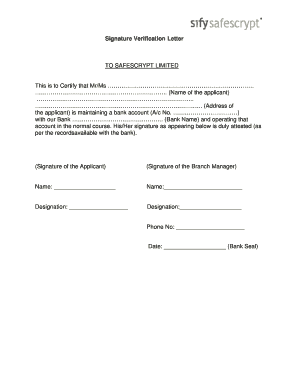
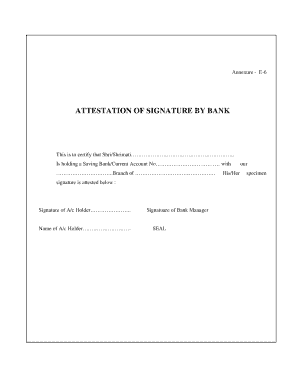
The Signature Verification Form is a business document used by financial institutions to verify the signatures of account holders or applicants.
pdfFiller scores top ratings on review platforms




great tool to have at my fingers, all the forms i need for my tax needs,
This is the best PDF Program out on the web period!
Who needs Signature Verification?
Explore how professionals across industries use pdfFiller.

Signature Verification is needed by:
-
Bank account holders verifying their signatures
-
Financial institutions requiring verification for transactions
-
Branch managers responsible for approving account details
-
Regulatory agencies overseeing banking compliance
-
Account applicants submitting financial documents
Comprehensive Guide to Signature Verification
What is the Signature Verification Form?
The Signature Verification Form serves as a crucial document for verifying the signatures of account holders or applicants. This form not only defines how signatures should be authenticated but also plays a vital role in various financial transactions and account management processes. By ensuring the authenticity of signatures, financial institutions can prevent unauthorized access to accounts and services.
This form is particularly important for organizations dealing with high-stakes transactions where the legitimacy of signatures can affect legal compliance and operational integrity.
Purpose and Benefits of the Signature Verification Form
The necessity of the Signature Verification Form cannot be overstated. This document is designed to prevent fraud in financial transactions and ensures compliance with legal requirements in account management. Furthermore, it simplifies the verification process, providing both individuals and organizations with a structured approach to establish signature authenticity.
Benefits of utilizing this form include:
-
Reduction in fraudulent activities
-
Assurance of legal adherence
-
Streamlined verification procedures
Who Needs the Signature Verification Form?
The Signature Verification Form is essential for various users within the financial services sector. Primarily, it is required by:
-
Applicants aiming to open new bank accounts or access financial services
-
Branch managers or financial institutions tasked with verifying signatures for compliance
-
Businesses engaged in transactions that require robust signature authentication
Each of these scenarios underscores the importance of having the properly filled Signature Verification Form to safeguard against potential legal and financial risks.
How to Fill Out the Signature Verification Form Online
Completing the Signature Verification Form online is a straightforward process when using a platform like pdfFiller. Here’s a step-by-step guide for efficient completion:
-
Open pdfFiller and locate the Signature Verification Form.
-
Carefully fill in the blank fields with accurate personal and bank account details.
-
Ensure that names and signatures are entered precisely to avoid errors.
-
Utilize features in pdfFiller for pre-filling and editing to enhance efficiency.
Accuracy is critical; any mistakes can lead to delays in processing.
Field-by-Field Instructions for the Signature Verification Form
Understanding the specific fields of the Signature Verification Form is essential for success. Below are detailed instructions for each section:
-
Name: Provide your full legal name as required.
-
Signature/s: Sign as per the mode of holding listed on your account.
Common mistakes include leaving fields incomplete or miswriting signatures. It's recommended to double-check all information before submission.
Submission Methods for the Signature Verification Form
After completing the Signature Verification Form, you have several submission options to consider. You can choose between:
-
Digital submission via pdfFiller, ensuring a faster process
-
Physical submissions through postal services or in-person delivery
Be mindful of any specific deadlines and requirements for the method you select to ensure timely processing.
Security and Compliance for the Signature Verification Form
When submitting sensitive documents like the Signature Verification Form, data protection is paramount. It is crucial to follow established security measures, including:
-
Using encrypted services for digital submissions
-
Ensuring compliance with standards such as GDPR
pdfFiller incorporates robust security features to guarantee the confidentiality and integrity of your submissions, offering peace of mind when handling important financial documents.
Common Errors and How to Avoid Them When Submitting the Signature Verification Form
Submitting the Signature Verification Form can be problematic if not done correctly. Here are some common errors to avoid:
-
Incomplete fields that can lead to rejection
-
Incorrect signatures which may invalidate the verification process
Double-checking the form before submission and utilizing pdfFiller’s support features can significantly reduce the likelihood of these errors.
What Happens After You Submit the Signature Verification Form?
Once you submit the Signature Verification Form, it's important to understand what to expect next. You will typically receive:
-
A confirmation receipt acknowledging your submission
-
Information regarding processing timelines
Be prepared for potential follow-ups, as additional documentation may be required during the verification process.
Elevate Your Document Management Experience with pdfFiller
Using pdfFiller to manage your Signature Verification Form can vastly enhance your document handling experience. With capabilities for filling, signing, and managing forms, pdfFiller equips users with the tools needed for efficient document workflows.
User testimonials highlight successful experiences, reinforcing pdfFiller's reputation for secure and effective document management.
How to fill out the Signature Verification
-
1.Access the Signature Verification Form by visiting pdfFiller and searching for the form using the title.
-
2.Click on the form to open it in the editing interface, where you can begin to fill in the necessary fields.
-
3.Before filling in the form, gather essential information such as personal details, bank account numbers, and the required signatures from the applicants and branch manager.
-
4.Start completing the form by entering your name in the designated field, ensuring it matches the name on your bank account.
-
5.Next, fill out the fields for your bank account information, ensuring accuracy for successful verification.
-
6.Use pdfFiller's interface to add checkmarks in checkboxes as applicable and follow the explicit instructions provided in the form template.
-
7.Once all the fields are completed, use pdfFiller's tools to review the form for any errors or missing information.
-
8.When you are satisfied with the accuracy of the form, save your progress to ensure that your information is not lost.
-
9.You can download the completed document directly from pdfFiller or submit it online if your institution allows electronic submission.

Who is eligible to use the Signature Verification Form?
The Signature Verification Form can be used by bank account holders and applicants who need to verify their signatures for financial transactions. It is essential for individuals opening new accounts or modifying existing ones.
What is the purpose of the Signature Verification Form?
The purpose of the Signature Verification Form is to verify the authenticity of signatures on financial documents. This verification helps banks and financial institutions ensure compliance and prevent fraud.
How do I submit the completed Signature Verification Form?
You can submit the completed Signature Verification Form either electronically via your financial institution's website or by printing and mailing the form. Be sure to check submission preferences outlined by your bank.
Are there any supporting documents required with this form?
Typically, the Signature Verification Form may require identification documents like a government-issued ID or proof of address to validate the information provided. Check with your bank for specific requirements.
What common mistakes should I avoid when filling out this form?
Common mistakes include entering incorrect personal details, not matching signatures to those on record, and failing to sign the form where required. Always double-check all fields before submission.
How long does it take to process the Signature Verification Form?
Processing times for the Signature Verification Form can vary by institution, but it typically takes a few days to a week. Always confirm time frames with your bank directly.
Can I edit the Signature Verification Form after submission?
Once submitted, editing the Signature Verification Form may not be possible. If you realize there is an error, contact your financial institution immediately for guidance on how to rectify it.
Related Forms



Get the latest insights from our blog


If you believe that this page should be taken down, please follow our DMCA take down process
here
.
This form may include fields for payment information. Data entered in these fields is not covered by PCI DSS compliance.