
Last updated on
Nov 6, 2026
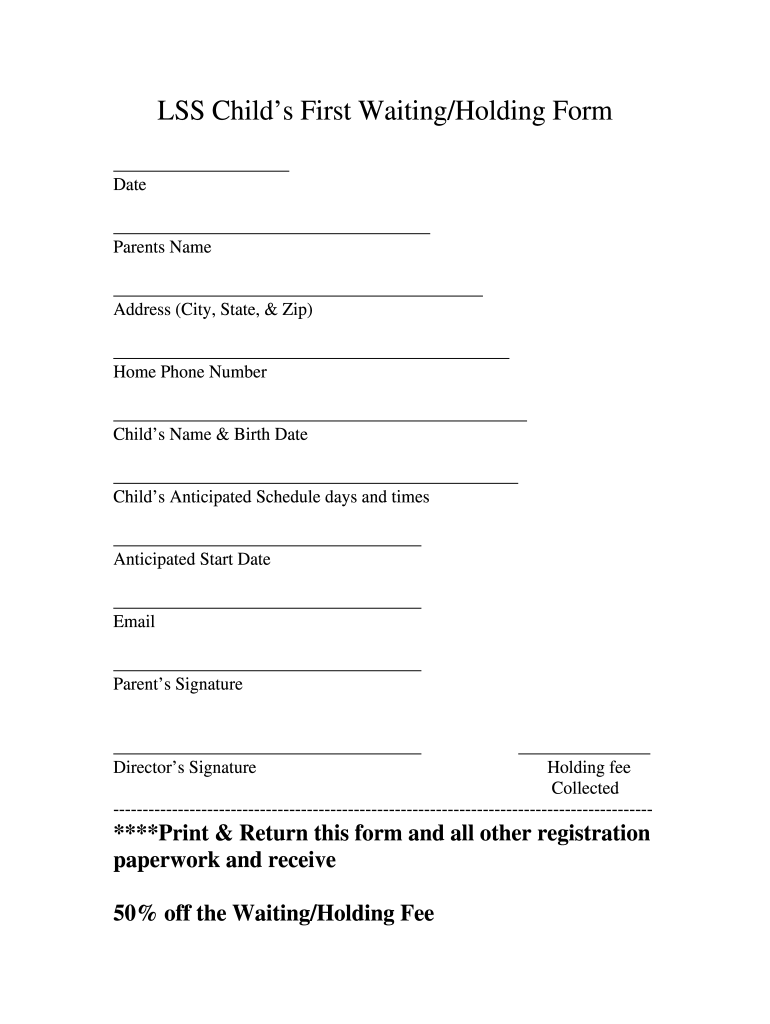
LSS Childs First WaitingHolding free printable template
We are not affiliated with any brand or entity on this form

Fill out
Complete the form online in a simple drag-and-drop editor.

eSign
Add your legally binding signature or send the form for signing.

Share
Share the form via a link, letting anyone fill it out from any device.

Export
Download, print, email, or move the form to your cloud storage.
Why pdfFiller is the best tool for your documents and forms


End-to-end document management
From editing and signing to collaboration and tracking, pdfFiller has everything you need to get your documents done quickly and efficiently.
Accessible from anywhere
pdfFiller is fully cloud-based. This means you can edit, sign, and share documents from anywhere using your computer, smartphone, or tablet.
Secure and compliant
pdfFiller lets you securely manage documents following global laws like ESIGN, CCPA, and GDPR. It's also HIPAA and SOC 2 compliant.
What is LSS Childs First WaitingHolding
The Child’s First Waiting/Holding Form is an activity participation document used by parents to register their child for a waiting list at an educational or childcare facility.
pdfFiller scores top ratings on review platforms




Well, I am doing my W-2's at the last minute and so was very happy to find this site.
A 1st Class Product - I Highly Recommend it !
I have been their client for many years , and I would recommend anyone to be come one , you have only to gain as their product is Fantastic .I must complement their customer support team , they are very much client oriented and they would resolve any issues that you might incur at no time.
Who needs LSS Childs First WaitingHolding?
Explore how professionals across industries use pdfFiller.

LSS Childs First WaitingHolding is needed by:
-
Parents seeking to enroll their child in childcare
-
Directors of educational facilities managing registrations
-
Childcare providers needing to manage waiting lists
-
Administrators tracking child enrollment and schedules
-
Families requiring documentation for childcare applications
Comprehensive Guide to LSS Childs First WaitingHolding
What is the Child’s First Waiting/Holding Form?
The Child’s First Waiting/Holding Form serves as a crucial document for parents registering their children in waiting lists or holding periods at educational or childcare establishments. This child registration form is designed to streamline the process, ensuring that all necessary information is collected efficiently.
By utilizing this form, parents can easily indicate their intentions for enrolling their child, facilitating smoother communication with childcare facilities. It acts as a holding form template, pivotal for managing waiting lists systematically.
Purpose and Benefits of the Child’s First Waiting/Holding Form
The primary purpose of this form is to provide clarity and structure for both parents and childcare facilities. Using the childcare registration form can result in significant advantages, such as cost savings, including a 50% discount on holding fees.
Parents benefit from a straightforward process that minimizes confusion during initial registration, while childcare facilities gain from organized documentation and better client management. This education holding form is essential for setting clear expectations from the start.
Key Features of the Child’s First Waiting/Holding Form
This form includes various components that ensure comprehensive information gathering. Key features consist of:
-
Parent and child information fields
-
Designated schedule for the child
-
Signature lines for both parents and directors
-
Contact details such as email and phone number
Required fields also encompass anticipated start dates, enhancing scheduling efficiency. The printable waiting form aids in making this information easily accessible.
Who Needs the Child’s First Waiting/Holding Form?
The target audience for this form primarily includes parents and directors of educational or childcare facilities. In instances where a child is anticipated to join a program but is not yet enrolled, this form is crucial.
Scenarios necessitating this form range from initial registration for school programs to childcare reservations. It plays a role in formalizing intent through parent signature forms and director signature forms.
How to Fill Out the Child’s First Waiting/Holding Form Online (Step-by-Step)
To complete the form online using pdfFiller, follow these steps:
-
Access the fillable form on pdfFiller's platform.
-
Fill in the parent's name and contact information in the designated fields.
-
Enter the child's name and birth date accurately.
-
Specify the anticipated schedule, including days and times.
-
Provide the anticipated start date and email address.
-
Ensure both parent and director signatures are obtained before submission.
This detailed approach to childcare paperwork minimizes errors and ensures completeness.
Common Errors and How to Avoid Them
Many individuals make frequent mistakes when filling out the Child’s First Waiting/Holding Form. Common errors include incomplete fields or providing incorrect information.
To avoid these pitfalls, consider the following practical tips:
-
Double-check all information before submission.
-
Use the review checklist to ensure all necessary fields are filled accurately.
By paying attention to detail, parents can ensure a successful submission of the child waiting form.
How to Sign the Child’s First Waiting/Holding Form
Signing the form is an essential step to validate the registration process. Both digital and wet signatures are acceptable. It’s important for both parents and directors to understand the signature requirements, as they confirm the authenticity of the document.
Utilizing eSign technology simplifies the signing process, ensuring that all parties can authenticate the form conveniently.
Submission Methods for the Child’s First Waiting/Holding Form
Once completed, the Child’s First Waiting/Holding Form can be submitted through various methods:
-
Online submission via pdfFiller
-
Mailing the form to the designated address
-
In-person delivery at the childcare facility
Be sure to check for any associated fees, deadlines, and processing times based on the chosen submission method to avoid delays.
Security and Compliance for the Child’s First Waiting/Holding Form
Data protection and privacy are paramount when handling the Child’s First Waiting/Holding Form. Utilizing a platform like pdfFiller ensures compliance with security standards such as HIPAA and GDPR.
This commitment to security reinforces the integrity of the child registration form, instilling confidence for both parents and childcare providers.
Experience Seamless Form Completion with pdfFiller
pdfFiller provides an efficient environment for completing the Child’s First Waiting/Holding Form. Leveraging a cloud-based solution allows users to create, edit, and manage documents with ease.
In addition to form filling, pdfFiller offers features such as eSigning and document editing, making it a comprehensive tool for all document management needs.
How to fill out the LSS Childs First WaitingHolding
-
1.To access the form on pdfFiller, visit the pdfFiller website and use the search bar to find the Child’s First Waiting/Holding Form.
-
2.Open the form by clicking on it in the search results. This will load the document into the editing interface.
-
3.Gather necessary information before you begin, including your name, contact details, and your child’s information like name, birth date, and anticipated schedule.
-
4.Use the mouse or touchpad to click on the fields in the form. Begin by entering your name, address, and phone number in the respective fields.
-
5.Fill out your child’s name and birth date accurately. Ensure to provide the anticipated schedule for your child, specifying days and times.
-
6.Next, enter the anticipated start date for your child's attendance. Don't forget to input an email address for any correspondence.
-
7.After you complete all the necessary fields, double-check the information for accuracy to avoid mistakes.
-
8.Signing the form is essential. Click on the signature fields to proceed. You will have an option to draw your signature or upload an image.
-
9.When satisfied with the content, you can review the entire form one last time.
-
10.To save or download the completed form, click on the 'Save' or 'Download' button. Select your preferred file format if prompted.
-
11.If you need to submit the form directly, look for the submission options provided by pdfFiller and follow the instructions.

Who is required to sign the Child’s First Waiting/Holding Form?
The form requires signatures from both the parent and the director of the educational facility for it to be valid.
What information do I need to fill out the form?
You will need your name, address, phone number, your child's name, birth date, anticipated schedule, start date, and email address before filling out the form.
Is there a holding fee associated with this form?
Yes, a holding fee may be collected when you submit the form. However, you can receive a 50% discount if all registration paperwork is printed and returned.
What should I avoid when filling out the form?
Make sure to double-check all entries for accuracy. Common mistakes include misspelling names and incorrect contact information, which can delay processing.
How can I submit the completed Child’s First Waiting/Holding Form?
You can submit the form via pdfFiller by using the online submission options provided after you complete and review your document.
Are there any deadlines for submitting this form?
Deadlines typically depend on the educational or childcare facility's policy. It's advised to submit the form as soon as you have completed it to ensure timely consideration.
Do I need to notarize the Child’s First Waiting/Holding Form?
No, notarization is not required for the Child's First Waiting/Holding Form, making it easier for parents to complete and submit.
Related Forms




Related Catalogs
Get the latest insights from our blog



If you believe that this page should be taken down, please follow our DMCA take down process
here
.
This form may include fields for payment information. Data entered in these fields is not covered by PCI DSS compliance.