
Last updated on
Oct 31, 2026

Get the free Last Will and Testament Template
We are not affiliated with any brand or entity on this form

Fill out
Complete the form online in a simple drag-and-drop editor.

eSign
Add your legally binding signature or send the form for signing.

Share
Share the form via a link, letting anyone fill it out from any device.

Export
Download, print, email, or move the form to your cloud storage.
Why pdfFiller is the best tool for your documents and forms


End-to-end document management
From editing and signing to collaboration and tracking, pdfFiller has everything you need to get your documents done quickly and efficiently.
Accessible from anywhere
pdfFiller is fully cloud-based. This means you can edit, sign, and share documents from anywhere using your computer, smartphone, or tablet.
Secure and compliant
pdfFiller lets you securely manage documents following global laws like ESIGN, CCPA, and GDPR. It's also HIPAA and SOC 2 compliant.
What is Will Template
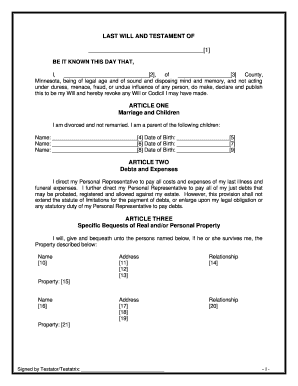
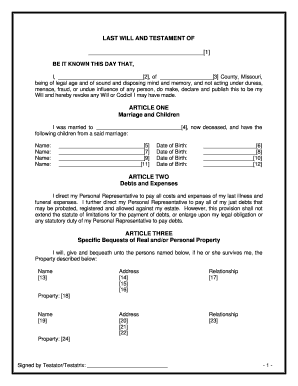
The Last Will and Testament Template is a legal document used by individuals in Minnesota to outline their wishes regarding property distribution and minor child care after death.
pdfFiller scores top ratings on review platforms




Who needs Will Template?
Explore how professionals across industries use pdfFiller.

Will Template is needed by:
-
Individuals planning their estate
-
Parents with minor children
-
Executors handling an estate
-
Trustees managing assets
-
Guardians for dependent children
Comprehensive Guide to Will Template
What is the Last Will and Testament Template?
The Last Will and Testament Template is a crucial legal document used in Minnesota to specify an individual’s wishes regarding property distribution and minor child care after their passing. This template enables individuals to outline their personal wishes clearly and serves as an essential tool in effective estate planning. By utilizing a Minnesota will form, individuals can ensure their intentions are honored and legally recognized.
Purpose and Benefits of the Last Will and Testament Template
Having a last will is vital for individuals residing in Minnesota, as it not only helps in the distribution of assets but also provides clarity on matters such as child custody. The purpose of this estate planning document is multifold:
-
Ensures that personal belongings go to designated beneficiaries.
-
Aids in appointing guardians for minor children.
-
Facilitates the appointment of a personal representative to manage the estate.
-
Helps in minimizing disputes among surviving family members.
Key Features of the Last Will and Testament Template
The template is designed with user-friendly features that simplify the completion process. Main attributes include:
-
Sections for personal information such as name and date of birth.
-
Designated fields for bequests, ensuring clear distribution of assets.
-
Roles for signing parties, including testator, personal representative, trustee, and guardian.
-
Instructions for filling out the form correctly.
Who Needs the Last Will and Testament Template?
Identifying the target audience for this vital document is key for proper estate planning. Individuals who should consider a last will include:
-
Parents with minor children who need guardianship arrangements.
-
Property owners wishing to dictate the distribution of real and personal assets.
-
Individuals with specific wishes regarding their possessions.
-
Any adult over the age of 18 planning for future uncertainties.
Understanding the roles of the testator, personal representative, guardian, and trustee is essential for anyone filling out this template.
How to Fill Out the Last Will and Testament Template Online (Step-by-Step)
To complete the template smoothly, follow these step-by-step instructions using pdfFiller:
-
Access the last will template in pdfFiller.
-
Enter personal details in the specified fields.
-
Specify your bequests clearly to avoid confusion.
-
Appoint a personal representative, trustee, and guardian where applicable.
-
Check signature requirements for all involved parties.
Important Considerations for Validity
To ensure the Last Will and Testament Template is legally binding, certain signature requirements must be observed:
-
The testator must sign the document to validate it.
-
Witnesses may also need to sign to confirm the authenticity of the document.
-
Understanding the distinction between a digital signature and a wet signature is crucial for compliance with Minnesota laws.
How to Download and Save the Last Will and Testament Template PDF
Once the template is completed, saving it is straightforward. Follow these guidelines within pdfFiller:
-
Select the 'Download' option to obtain a PDF version of your last will.
-
Organize your document in a secure folder for easy access.
-
Ensure all information is accurate before saving to avoid errors.
Submission Methods for the Last Will and Testament Template
After completing the last will form, it is important to know the submission process:
-
Determine the appropriate court or office where the will must be submitted.
-
Take note of any required fees associated with the filing.
-
Be aware of processing times to ensure timely execution of your wishes.
Common Errors and How to Avoid Them
Filling out the Last Will and Testament Template requires attention to detail to prevent common errors:
-
Double-check all personal information for accuracy.
-
Ensure that bequests are clear to avoid disputes among beneficiaries.
-
Review the completed document against a checklist before submission.
Why Choose pdfFiller for Your Last Will and Testament Template?
pdfFiller offers numerous advantages for completing legal forms securely:
-
User-friendly interface that simplifies the process of editing and filling forms.
-
Comprehensive security measures, including 256-bit encryption, to protect sensitive information.
-
Cloud storage ensures your documents are accessible anytime, anywhere.
Choosing pdfFiller instills confidence when handling important legal documents like a Last Will and Testament Template.
How to fill out the Will Template
-
1.Open your web browser and navigate to pdfFiller's website.
-
2.Use the search bar to find the 'Last Will and Testament Template' form.
-
3.Click on the form to access it in pdfFiller’s editing interface.
-
4.Before filling out the form, gather necessary information including your name, date of birth, details of your assets, and names of individuals you wish to designate as personal representatives, trustees, and guardians.
-
5.Begin by filling in your personal information in the designated fields labeled 'Name' and 'Date of Birth'.
-
6.Specify your bequests clearly in the designated sections, being as specific as possible about your wishes.
-
7.Designate a personal representative, trustee, and guardian by filling in their names in the correct fields.
-
8.Carefully review the document to ensure that all information is accurate and complete.
-
9.Pay attention to the signature lines and make sure to sign the document as the testator, along with any applicable witnesses.
-
10.Once completed, save your document by clicking the save icon on the toolbar.
-
11.Download a copy of the form by selecting the download option in pdfFiller, ensuring you have a saved version.
-
12.If required, submit the document according to your local regulations by printing or sharing it with relevant parties as necessary.

Who is eligible to use the Last Will and Testament Template in Minnesota?
Any adult resident of Minnesota can use this Last Will and Testament Template to legally outline their estate preferences and care provisions for minors. Ensure that you meet the state's requirements regarding will creation.
Are there specific witnesses required when signing the will?
Yes, Minnesota law typically requires that the Last Will and Testament be signed in the presence of at least two witnesses who are not beneficiaries of the will. Ensure they sign after you do.
What are common mistakes to avoid when filling out this form?
Common mistakes include leaving fields blank, not specifying bequests clearly, and forgetting to sign the document. Always double-check for accuracy and completeness before finalizing.
How should I submit my completed will after filling it out?
Once completed, print the will and sign it in front of witnesses. Store it in a safe place, and consider providing copies to your personal representative and trusted family members.
What if I need to change my will after completing it?
If you need to make changes, it's advisable to create a new will or use a codicil. Ensure that any revisions comply with Minnesota's legal requirements.
Is there a fee for using the Last Will and Testament Template on pdfFiller?
While accessing the Last Will and Testament Template may be free, pdfFiller may have a subscription fee for using its platform. Check their pricing page for detailed information.
How long does the process take to finalize a will?
The process of finalizing a will can vary. Completing the form may take a few hours, but ensure you give yourself adequate time for review and signing with witnesses to meet any state deadlines.
Related Content
Related Forms



Get the latest insights from our blog


If you believe that this page should be taken down, please follow our DMCA take down process
here
.
This form may include fields for payment information. Data entered in these fields is not covered by PCI DSS compliance.