
Last updated on
Oct 31, 2026
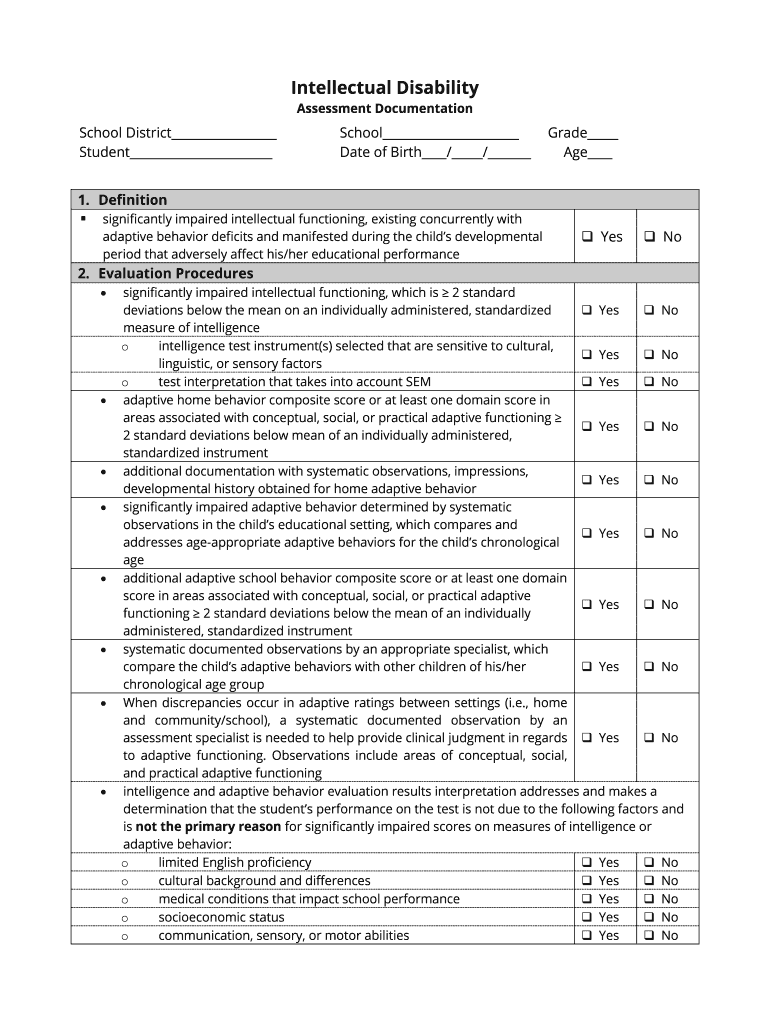
Get the free Intellectual Disability Assessment Form
We are not affiliated with any brand or entity on this form

Fill out
Complete the form online in a simple drag-and-drop editor.

eSign
Add your legally binding signature or send the form for signing.

Share
Share the form via a link, letting anyone fill it out from any device.

Export
Download, print, email, or move the form to your cloud storage.
Why pdfFiller is the best tool for your documents and forms


End-to-end document management
From editing and signing to collaboration and tracking, pdfFiller has everything you need to get your documents done quickly and efficiently.
Accessible from anywhere
pdfFiller is fully cloud-based. This means you can edit, sign, and share documents from anywhere using your computer, smartphone, or tablet.
Secure and compliant
pdfFiller lets you securely manage documents following global laws like ESIGN, CCPA, and GDPR. It's also HIPAA and SOC 2 compliant.
What is ID Assessment Form
The Intellectual Disability Assessment Form is a documentation tool used by schools to evaluate and record a student's intellectual and adaptive functioning for educational purposes.
pdfFiller scores top ratings on review platforms




Who needs ID Assessment Form?
Explore how professionals across industries use pdfFiller.

ID Assessment Form is needed by:
-
Assessment Team Members needing to document evaluations
-
Teachers preparing for special education assessments
-
School administrators managing student records
-
Parents of students undergoing evaluation
-
Special education professionals conducting assessments
Comprehensive Guide to ID Assessment Form
What is the Intellectual Disability Assessment Form?
The Intellectual Disability Assessment Form serves a crucial role in evaluating and documenting a student's intellectual and adaptive functioning within educational settings. This form is pivotal for educators and assessment teams as it provides a structured approach to assess how intellectual disabilities impact educational performance. By using this form, professionals can systematically collect observations and information regarding a student's needs, paving the way for tailored educational strategies.
Purpose and Benefits of the Intellectual Disability Assessment Form
The primary purpose of the Intellectual Disability Assessment Form is to determine the educational implications of intellectual disabilities. By utilizing this form, professionals can identify specific areas where students may require additional support. Furthermore, the form assists in systematic documentation, enabling educators to maintain comprehensive records that support decision-making regarding a child's educational journey.
-
Facilitates identification of student needs.
-
Provides clear documentation for educational planning.
-
Aids in compliance with special education regulations.
Key Features of the Intellectual Disability Assessment Form
This form is designed to streamline the assessment process and includes various user input fields. Key sections comprise checkboxes and areas for entering essential details such as 'School District,' 'Student Name,' 'Date of Birth,' and spaces for signatures. The fillable nature of the form and the incorporation of electronic signature capabilities further enhance its usability for educators and assessment teams.
-
Fillable fields for efficient data entry.
-
Checkboxes for easy selection of assessment criteria.
-
Signature areas to validate assessments electronically.
Who Needs the Intellectual Disability Assessment Form?
The Intellectual Disability Assessment Form is primarily utilized by educators, assessment team members, and school psychologists. These professionals require this documentation at various stages of student evaluation to ensure comprehensive assessments that reflect the student's unique needs and capabilities. Understanding when and why to use this form is essential for effective assessment practices.
-
Essential for special education teachers during evaluations.
-
Used by school psychologists for psychological assessments.
-
Important for assessment teams in documenting findings.
How to Fill Out the Intellectual Disability Assessment Form Online (Step-by-Step)
Filling out the Intellectual Disability Assessment Form online can be accomplished efficiently using pdfFiller. Here’s how to do it step-by-step:
-
Navigate to the Intellectual Disability Assessment Form on pdfFiller.
-
Input the student’s information, including their name and date of birth.
-
Select the appropriate options from the checkboxes for assessment criteria.
-
Enter the 'School District' information in the designated field.
-
Ensure all sections are accurately filled, including signatures.
-
Review for any errors before saving or submitting the form.
Common Errors and How to Avoid Them
When completing the Intellectual Disability Assessment Form, certain errors may occur that can affect the accuracy of the documentation. Common mistakes include missing signature fields or incorrect student information. To prevent these errors, it’s essential to validate all entered information prior to submission. Double-checking each section for completeness ensures that the assessment is reliable and effective.
-
Ensure all required fields are filled out accurately.
-
Verify the inclusion of electronic signatures where necessary.
Submission Methods and Delivery
After completing the Intellectual Disability Assessment Form, various submission methods are available. Users can choose to submit the form electronically via pdfFiller or download it for manual submission to their school district. It's important to be aware of submission deadlines, as late submissions can impact the evaluation process.
Understanding Security and Compliance for the Intellectual Disability Assessment Form
Handling sensitive student data requires robust security measures. The Intellectual Disability Assessment Form adheres to stringent security standards to protect this information. pdfFiller implements features such as 256-bit encryption and compliance with regulatory frameworks including HIPAA and GDPR, ensuring that all forms are managed securely.
How pdfFiller Facilitates the Intellectual Disability Assessment Process
pdfFiller significantly enhances the process of filling out and managing the Intellectual Disability Assessment Form. Key capabilities include easy editing of form contents, digital signatures, and straightforward document sharing options. By utilizing these features, educators can streamline their workflow and ensure that all necessary documentation is efficiently managed.
Get Started with Your Intellectual Disability Assessment Form Today
Utilizing pdfFiller to complete your Intellectual Disability Assessment Form simplifies the assessment process. With features designed for ease of use and ensuring compliance, you can effectively manage critical documentation related to student evaluations.
How to fill out the ID Assessment Form
-
1.To access the Intellectual Disability Assessment Form on pdfFiller, visit the website and search for the form by its title or upload it if you have it saved on your device.
-
2.Once open, use the navigation menu to locate each section of the form. Familiarize yourself with the layout which includes fields for student information and assessment details.
-
3.Collect necessary information before starting the form, such as the student's name, date of birth, and the school district’s information. This will ensure you can fill out the form accurately.
-
4.Begin entering details in the provided fields. Click on the appropriate checkboxes or input text in the blank areas, using pdfFiller's interactive features to make completing the form easy.
-
5.After filling in all required sections, review the completed form for accuracy and completeness. Make sure signatures from assessment team members are included where necessary.
-
6.Once everything is reviewed, save your progress using the save function. You can also download the form as a PDF for your records or submit it directly through pdfFiller’s submission features.
-
7.If submitting through email or print, follow the respective procedures provided by pdfFiller to ensure the form reaches the relevant school authorities.

Who is eligible to use the Intellectual Disability Assessment Form?
The form is primarily intended for use by assessment teams, educators, and school administrators involved in the evaluation of students with suspected intellectual disabilities.
Are there deadlines for submitting this form?
While the submission deadline can vary by school district, it is crucial to complete the assessment promptly to ensure timely service provision for the student.
What is the submission method for this form?
The completed form can be submitted electronically via email or physically printed out and delivered to the relevant school office, as per your school’s submission guidelines.
What supporting documents are required with the form?
Typically, supporting documents may include previous assessment results, parental consent, and relevant educational records. Always check with your school for specific requirements.
What common mistakes should I avoid while filling out the form?
Common mistakes include leaving fields blank, failing to obtain necessary signatures, and not reviewing the completed form for accuracy. Ensure all sections are fully filled out and reviewed.
How long does it take to process the assessment once submitted?
Processing times can vary, but typically it takes a few weeks for the assessment results to be reviewed and for necessary follow-up actions to be determined.
What concerns might arise during the assessment process?
Concerns may include gathering sufficient data for the assessment, ensuring the involvement of all relevant parties, and addressing parental inquiries. Open communication is key.
Related Forms





Get the latest insights from our blog


If you believe that this page should be taken down, please follow our DMCA take down process
here
.
This form may include fields for payment information. Data entered in these fields is not covered by PCI DSS compliance.