
Last updated on
Oct 30, 2026

FL Juvenile Welfare Board SharePoint Access Request Form 2019 free printable template
pdfFiller is not affiliated with any government organization

Fill out
Complete the form online in a simple drag-and-drop editor.

eSign
Add your legally binding signature or send the form for signing.

Share
Share the form via a link, letting anyone fill it out from any device.

Export
Download, print, email, or move the form to your cloud storage.
Why pdfFiller is the best tool for your documents and forms


End-to-end document management
From editing and signing to collaboration and tracking, pdfFiller has everything you need to get your documents done quickly and efficiently.
Accessible from anywhere
pdfFiller is fully cloud-based. This means you can edit, sign, and share documents from anywhere using your computer, smartphone, or tablet.
Secure and compliant
pdfFiller lets you securely manage documents following global laws like ESIGN, CCPA, and GDPR. It's also HIPAA and SOC 2 compliant.
What is FL Juvenile Welfare Board SharePoint Access Request Form
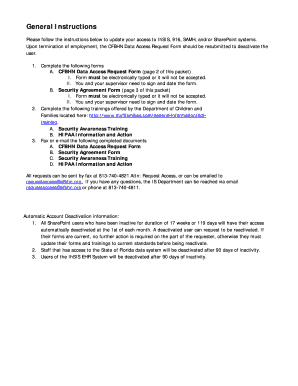
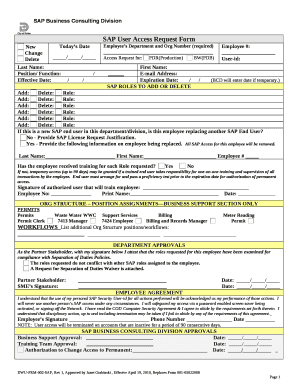
The SharePoint Access Request Form is a service agreement used by organization members to request, change, or terminate access to SharePoint sites.
pdfFiller scores top ratings on review platforms




Who needs FL Juvenile Welfare Board SharePoint Access Request Form?
Explore how professionals across industries use pdfFiller.

FL Juvenile Welfare Board SharePoint Access Request Form is needed by:
-
SharePoint users requiring access modifications
-
IT professionals managing user permissions
-
Agency administrators overseeing security
-
Compliance officers ensuring policy adherence
-
External users looking for SharePoint access
Comprehensive Guide to FL Juvenile Welfare Board SharePoint Access Request Form
What is the SharePoint Access Request Form?
The SharePoint Access Request Form is an essential document utilized for requesting, changing, or terminating access to SharePoint sites. This form plays a significant role in maintaining secure access and ensuring compliance with internal SharePoint External User Policies. Both employees and IT personnel frequently use the form to manage user access effectively.
Through this form, users can outline their access needs, facilitating seamless communication between requesters and administrators. It is critical for organizations to adhere to compliance guidelines when handling access requests.
Purpose and Benefits of the SharePoint Access Request Form
The SharePoint Access Request Form brings numerous advantages to organizations and employees alike. Primarily, it streamlines the process of managing SharePoint access by providing a structured approach to requests. This organization enhances security through the enforcement of proper approval protocols.
Additionally, the form helps ensure compliance with internal and external policies, mitigating potential risks associated with unauthorized access. Overall, the use of this form promotes consistent and secure SharePoint access management.
Who Needs the SharePoint Access Request Form?
Several groups are required to utilize the SharePoint Access Request Form. Primarily, employees who need access to SharePoint sites benefit from this document, as it formally initiates their requests. Moreover, IT personnel play a critical role in managing user access using this form.
Specific eligibility criteria may apply, particularly for users located in Florida, ensuring that access requests align with local compliance and operational policies.
How to Fill Out the SharePoint Access Request Form Online (Step-by-Step)
Filling out the SharePoint Access Request Form online involves several important steps:
-
Locate the fillable fields and sections within the form.
-
Read and agree to the user policies to ensure compliance and understanding.
-
Provide all necessary personal and agency information accurately.
-
Complete the signature requirements before submission to validate your request.
Following these steps will help ensure a smooth submission process for your SharePoint access request.
Key Features and Sections of the SharePoint Access Request Form
The SharePoint Access Request Form comprises various key features and sections that facilitate efficient completion. Personal and agency information fields are crucial for accurately documenting user requests.
Additionally, an IT confirmation section allows for verification of user access changes, ensuring the accuracy of data processed. Guidelines for sharing or archiving completed forms are also included, promoting organized document management.
Common Errors When Filling Out the SharePoint Access Request Form
When completing the SharePoint Access Request Form, users often encounter common errors. Frequent mistakes include missing signature requirements or failing to agree to necessary policies.
Another common issue is providing incomplete personal or agency information. To avoid these mistakes, it is advisable to review the form thoroughly before submission, ensuring all required fields are completed accurately.
Submission Methods and What Happens After Submission
There are multiple methods for submitting the SharePoint Access Request Form, including online submission and email. Tracking submissions is crucial to confirm that the request has been received and is being processed.
After submission, users can expect a clear timeline for processing their access requests, along with potential next steps communicated by IT personnel.
Security and Compliance Considerations for the SharePoint Access Request Form
Security is a primary consideration when handling the SharePoint Access Request Form. This form is protected by 256-bit encryption, adhering to strict data protection policies to safeguard sensitive information.
Furthermore, compliance with HIPAA and GDPR standards is paramount. Organizations are encouraged to implement recommendations for safe handling to maintain the integrity and confidentiality of user data throughout the request process.
Why Use pdfFiller for Your SharePoint Access Request Form Needs?
pdfFiller offers valuable capabilities for handling the SharePoint Access Request Form with ease. Its cloud-based editing and eSigning functionalities streamline the process of filling out the form.
Moreover, pdfFiller enables seamless document sharing and management, providing a stress-free experience with secure features that protect sensitive information associated with access requests.
How to fill out the FL Juvenile Welfare Board SharePoint Access Request Form
-
1.Access the SharePoint Access Request Form by visiting pdfFiller's website and searching for the document using its official name.
-
2.Once the form is displayed, click on it to open it in the pdfFiller interface.
-
3.Before filling out the form, gather necessary information such as personal details, agency information, and the reason for access changes.
-
4.Navigate through the form using the interactive fields; click on each fillable area to enter information.
-
5.Carefully read the SharePoint External User Policies listed within the form and indicate your agreement by checking the appropriate box.
-
6.Complete sections designated for IT confirmation, if applicable, including user addition or removal from Active Directory.
-
7.Make sure to review all entered information for any errors or omissions before finalizing your request.
-
8.Once completed, save your changes by clicking the ‘Save’ button and select your preferred file format.
-
9.You can download the form to your device or submit it directly through pdfFiller by following the prompts provided.
-
10.Finally, keep a copy of the submitted form for your records, ensuring you have all the details for future reference.

Who is eligible to use the SharePoint Access Request Form?
The SharePoint Access Request Form is intended for employees or external users who need access to SharePoint sites. To qualify, users must provide necessary personal and agency information per the guidelines.
What is the deadline for submitting the form?
There is no specific deadline mentioned for submitting the SharePoint Access Request Form. However, it is advisable to submit requests as soon as access changes are needed to avoid delays in site access.
How do I submit the SharePoint Access Request Form?
You can submit the SharePoint Access Request Form by completing it on pdfFiller and either downloading it for manual submission or using online submission options available through pdfFiller.
What supporting documents do I need to include?
Typically, supporting documents may include identification and any authorization needed from supervisors or IT personnel to confirm the request. Be sure to refer to your organization’s guidelines for specific requirements.
What common mistakes should I avoid when filling out the form?
Common mistakes include omitting required fields, not signing the form where necessary, and failing to read the SharePoint External User Policies. Ensure all information is accurate before submission.
How long does it take to process the request?
Processing times vary based on organizational policies and IT workloads. It is best to follow up with your IT department if you do not receive confirmation shortly after submission.
What should I do if I need to make changes to my request after submission?
If you need to make changes after submitting the SharePoint Access Request Form, contact your IT department directly to discuss the necessary adjustments and follow their instructions for altering access.
FL Juvenile Welfare Board SharePoint Access Request Form Form Versions
Related Forms



Get the latest insights from our blog


If you believe that this page should be taken down, please follow our DMCA take down process
here
.
This form may include fields for payment information. Data entered in these fields is not covered by PCI DSS compliance.