
Last updated on
Nov 9, 2026

AR BCBS Group Employee Application 2017 free printable template
pdfFiller is not affiliated with any government organization

Fill out
Complete the form online in a simple drag-and-drop editor.

eSign
Add your legally binding signature or send the form for signing.

Share
Share the form via a link, letting anyone fill it out from any device.

Export
Download, print, email, or move the form to your cloud storage.
Why pdfFiller is the best tool for your documents and forms


End-to-end document management
From editing and signing to collaboration and tracking, pdfFiller has everything you need to get your documents done quickly and efficiently.
Accessible from anywhere
pdfFiller is fully cloud-based. This means you can edit, sign, and share documents from anywhere using your computer, smartphone, or tablet.
Secure and compliant
pdfFiller lets you securely manage documents following global laws like ESIGN, CCPA, and GDPR. It's also HIPAA and SOC 2 compliant.
What is AR BCBS Group Employee Application
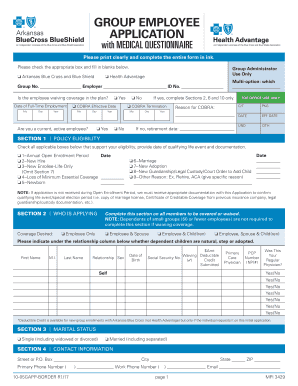
The Arkansas BlueCross BlueShield Employee Application Form is a healthcare document used by employees to apply for health insurance coverage through their employer.
pdfFiller scores top ratings on review platforms




Who needs AR BCBS Group Employee Application?
Explore how professionals across industries use pdfFiller.

AR BCBS Group Employee Application is needed by:
-
Employees seeking health insurance benefits
-
Employers or group representatives facilitating employee insurance applications
-
HR professionals managing employee benefits enrollment
-
Insurance agents advising on health insurance options
-
Healthcare administrators processing insurance applications
Comprehensive Guide to AR BCBS Group Employee Application
Understanding the Arkansas BlueCross BlueShield Employee Application Form
The Arkansas BlueCross BlueShield Employee Application Form is a vital document used by employees to secure health insurance coverage offered by their employer. This application serves as a formal request to enroll in a health insurance plan specifically catered to employees in Arkansas.
Employers also rely on this form to manage their health insurance offerings efficiently. It ensures that employees receive the necessary benefits while allowing employers to maintain compliance with insurance regulations.
Purpose and Benefits of the Arkansas BlueCross BlueShield Employee Application Form
This application form is crucial for employees seeking to benefit from health insurance coverage through their workplace. Securing health coverage via an employer not only provides financial protection against medical expenses but also enhances overall employee satisfaction.
Timely submission of the application is essential, as it determines eligibility and influences coverage start dates. Employees who submit their health coverage application promptly are more likely to avoid gaps in their healthcare benefits.
Who is Required to Use the Arkansas BlueCross BlueShield Employee Application Form?
The primary users of the Arkansas BlueCross BlueShield Employee Application Form are employees and employer or group representatives. Employees need to complete the form to apply for health coverage while the employer/group representative is responsible for verifying the information provided.
Applicants must meet specific eligibility requirements, which often include being a full-time employee or part of a designated employee group within the organization. It is critical that both roles understand their responsibility in the application process.
How to Fill Out the Arkansas BlueCross BlueShield Employee Application Form Online
Filling out the Arkansas BlueCross BlueShield Employee Application Form online can be efficiently done through pdfFiller. Follow these steps to complete the form:
-
Access the form in pdfFiller.
-
Fill in the required personal information, including name and contact details.
-
Provide employment details, ensuring accuracy in your job title and department.
-
Disclose any previous insurance history pertinent to eligibility.
-
Review the completed sections carefully before submitting.
To ensure accurate completion, always use clear handwriting if filling out by hand and double-check your entries.
Field-by-Field Instructions for the Arkansas BlueCross BlueShield Employee Application Form
Understanding each section of the Arkansas BlueCross BlueShield Employee Application Form is vital for a successful application. Here’s a breakdown of essential fields:
-
Marital status: Indicate your current marital situation as it can affect your coverage options.
-
Contact details: Ensure your phone number and email are correct to facilitate communication.
-
Insurance history: Provide information about any prior health coverage, as this can impact eligibility.
Be cautious when filling out checkboxes; always ensure you confirm your selections to avoid common errors.
Review and Validation of the Arkansas BlueCross BlueShield Employee Application Form
Reviewing the Arkansas BlueCross BlueShield Employee Application Form before submission is critical to avoid errors. A checklist for validation includes verifying accuracy in personal information, ensuring all fields are completed, and confirming requisite signatures.
Common mistakes include leaving essential fields blank or providing incorrect information, both of which can lead to application rejection. Take the time to double-check your form to improve the likelihood of acceptance.
Submission Guidelines for the Arkansas BlueCross BlueShield Employee Application Form
Submitting the completed Arkansas BlueCross BlueShield Employee Application Form can be done through various methods, including online submissions via pdfFiller or conventional mail. It's imperative to confirm the submission method preferred by your employer.
Once submitted, you should seek confirmation of your application and track its status for assurance regarding your health coverage.
Security and Compliance for the Arkansas BlueCross BlueShield Employee Application Form
Security measures are vital when handling sensitive data in the Arkansas BlueCross BlueShield Employee Application Form. pdfFiller implements robust security protocols, including 256-bit encryption, to protect your information.
This application form adheres to compliance standards such as HIPAA and GDPR, ensuring your data privacy throughout the submission and processing stages.
Sample Completion of the Arkansas BlueCross BlueShield Employee Application Form
To assist applicants, a sample completion of the Arkansas BlueCross BlueShield Employee Application Form is beneficial. The filled form typically highlights crucial areas, such as the applicant's personal details and employment history, which are essential for the application process.
By reviewing a completed application, potential candidates can gain insight into how to fill out their forms accurately and effectively, minimizing the risk of mistakes.
Maximize Your Experience with pdfFiller for the Arkansas BlueCross BlueShield Employee Application
Utilizing pdfFiller for the Arkansas BlueCross BlueShield Employee Application can greatly enhance your application experience. The platform offers features such as eSigning and document editing, streamlining the application process.
To access pdfFiller, visit the website and take advantage of its document management capabilities, allowing you to handle all your form filling needs securely and efficiently.
How to fill out the AR BCBS Group Employee Application
-
1.To begin, access pdfFiller and log in or create an account if you haven't already. Use the search bar to locate the Arkansas BlueCross BlueShield Employee Application Form.
-
2.Once you find the form, click on it to open it in the pdfFiller editor. The interface will allow you to view the form's fields and instructions clearly.
-
3.Before filling out the form, ensure you have all necessary information with you. Gather your personal details, including your marital status, employment information, contact details, and any details about current or previous insurance.
-
4.Begin filling in the personal information fields. Click on each field to type in your answers. Follow the prompts in the form, ensuring you print clearly and complete each section accurately.
-
5.Pay particular attention to the sections requiring employment status and policy eligibility. Use the provided checkboxes for relevant options, filling in any blanks as instructed.
-
6.Review your inputs carefully once all fields are filled. Ensure that all information is accurate and matches the documents you have gathered.
-
7.After reviewing, double-check that both you and your employer/group representative have signed the form in the designated areas. Signing is essential for the application to be valid.
-
8.Finally, save the completed form on pdfFiller. Choose to download it for your records or submit it directly through your employer’s portal, as instructed, before the submission deadline.

Who is eligible to use the Arkansas BlueCross BlueShield Employee Application Form?
The form is intended for employees of organizations that offer Arkansas BlueCross BlueShield health insurance coverage. Employees must meet their employer's eligibility criteria to apply.
Are there any deadlines for submitting this application form?
Yes, each employer may set specific deadlines for submitting the Arkansas BlueCross BlueShield Employee Application Form to ensure timely processing. It is best to verify with your HR department for exact dates.
What is the process for submitting the completed form?
You can submit the completed form either electronically via your employer's portal or by printing it out and handing it to your HR department. Ensure it's signed by both you and the employer or group representative.
What supporting documents are required with the application form?
Typically, you may need to provide proof of employment, current or prior insurance details, and personal identification. Check with your employer for any specific document requirements.
What common mistakes should I avoid when filling out this form?
Avoid incomplete fields, incorrect personal information, and forgetting to obtain signatures. It's crucial to read all instructions carefully and double-check your entries before submission.
How long does it take to process the application once submitted?
Processing times can vary, but generally, it may take several days to weeks depending on the employer's workflows and the completeness of the application. Always verify with your HR department for estimates.
What should I do if I have questions while filling out the form?
If you have questions while completing the form, reach out to your HR department or insurance representative for assistance. They can provide guidance on specific questions or concerns.
AR BCBS Group Employee Application Form Versions
Related Forms




Get the latest insights from our blog


If you believe that this page should be taken down, please follow our DMCA take down process
here
.
This form may include fields for payment information. Data entered in these fields is not covered by PCI DSS compliance.