
Last updated on
Oct 31, 2026

Get the free Schedule A Letter for Employment Certification
We are not affiliated with any brand or entity on this form

Fill out
Complete the form online in a simple drag-and-drop editor.

eSign
Add your legally binding signature or send the form for signing.

Share
Share the form via a link, letting anyone fill it out from any device.

Export
Download, print, email, or move the form to your cloud storage.
Why pdfFiller is the best tool for your documents and forms


End-to-end document management
From editing and signing to collaboration and tracking, pdfFiller has everything you need to get your documents done quickly and efficiently.
Accessible from anywhere
pdfFiller is fully cloud-based. This means you can edit, sign, and share documents from anywhere using your computer, smartphone, or tablet.
Secure and compliant
pdfFiller lets you securely manage documents following global laws like ESIGN, CCPA, and GDPR. It's also HIPAA and SOC 2 compliant.
What is Schedule A Letter
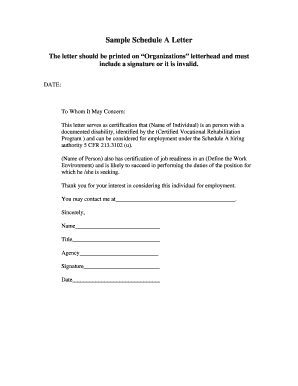
The Schedule A Letter for Employment Certification is a document used by certified professionals to endorse the employment eligibility of individuals with disabilities under Schedule A hiring authority.
pdfFiller scores top ratings on review platforms




Who needs Schedule A Letter?
Explore how professionals across industries use pdfFiller.

Schedule A Letter is needed by:
-
Vocational rehabilitation professionals certifying individuals with disabilities.
-
Medical professionals supporting employment applications for disabled clients.
-
Employers seeking documentation for hiring under Schedule A.
-
Government agencies managing disability employment programs.
-
Individuals with disabilities applying for federal employment.
Comprehensive Guide to Schedule A Letter
What is the Schedule A Letter for Employment Certification?
The Schedule A Letter is a formal document designed to certify that an individual with a documented disability is eligible for federal employment through the Schedule A hiring authority as outlined in 5 CFR 213.3102(u). This letter plays a crucial role in ensuring that qualified individuals with disabilities have equal access to job opportunities within the federal sector.
Vocational Rehabilitation Professionals and Medical Professionals are authorized to issue this essential document. Their certification provides valuable evidence of an individual’s disability status and supports the main goal of inclusive hiring practices in the workforce.
Purpose and Benefits of the Schedule A Letter for Employment Certification
This letter serves multiple purposes that significantly benefit both job seekers and employers. First and foremost, it empowers individuals with disabilities by providing access to federal job opportunities, aligning with government guidelines.
Employers also stand to gain from using the Schedule A Letter. By incorporating this document into their hiring process, they not only comply with federal regulations but also foster a diverse workplace culture, enhancing the overall productivity and harmony within their organizations.
Who Needs the Schedule A Letter for Employment Certification?
The target audience for the Schedule A Letter includes individuals with documented disabilities actively seeking federal employment. This letter is particularly important for those who may face barriers in the hiring process due to their disability status.
Vocational rehabilitation professionals and medical professionals play a crucial role in this context, as they are responsible for certifying the eligibility of applicants. Generally, this letter should be submitted when applying for positions that specify the need for Schedule A documentation.
How to Fill Out the Schedule A Letter for Employment Certification Online
Filling out the Schedule A Letter can be efficiently accomplished using pdfFiller. Here are the steps to complete the letter:
-
Access the pdfFiller platform.
-
Select the Schedule A Letter template.
-
Fill in the required fields, including names, contact information, and signatures.
-
Utilize pdfFiller’s tools to save and edit the document as needed.
-
Securely save your completed document.
pdfFiller provides robust security features to protect personal information while handling sensitive documentation.
Common Errors and How to Avoid Them in the Schedule A Letter for Employment Certification
Applicants often make mistakes when preparing their Schedule A Letter, which can lead to delays in the application process. Here are some common errors to avoid:
-
Missing signatures from the certifying professionals.
-
Incorrect or incomplete contact information.
To ensure that your letter is complete and accurate, consider implementing a review and validation checklist before submission.
Submission Methods for the Schedule A Letter for Employment Certification
Once the Schedule A Letter is completed, applicants have several options for submitting it:
-
Emailing the letter directly to potential employers.
-
Printing the letter for physical submission.
Include necessary documents (e.g., resumes or application forms) with the letter and always confirm receipt with the employer to avoid any misunderstandings.
What Happens After You Submit the Schedule A Letter for Employment Certification?
After submitting your Schedule A Letter, applicants can expect a few potential outcomes. Employers may invite you for interviews or request additional evaluations based on the information provided.
It's important to follow up with the employer to express continued interest in the position. Additionally, applicants should be prepared for potential renewal or resubmission processes if required.
Why Use pdfFiller for Your Schedule A Letter for Employment Certification?
Using pdfFiller to create and manage your Schedule A Letter offers several advantages. The platform provides robust editing capabilities, ensuring that your document is accurate and professional.
pdfFiller is also known for its security measures, offering features like eSigning and secure document handling. Many users have successfully utilized pdfFiller for employment certification needs, citing its ease of use and compliance with privacy standards.
Get Started with Your Schedule A Letter for Employment Certification Today!
Take the first step toward securing your employment opportunities by using pdfFiller to fill out and edit your Schedule A Letter. Its user-friendly platform and security measures make the process convenient and trustworthy for handling sensitive documents.
How to fill out the Schedule A Letter
-
1.To access and open the Schedule A Letter for Employment Certification on pdfFiller, begin by visiting the pdfFiller website and logging into your account.
-
2.Search for 'Schedule A Letter for Employment Certification' in the search bar or browse through the government forms section to locate the form.
-
3.Once opened, familiarize yourself with the interface, which allows you to click on fields to fill them out with your information.
-
4.Before starting, gather the necessary details, including the name of the individual being certified, the certifying professional's contact information, and required signatures.
-
5.Navigate to each blank field in the form, and click to enter your details directly into the designated areas.
-
6.For required signatures, use the electronic signature feature on pdfFiller, or print the form to sign it manually before scanning it back onto your device.
-
7.Review the completed form carefully for any errors or omissions, ensuring all required fields are filled and signatures are in place.
-
8.Once complete, save your document by clicking 'Save' to keep a copy on pdfFiller or choose to download it to your device in your desired format.
-
9.If submitting electronically, follow the sharing options to securely send the completed letter to your intended recipient or embed it in your digital application.

Who is eligible to use the Schedule A Letter for Employment Certification?
The Schedule A Letter is intended for individuals with documented disabilities who are seeking federal employment. Vocational rehabilitation professionals and licensed medical professionals can certify their eligibility.
Is there a deadline for submitting this employment certification letter?
While there is no specific deadline for submitting the Schedule A Letter, it is advisable to include it with job applications to ensure consideration under Schedule A hiring authorities as early as possible.
How should I submit the Schedule A Letter after completion?
You can submit the completed Schedule A Letter by attaching it to your job application or emailing it to potential employers, as directed in their application instructions. Ensure it is submitted alongside all required documentation.
What supporting documents need to accompany the Schedule A Letter?
No specific supporting documents are required with the Schedule A Letter itself; however, applicants may need to provide additional evidence of their disability and relevant qualifications depending on employer requirements.
What common mistakes should I avoid when filling out the form?
Common mistakes include leaving blank fields, incorrect spelling of names or contact information, and failure to secure necessary signatures. Always double-check your completed form.
How long does it take to process the Schedule A Letter?
Processing times can vary based on the employer. Once received, employers typically review the documentation quickly, but response times may differ based on their hiring timeline.
Can I find a printable version of the Schedule A Letter Template?
Yes, a printable version of the Schedule A Letter for Employment Certification can be accessed through pdfFiller. Just select 'Download' after completing the form to print it directly.
Related Forms





Related Catalogs
Get the latest insights from our blog


If you believe that this page should be taken down, please follow our DMCA take down process
here
.
This form may include fields for payment information. Data entered in these fields is not covered by PCI DSS compliance.