
Last updated on
Oct 31, 2026
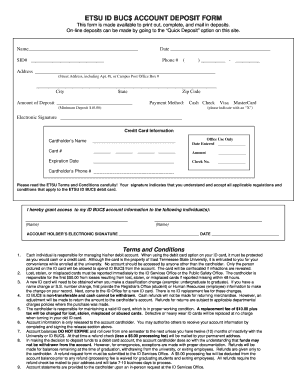
Access Transportation Systems E-Purse Deposit Form free printable template
pdfFiller is not affiliated with any government organization

Fill out
Complete the form online in a simple drag-and-drop editor.

eSign
Add your legally binding signature or send the form for signing.

Share
Share the form via a link, letting anyone fill it out from any device.

Export
Download, print, email, or move the form to your cloud storage.
Why pdfFiller is the best tool for your documents and forms


End-to-end document management
From editing and signing to collaboration and tracking, pdfFiller has everything you need to get your documents done quickly and efficiently.
Accessible from anywhere
pdfFiller is fully cloud-based. This means you can edit, sign, and share documents from anywhere using your computer, smartphone, or tablet.
Secure and compliant
pdfFiller lets you securely manage documents following global laws like ESIGN, CCPA, and GDPR. It's also HIPAA and SOC 2 compliant.
What is Access Transportation Systems E-Purse Deposit Form
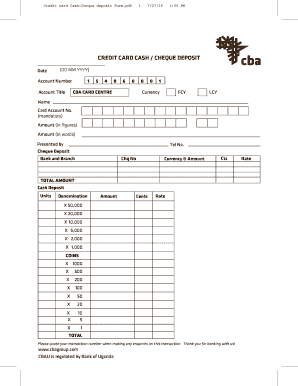
The E-Purse Deposit Form is a personal finance document used by cardholders to deposit funds into an electronic purse account.
pdfFiller scores top ratings on review platforms




Who needs Access Transportation Systems E-Purse Deposit Form?
Explore how professionals across industries use pdfFiller.

Access Transportation Systems E-Purse Deposit Form is needed by:
-
Individuals looking to manage their personal finances.
-
Cardholders who want to utilize electronic payment methods.
-
Residents of Pennsylvania needing to deposit funds.
-
Users looking to deposit via checks, money orders, or credit cards.
Comprehensive Guide to Access Transportation Systems E-Purse Deposit Form
What is the E-Purse Deposit Form?
The E-Purse Deposit Form is a crucial tool used for depositing funds into an electronic purse account. This form facilitates the transfer of money, enabling cardholders to manage their electronic finances efficiently. Individuals who frequently utilize electronic purse systems, such as those in Pennsylvania, typically require this form for their transactions.
Purpose and Benefits of the E-Purse Deposit Form
The E-Purse Deposit Form simplifies personal finance management by offering various benefits. It streamlines the deposit process, allowing users to deposit funds quickly and securely. Furthermore, this form supports multiple payment methods, giving users the flexibility to choose the most convenient option for them.
Who Should Use the E-Purse Deposit Form?
This form is specifically designed for cardholders, particularly those residing in Pennsylvania. It is essential for individuals looking to deposit funds into their electronic purse accounts, especially in scenarios where immediate deposits are necessary for daily transactions or commuting needs.
Eligibility Criteria for Submitting the E-Purse Deposit Form
To successfully submit the E-Purse Deposit Form, users need to meet specific eligibility requirements. These may include:
-
Being a registered cardholder in Pennsylvania.
-
Providing personal information, including name, address, and contact details.
How to Fill Out the E-Purse Deposit Form
Completing the E-Purse Deposit Form online through pdfFiller is straightforward. Follow these steps:
-
Access the E-Purse Deposit Form on pdfFiller.
-
Fill in your personal details in the 'Name', 'Address', 'City', 'State', 'Zip Code', and 'Deposit Amount' fields.
-
Review the information for accuracy and sign the form as required.
Submission Methods for the E-Purse Deposit Form
Once the E-Purse Deposit Form is completed, there are several submission methods available:
-
Mail the signed form to the designated address in Pittsburgh, Pennsylvania.
-
Explore alternative digital submission methods if applicable.
Payment Methods Accepted for the E-Purse Deposit Form
Users can utilize various payment methods when depositing funds through the E-Purse Deposit Form, including:
-
Check
-
Money order
-
Credit card
Be mindful of any associated fees or conditions that may apply based on the payment method selected.
Security and Compliance for the E-Purse Deposit Form
Security is paramount when handling sensitive information, and pdfFiller employs robust measures to protect user data. The platform ensures compliance with regulations such as HIPAA and GDPR, safeguarding user privacy throughout the form submission process. Users can feel confident that their information is handled securely.
Common Errors and Tips for a Successful Submission
To avoid common mistakes while filling out the E-Purse Deposit Form, consider these tips:
-
Double-check all entered information for accuracy.
-
Ensure your signature is included where required.
-
Avoid leaving any fields blank that may be mandatory.
Use pdfFiller to Simplify the E-Purse Deposit Form Process
Utilizing pdfFiller's tools can significantly ease the E-Purse Deposit Form process. The platform allows users to edit, eSign, and securely manage their forms online, enabling a more efficient and hassle-free experience in completing essential personal finance forms.
How to fill out the Access Transportation Systems E-Purse Deposit Form
-
1.Access the E-Purse Deposit Form on pdfFiller by searching for its name in the platform's search bar.
-
2.Open the form by clicking on it to launch the PDF editor within pdfFiller.
-
3.Gather necessary information such as your name, address, contact details, and the desired deposit amount before starting.
-
4.Begin filling out the form by entering your name, ensuring that all information is accurate and complete.
-
5.Continue to the address field; provide your complete residential address, including city, state, and zip code.
-
6.Input the deposit amount you wish to add to your electronic purse account.
-
7.Select the method of payment by checking the appropriate boxes for either check, money order, or credit card.
-
8.Complete the signature field by signing your name to verify your submission.
-
9.Review all entered information and ensure that it is free from errors before finalizing your form.
-
10.Once reviewed, use the 'Save' option to keep a copy of your completed form.
-
11.Download the completed form to your device or submit it electronically through pdfFiller, as per your preference.

Who is eligible to use the E-Purse Deposit Form?
Anyone wishing to deposit funds into their electronic purse account is eligible, especially cardholders residing in Pennsylvania.
What are the submission methods for this form?
The completed E-Purse Deposit Form can be mailed to the specified address in Pittsburgh, Pennsylvania, or submitted electronically via pdfFiller.
What information is required to complete the form?
You need to provide your name, address, contact details, and the amount you intend to deposit. Ensure your signature is included at the end.
Are there any common mistakes to avoid when filling out this form?
Common mistakes include leaving fields blank, providing incorrect information, or forgetting to sign the form, which can delay processing.
How long does it take to process the submitted form?
Processing times can vary, but typically, allow a week for your deposit to be processed once your form is received.
Do I need to notarize the E-Purse Deposit Form?
No, the E-Purse Deposit Form does not require notarization, only a signature from the cardholder.
Can I make multiple deposits using the same form?
No, each E-Purse Deposit Form is intended for a single deposit. You will need to fill out a new form for each additional deposit.






Get the latest insights from our blog


If you believe that this page should be taken down, please follow our DMCA take down process
here
.
This form may include fields for payment information. Data entered in these fields is not covered by PCI DSS compliance.