
Last updated on
Nov 9, 2026
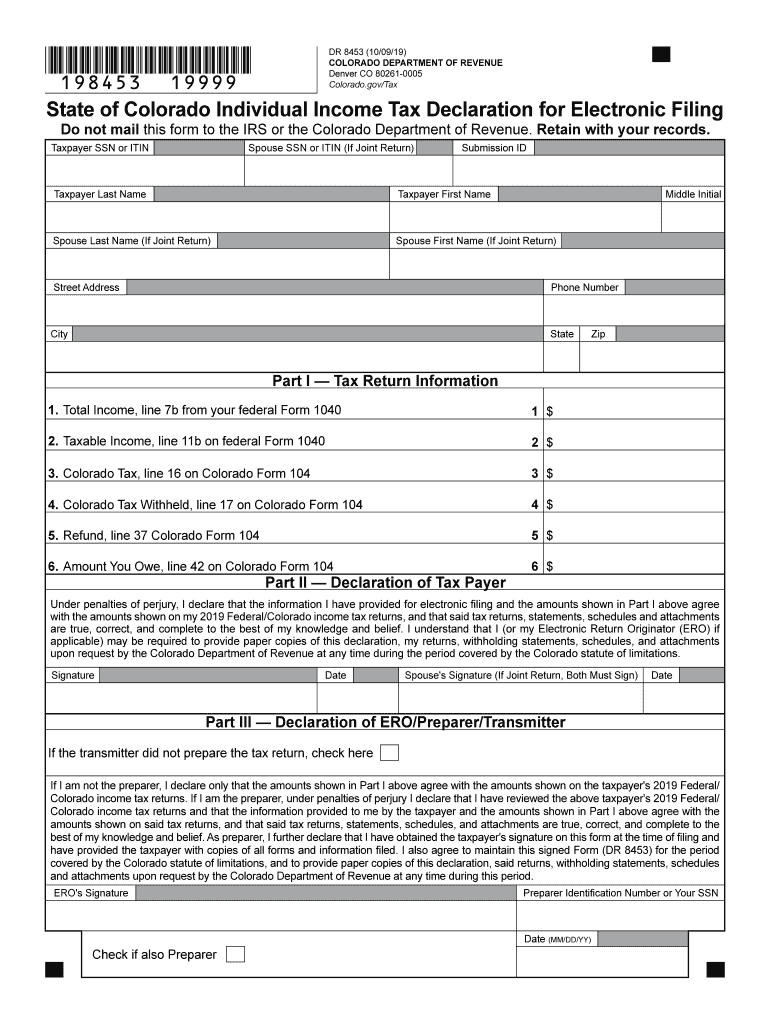
CO DR 8453 2019 free printable template
pdfFiller is not affiliated with any government organization

Fill out
Complete the form online in a simple drag-and-drop editor.

eSign
Add your legally binding signature or send the form for signing.

Share
Share the form via a link, letting anyone fill it out from any device.

Export
Download, print, email, or move the form to your cloud storage.
Why pdfFiller is the best tool for your documents and forms


End-to-end document management
From editing and signing to collaboration and tracking, pdfFiller has everything you need to get your documents done quickly and efficiently.
Accessible from anywhere
pdfFiller is fully cloud-based. This means you can edit, sign, and share documents from anywhere using your computer, smartphone, or tablet.
Secure and compliant
pdfFiller lets you securely manage documents following global laws like ESIGN, CCPA, and GDPR. It's also HIPAA and SOC 2 compliant.
What is CO DR 8453
The Colorado DR 8453 Tax Declaration Form is a state tax document used by taxpayers to declare their electronic filing of state income tax returns.
pdfFiller scores top ratings on review platforms




Who needs CO DR 8453?
Explore how professionals across industries use pdfFiller.

CO DR 8453 is needed by:
-
Individual taxpayers filing state taxes in Colorado
-
Spouses joining in a joint tax filing in Colorado
-
Electronic Return Originators (EROs) assisting taxpayers
-
Tax preparers managing tax submissions for clients
-
Residents of Colorado needing a record of electronic tax submissions
Comprehensive Guide to CO DR 8453
What is the Colorado DR 8453 Tax Declaration Form?
The Colorado DR 8453 Tax Declaration Form serves as a critical document in the state's tax system. This form is utilized primarily for the electronic filing of state income tax returns. It plays a vital role in confirming the identities of the taxpayer and their spouse, as their signatures are required on the form.
It is essential to note that the Colorado DR 8453 form is not submitted to the IRS or the Colorado Department of Revenue, making it a document meant solely for the records of the taxpayer.
Purpose and Benefits of the Colorado DR 8453 Tax Declaration Form
The purpose of the Colorado DR 8453 form extends beyond mere documentation; it also offers numerous benefits for taxpayers. Firstly, this form ensures compliance with Colorado's tax filing requirements, which is crucial for maintaining good standing with the state.
Additionally, it facilitates electronic filing, thus streamlining the tax processing system. By utilizing this form, taxpayers can protect their rights and maintain important documentation for future reference.
Who Needs the Colorado DR 8453 Tax Declaration Form?
The Colorado DR 8453 form is necessary for specific individuals involved in the electronic filing process. Taxpayers filing electronically in Colorado are required to complete this form to validate their submissions.
-
Spouses who are filing jointly must also sign the form, ensuring both parties are aware of the submission.
-
Electronic Return Originators (EROs) or preparers involved in the filing process must ensure the form is correctly filled out.
How to Fill Out the Colorado DR 8453 Tax Declaration Form Online (Step-by-Step)
Filling out the Colorado DR 8453 form online can be accomplished through a clear, step-by-step method. Begin by entering your personal information in designated fields:
-
Name: Provide the full name of the taxpayer.
-
Date: Enter the date when the form is filled out.
-
Signature: Ensure the taxpayer and spouse's signatures are provided if applicable.
Accuracy in completing each section is paramount to avoid potential processing issues.
Common Errors and How to Avoid Them
While filling out the Colorado DR 8453 form, several common errors can occur. These mistakes can include missing signatures or incorrect dates, which can lead to complications in processing your tax return.
-
Always double-check for signatures.
-
Verify that all dates entered are accurate and formatted correctly.
-
Follow the provided instructions closely to avoid errors.
Submission Methods and Delivery for the Colorado DR 8453 Form
After completing the Colorado DR 8453 form, understanding submission methods is crucial. It is important to remember that this form does not need to be mailed; instead, it must be retained for personal records.
Taxpayers can utilize digital methods of submission while ensuring that they follow guidance for secure record-keeping. Adequate security measures should always be in place when managing electronic documents.
What Happens After You Submit the Colorado DR 8453 Tax Declaration Form?
Once you submit the Colorado DR 8453 form, several processing steps occur. Initially, you can expect to wait for a certain processing time, during which the appropriate agencies review your submission.
Many taxpayers also have the ability to track their submission status, making it easier to stay informed about any potential issues. If complications arise, it is advisable to refer back to your records and the instructions provided with the form.
Security and Compliance for the Colorado DR 8453 Tax Declaration Form
Data security is a fundamental aspect when handling the Colorado DR 8453 form. pdfFiller incorporates various security measures designed to protect sensitive information, such as encryption and adherence to compliance standards.
It is crucial to handle all tax documents with care to safeguard personal data. Always refer to privacy policies to ensure that your information is well protected during the form-filling process.
How pdfFiller Can Help with Filling Out the Colorado DR 8453 Tax Declaration Form
Using pdfFiller for filling out the Colorado DR 8453 Tax Declaration form significantly enhances the experience. The platform provides valuable tools for editing, signing, and managing the form efficiently.
-
Take advantage of cloud-based access for added security and convenience.
-
Utilize features for creating fillable forms, eSigning, and more for an efficient completion experience.
Tips for Proper Record Retention of the Colorado DR 8453 Tax Declaration Form
Proper record retention is essential for tax purposes. Taxpayers should ensure they keep a copy of the Colorado DR 8453 form for their personal records.
-
Retain the form for a recommended duration to comply with tax regulations.
-
Consider digital storage solutions for easy access to your tax documents whenever necessary.
How to fill out the CO DR 8453
-
1.Access the Colorado DR 8453 form on pdfFiller by searching for its name in the search bar after logging in.
-
2.Open the form and navigate the interface using the toolbar to fill in the required fields.
-
3.Begin by collecting all necessary information, such as names, signature requirements, and the identification number of the preparer.
-
4.Carefully fill in your name, signature, and the date in the designated fillable fields, ensuring accuracy.
-
5.If applicable, have your spouse also complete and sign the necessary fields if you are filing jointly.
-
6.If you are an ERO or tax preparer, use the designated section to fill in your identification number and signature as needed.
-
7.Once all fields are complete, review the form for any errors or missing information before finalizing it.
-
8.Use the review option in pdfFiller to ensure all entries are correctly completed.
-
9.Save your changes frequently to avoid loss of information while filling out the form.
-
10.Finally, save the completed form to your device or choose to download it in your preferred format for records or electronic submission through the relevant channels.

Who is eligible to use the Colorado DR 8453 form?
Any taxpayer filing their Colorado state income tax electronically must use the Colorado DR 8453 form. This includes individuals, spouses filing jointly, and EROs assisting in the filing process.
What is the deadline for submitting the Colorado DR 8453 form?
The Colorado DR 8453 form must be submitted along with the electronic filing of your state income tax return by the typical tax filing deadline, which is usually April 15th.
How do I submit the Colorado DR 8453 form?
The Colorado DR 8453 form is not mailed to the IRS or the Colorado Department of Revenue. Instead, it should be retained with your records after electronic filing to confirm your declaration.
What information do I need to complete the form?
To complete the Colorado DR 8453 form, gather personal information such as your name, signature, and the date, along with your spouse’s details if filing jointly. You'll also need the ERO or preparer's identification number if applicable.
What are common mistakes to avoid while filling out this form?
Ensure that all signatures are completed and dates are accurate. Avoid leaving any required fields blank and double-check the ERO or preparer's identification number for accuracy.
How long does it take for processed forms to be confirmed?
Since the DR 8453 form is not submitted separately, confirmation comes from the processing of your state income tax return. Processing times may vary, typically taking several weeks.
Are there any fees associated with submitting this form?
There are no fees associated directly with the Colorado DR 8453 form itself, but any fees related to the tax preparation services or electronic filing should be verified with your tax preparer or software provider.
CO DR 8453 Form Versions
Related Content
Related Forms





Get the latest insights from our blog


If you believe that this page should be taken down, please follow our DMCA take down process
here
.
This form may include fields for payment information. Data entered in these fields is not covered by PCI DSS compliance.