
Last updated on
Nov 6, 2026
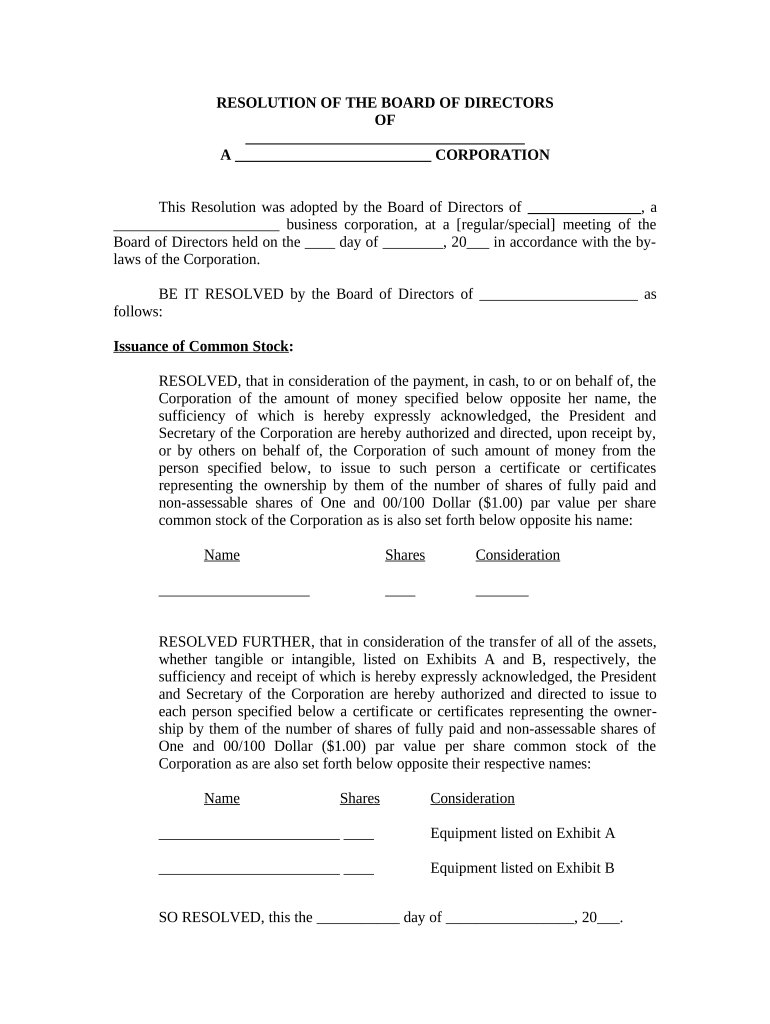
Get the free Board Resolution for Issuance of Common Stock
We are not affiliated with any brand or entity on this form

Fill out
Complete the form online in a simple drag-and-drop editor.

eSign
Add your legally binding signature or send the form for signing.

Share
Share the form via a link, letting anyone fill it out from any device.

Export
Download, print, email, or move the form to your cloud storage.
Why pdfFiller is the best tool for your documents and forms


End-to-end document management
From editing and signing to collaboration and tracking, pdfFiller has everything you need to get your documents done quickly and efficiently.
Accessible from anywhere
pdfFiller is fully cloud-based. This means you can edit, sign, and share documents from anywhere using your computer, smartphone, or tablet.
Secure and compliant
pdfFiller lets you securely manage documents following global laws like ESIGN, CCPA, and GDPR. It's also HIPAA and SOC 2 compliant.
What is Stock Issuance Resolution
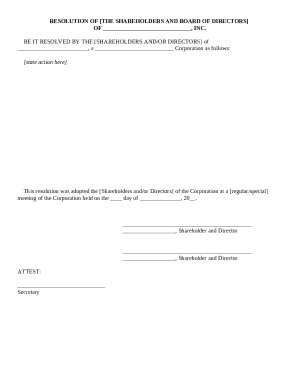
The Board Resolution for Issuance of Common Stock is a corporate document used by the Board of Directors to authorize the issuance of shares in exchange for cash or assets.
pdfFiller scores top ratings on review platforms




Very satisfied from PDF filler
PDF filler has been a huge help with our secondary paper billing purposes
so far so good
GREAT
Good and efficient tool.
Good and efficient tool.
I enjoy being able to make fillable fields to share
Who needs Stock Issuance Resolution?
Explore how professionals across industries use pdfFiller.

Stock Issuance Resolution is needed by:
-
Corporate Directors authorized to make stock issuance decisions
-
Secretaries responsible for certifying board resolutions
-
Legal departments managing corporate compliance and governance
-
Shareholders seeking formal documentation of stock issuance
-
Accountants or auditors reviewing corporate financial records
Comprehensive Guide to Stock Issuance Resolution
What is the Board Resolution for Issuance of Common Stock?
The board resolution for the issuance of common stock is a crucial document that serves a fundamental role in corporate governance. Its primary purpose is to authorize the issuance of shares, thereby allowing a corporation to raise capital through equity financing. This document is essential for maintaining transparency and accountability within the organization, as it delineates the specific powers granted to the Board of Directors in making such decisions.
By adopting this resolution, the Board of Directors formally approves the number of shares to be issued and the terms under which they will be sold. This process not only provides clarity for shareholders but also protects the directors by ensuring that their actions are documented and legally compliant. Organizations utilize a board resolution template to facilitate this process when they are ready to issue new equity, ensuring a standard format is followed.
Purpose and Benefits of the Board Resolution for Issuance of Common Stock
The necessity of a board resolution in corporate operations cannot be overstated. First and foremost, it provides legal protection for directors, as it clearly documents the approval of share issuance. This protection is vital, especially when decisions involve significant financial implications. By having clear documentation, corporations can streamline transactions related to share allocation.
Additionally, the resolution fulfills compliance requirements, as regulatory bodies may require documentation of such corporate actions. Benefits of this resolution include:
-
Legal protection for directors during share issuance
-
Clear documentation that can be referenced in the future
-
Facilitation of efficient share allocation processes
-
Standardization of the issuance process across the organization
Key Features of the Board Resolution for Issuance of Common Stock
Understanding the essential elements of the board resolution for issuance of common stock is vital for accurate completion. Key features typically include:
-
Names of the directors and the secretary
-
Number of shares being issued
-
Consideration types for the shares (for cash or assets)
-
Signature lines requiring approval from directors
-
Certification line for the Secretary's signature
These components are critical to ensure that the resolution is both comprehensive and compliant with legal standards, making a stock issuance form straightforward to complete.
Who Needs the Board Resolution for Issuance of Common Stock?
This document is essential for various stakeholders, including corporations, directors, and financial institutions. For corporations, it serves as both a planning tool and a safeguard against future legal challenges. Financial institutions often require this resolution to assess the legitimacy of share issuances before financing decisions can be made.
Scenarios where this resolution is particularly important include:
-
When a startup needs to raise capital by issuing shares
-
During corporate acquisitions that involve stock transactions
-
For funding rounds in established companies
-
When altering the structure of equity ownership among existing shareholders
How to Fill Out the Board Resolution for Issuance of Common Stock Online (Step-by-Step)
Filling out the board resolution for issuance of common stock can be simplified when using platforms such as pdfFiller. Here’s a user-friendly guide on completing the form:
-
Access the board resolution template via pdfFiller.
-
Enter the names of the directors and the secretary in the designated fields.
-
Specify the number of shares to be issued.
-
Indicate the consideration (cash or assets) being provided for the shares.
-
Gather signatures from all directors and the secretary upon completion.
This structured approach ensures clarity and completeness for all parties involved.
Common Errors and How to Avoid Them in Issuing Common Stock
While filling out the resolution, users often encounter frequent mistakes that can hinder compliance. Common errors include:
-
Leaving signature fields blank
-
Failing to specify the number of shares issued
-
Omitting the consideration details
-
Not updating the resolution with the correct dates
To prevent these issues, thorough reviews of the completed document are recommended. Additionally, familiarizing oneself with the legal requirements for share issuance can mitigate the risk of errors.
Digital Signing and Submission of the Board Resolution for Issuance of Common Stock
Digital signatures have revolutionized the submission process for board resolutions. Organizations can opt for either digital or wet signatures based on their requirements. When submitting the board resolution, it’s imperative to ensure that it is acknowledged by the appropriate parties involved.
Best practices for submitting the form include:
-
Confirming the authenticity of the digital signatures
-
Scheduling submission during business hours for immediate acknowledgment
-
Retaining copies of submitted documents for future reference
How to Access and Save Your Board Resolution for Issuance of Common Stock
Upon completing the board resolution, users can easily download, save, and print their document through pdfFiller. The platform provides robust security measures to ensure sensitive information remains protected.
To access and securely save your document, follow these steps:
-
Download the completed resolution in your preferred format (PDF, DOCX, etc.).
-
Utilize the saving features to keep the document organized and easily retrievable.
-
Print copies as needed for official records.
Security and Compliance for the Board Resolution for Issuance of Common Stock
Ensuring security and compliance when handling board resolutions is essential. pdfFiller offers various security features designed to protect sensitive documents, such as 256-bit encryption. Furthermore, the platform adheres to industry standards including SOC 2 Type II and GDPR regulations, ensuring compliance for all users.
By leveraging these security measures, organizations can confidently manage their corporate resolutions without compromising on confidentiality.
Create Your Board Resolution for Issuance of Common Stock Easily with pdfFiller
Users can capitalize on pdfFiller’s cloud-based tools to create, edit, and store their board resolutions effectively. The platform simplifies the document management process, allowing for seamless eSigning, secure storage, and easy access anytime, anywhere.
Using pdfFiller not only enhances efficiency for corporate documentation but also provides peace of mind through its robust security and compliance frameworks.
How to fill out the Stock Issuance Resolution
-
1.To access the Board Resolution for Issuance of Common Stock on pdfFiller, begin by logging into your pdfFiller account.
-
2.Use the search bar to locate the form by typing its name, and click the form to open it in the editor.
-
3.Gather all necessary information, such as the names of stock recipients, number of shares being issued, and consideration provided prior to filling out the document.
-
4.Navigate through the form's blank fields by clicking on each one to enter the required information, using the text box options for each section.
-
5.Ensure that you enter accurate details for each recipient and the resolutions you're adopting to prevent any errors in stock issuance.
-
6.Pay attention to the signature lines for the Directors and Secretary; you may need to gather their electronic signatures or print the document for physical signing later.
-
7.Once you have completed all fields, carefully review the entire document for accuracy and completeness.
-
8.Utilize pdfFiller’s built-in editing tools to make any necessary adjustments or corrections before finalization.
-
9.After final review, save your document. You can choose to download it in various formats or submit it directly through the provided methods in pdfFiller.

Who is eligible to use the Board Resolution for Issuance of Common Stock?
This form is typically used by corporate Directors and Secretaries within organizations that require board approval for stock issuance. It ensures proper governance and documentation within corporate structures.
Is there a deadline for submitting this form?
The form should be adopted and signed in a timely manner, ideally during a scheduled board meeting. There isn’t a specific deadline; however, timely submission is important for maintaining corporate records.
How should this form be submitted once completed?
Completed forms can be saved and printed for physical submission or submitted electronically depending on your corporate policies. Make sure to retain copies for your records.
What supporting documents are required with this form?
Typically, no specific supporting documents are required; however, having details on stock recipients and terms of issuance ready is important. Legal counsel may provide additional documentation based on corporate policies.
What are some common mistakes to avoid when filling out this form?
Be sure to double-check the names of recipients and the number of shares to be issued; inaccuracies can lead to legal complications. Also, ensure all required signatures are obtained.
How long does it take to process this form?
Processing time can vary based on corporate procedures. However, once signed by all Directors and the Secretary, the form should be added to corporate records immediately to ensure compliance.
What if I have additional questions about this form?
For specific inquiries, consult your legal counsel or corporate governance team. They can provide detailed guidance tailored to your organization's needs and compliance regulations.
Related Forms


Related Catalogs
Get the latest insights from our blog


If you believe that this page should be taken down, please follow our DMCA take down process
here
.
This form may include fields for payment information. Data entered in these fields is not covered by PCI DSS compliance.