
Last updated on
Oct 31, 2026
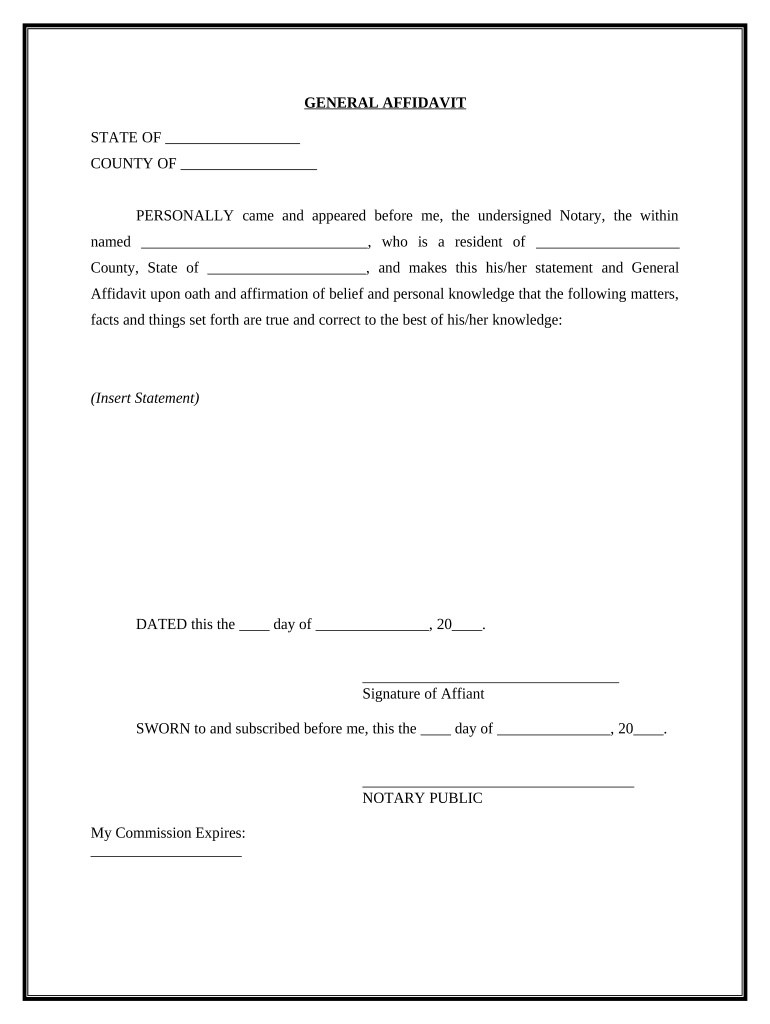
Get the free General Affidavit Form
We are not affiliated with any brand or entity on this form

Fill out
Complete the form online in a simple drag-and-drop editor.

eSign
Add your legally binding signature or send the form for signing.

Share
Share the form via a link, letting anyone fill it out from any device.

Export
Download, print, email, or move the form to your cloud storage.
Why pdfFiller is the best tool for your documents and forms


End-to-end document management
From editing and signing to collaboration and tracking, pdfFiller has everything you need to get your documents done quickly and efficiently.
Accessible from anywhere
pdfFiller is fully cloud-based. This means you can edit, sign, and share documents from anywhere using your computer, smartphone, or tablet.
Secure and compliant
pdfFiller lets you securely manage documents following global laws like ESIGN, CCPA, and GDPR. It's also HIPAA and SOC 2 compliant.
What is Affidavit Form
The General Affidavit Form is a legal document used by individuals to make sworn statements under oath for various legal proceedings.
pdfFiller scores top ratings on review platforms




awesome ,a little hard to figure out at first but I got it !!!
It is the most efficient, neat and tidy way to complete forms. Won't be without it now. Thank you PDF filler!
It makes form filling a breeze. Wow...what a feeling of accomplishment after a form is filled out so neatly.
It's the best.
Easy to use. Gives me access to forms I have had trouble finding in the past.
A very easy to use application with a ton of benefits. Absolutely a need.
It is a great option to find the right form you need, plus the fulfill option give you a professional look.
awesome how you can fill forms out online would be awesome aswell to be able to do order forms and quotes for business side of things
Who needs Affidavit Form?
Explore how professionals across industries use pdfFiller.

Affidavit Form is needed by:
-
Individuals involved in legal disputes requiring a sworn statement.
-
Those seeking notarization of their statements.
-
Lawyers needing official declarations for court cases.
-
Businesses requiring sworn affidavits for compliance.
-
Real estate professionals needing affidavits for transactions.
Comprehensive Guide to Affidavit Form
What is the General Affidavit Form?
A general affidavit form is a legal document that allows an individual to make a sworn statement under oath. It serves multiple purposes in legal proceedings, including various types of legal filings and court documents. This form is essential as it validates the truthfulness of the statements made by the affiant, thereby enhancing the legal credibility of the document.
Sworn statements are often required in various situations, ranging from personal declarations to business transactions, making the general affidavit form a critical component in the legal landscape.
Purpose and Benefits of the General Affidavit Form
The primary purpose of utilizing a general affidavit form lies in its ability to provide legal credibility in formal declarations. When properly executed, it plays a vital role in record-keeping and documentation processes.
For both affiants and notaries, having a sworn statement form is indispensable. It helps mitigate misunderstandings and provides a clear, concise account of facts that can be referenced in future legal proceedings.
Who Needs the General Affidavit Form?
A variety of individuals and entities may require a general affidavit form. Common users include property owners, business entities, and individuals involved in custody or immigration matters.
Specific circumstances that necessitate filing an affidavit range from confirming identity to validating claims in a legal dispute. Notaries also play a significant role in assisting individuals who act as affiants in ensuring that documents are adequately completed and signed.
Key Features of the General Affidavit Form
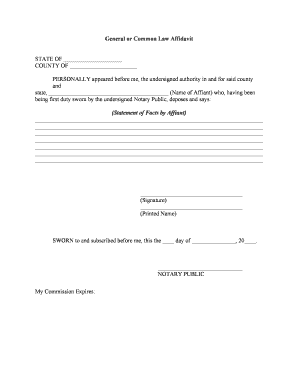
The general affidavit form includes several blank fields designed for user input, allowing flexibility in its application. Some critical sections include:
-
Affiant's name and contact information
-
Description of the facts being sworn
-
Signature area for both the affiant and notary
The document also provides user-friendly instructions, making it easier to navigate through the completion process.
How to Fill Out the General Affidavit Form Online (Step-by-Step)
Filling out the general affidavit form online is straightforward when following these steps:
-
Access the digital form through a trusted platform like pdfFiller.
-
Enter the required affiant information, including name and address.
-
Clearly outline the facts being stated under oath.
-
Review the information for accuracy before submitting.
-
Proceed to the signature section for affiant and notary.
Attention to key fields, particularly those requesting affiant and notary information, is vital to prevent common mistakes during the filling process.
How to Sign or Notarize the General Affidavit Form
Understanding the signature and notarization process is essential for the legal validity of the general affidavit form. Users should be aware of the differences between digital and wet signatures, as each carries different legal implications.
To ensure proper notarization, follow these necessary steps:
-
Complete all fields of the affidavit before presenting it to a notary.
-
Sign the document in the presence of the notary.
-
Request notarization after confirming the notary's credentials.
Notarization is crucial for legal acceptance, making it a necessary step in the affidavit process.
Submission Methods and Delivery of the General Affidavit Form
Submitting the completed general affidavit form can be accomplished through various methods, depending on jurisdictional requirements. Common submission options include:
-
Online submission through designated legal platforms
-
Physical submission at local courthouses or government agencies
Be sure to verify where the form needs to be filed, as requirements may vary across different jurisdictions. Also, understanding the timeline for processing and receiving acknowledgment is essential for managing legal expectations.
Security and Compliance for the General Affidavit Form
When handling personal documents such as the general affidavit form, data security is a crucial concern. Platforms like pdfFiller are equipped with robust security features, including 256-bit encryption to safeguard sensitive information.
Moreover, compliance with regulations like HIPAA and GDPR ensures that user data is protected, creating a secure environment for document handling. Following best practices for data submission also contributes to maintaining confidentiality and security.
How pdfFiller Simplifies the Use of the General Affidavit Form
pdfFiller significantly enhances the affidavit management experience, offering a variety of features to simplify processes. Users can easily fill out, sign, and submit documents online without needing downloads.
The platform allows seamless access to legal documents, ensuring that users can manage their forms efficiently from any browser. Leveraging pdfFiller’s cloud services enables a streamlined approach to legal documentation, making the affidavit process more straightforward.
Real-Life Example of a Completed General Affidavit Form
Providing a practical illustration of the general affidavit form's application can help clarify its use. A sample or template of a fully completed general affidavit would typically include:
-
Affiant's personal details
-
Clear statements affirming certain facts
-
Signature and notary acknowledgment sections
This example highlights typical scenarios in which such documentation might be utilized, reinforcing the context of the affidavit's importance in legal matters.
How to fill out the Affidavit Form
-
1.Access pdfFiller and search for 'General Affidavit Form' in the template library.
-
2.Open the form and familiarize yourself with the layout, including sections for your information and signature.
-
3.Gather all necessary information before starting, including the facts you need to affirm, your name, address, and any relevant case details.
-
4.Use pdfFiller's interface to select the text fields and fill in the required information.
-
5.Carefully check any instructions provided on the form for specific required information.
-
6.Address the checkboxes, if applicable, ensuring you select the appropriate options relevant to your statements.
-
7.Once the form is filled out, review the information for accuracy. Make sure the statements align with the facts you plan to affirm.
-
8.Finalize the document by adding your signature and the date in the designated sections. The notary will also need to sign at this point.
-
9.After reviewing, ensure that the notary acknowledgment section is completed if required.
-
10.Save your completed affidavit on pdfFiller, or download it directly in your preferred format.
-
11.You can submit your affidavit electronically if permitted, or print and send it via mail or in person as necessary.

Who is eligible to complete the General Affidavit Form?
Any individual who needs to make a sworn statement under oath for a legal matter is eligible to complete the General Affidavit Form, including private citizens and professionals involved in legal proceedings.
What is the deadline for submitting the General Affidavit Form?
Deadlines for submitting the General Affidavit Form depend on the specific legal proceedings it relates to. Check with legal counsel or the court for any time-sensitive requirements.
How do I submit the completed General Affidavit Form?
You can submit the completed General Affidavit Form by printing it out and filing it with the relevant court or authority, or, if permitted, submit it electronically as per local regulations.
What supporting documents are required with this affidavit?
Generally, you should include any documents that substantiate the facts stated in your affidavit. Be sure to check if your jurisdiction requires specific additional documents.
What common mistakes should I avoid when filling out the affidavit?
Avoid leaving fields blank, providing inaccurate information, or failing to have the notary sign the document. Ensure all required sections are filled out correctly.
How long does it take to process the General Affidavit?
Processing times can vary by jurisdiction and the specific legal context of the affidavit. Typically, once filed, the processing can take from a few days to several weeks.
Do I need to have the General Affidavit Form notarized?
Yes, the General Affidavit Form requires notarization to be considered valid, as it must include the notary's acknowledgment of your signature.
Related Forms



Related Catalogs
Get the latest insights from our blog


If you believe that this page should be taken down, please follow our DMCA take down process
here
.
This form may include fields for payment information. Data entered in these fields is not covered by PCI DSS compliance.