
Last updated on
Nov 6, 2026

Get the free USLF Construction Form 8
We are not affiliated with any brand or entity on this form

Fill out
Complete the form online in a simple drag-and-drop editor.

eSign
Add your legally binding signature or send the form for signing.

Share
Share the form via a link, letting anyone fill it out from any device.

Export
Download, print, email, or move the form to your cloud storage.
Why pdfFiller is the best tool for your documents and forms


End-to-end document management
From editing and signing to collaboration and tracking, pdfFiller has everything you need to get your documents done quickly and efficiently.
Accessible from anywhere
pdfFiller is fully cloud-based. This means you can edit, sign, and share documents from anywhere using your computer, smartphone, or tablet.
Secure and compliant
pdfFiller lets you securely manage documents following global laws like ESIGN, CCPA, and GDPR. It's also HIPAA and SOC 2 compliant.
What is Construction Form 8
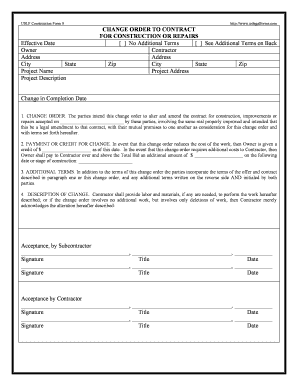
The USLF Construction Form 8 is a work order or change order to subcontract form used by contractors and subcontractors to outline project details and requirements.
pdfFiller scores top ratings on review platforms




It's excellent! Saw Vadim talk when @ TS Boston and switched over from docusign. Personally think that everything about pdffiller is better and would never go back. Highly recommend pdffiller to all of my friends.
First time using, once navigation around features was learned a very productive product.
PDFiller has allowed me to complete an application form that looks professional and is much more legible than my handwriting would have been.
Does exactly what I need to do very easily!!!!
It works incredibly well and saves your time.
Very helpful while taking my masters courses
Who needs Construction Form 8?
Explore how professionals across industries use pdfFiller.

Construction Form 8 is needed by:
-
Contractors involved in construction projects
-
Subcontractors providing specialized services
-
Construction project managers overseeing project execution
-
Legal professionals drafting vendor contracts
-
Business owners managing construction activities
Comprehensive Guide to Construction Form 8
What is the USLF Construction Form 8?
The USLF Construction Form 8 is a vital document in the construction industry, serving as both a work order and a change order to subcontract form. It provides a clear structure for contractors and subcontractors to outline specific work details and project requirements. Key fields included in the form facilitate efficient communication between all parties involved.
Understanding the USLF Construction Form 8 is crucial for ensuring effective project management and fostering good relationships among contractors and subcontractors.
Purpose and Benefits of the USLF Construction Form 8
This form plays a significant role in documenting essential project details. Clear documentation helps avoid misunderstandings and disputes. It also protects contractors and subcontractors through mutual agreements that define the scope and responsibilities.
Furthermore, the USLF Construction Form 8 streamlines the process for managing changes in subcontract work, enabling quick adaptations to project needs.
Key Features of the USLF Construction Form 8
The USLF Construction Form 8 includes several important features:
-
Address and project number fields for accurate identification.
-
Project description to specify the nature of the work.
-
Signature lines that confirm acceptance and agreement from both parties.
-
Checkbox options to distinguish between work orders and change orders.
These features contribute to the form's effectiveness in various construction projects.
Who Needs the USLF Construction Form 8?
The primary users of the USLF Construction Form 8 include:
-
Contractors who oversee projects involving subcontractors.
-
Subcontractors seeking formal documentation for work changes.
-
Stakeholders in construction projects requiring legal compliance.
This form ensures that all involved parties have a legal and binding agreement, protecting their interests and ensuring project integrity.
How to Fill Out the USLF Construction Form 8 Online (Step-by-Step)
To fill out the USLF Construction Form 8 online, follow these steps:
-
Access the form on pdfFiller.
-
Complete essential sections, including project number and address.
-
Review filled fields for accuracy and clarity.
-
Preview the form before final submission.
Pay attention to common errors, such as misplacing information in fields, which can delay processing or cause misunderstandings.
How to Sign the USLF Construction Form 8
Signing the USLF Construction Form 8 is crucial for its validity. Users can choose between digital signatures and traditional wet signatures:
-
Digital signatures provide a secure and efficient way to sign documents.
-
Traditional wet signatures may be required in specific situations.
Using pdfFiller, the steps to eSign are straightforward and emphasize security, ensuring that both parties' agreements are legally accepted.
Submitting the USLF Construction Form 8
After completing the USLF Construction Form 8, consider the following submission methods:
-
Online submissions via pdfFiller for immediate processing.
-
Physical submissions based on project location or jurisdiction.
Meeting submission deadlines is critical, as late submissions can lead to complications or project delays.
What Happens After You Submit the USLF Construction Form 8?
Following submission, users can expect:
-
Confirmation of submission and tracking options available through pdfFiller.
-
Timelines for processing and when feedback can be anticipated.
Staying informed about notifications after submission can help manage active projects effectively.
Security and Compliance When Using the USLF Construction Form 8
Using the USLF Construction Form 8 through pdfFiller ensures your data is secure. Key security features include:
-
256-bit encryption for protecting sensitive information.
-
Compliance with industry regulations such as HIPAA and GDPR.
Users can feel confident that their legal documents are handled with the utmost care and security.
Maximize Your Experience with pdfFiller
To get the most from pdfFiller, users should leverage its user-friendly features designed for completing the USLF Construction Form 8:
-
Utilize eSign capabilities for quick approval processes.
-
Explore document management tools to keep files organized.
pdfFiller's commitment to user security and document integrity enhances the overall experience in managing construction forms.
How to fill out the Construction Form 8
-
1.To access the USLF Construction Form 8 on pdfFiller, navigate to the pdfFiller website and use the search bar to find the form by its name. Click on the relevant search result to open the form in the editing interface.
-
2.Once the form is open, you will see various fillable fields. Begin by selecting the first field and type in the required information. You can use your keyboard or the on-screen keyboard as needed.
-
3.Before starting, gather all necessary information such as project details and contractor/subcontractor names to fill in the form accurately. This includes the project address, project number, and license number.
-
4.Be sure to review each section of the form carefully. Use the navigation tools provided by pdfFiller to ensure you are completing all required fields. If you need to make corrections, simply click back into the field and edit your input.
-
5.After filling in all required information, take a moment to finalize your entries. Check that all signatures and print names are included, and all sections are complete according to your project needs.
-
6.To save, download, or submit the form, look for the options located on the top toolbar of pdfFiller. You can choose to save the completed form to your account, download it to your device, or submit it directly via email or other provided channels.

Who is eligible to use the USLF Construction Form 8?
The USLF Construction Form 8 is suitable for contractors and subcontractors involved in the construction industry. Anyone managing a construction project requiring this documentation can use the form.
Is there a deadline for submitting the USLF Construction Form 8?
Deadlines for submitting the USLF Construction Form 8 will typically depend on project timelines or contractual agreements. It's essential to consult with project stakeholders and adhere to specific timelines set in the project contract.
How can I submit the USLF Construction Form 8 once completed?
You can submit the completed USLF Construction Form 8 through various methods available on pdfFiller. Options typically include downloading the form for mail submission or sending it directly via email through the service.
What supporting documents are needed to complete the form?
When filling out the USLF Construction Form 8, you may need to provide additional documents such as a copy of the original contract, project plans, and any permits or licenses relevant to the project and parties involved.
What are some common mistakes to avoid when using this form?
Common mistakes include missing signatures, incorrectly filled fields, and omitting important project details. Always double-check your entries and ensure that all required information is accurate before finalizing the form.
How long does it take to process the USLF Construction Form 8 once submitted?
Processing times for the USLF Construction Form 8 can vary but typically depend on the parties involved reviewing and signing the document. Ensure you allow sufficient time for all necessary approvals.
Do I need to have the USLF Construction Form 8 notarized?
No, the USLF Construction Form 8 does not require notarization. However, both parties must sign the document to make it legally binding.
Related Forms


Related Catalogs
Get the latest insights from our blog


If you believe that this page should be taken down, please follow our DMCA take down process
here
.
This form may include fields for payment information. Data entered in these fields is not covered by PCI DSS compliance.