
Last updated on
Nov 6, 2026
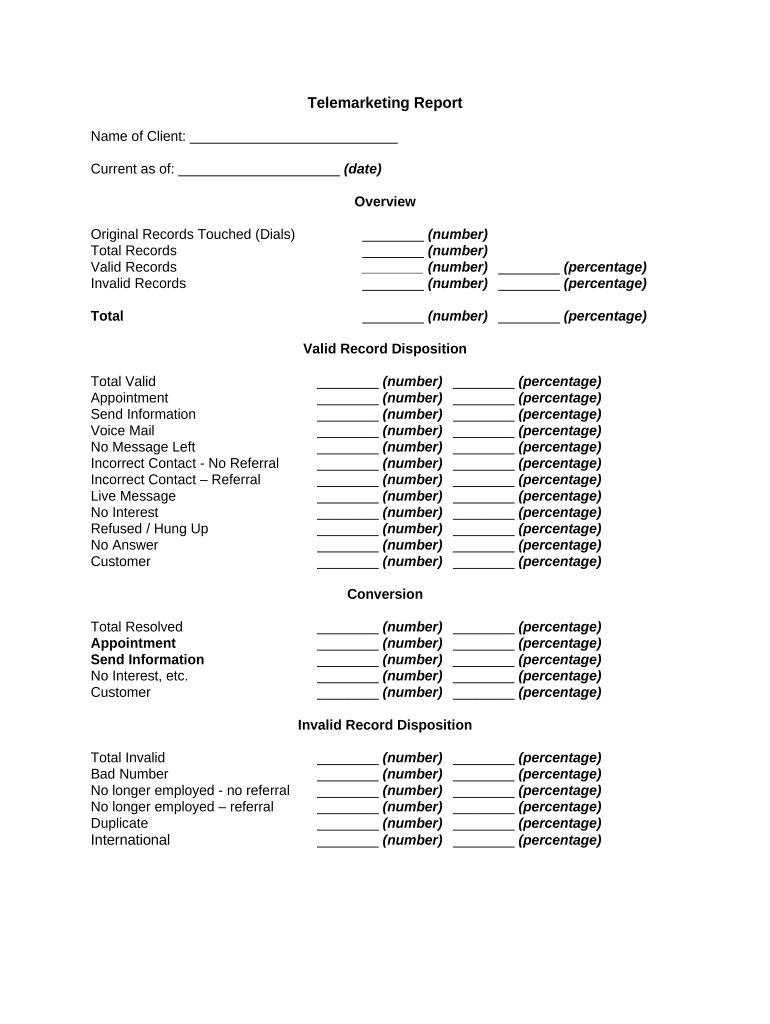
Get the free Telemarketing Report Form
We are not affiliated with any brand or entity on this form

Fill out
Complete the form online in a simple drag-and-drop editor.

eSign
Add your legally binding signature or send the form for signing.

Share
Share the form via a link, letting anyone fill it out from any device.

Export
Download, print, email, or move the form to your cloud storage.
Why pdfFiller is the best tool for your documents and forms


End-to-end document management
From editing and signing to collaboration and tracking, pdfFiller has everything you need to get your documents done quickly and efficiently.
Accessible from anywhere
pdfFiller is fully cloud-based. This means you can edit, sign, and share documents from anywhere using your computer, smartphone, or tablet.
Secure and compliant
pdfFiller lets you securely manage documents following global laws like ESIGN, CCPA, and GDPR. It's also HIPAA and SOC 2 compliant.
What is Telemarketing Report
The Telemarketing Report Form is an expense report document used by businesses to track and analyze the outcomes of telemarketing campaigns.
pdfFiller scores top ratings on review platforms




Good. Saving files could be a lot easier, but other than that I'm very satisfied.
C'est vraiment super pratique de pouvoir modifier ses documents!
Simple and easy to use. No regrets for our annual subscription.
This is great for filling out forms. We have used it a lot and it has really made the work easier.
PDF filler has saved me hours filing a Form 990 for a non-profit I am involved with.
literally this app has changed my life and has made it so much easier and convienant for me always being on the go and now i dont really need to be on the go its just right here everything in one
Who needs Telemarketing Report?
Explore how professionals across industries use pdfFiller.

Telemarketing Report is needed by:
-
Business managers evaluating telemarketing performance
-
Call center operators requiring reporting templates
-
Marketing analysts measuring telemarketing efficacy
-
Sales teams tracking call metrics
-
Telemarketing agencies needing documentation for performance reviews
-
Compliance officers ensuring accurate record-keeping
Comprehensive Guide to Telemarketing Report
What is the Telemarketing Report Form?
The Telemarketing Report Form is a crucial tool for tracking and analyzing telemarketing campaigns. Its primary function is to record essential metrics, facilitating businesses in evaluating the effectiveness of their telemarketing efforts. This form's importance lies in its capability to track various metrics such as the number of dials made and the dispositions of calls, allowing for comprehensive performance analysis.
By utilizing the telemarketing report form, businesses can keep tabs on their telemarketing metrics, helping them to refine their strategies and improve their outreach effectiveness.
Purpose and Benefits of the Telemarketing Report Form
The Telemarketing Report Form serves as an essential resource for businesses aiming to enhance their telemarketing operations. It helps analyze the effectiveness of telemarketing campaigns, providing insights into performance and areas of improvement. This analysis drives data-driven decisions that can significantly enhance return on investment (ROI) and lead to business growth.
Moreover, by optimizing telemarketing efforts through this form, organizations can experience substantial growth, ensuring that their resources are directed toward the most effective channels.
Key Features of the Telemarketing Report Form
The Telemarketing Report Form is designed with specific components that enhance usability and functionality. Key features include:
-
Fillable fields for client information and various performance metrics.
-
Checkboxes that simplify recording dispositions, ensuring ease of use.
-
Percentage fields and numerical inputs to capture data accurately.
These components make the form an effective tool for recording and analyzing telemarketing metrics, directly aligning with business objectives.
Who Needs the Telemarketing Report Form?
Various professionals and businesses can benefit from utilizing the Telemarketing Report Form. Key users include:
-
Telemarketing managers who oversee campaign effectiveness.
-
Sales teams that rely on accurate tracking of outreach efforts.
-
Businesses of all sizes, from startups to established corporations.
-
Industries where telemarketing plays a vital role, including sales and lead generation.
This form is essential for anyone aiming to improve their telemarketing performance tracking and evaluation.
How to Fill Out the Telemarketing Report Form Online (Step-by-Step)
Filling out the Telemarketing Report Form online involves a straightforward procedure. Follow these steps for accurate completion:
-
Open the Telemarketing Report Form within the pdfFiller platform.
-
Enter the necessary client information in the designated fields.
-
Record metrics such as the number of dials and dispositions using checkboxes.
-
Review all entries for accuracy before submission.
-
Submit the form and keep a copy for future reference.
Accuracy and completeness are pivotal, so take your time to ensure all information is correctly entered.
Common Errors and How to Avoid Them
While filling out the Telemarketing Report Form, users may encounter several common errors. Frequent mistakes include:
-
Entering incorrect data into the form fields.
-
Omitting required information that can impact the analysis.
To mitigate these issues, always validate the information entered before submitting the form. If mistakes are identified post-submission, reviewing and correcting them promptly is crucial for maintaining accurate tracking.
Security and Compliance for the Telemarketing Report Form
When using the Telemarketing Report Form, users can be assured of data security and compliance. pdfFiller employs robust security features, including:
-
256-bit encryption to protect sensitive information.
-
Compliance with privacy regulations such as HIPAA and GDPR.
These measures ensure that businesses can handle telemarketing data safely, safeguarding privacy throughout the form submission process.
How to Download, Print, and Save the Telemarketing Report Form PDF
Managing the Telemarketing Report Form after completion is essential for continuous tracking. To do this, follow these steps:
-
Download the filled form from the pdfFiller platform.
-
Print a physical copy for your records.
-
Save the PDF for future use, enabling tracking of past results.
Best practices for keeping records include labeling saved documents clearly and securely storing them for easy retrieval.
What Happens After You Submit Your Telemarketing Report Form?
After submitting your Telemarketing Report Form, anticipate various potential responses. Users should be aware that:
-
Confirmation of submission may be provided.
-
Additional requests for information could arise based on the report.
Understanding response timelines and what next steps to take based on report outcomes can help businesses streamline their follow-up processes.
Get Started with pdfFiller Today!
pdfFiller offers an efficient platform for filling out your Telemarketing Report Form. With its editing and secure sharing capabilities, users can easily manage their forms.
By utilizing pdfFiller, businesses can enhance their telemarketing report processes and facilitate better tracking of performance metrics.
How to fill out the Telemarketing Report
-
1.To access the Telemarketing Report Form on pdfFiller, visit the website and log in to your account. Use the search bar at the top to find the form by entering its name.
-
2.Once you've located the form, click on it to open it in the pdfFiller editor. Familiarize yourself with the interface, which includes tools for editing and filling out the form fields.
-
3.Before you begin filling out the form, gather all necessary information such as client names, call statistics, and performance data from your telemarketing campaigns. This preparation will streamline your completion process.
-
4.As you proceed to complete each field, click on the area you want to fill. Use fillable fields for entering data and checkboxes for your metrics. Make sure to accurately report the number of dials and dispositions.
-
5.When you've filled in all required sections, review the entire form for accuracy. Check that all metrics align with your campaign outcomes and that no necessary information is missing.
-
6.After your review, use the options in pdfFiller to save your form. You can download it in various formats or submit it directly if submission methods are supported.
-
7.Finally, ensure you follow any submission guidelines provided by your organization or clients. If you need to share the form electronically, use pdfFiller’s sharing options to send it securely.

Who is eligible to use the Telemarketing Report Form?
The Telemarketing Report Form is intended for businesses engaged in telemarketing activities, specifically managers, analysts, and sales personnel who need to track performance metrics.
Is there a deadline for submitting this form?
While the Telemarketing Report Form does not have a strict deadline, it is advisable to submit it promptly after a telemarketing campaign to ensure timely evaluation and strategy adjustments.
How do I submit the Telemarketing Report Form once completed?
You can submit the completed Telemarketing Report Form by downloading it from pdfFiller and emailing it to the relevant stakeholders or utilizing any submission methods provided by your organization.
What supporting documents do I need when completing the form?
Typically, you should gather documents related to your telemarketing calls, including call logs, client details, and any internal reports that provide performance data to input into the form.
What common mistakes should I avoid when filling out the form?
Avoid leaving blank fields or incorrect metrics, as these can lead to misinterpretation of data. Double-check that all information is accurate to reflect your telemarketing efforts properly.
How long does it take to process the Telemarketing Report Form?
Processing time for the Telemarketing Report Form can vary depending on your internal procedures, but it typically should not take longer than a week after submission for reviews and feedback.
Can I edit the Telemarketing Report Form after I fill it out?
Yes, you can edit the Telemarketing Report Form on pdfFiller even after initial completion. Simply return to your document in the pdfFiller editor to make any necessary changes.
Related Forms



Related Catalogs
Get the latest insights from our blog


If you believe that this page should be taken down, please follow our DMCA take down process
here
.
This form may include fields for payment information. Data entered in these fields is not covered by PCI DSS compliance.