
Last updated on
Oct 31, 2026
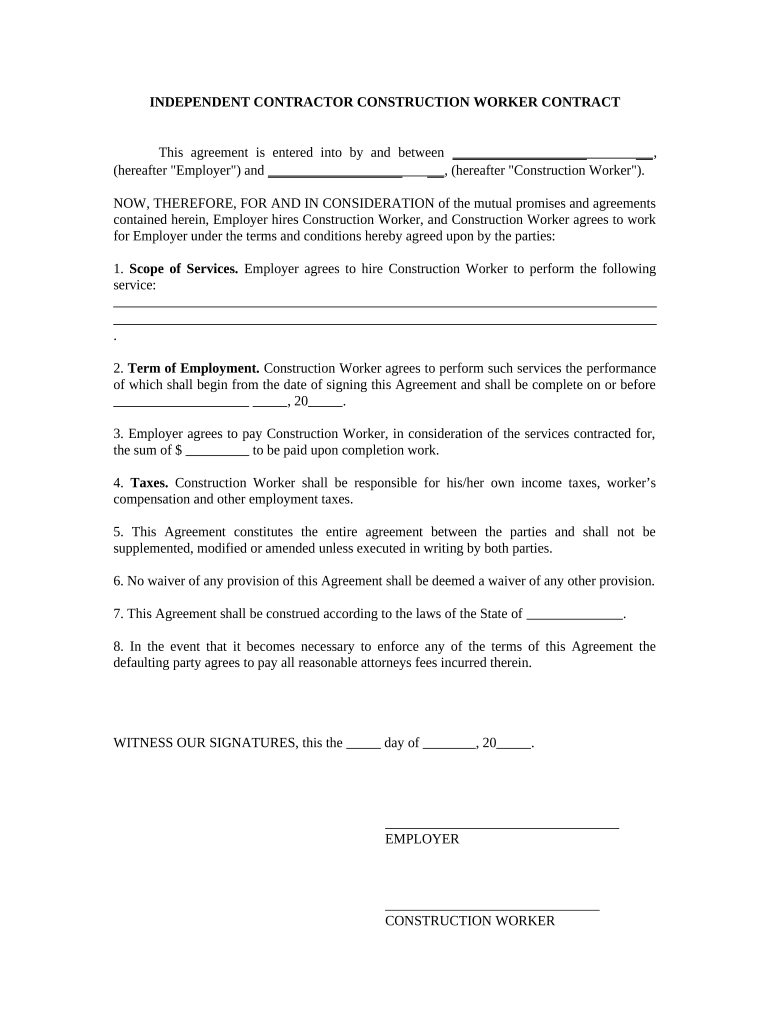
Get the free Independent Contractor Construction Worker Contract
We are not affiliated with any brand or entity on this form

Fill out
Complete the form online in a simple drag-and-drop editor.

eSign
Add your legally binding signature or send the form for signing.

Share
Share the form via a link, letting anyone fill it out from any device.

Export
Download, print, email, or move the form to your cloud storage.
Why pdfFiller is the best tool for your documents and forms


End-to-end document management
From editing and signing to collaboration and tracking, pdfFiller has everything you need to get your documents done quickly and efficiently.
Accessible from anywhere
pdfFiller is fully cloud-based. This means you can edit, sign, and share documents from anywhere using your computer, smartphone, or tablet.
Secure and compliant
pdfFiller lets you securely manage documents following global laws like ESIGN, CCPA, and GDPR. It's also HIPAA and SOC 2 compliant.
What is Construction Worker Contract
The Independent Contractor Construction Worker Contract is a legal document used by employers and construction workers to formalize their agreement for independent contractor services.
pdfFiller scores top ratings on review platforms




It has been tremendously helpful to me in having to complete forms that require numerous drafts.
PDF Filler allows me to submit professionally prepared forms.
I needed this for an emergency document and paid for it thinking I probably will not use this much....but was I wrong. I use it all the time and LOVE IT!!!
It has been wonderful allowing me to complete a legal document and make changes when necessary
The product has worked GREAT, very satisfied!!
3 times I have contacted PDFFiller support and every time they have responded in less than 30 minutes. This is the fastest support service I have ever encountered.
Who needs Construction Worker Contract?
Explore how professionals across industries use pdfFiller.

Construction Worker Contract is needed by:
-
Employers hiring construction workers as independent contractors
-
Construction workers seeking formal agreements for their services
-
Legal professionals drafting service agreements
-
Contractors needing clear outlines for job responsibilities
-
Businesses managing subcontracted construction projects
Comprehensive Guide to Construction Worker Contract
What is the Independent Contractor Construction Worker Contract?
The Independent Contractor Construction Worker Contract is essential for formalizing the relationship between employers and construction workers. This contract serves to clarify terms of engagement, ensuring all parties understand their responsibilities. Employers seeking to hire construction workers and the workers themselves can utilize this contract. Legal aspects, particularly state-specific regulations, govern its use, making compliance critical for successful agreements.
Purpose and Benefits of the Independent Contractor Construction Worker Contract
Having a well-defined contract in place offers numerous advantages for both employers and construction workers. This contract provides clarity on essential job aspects such as scope of work, payment schedules, and tax obligations. Additionally, it serves as a safeguard, protecting both parties from potential misunderstandings and disputes that may arise during the project.
Notably, a service agreement for a construction worker minimizes ambiguity, ensuring all expectations are aligned before work begins.
Key Features of the Independent Contractor Construction Worker Contract
The Independent Contractor Construction Worker Contract includes various key components to facilitate a smooth working relationship. Essential elements typically encompass:
-
Scope of services to define the work expected.
-
Comprehensive payment terms for transparency.
-
Signature sections for both parties to authenticate the agreement.
Additionally, the contract features user-friendly input fields that guide users in entering necessary information, ensuring clarity throughout the completion process.
Who Needs the Independent Contractor Construction Worker Contract?
This contract is relevant for employers who hire construction workers and those construction workers seeking to establish formal agreements. Scenarios that particularly benefit from this contract include project-based hiring and temporary contracts. Industries such as residential construction, commercial building, and renovation services should consider this contract essential to their operational protocols.
How to Fill Out the Independent Contractor Construction Worker Contract Online
To efficiently fill out the Independent Contractor Construction Worker Contract using pdfFiller, follow this step-by-step guide:
-
Access the contract form on the pdfFiller platform.
-
Gather necessary details, including project scope, salaries, and timelines.
-
Complete all blank fields with precise information.
-
Review your entries to ensure accuracy.
-
Save and download the completed contract for signatures.
Ensuring accuracy while completing the form is crucial for its legal effectiveness.
Common Errors and How to Avoid Them
When completing the Independent Contractor Construction Worker Contract, users often encounter pitfalls that can undermine the agreement. Common mistakes include:
-
Leaving blank fields that require essential information.
-
Misunderstanding payment schedules and terms.
-
Omitting signatures from one or both parties.
To avoid these errors, users should review and validate the contract thoroughly before signing, ensuring all requirements are met.
How to Sign the Independent Contractor Construction Worker Contract
Signing the contract can be accomplished through several methods, offering flexibility based on user preference. Options include:
-
Digital signatures, which provide convenience and quick turnaround.
-
Wet signatures, which may require printed copies of the contract.
Depending on the circumstances, some contracts may necessitate witnesses or notarization. Using eSigning via pdfFiller streamlines the process, ensuring legality and compliance.
Submission Methods and What Happens After You Submit
After completing the contract, users can submit it through various methods, including:
-
Electronic submission via email or online platforms.
-
Physical submission by mailing or delivering printed copies.
Post-submission, it is important to confirm receipt and follow up on any necessary actions. Keeping a record of the signed contract is critical for future reference and accountability.
Security and Compliance for the Independent Contractor Construction Worker Contract
Managing sensitive information through the Independent Contractor Construction Worker Contract requires robust security measures. pdfFiller prioritizes user safety by implementing:
-
256-bit encryption to protect data.
-
Compliance with privacy standards such as HIPAA and GDPR.
-
Security features that safeguard against unauthorized access.
Employing these measures ensures the integrity and confidentiality of the contract information.
Get Started with Your Independent Contractor Construction Worker Contract Today!
Utilizing pdfFiller for your Independent Contractor Construction Worker Contract makes the process simple and efficient. The platform offers easy access and a suite of features designed to enhance the completion of your contract. By simplifying the creation, editing, and signing of contracts, pdfFiller is integral to ensuring a streamlined experience from beginning to end.
How to fill out the Construction Worker Contract
-
1.To access the Independent Contractor Construction Worker Contract, go to pdfFiller's website and log in or create an account if you don't have one.
-
2.Once logged in, use the search bar to look for 'Independent Contractor Construction Worker Contract' and select it from the results.
-
3.Begin by gathering necessary information such as the names of both the employer and construction worker, job details, payment terms, and legal jurisdiction.
-
4.Navigate through the form by clicking on the blank fields. Enter the respective details, making sure to accurately fill in all required sections.
-
5.Use checkboxes where applicable for terms that require acknowledgment or acceptance.
-
6.Follow the explicit instructions provided within the document to ensure that you fill out any fields correctly, including signatures and dates.
-
7.Upon completing all entries, review the document carefully to verify that all information is accurate and complete.
-
8.Once reviewed, finalize the form by ensuring both parties have signed it in the designated spaces.
-
9.To save your filled document, click on the 'Save' button, or choose to download it directly to your device for printing.
-
10.You can also choose to submit the completed form via email directly through pdfFiller by selecting the 'Email' option after saving.
-
11.Remember to keep a copy for your records after submitting or downloading the form.

Who is eligible to use the Independent Contractor Construction Worker Contract?
The Independent Contractor Construction Worker Contract is suitable for any employer hiring a construction worker as an independent contractor, as well as the workers themselves who require a formal agreement.
What information do I need to fill out before starting the contract?
Before you begin filling out the contract, gather essential information such as the names and contact details of both parties, the scope of work, payment terms, and any relevant state laws.
How do I submit the completed contract?
Once you've finished filling out the Independent Contractor Construction Worker Contract, you can submit it by downloading it for printing or emailing it directly through pdfFiller.
Are there common mistakes to avoid when completing this form?
Common mistakes include overlooking required fields, failing to sign the contract, and not double-checking for accuracy in the names and payment details.
How long does it take to complete the contract?
Completing the Independent Contractor Construction Worker Contract typically takes around 15-30 minutes, depending on the complexity of the job details and payment terms.
Do I need to have this document notarized?
No, the Independent Contractor Construction Worker Contract does not require notarization, but it is essential that both parties sign it to validate the agreement.
What happens if there are disputes regarding the contract?
In the event of a dispute, the contract's terms will guide both parties on how to resolve issues. It's advisable to seek legal advice if conflicts arise.
Related Forms
Related Catalogs
Get the latest insights from our blog


If you believe that this page should be taken down, please follow our DMCA take down process
here
.
This form may include fields for payment information. Data entered in these fields is not covered by PCI DSS compliance.