
Last updated on
Nov 6, 2026
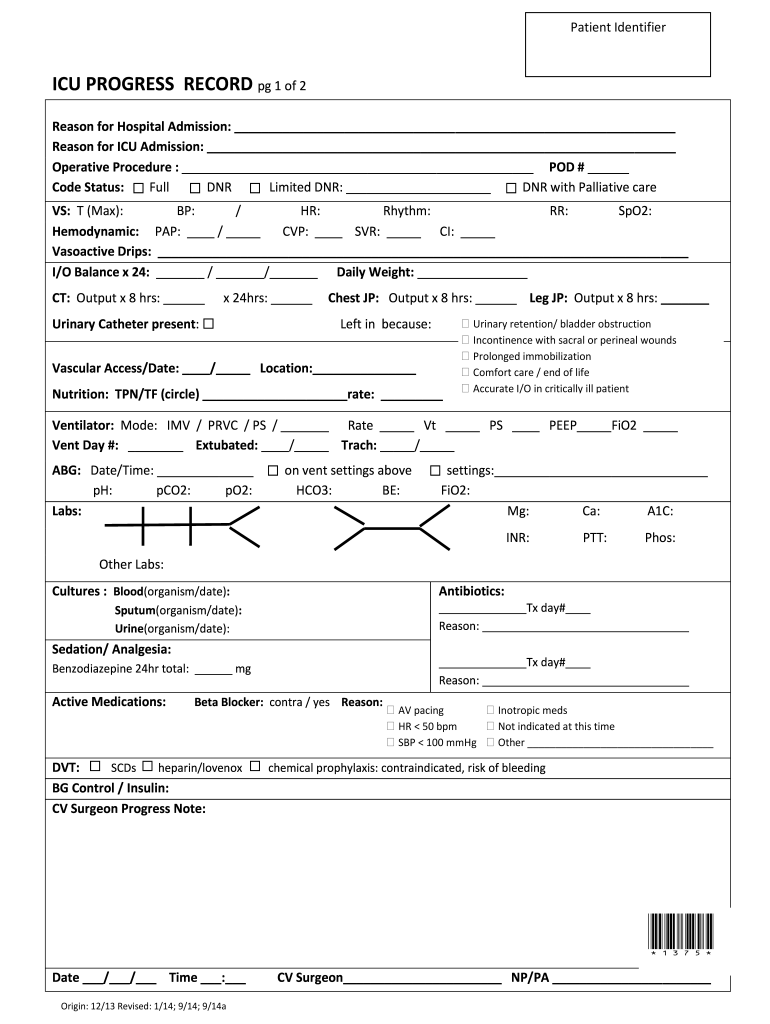
Roper St. Francis Healthcare ICU Progress Record 2014-2026 free printable template
pdfFiller is not affiliated with any government organization

Fill out
Complete the form online in a simple drag-and-drop editor.

eSign
Add your legally binding signature or send the form for signing.

Share
Share the form via a link, letting anyone fill it out from any device.

Export
Download, print, email, or move the form to your cloud storage.
Why pdfFiller is the best tool for your documents and forms


End-to-end document management
From editing and signing to collaboration and tracking, pdfFiller has everything you need to get your documents done quickly and efficiently.
Accessible from anywhere
pdfFiller is fully cloud-based. This means you can edit, sign, and share documents from anywhere using your computer, smartphone, or tablet.
Secure and compliant
pdfFiller lets you securely manage documents following global laws like ESIGN, CCPA, and GDPR. It's also HIPAA and SOC 2 compliant.
What is Roper St. Francis Healthcare ICU Progress Record
The ICU Progress Record is a medical history form used by healthcare professionals to document the progress and status of patients in the Intensive Care Unit (ICU).
pdfFiller scores top ratings on review platforms




No complaints. With some determination, I was able to navigate the site successfully.
love u guys u just need better prices!
Who needs Roper St. Francis Healthcare ICU Progress Record?
Explore how professionals across industries use pdfFiller.

Roper St. Francis Healthcare ICU Progress Record is needed by:
-
CV Surgeons responsible for patient care in ICU
-
Nurse Practitioners (NP) providing critical care treatments
-
Physician Assistants (PA) monitoring patient status
-
Medical Doctors (MD) overseeing overall patient management
-
Healthcare facilities utilizing ICU records
-
Administrators implementing patient documentation systems
Comprehensive Guide to Roper St. Francis Healthcare ICU Progress Record
What is the ICU Progress Record?
The ICU Progress Record is a vital medical form designed for use in healthcare settings, particularly in Intensive Care Units (ICUs). This form documents essential patient information, such as vital signs, major medical events, and lab results. By meticulously tracking patient progress in the ICU, healthcare providers can make informed decisions that directly impact patient care.
The significance of the ICU Progress Record lies in its ability to provide a continuous stream of data that informs medical treatments. It serves as a comprehensive account of a patient's medical history, allowing for seamless transitions between care teams and ensuring that all healthcare professionals are aligned on the patient’s status.
Purpose and Benefits of Using the ICU Progress Record
The primary purpose of the ICU Progress Record is to enhance patient care by facilitating accurate monitoring of critically ill patients. This form acts as a central repository of essential information that supports decision-making among healthcare teams.
Benefits include improved communication between healthcare providers, more effective management of patient care, and better documentation of health trends. The collaboration among CV Surgeons, NPs/PAs, and MDs is crucial, as it fosters a multi-disciplinary approach to patient management.
Key Features of the ICU Progress Record
The ICU Progress Record includes several major sections that are critical for patient monitoring. Key components consist of vital signs, hemodynamic data, lab results, and input/output balance. Each section is designed to capture specific data points that contribute to a holistic view of the patient's health status.
This form is fillable, which streamlines data collection and reduces the risk of errors during manual entry. Additionally, signature requirements for healthcare roles—CV Surgeons, NPs/PAs, and MDs—ensure accountability and compliance with medical standards.
Who Needs the ICU Progress Record?
The ICU Progress Record is essential for various healthcare professionals, including CV Surgeons, NPs/PAs, MDs, and healthcare facilities. Scenarios where this form is beneficial include pre-operative assessments, ongoing patient monitoring, and during shift changes.
This document is integral to the patient care workflow, supporting effective communication and coordination among medical staff to enhance patient outcomes.
How to Fill Out the ICU Progress Record Online (Step-by-Step)
-
Access the ICU Progress Record using a secure internet connection.
-
Complete each section by entering relevant data, following the provided instructions.
-
Double-check all entered information for accuracy and completeness before finalizing the form.
-
Save your changes and prepare for submission according to your institution's guidelines.
Ensuring accuracy in the form is critical as it directly affects patient care decisions. Familiarity with the purpose of each section can aid in effective completion.
Common Errors and How to Avoid Them
Healthcare providers often encounter frequent mistakes while completing the ICU Progress Record. Common errors include incomplete sections, incorrect vital sign entries, and missing signatures.
To avoid these pitfalls, consider implementing a validation checklist before submission. Regularly reviewing the completed form for accuracy can prevent delays in patient care and ensure compliance with healthcare standards.
Security and Compliance of the ICU Progress Record
pdfFiller employs robust security measures to protect sensitive medical documents. Compliance with key regulations such as HIPAA and GDPR ensures that patient privacy is rigorously maintained.
Understanding the importance of security when handling the ICU Progress Record is essential for all healthcare professionals, as it directly impacts patient trust and care quality. Adequate record retention practices must also be followed to comply with legal requirements.
How to Sign or eSign the ICU Progress Record
Signing the ICU Progress Record can be completed either digitally or with a wet signature. The eSigning process offers several benefits, including faster processing and enhanced security compared to traditional signature methods.
It’s crucial for required healthcare roles—CV Surgeons, NPs/PAs, and MDs—to provide their sign-offs to validate the information documented in the form.
Submission and Delivery Methods for the ICU Progress Record
There are multiple submission methods for the completed ICU Progress Record, including physical delivery and electronic submission. Depending on the institution, specific protocols for submission will apply.
To track submission status, it's advisable to seek confirmation of receipt once the form has been submitted. This practice helps maintain a comprehensive patient record and ensures that all necessary parties are informed.
Experience Seamless Form Management with pdfFiller
Users can leverage pdfFiller’s platform to edit, sign, and manage the ICU Progress Record efficiently. Its user-friendly features enhance the experience of filling out healthcare forms while ensuring high levels of security.
Cloud storage capabilities facilitate easy sharing of the document among healthcare professionals, ensuring that the record is readily accessible when needed.
How to fill out the Roper St. Francis Healthcare ICU Progress Record
-
1.Begin by accessing the ICU Progress Record form on pdfFiller. You can search for the form in the pdfFiller search bar or navigate through healthcare form categories.
-
2.Once you have located the form, click to open it. Familiarize yourself with the interface, which includes fields, checkboxes, and instructions.
-
3.Before you begin completing the form, gather all necessary patient information. This includes vital signs, hemodynamic data, lab results, and any significant events to ensure accurate reporting.
-
4.Start filling in the fields according to the sections outlined in the form. Enter patient details, including the reason for hospital admission, vital signs (temperature, blood pressure, heart rate, etc.), and relevant clinical data.
-
5.Utilize the checkboxes for documenting specific conditions or treatments as necessary. Ensure all sections are thoroughly completed as incomplete forms may impede patient care.
-
6.Review the information you've entered carefully. Ensure all details are accurate, and check that required signature lines for CV Surgeons, NPs/PAs, and MDs are left open for finalization.
-
7.Once the form is complete and reviewed, save your progress on pdfFiller. You can opt to download the completed form as a PDF file or submit it directly through the interface.

Who is required to sign the ICU Progress Record?
The ICU Progress Record must be signed by a CV Surgeon, Nurse Practitioner (NP), Physician Assistant (PA), or Medical Doctor (MD), as they are responsible for the patient's care.
What information do I need before filling out this form?
Before completing the ICU Progress Record, gather essential patient data including vital signs, lab results, and details about the patient's condition and treatment in the ICU.
Are there deadlines for submitting the ICU Progress Record?
While specific submission deadlines may not be outlined, it is essential to complete the ICU Progress Record promptly to ensure accurate patient monitoring and care.
How can I submit the completed ICU Progress Record?
Completed forms can be submitted through pdfFiller by saving it electronically or printing it out for physical submission, depending on your facility’s documentation procedures.
What are common mistakes to avoid when filling out the form?
Ensure all fields are completed accurately and avoid leaving any sections blank. Double-check signature requirements for each role before finalizing the document.
Can I edit the form after I have saved it?
Yes, pdfFiller allows you to edit saved documents. Simply re-open the form and make any necessary adjustments before final submission or download.
Is the ICU Progress Record IRS relevant?
No, the ICU Progress Record is not an IRS form and does not pertain to tax documentation. It is solely used within healthcare settings for patient management.
Related Forms



Get the latest insights from our blog


If you believe that this page should be taken down, please follow our DMCA take down process
here
.
This form may include fields for payment information. Data entered in these fields is not covered by PCI DSS compliance.