
Last updated on
Nov 6, 2026

Ohio University ApplicationEmergency Contact Information Form free printable template
pdfFiller is not affiliated with any government organization

Fill out
Complete the form online in a simple drag-and-drop editor.

eSign
Add your legally binding signature or send the form for signing.

Share
Share the form via a link, letting anyone fill it out from any device.

Export
Download, print, email, or move the form to your cloud storage.
Why pdfFiller is the best tool for your documents and forms


End-to-end document management
From editing and signing to collaboration and tracking, pdfFiller has everything you need to get your documents done quickly and efficiently.
Accessible from anywhere
pdfFiller is fully cloud-based. This means you can edit, sign, and share documents from anywhere using your computer, smartphone, or tablet.
Secure and compliant
pdfFiller lets you securely manage documents following global laws like ESIGN, CCPA, and GDPR. It's also HIPAA and SOC 2 compliant.
What is Ohio University ApplicationEmergency Contact Information Form
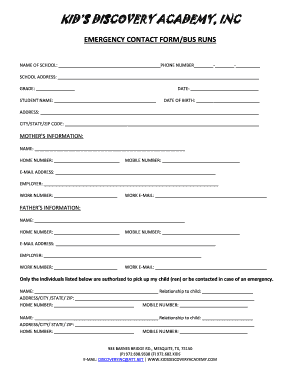
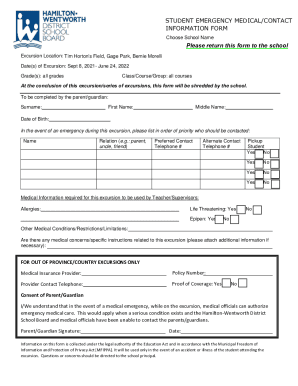
The Emergency Contact Information Form is a document used by parents or guardians to provide essential contact details and consent for their child's participation in a program at Ohio University.
pdfFiller scores top ratings on review platforms




Who needs Ohio University ApplicationEmergency Contact Information Form?
Explore how professionals across industries use pdfFiller.

Ohio University ApplicationEmergency Contact Information Form is needed by:
-
Parents or guardians of participants
-
Educational administrators at Ohio University
-
Teachers and program coordinators
-
Health and safety officials
-
Community program leaders
-
School counselors
Comprehensive Guide to Ohio University ApplicationEmergency Contact Information Form
What is the Emergency Contact Information Form?
The Emergency Contact Information Form serves a critical role in educational settings by enabling parents or guardians to provide essential details necessary for their child's safety. This form is designed to capture comprehensive information, including contact details and parental consent for participation in programs at educational institutions like Ohio University. It ensures that schools have immediate access to necessary contacts during emergencies, thus prioritizing student safety.
This form specifically requires that all parents or guardians provide accurate information regarding their children, emphasizing the importance of consent and communication channels in an educational environment.
Purpose and Benefits of the Emergency Contact Information Form
The Emergency Contact Information Form offers significant benefits both to parents and educational institutions. Primarily, it ensures child safety during various programs by providing critical contact information. In an emergency, quick communication can make a vital difference, and this form helps facilitate that process.
Additionally, the form provides clear consent regarding participation, assuring schools that all necessary permissions have been secured prior to engaging children in activities, thus enhancing operational efficiency and safety protocols.
Who Needs the Emergency Contact Information Form?
This form is required for parents or guardians of participants enrolled in specific programs at educational institutions, particularly at Ohio University. Eligibility primarily includes any parent or guardian looking to enroll their child in these educational activities.
Programs that necessitate this form usually involve direct supervision or activities that may pose a risk to participants, making it crucial for contact information and consent to be readily available.
How to Fill Out the Emergency Contact Information Form Online
To fill out the Emergency Contact Information Form online, follow these detailed steps:
-
Access the form via pdfFiller's platform.
-
Enter the Participant’s Name, Address, and Date of Birth in the designated fields.
-
Provide transportation details, specifying how your child will arrive and depart.
-
Fill out emergency contact information, ensuring multiple contacts are listed if possible.
Double-check each section carefully to avoid missing crucial information, as accurate details are vital for effective communication during emergencies.
Common Errors and How to Avoid Them When Filling Out the Form
When completing the Emergency Contact Information Form, users often encounter several common pitfalls. These may include:
-
Omitting required signatures, which can result in delays or invalid submissions.
-
Providing incomplete or inaccurate information, leading to communication issues.
-
Failing to review specific requirements for each section, causing errors in critical details.
To avoid these errors, take the time to double-check all entries and utilize pdfFiller’s validation prompts, which can help identify potential mistakes before submission.
How to Sign and Submit the Emergency Contact Information Form
Submitting the Emergency Contact Information Form involves a straightforward process for signing and finalizing your submission. First, choose from available digital signature options on pdfFiller. This feature allows you to sign documents securely and efficiently without printing.
After signing, follow the steps to submit your completed form online. Ensure the submission is secured, as pdfFiller prioritizes document security and compliance with relevant regulations.
What Happens After You Submit the Emergency Contact Information Form?
Upon successfully submitting the Emergency Contact Information Form, parents and guardians can expect a confirmation of submission. Users will have the ability to track the status of their documents, providing peace of mind.
In addition, the process typically includes a designated timeframe for processing information, along with instructions on how to amend or check the status of your submission, if necessary.
Security and Compliance for the Emergency Contact Information Form
Security is paramount when handling sensitive information, especially when it concerns minors. pdfFiller employs robust security features such as 256-bit encryption to safeguard data. The platform adheres to compliance standards, including HIPAA and GDPR, ensuring that all sensitive information remains confidential.
Additionally, understanding data retention policies is crucial, as they dictate how long your information is stored and under what conditions it may be accessed.
Why Use pdfFiller for Your Emergency Contact Information Form
Utilizing pdfFiller for completing the Emergency Contact Information Form offers numerous advantages. Its features streamline the process, making editing, eSigning, and document management intuitive and effective.
With a user-friendly interface accessible from any browser, pdfFiller also supports hassle-free document organization and sharing, thereby enhancing user experience significantly while maintaining stringent security standards.
Get Started with Your Emergency Contact Information Form Today!
Taking action to ensure your child’s safety is now easier than ever. By using pdfFiller, you can complete the Emergency Contact Information Form quickly and securely. This process emphasizes the importance of timely submissions and provides you with all necessary tools to manage your documents efficiently.
Explore additional features on pdfFiller and experience the benefits of a streamlined form-filling process designed to meet your needs.
How to fill out the Ohio University ApplicationEmergency Contact Information Form
-
1.To access the Emergency Contact Information Form on pdfFiller, visit the website and use the search function to locate the form by typing its name in the search bar.
-
2.Once you've found the form, click on it to open the fillable PDF in pdfFiller's interface. Take a moment to familiarize yourself with the layout and features available.
-
3.Before starting, gather all necessary information including your child's name, address, date of birth, transportation preferences, and emergency contact names and numbers.
-
4.Begin filling in the form by clicking on the relevant fields. Use the text box to enter information for your child's name, address, and date of birth accurately. Make sure to double-check spellings and numbers.
-
5.As you continue, select the appropriate transportation options by clicking on the checkboxes provided. Ensure that the options you select accurately reflect your preferences for your child's transportation.
-
6.Next, fill in the sections for emergency contact information. Include contact names and their phone numbers so that they can be reached during emergencies.
-
7.After completing the form, review all entered information carefully. Check for any errors or missing fields that may need correction.
-
8.Once everything is verified, save your progress and either download the PDF or submit it directly through pdfFiller if available. Use the 'Save' button to store a copy or 'Submit' to send the form.

Who needs to fill out the Emergency Contact Information Form?
The Emergency Contact Information Form must be completed by parents or guardians of participants enrolled in programs at Ohio University. This form ensures that emergency contacts are on file and that consent is given for participation.
What is the deadline for submitting the form?
The deadline for submitting the Emergency Contact Information Form typically aligns with the program start date. Ensure to check with the specific program or educational administrator for exact submission timelines.
How can I submit the filled form?
You can submit the filled Emergency Contact Information Form through pdfFiller by using the 'Submit' option if available. Alternatively, download the completed form and email or hand-deliver it to the appropriate school or program office.
Are supporting documents required with this form?
No supporting documents are typically required to be submitted with the Emergency Contact Information Form. However, it's essential to ensure that all information is accurate and complete.
What common mistakes should I avoid?
Common mistakes when filling out the Emergency Contact Information Form include leaving fields blank, misspelling names or contact information, and not signing the form where required. Double-check all entries before submission.
How long does it take to process this form?
Processing times for the Emergency Contact Information Form vary depending on the program or department. Generally, you should expect confirmation of receipt within a few days after submission.
What should I do if I forget my emergency contact's information?
If you forget emergency contact details while filling out the Emergency Contact Information Form, it is advisable to gather this information before starting to prevent delays. Ensure you have reliable contacts ready to provide.
Related Forms




Get the latest insights from our blog



If you believe that this page should be taken down, please follow our DMCA take down process
here
.
This form may include fields for payment information. Data entered in these fields is not covered by PCI DSS compliance.