
Last updated on
Oct 2, 2026

Get the free Educational Assistance Plan
We are not affiliated with any brand or entity on this form

Fill out
Complete the form online in a simple drag-and-drop editor.

eSign
Add your legally binding signature or send the form for signing.

Share
Share the form via a link, letting anyone fill it out from any device.

Export
Download, print, email, or move the form to your cloud storage.
Why pdfFiller is the best tool for your documents and forms


End-to-end document management
From editing and signing to collaboration and tracking, pdfFiller has everything you need to get your documents done quickly and efficiently.
Accessible from anywhere
pdfFiller is fully cloud-based. This means you can edit, sign, and share documents from anywhere using your computer, smartphone, or tablet.
Secure and compliant
pdfFiller lets you securely manage documents following global laws like ESIGN, CCPA, and GDPR. It's also HIPAA and SOC 2 compliant.
What is Educational Assistance
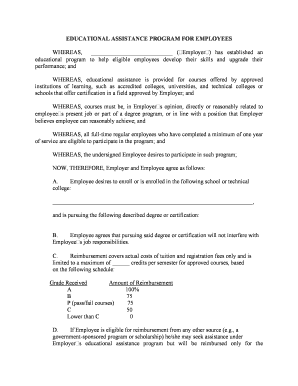
The Educational Assistance Plan is a document used by employers to provide educational benefits to employees under Section 127 of the Internal Revenue Code.
pdfFiller scores top ratings on review platforms




Who needs Educational Assistance?
Explore how professionals across industries use pdfFiller.

Educational Assistance is needed by:
-
Employees seeking educational reimbursement
-
Employers offering educational assistance
-
Human resources departments managing benefits
-
Financial departments overseeing reimbursement processes
-
Tax professionals advising on Section 127
-
Employment advocates or legal advisors for employees
Comprehensive Guide to Educational Assistance
What is the Educational Assistance Plan?
The Educational Assistance Plan is a key benefit available to employees under Section 127 of the Internal Revenue Code. This plan is designed to provide tax-free educational reimbursement, allowing companies to invest in their employees’ education while enhancing their overall benefits package. By offering such assistance, employers can address the educational needs of their workforce, fostering a culture of growth and development.
This plan plays a significant role in promoting employee education benefits and encourages continuous professional development. As a result, both employees and employers can reap the rewards of enhanced skills and knowledge in the workplace.
Purpose and Benefits of the Educational Assistance Plan
The main purpose of the Educational Assistance Plan is to emphasize the advantages it provides to both employees and employers. Employees benefit from educational reimbursement, which can cover costs up to $5,250 per year for qualified educational programs. This enhances their opportunities for advancement while mitigating financial burdens associated with furthering their education.
Employers also stand to gain significantly. By leveraging this plan, they can enjoy tax advantages under Section 127, which can lead to improved employee retention and job satisfaction levels. Fostering continued education through this assistance is linked to a more engaged and skilled workforce.
Key Features of the Educational Assistance Plan
A well-structured Educational Assistance Plan includes various critical components. One important eligibility criterion is that employees must work at least 500 hours per calendar year to qualify. Additionally, the plan outlines specific benefits, including reimbursement limits of up to $5,250 per year.
-
Eligibility criteria based on hours worked
-
Defined reimbursement limits for educational expenses
-
Conditions under which benefits may be forfeited
-
Clearly outlined reimbursement process for ease of access
Who Needs the Educational Assistance Plan?
The Educational Assistance Plan is particularly beneficial for distinct groups within the workplace. Employees seeking educational funding for personal and professional growth are ideal candidates for this program. Employers who want to enhance their benefits packages should also consider implementing this plan.
Furthermore, organizations aiming to comply with IRS regulations can find this plan invaluable, ensuring adherence to requirements while offering meaningful support to their workforce.
How to Fill Out the Educational Assistance Plan Online
Filling out the Educational Assistance Plan online is a straightforward process. Begin by accessing the digital form through the designated platform. Then, follow these step-by-step instructions:
-
Access the form and ensure you have a digital copy.
-
Fill in key fields such as 'Printed Name', 'Signature', and 'Date'.
-
Review each section for accuracy before submission.
-
Comply with all submission requirements for successful processing.
Taking the time to ensure accuracy will aid in maintaining compliance and expedites the review process.
Common Errors and How to Avoid Them
Avoiding common errors in the application process is crucial for the effective submission of the Educational Assistance Plan. Frequently made mistakes include incorrect data entries, missing signatures, and omitting required fields. Implementing best practices can greatly reduce these errors.
-
Double-check all information against eligibility criteria.
-
Verify that all necessary fields are filled correctly.
-
Review the completed form multiple times before submission.
How to Sign and Submit the Educational Assistance Plan
Signing and submitting the Educational Assistance Plan involves a few important steps. Employees and employers must determine the appropriate method of signing, which could include digital signatures for straightforward submission.
In addition to signing, it's essential to follow guidance on submission methods, whether sending via email, uploading online, or postal mail. Tracking the submission status post-filing is recommended to confirm processing.
Security and Compliance for the Educational Assistance Plan
Ensuring security and compliance in managing the Educational Assistance Plan is critical. Handling sensitive documents requires adherence to strict data protection measures. pdfFiller implements methods aligned with regulations such as HIPAA and GDPR, guaranteeing the privacy of user data.
Employers and employees must remain vigilant, securely handling all related documents to maintain compliance and safeguard personal information.
Sample of a Completed Educational Assistance Plan
Providing a reference example for users can significantly aid in completing the Educational Assistance Plan. A visual example of a filled-out form can serve as a guide, showcasing the correct completion of the various sections.
-
Annotations explaining each section based on real data
-
Importance of using such examples for accurate form submissions
Utilizing pdfFiller for Your Educational Assistance Plan Needs
pdfFiller offers a range of capabilities designed to facilitate the management of your Educational Assistance Plan. Users can easily fill, sign, and manage PDFs without the need for software downloads, streamlining the process.
Highlighting features such as accessibility from any browser and robust security measures reflects pdfFiller’s commitment to user needs. Start your educational assistance process today by leveraging pdfFiller's platform for an efficient and secure experience.
How to fill out the Educational Assistance
-
1.Access the Educational Assistance Plan form on pdfFiller by searching for it in the platform’s library or using a direct link provided by your employer.
-
2.Once open, familiarize yourself with the layout of the form. Notice the fillable fields for printed name, signature, and date for both Employee and Employer.
-
3.Gather information beforehand, such as your employee ID, details of educational programs, and any receipts for expenses you wish to reimburse.
-
4.Click on each fillable field to enter your information. Use the instructions provided on pdfFiller for guidance on formatting or required content.
-
5.If there are sections that require checkboxes or selections, click them to indicate your preferences or acknowledgment.
-
6.Carefully review each field after filling it out to ensure accuracy. This is crucial as errors can cause delays in processing your reimbursement.
-
7.Once you have completed all required fields, use the 'review' option on pdfFiller to double-check that all necessary information is accurate and complete.
-
8.Save your work periodically to prevent data loss. After finalizing your entries, choose the save option to download a PDF version of your completed form.
-
9.If required, submit the form electronically through the pdfFiller platform, or download and print it for manual submission to your employer.

Who is eligible for the Educational Assistance Plan?
Employees who work 500 hours or more in a calendar year are eligible to participate in the Educational Assistance Plan and receive benefits.
What is the deadline for submitting the Educational Assistance Plan?
There may not be a specific deadline in the form, but it is advisable to submit your benefits request as soon as possible to avoid missing out on eligible reimbursements.
How do I submit the Educational Assistance Plan once completed?
You can submit the form electronically through pdfFiller or print it out and submit it to your employer's HR department depending on the instructions provided by your company.
What supporting documents do I need for reimbursement?
You typically need to include receipts for qualified educational expenses and any documentation proving your enrollment or participation in educational programs.
What common mistakes should I avoid when completing the form?
Ensure all fields are correctly filled, check the eligibility criteria, and review instructions carefully. Missing signatures or incomplete sections may delay processing.
What are the processing times for reimbursements under this plan?
Processing times can vary depending on the employer’s internal procedures, but typically reimbursements take a few weeks to process after submission.
Can I receive a tax deduction for educational expenses reimbursed through this plan?
Yes, reimbursements for qualified educational expenses may be tax-free under Section 127, but it's advisable to consult a tax professional for specific guidance.
Related Forms




Related Catalogs
Get the latest insights from our blog


If you believe that this page should be taken down, please follow our DMCA take down process
here
.
This form may include fields for payment information. Data entered in these fields is not covered by PCI DSS compliance.