
Last updated on
Nov 7, 2026

MS Petal Primary School (K-2nd) Registration Form 2012-2026 free printable template
pdfFiller is not affiliated with any government organization

Fill out
Complete the form online in a simple drag-and-drop editor.

eSign
Add your legally binding signature or send the form for signing.

Share
Share the form via a link, letting anyone fill it out from any device.

Export
Download, print, email, or move the form to your cloud storage.
Why pdfFiller is the best tool for your documents and forms


End-to-end document management
From editing and signing to collaboration and tracking, pdfFiller has everything you need to get your documents done quickly and efficiently.
Accessible from anywhere
pdfFiller is fully cloud-based. This means you can edit, sign, and share documents from anywhere using your computer, smartphone, or tablet.
Secure and compliant
pdfFiller lets you securely manage documents following global laws like ESIGN, CCPA, and GDPR. It's also HIPAA and SOC 2 compliant.
What is MS Petal Primary School (K-2nd) Registration Form
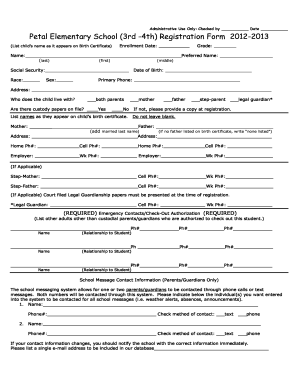
The Petal Primary School Registration Form is a school enrollment document used by parents to enroll children in grades K-2nd for the 2012-2013 school year.
pdfFiller scores top ratings on review platforms




It has made it so much easier to fill out court forms
I liked the access to all the forms. It was great. And as I tried to do ever more complicated things with the forms (strikethroughs, initialing the corrections in random places, etc.) I learned more and more about the tools the platform has. It has just about everything you could imagine.
Who needs MS Petal Primary School (K-2nd) Registration Form?
Explore how professionals across industries use pdfFiller.

MS Petal Primary School (K-2nd) Registration Form is needed by:
-
Parents looking to enroll their child in Petal Primary School
-
Guardians seeking educational opportunities for K-2nd grade students
-
School administrators managing enrollment procedures
-
Child care providers assessing educational options for children
-
Legal guardians needing to complete enrollment documentation for custody arrangements
Comprehensive Guide to MS Petal Primary School (K-2nd) Registration Form
What is the Petal Primary School Registration Form?
The Petal Primary School Registration Form is essential for enrolling children in grades K-2nd for the 2 school year. It serves the vital purpose of collecting accurate and detailed personal information about children, parents, and guardians. Completing this form correctly is crucial for ensuring a smooth educational journey for your child.
Submitting the registration form requires certain documents, including a birth certificate, to confirm the child's identity and eligibility. Accurate information is necessary to avoid delays in the enrollment process.
Purpose and Benefits of the Petal Primary School Registration Form
This registration form provides several benefits for parents and guardians. By completing the form accurately, families can secure a spot in the desired school for their children. Missing deadlines or failing to register properly can lead to adverse outcomes, such as losing a place in the school or delayed access to education.
The form not only ensures timely enrollment but also facilitates a streamlined process for accessing educational resources and supports for the child.
Who Needs the Petal Primary School Registration Form?
The target audience for the Petal Primary School Registration Form includes parents and guardians of children entering grades K-2nd. Eligibility criteria typically require that children must be of a specific age and reside within the district. Unique cases, such as children transferring from other schools, also need to complete this form to ensure a smooth transition into their new educational environment.
How to Fill Out the Petal Primary School Registration Form Online
Filling out the Petal Primary School Registration Form online can streamline the registration process considerably. To fill out the form using pdfFiller, follow these steps:
-
Access the form on pdfFiller's platform.
-
Enter the required personal information, ensuring accuracy.
-
Pay special attention to essential fields, such as custody information.
-
Review the entered information against the checklist provided by pdfFiller.
Utilizing pdfFiller not only simplifies the process but also allows for easy adjustments should any information need updating.
Required Documents for Petal Primary School Registration
To complete the Petal Primary School Registration Form, several mandatory documents are needed. These documents include:
-
Birth certificate to prove the child's identity.
-
Custody papers, if applicable, to clarify legal guardianship.
Each document holds significance in the registration process, as they validate the child's eligibility and circumstances. Parents should ensure that all documents are prepared in the correct formats and multiples of copies when necessary.
Submission Methods for the Petal Primary School Registration Form
Once the form is completed, you can submit it through various methods. Submissions can be made:
-
Online via the official school district website.
-
In-person at designated schools or district offices.
Be mindful of submission deadlines and check if any fees are associated with processing the registration.
What Happens After You Submit the Petal Primary School Registration Form?
After submission, a confirmation process begins immediately, providing reassurance that your application has been received. Parents can track the status of their child's application, ensuring they stay informed throughout the process.
The possible outcomes can vary, and timelines for notifications will depend on the school district's processes and capacity to handle registrations.
Common Errors and How to Avoid Them When Filling the Form
When completing the registration form, it is essential to be aware of common mistakes. Common errors include:
-
Omitting required fields that could delay the application.
-
Providing incorrect personal information leading to complications.
To avoid such pitfalls, double-checking all entries for accuracy is recommended. If corrections are necessary, follow the guidelines provided by the school registration office.
Security and Compliance for the Petal Primary School Registration Form
Utilizing pdfFiller for filling out the Petal Primary School Registration Form ensures that your data is handled securely. pdfFiller employs advanced security measures such as 256-bit encryption and complies with regulations like HIPAA and GDPR.
It's essential to safeguard sensitive information during this process. Understanding your rights regarding data privacy can further enhance the security of your submission.
Why Use pdfFiller for Your Petal Primary School Registration Form?
Choosing pdfFiller for your Petal Primary School Registration Form offers numerous advantages. Its user-friendly features eliminate the need for downloads and allow easy management of the form. Additional benefits include:
-
Digital signing capabilities for quick approval.
-
Access to various support resources, including tutorials and customer service.
Using pdfFiller enhances the overall efficiency of the registration process, making it simpler and more accessible for families.
How to fill out the MS Petal Primary School (K-2nd) Registration Form
-
1.Begin by accessing pdfFiller and searching for the Petal Primary School Registration Form in the template library.
-
2.Once you find the form, click on it to open in the pdfFiller editor, where you will see an interactive version of the document.
-
3.Gather the necessary information before starting. You'll need details like the child's full name, date of birth, and prior school information, along with parents' and guardians' names.
-
4.Navigate through the form fields using your mouse or keyboard to click into each area where information is needed. Use the text boxes to fill in required information and checkboxes for applicable responses.
-
5.Pay attention to sections that require uploading supporting documents. It's important to have a copy of the child's birth certificate and custody papers ready for upload, if necessary.
-
6.Once all fields are filled out accurately, take time to review the entire form to ensure all information is complete and correct.
-
7.After reviewing, you can save your work by clicking the 'Save' button in the pdfFiller interface. You also have the option to download a copy for your records or to print it out directly from pdfFiller.
-
8.To submit the form, check the submission methods available on pdfFiller, following any additional instructions provided for the Petal Primary School, and ensure you complete this process by any specified deadlines.

What are the eligibility requirements for the Petal Primary School Registration?
To enroll in the Petal Primary School, children must be entering grades K-2nd for the 2012-2013 school year. Parents and guardians will need to provide proof of residency and the child's age with a birth certificate.
What is the deadline for submitting the registration form?
Registration deadlines can vary. It's important to check with Petal Primary School for specific dates related to the 2012-2013 school year to ensure timely submission of the registration form.
How can I submit the completed registration form?
Completed forms can be submitted electronically through pdfFiller, or printed out and mailed or delivered in person to Petal Primary School. Check with the school for their preferred submission method.
What supporting documents do I need to attach with the registration form?
You will need to include a copy of your child's birth certificate. If applicable, custody papers or legal guardianship documents may also be required to accompany the registration form.
What are common mistakes to avoid when filling out the registration form?
Common mistakes include omitting required fields, not providing accurate contact information, and failing to attach necessary documents such as birth certificates. Always double-check before submitting.
How long will it take for the registration to be processed?
Processing times can vary based on the volume of applications. Generally, you should allow a few weeks for the school to process your registration and contact you with further information.
Are there any fees associated with the registration process?
Typically, there are no fees for submitting the Petal Primary School Registration Form. However, check with the school district for any potential costs related to enrollment or additional programs.
Related Forms




Related Catalogs
Get the latest insights from our blog


If you believe that this page should be taken down, please follow our DMCA take down process
here
.
This form may include fields for payment information. Data entered in these fields is not covered by PCI DSS compliance.