
Last updated on
Nov 9, 2026
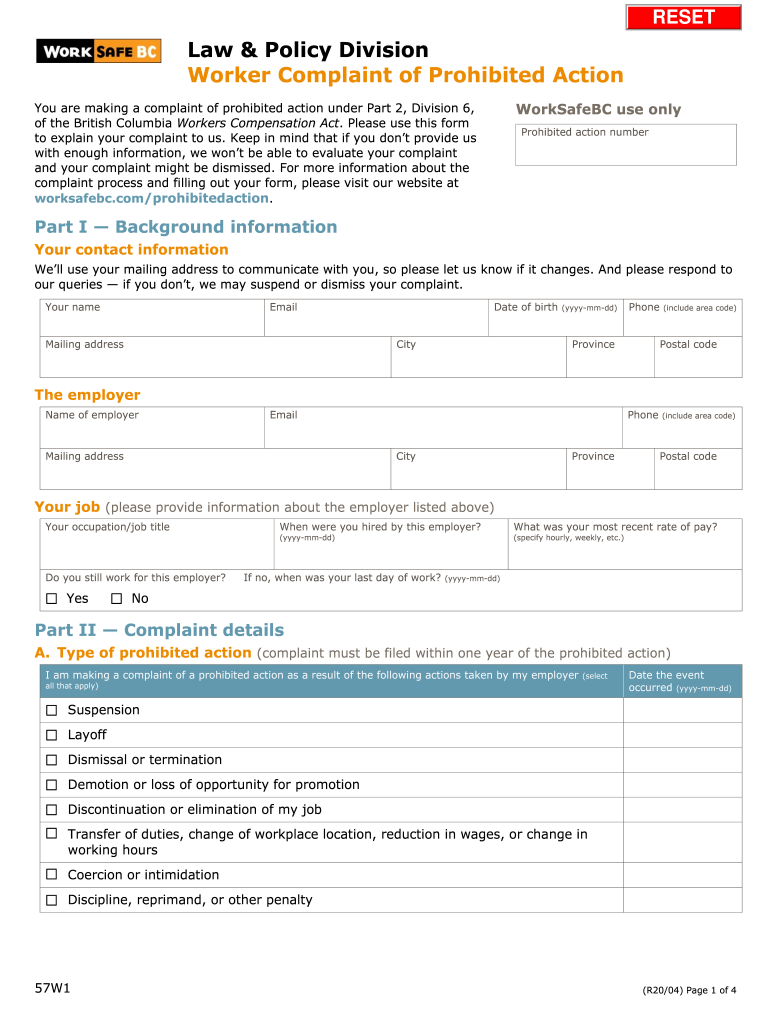
Canada WorkSafe BC 57W1 2020 free printable template
We are not affiliated with any brand or entity on this form

Fill out
Complete the form online in a simple drag-and-drop editor.

eSign
Add your legally binding signature or send the form for signing.

Share
Share the form via a link, letting anyone fill it out from any device.

Export
Download, print, email, or move the form to your cloud storage.
Why pdfFiller is the best tool for your documents and forms


End-to-end document management
From editing and signing to collaboration and tracking, pdfFiller has everything you need to get your documents done quickly and efficiently.
Accessible from anywhere
pdfFiller is fully cloud-based. This means you can edit, sign, and share documents from anywhere using your computer, smartphone, or tablet.
Secure and compliant
pdfFiller lets you securely manage documents following global laws like ESIGN, CCPA, and GDPR. It's also HIPAA and SOC 2 compliant.
What is Canada WorkSafe BC 57W1
The Worker Complaint of Prohibited Action form is a legal document used by workers in British Columbia to file complaints under the Workers Compensation Act.
pdfFiller scores top ratings on review platforms




Who needs Canada WorkSafe BC 57W1?
Explore how professionals across industries use pdfFiller.

Canada WorkSafe BC 57W1 is needed by:
-
Workers filing complaints against employers
-
Employees concerned about workplace safety
-
Advocates assisting workers with rights issues
-
Legal professionals representing clients in disputes
-
Human resource officers handling employee grievances
-
Regulatory bodies monitoring workplace compliance
Comprehensive Guide to Canada WorkSafe BC 57W1
What is the Worker Complaint of Prohibited Action?
The Worker Complaint of Prohibited Action form is a critical mechanism for workers in British Columbia to report illegal actions related to workplace safety. This form operates under the Workers Compensation Act, providing a formal channel for grievances against employers. Filing this complaint with WorkSafeBC is essential to ensure that worker rights are upheld and that workplaces comply with safety regulations.
Purpose and Benefits of Filing a Worker Complaint of Prohibited Action
Understanding the necessity of filing a Worker Complaint of Prohibited Action is vital for all employees. This process empowers workers by delineating their rights under the Workers Compensation Act, reinforcing their ability to ensure a safe working environment. By submitting the complaint, workers contribute to accountability and the establishment of safer workplace standards.
Benefits of filing this complaint include the potential for protective actions taken against employers who violate safety regulations and the promotion of an overall safer workplace culture.
Who Needs to File the Worker Complaint of Prohibited Action?
Eligibility to file the Worker Complaint of Prohibited Action primarily includes any worker who believes they have experienced prohibited actions at work. Specific criteria often involve employment status, nature of the complaint, and potential harm faced in the workplace.
-
Any employee working under hazardous conditions.
-
Individuals encountering retaliation for reporting unsafe practices.
-
Workers who feel unsafe due to employer negligence.
Employers also bear the responsibility to prevent any act that could be considered prohibited, fostering an honest and safe reporting environment.
How to Fill Out the Worker Complaint of Prohibited Action Online
Filling out the Worker Complaint of Prohibited Action form ensures all necessary details are captured accurately. Users can access a fillable form online that features structured fields designed for clarity.
-
Start by entering your personal information, including your name and contact details.
-
Provide information about your employer, including their name and address.
-
Describe the prohibited action and any relevant incidents in detail.
-
Review your entries for accuracy before submission.
Ensuring completeness and precision in the information presented will expedite the assessment process by WorkSafeBC.
Common Errors in Filing the Worker Complaint of Prohibited Action
Avoiding common mistakes when completing the Worker Complaint of Prohibited Action is imperative for successful submission. Many users experience pitfalls that can delay the process.
-
Inadequate details about the incidents can lead to rejection.
-
Neglecting to provide personal information entirely or correctly.
-
Omitting necessary signatures and dates from the form.
To minimize errors, consider validating each field as you complete it to ensure all required sections are filled adequately.
Submission Methods for the Worker Complaint of Prohibited Action
Once the Worker Complaint of Prohibited Action form is ready, understanding submission methods is crucial. Workers can submit the completed form to WorkSafeBC through various channels.
-
Online submissions via the WorkSafeBC website.
-
Mailing the form directly to WorkSafeBC headquarters.
Bear in mind submission deadlines and any potential fees associated with processing the complaint to avoid delays. Documentation supporting the complaint may also be required when filing.
What Happens After You Submit the Worker Complaint of Prohibited Action?
Post-submission, awareness of the follow-up process serves to prepare workers for potential responses from WorkSafeBC. The organization typically assesses complaints and will communicate their findings or the next steps to the complainant.
-
Response time may vary based on the complexity of the complaint.
-
Tracking submission status is possible via the WorkSafeBC portal.
-
Expect an initial acknowledgment within a few weeks of submission.
Having insight into these timelines will assist workers in managing their expectations following the complaint process.
How pdfFiller Can Assist You with the Worker Complaint of Prohibited Action
pdfFiller offers robust support for individuals preparing the Worker Complaint of Prohibited Action. This platform enables users to easily edit and fill out legal forms while ensuring the security of sensitive information.
-
Intuitive platform for filling forms accurately and efficiently.
-
Support for eSigning, making the submission process seamless.
-
Compliance with data protection standards to secure user information.
Utilizing pdfFiller enhances your experience while managing important workplace documents.
Get Started with Your Worker Complaint of Prohibited Action Today!
Starting the filing process with pdfFiller is straightforward and effective. The platform simplifies creating and managing your Worker Complaint of Prohibited Action, offering tools to enhance user experience.
-
Access your forms from any device without downloading software.
-
Utilize features like document management to keep track of submissions.
Begin today to contribute to workplace safety through efficient complaint filing.
How to fill out the Canada WorkSafe BC 57W1
-
1.To access the Worker Complaint of Prohibited Action form, visit pdfFiller's website and use the search function to locate the form by name.
-
2.Once opened, familiarize yourself with the layout of the form, which includes several fields and checkboxes for your responses.
-
3.Before filling out the form, gather necessary information such as your personal details, employer's information, and specifics regarding the prohibited action you want to report.
-
4.Start by entering your full name, contact information, and the details of your employer in the designated fields.
-
5.Next, make sure to describe the nature of the prohibited action clearly and in detail, utilizing the provided checkboxes if applicable.
-
6.Use the guidance notes included in the form to ensure that you understand what information is essential to provide.
-
7.Once all fields are filled in, review your entries meticulously to ensure accuracy, as mistakes may lead to delays.
-
8.After reviewing, use the option to sign the document electronically within the pdfFiller interface.
-
9.Once satisfied with the completed form, save a copy to your device for your records.
-
10.Finally, download the form in your preferred format or use the submission feature on pdfFiller to send it directly to WorkSafeBC.

Who is eligible to use the Worker Complaint of Prohibited Action form?
This form is intended for workers in British Columbia who believe they have experienced prohibited actions as defined under the Workers Compensation Act.
What is the deadline for submitting this form?
There is no strict deadline; however, it is advisable to submit your complaint as soon as possible after the incident to ensure timely processing.
How should I submit the completed form?
You should submit the completed Worker Complaint of Prohibited Action form directly to WorkSafeBC, either electronically through pdfFiller or by mailing a printed copy, depending on your preference.
What supporting documents do I need to include?
You may need to provide documentation that supports your claim, such as emails, witness statements, or any other evidence related to the prohibited action.
What are common mistakes to avoid when filling out this form?
Ensure that all required fields are completed, double-check your personal information, and provide clear descriptions of the prohibited action to avoid processing delays.
How long does it take to process this complaint once submitted?
Processing times may vary, but you can generally expect a response from WorkSafeBC within a few weeks of submission.
Do I need a lawyer to file this complaint?
While it's not mandatory to have a lawyer, consulting one can be beneficial, especially if your complaint may lead to legal action or if you need assistance navigating the process.
Canada WorkSafe BC 57W1 Form Versions
Related Content
Related Forms


Get the latest insights from our blog


If you believe that this page should be taken down, please follow our DMCA take down process
here
.
This form may include fields for payment information. Data entered in these fields is not covered by PCI DSS compliance.