
Last updated on
Nov 9, 2026

ZA INUKA Fragrances Membership Registration Agreement 2020 free printable template
We are not affiliated with any brand or entity on this form

Fill out
Complete the form online in a simple drag-and-drop editor.

eSign
Add your legally binding signature or send the form for signing.

Share
Share the form via a link, letting anyone fill it out from any device.

Export
Download, print, email, or move the form to your cloud storage.
Why pdfFiller is the best tool for your documents and forms


End-to-end document management
From editing and signing to collaboration and tracking, pdfFiller has everything you need to get your documents done quickly and efficiently.
Accessible from anywhere
pdfFiller is fully cloud-based. This means you can edit, sign, and share documents from anywhere using your computer, smartphone, or tablet.
Secure and compliant
pdfFiller lets you securely manage documents following global laws like ESIGN, CCPA, and GDPR. It's also HIPAA and SOC 2 compliant.
What is ZA INUKA Fragrances Membership Registration Agreement
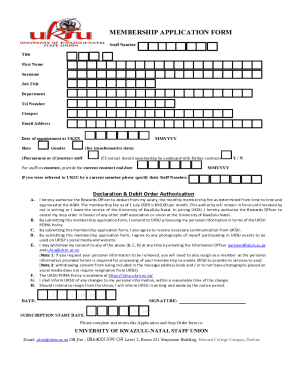
The INUKA Fragrances Membership Registration Form is a business form used by individuals and legal entities to apply for membership in the INUKA Fragrances network.
pdfFiller scores top ratings on review platforms




I love to be able to use the pdf filler app much easier and it has become very important for us in documents we need to fill out and sign and send. I would like to see some ease in the selecting the editing of a document, can the display of boxes for each section be less overlapping each other, this may be difficult to do. Sometimes when you have a saved pdf document you do updates rather than create a whole new document, we use them as templates. Right now the easiest way is to create a document in Word, save it as a Word doc and as a PDF doc. Which is okay, often, time is a factor and to quickly update a pdf file would be faster. Thanks for listening.
Other than being billed initially for a 30 days trial,...
Other than being billed initially for a 30 days trial, I contacted Customer Service right away and they credited me back the $144 first year right away. Otherwise, I am liking the service so far. Just learning how to use it.
Who needs ZA INUKA Fragrances Membership Registration Agreement?
Explore how professionals across industries use pdfFiller.

ZA INUKA Fragrances Membership Registration Agreement is needed by:
-
Individuals seeking wholesale pricing on INUKA products
-
Small business owners wanting to resell INUKA products
-
Entrepreneurs interested in joining a network for personal use or resale
-
Legal entities looking to participate in the INUKA Fragrances business model
-
New members wanting to access membership benefits
Comprehensive Guide to ZA INUKA Fragrances Membership Registration Agreement
What is the INUKA Fragrances Membership Registration Form?
The INUKA Fragrances Membership Registration Form serves as a crucial tool for individuals and legal entities wishing to join the INUKA Fragrances network. This form outlines the personal and banking information required for the registration process, ensuring all necessary details are collected accurately.
Joining the INUKA network comes with responsibilities, including acceptance of terms and conditions associated with membership. The INUKA registration form is vital for accessing exclusive benefits available to members.
Benefits of the INUKA Fragrances Membership Registration Form
Becoming a member through the INUKA Fragrances Membership Registration Form offers numerous advantages. Members can purchase INUKA products at wholesale prices, allowing for significant savings compared to retail shopping.
-
Members can choose to resell INUKA products or use them for personal enjoyment.
-
The membership includes product guarantees, enhancing customer confidence.
-
Access to special promotions and exclusive products reserved for members.
Eligibility Criteria for the INUKA Fragrances Membership Registration Form
To apply for membership using the INUKA Fragrances Membership Registration Form, applicants must meet specific eligibility criteria. Individuals and legal entities are welcome to join, provided they are residents of South Africa.
-
Proof of identity is required to verify applicant credentials.
-
Documentation must clearly demonstrate residency in South Africa.
-
Review the membership terms and conditions before application.
How to Complete the INUKA Fragrances Membership Registration Form Online (Step-by-Step)
Filling out the INUKA Fragrances Membership Registration Form online is straightforward if you follow these steps:
-
Begin by entering your First Name and Surname accurately.
-
Provide your ID Number or Passport Number in the designated field.
-
Ensure you use capital letters throughout the form.
-
Fill in your Email Address, Cell No, and physical address details.
-
Complete the banking section, including Bank Name, Account Number, and Name of Account Holder.
-
Finally, sign the form where indicated to confirm your application.
Common Errors and How to Avoid Them When Filling the INUKA Fragrances Membership Registration Form
Many users encounter common errors when completing the INUKA Fragrances Membership Registration Form. Recognizing these mistakes can help ensure a smooth application process.
-
Check for any missing information, as incomplete forms may lead to rejection.
-
Double-check all entries for accuracy, especially your banking details.
-
Use clear handwriting or a neat typeface to avoid misunderstandings.
Submitting the INUKA Fragrances Membership Registration Form
After completing the INUKA Fragrances Membership Registration Form, follow the submission process carefully. There are multiple methods available for submission, including online and physical options.
-
Choose your preferred submission method: online via the official INUKA website or send a hard copy via mail.
-
Submit payment for the Business Kit alongside your form.
-
Be aware of the processing timeline, which typically varies based on the submission method.
What Happens After You Submit the INUKA Fragrances Membership Registration Form?
Once you have submitted the INUKA Fragrances Membership Registration Form, you can expect certain next steps in the process. Typically, applicants receive confirmation messages to acknowledge receipt of their form.
-
Keep an eye on your email for updates on your application status.
-
Timelines for approval can vary, so check back if you do not receive communication soon.
-
Contact customer support if you need to track the status of your membership application.
Security Measures for the INUKA Fragrances Membership Registration Form
User security is a top priority for the INUKA Fragrances Membership Registration Form. The handling of personal information follows strict data protection practices to ensure privacy.
-
All sensitive data is protected through encryption and compliance with security standards.
-
Users should review the privacy policies to understand how their information is managed.
-
Regular updates to security measures ensure continued protection of user data.
Utilizing pdfFiller to Complete the INUKA Fragrances Membership Registration Form
For ease of completion, users are encouraged to utilize pdfFiller, a robust platform for managing forms. This tool simplifies the process of uploading and editing the INUKA Fragrances Membership Registration Form.
-
Upload your form and make necessary changes directly within the pdfFiller interface.
-
Take advantage of features like eSigning and secure sharing options.
-
The user-friendly interface streamlines the submission process, making it efficient.
How to fill out the ZA INUKA Fragrances Membership Registration Agreement
-
1.Access the INUKA Fragrances Membership Registration Form on pdfFiller by searching for the form name in the pdfFiller search bar.
-
2.Open the form by clicking on it, ensuring that you have a stable internet connection for smooth navigation.
-
3.Familiarize yourself with the layout; you will see various fields that require your personal information.
-
4.Before starting, gather necessary information such as your name, ID number, email address, bank details, and signature.
-
5.Begin filling in the fields sequentially, starting with 'First Name' and following through to 'Account Holder Name'.
-
6.Make sure to fill in all fields in capital letters as specified in the instructions on the form.
-
7.Double-check the accuracy of your information as you proceed, ensuring all details are correctly entered.
-
8.Once you have filled in all required fields, review the form to confirm that no sections are incomplete.
-
9.To finalize the form, confirm your signature and check that all necessary information is present.
-
10.Save your progress regularly to prevent data loss, and use the save function in pdfFiller to keep a copy of your application.
-
11.When you are satisfied with your completed application, download the filled form for your records.
-
12.Submit the form according to the provided submission guidelines, which may include uploading it back to the platform or emailing it.

Who is eligible to complete the INUKA Fragrances Membership Registration Form?
Eligibility for the INUKA Fragrances Membership Registration Form includes individuals and legal entities interested in becoming members to purchase products at wholesale prices or resell them.
What supporting documents are required when submitting this form?
When submitting the INUKA Fragrances Membership Registration Form, you need to include proof of payment for the Business Kit and delivery charges as part of your application.
How can I submit the completed INUKA Membership Registration Form?
You can submit the completed INUKA Membership Registration Form by downloading it from pdfFiller and then uploading it as instructed or emailing it to the specified address in the membership guidelines.
Are there any common mistakes to avoid when filling out this form?
Common mistakes to avoid include entering information in lowercase instead of capital letters, leaving mandatory fields blank, and not attaching necessary supporting documents.
What are the processing times after submitting this form?
Processing times for the INUKA Fragrances Membership Registration Form can vary but expect feedback within a few business days depending on the volume of applications received.
Is there a deadline for submitting the INUKA Membership Registration Form?
While there is generally no fixed deadline, it is advisable to submit the form as soon as possible to ensure timely processing and access to membership benefits.
Can I edit my information after submitting the form?
Once submitted, any changes usually require contacting customer support for the INUKA Fragrances network, as they will need to update your membership records.
ZA INUKA Fragrances Membership Registration Agreement Form Versions
Related Forms




Get the latest insights from our blog



If you believe that this page should be taken down, please follow our DMCA take down process
here
.
This form may include fields for payment information. Data entered in these fields is not covered by PCI DSS compliance.