
Last updated on
Oct 31, 2026

MY FCI Connectors Employment Application 2002-2026 free printable template
We are not affiliated with any brand or entity on this form

Fill out
Complete the form online in a simple drag-and-drop editor.

eSign
Add your legally binding signature or send the form for signing.

Share
Share the form via a link, letting anyone fill it out from any device.

Export
Download, print, email, or move the form to your cloud storage.
Why pdfFiller is the best tool for your documents and forms


End-to-end document management
From editing and signing to collaboration and tracking, pdfFiller has everything you need to get your documents done quickly and efficiently.
Accessible from anywhere
pdfFiller is fully cloud-based. This means you can edit, sign, and share documents from anywhere using your computer, smartphone, or tablet.
Secure and compliant
pdfFiller lets you securely manage documents following global laws like ESIGN, CCPA, and GDPR. It's also HIPAA and SOC 2 compliant.
What is MY FCI Connectors Employment Application
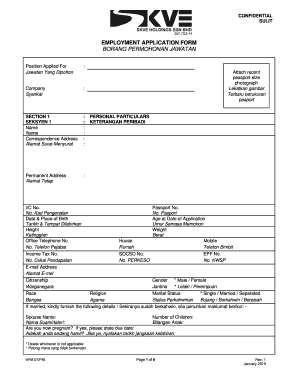
The Employment Application Form is a document used by job applicants to provide essential personal, educational, and employment information to potential employers in Singapore.
pdfFiller scores top ratings on review platforms




The form was simple to upload and simple to use--very intuitive.
easy to use, does what it's supposed to do
Who needs MY FCI Connectors Employment Application?
Explore how professionals across industries use pdfFiller.

MY FCI Connectors Employment Application is needed by:
-
Job seekers applying for positions in Singapore
-
Employers looking to collect applicant information
-
Recruitment agencies assisting with job placements
-
Educational institutions requiring details for internships
-
Government agencies processing employment applications
-
Human resources departments managing applicant records
Comprehensive Guide to MY FCI Connectors Employment Application
What is the Employment Application Form?
The Employment Application Form serves a vital role in the hiring process, primarily collecting personal and professional details from job applicants. This form gathers essential information such as the applicant's name, address, and work history, enabling employers to assess qualifications efficiently. Tailored specifically for use in Singapore, it standardizes the application process for both employers and candidates.
Purpose and Benefits of the Employment Application Form
This form is crucial for both job seekers and employers. For employers, it streamlines data collection and simplifies their selection procedures. Job applicants benefit from presenting their qualifications in a structured format, which increases the chances of standing out. Importance is placed on accuracy and completeness to ensure successful applications.
Key Features of the Employment Application Form
The Employment Application Form includes several essential fields that facilitate user completion. Important sections include:
-
Full Name
-
Residential Address
-
Date of Birth
-
Education and Employment History Checkboxes
Additionally, the declaration section, where applicants must sign, confirms the information's accuracy, further ensuring a trustworthy submission.
How to Fill Out the Employment Application Form Online
Filling out the Employment Application Form online is straightforward. Begin by accessing the form on pdfFiller, then follow these instructions:
-
Open the Employment Application Form on pdfFiller.
-
Complete each section with accurate information—common entries include your name and address.
-
Review your responses to avoid mistakes.
Remember to provide comprehensive and accurate information to create a strong application.
Common Errors and How to Avoid Them
While completing the application form, applicants often encounter common mistakes that can hinder their chances. These include:
-
Leaving required fields empty
-
Inputting incorrect information
Double-checking entries and thoroughly reviewing the completed form before submission can help prevent these pitfalls.
Submission Methods and Delivery
Applicants have several options for submitting the completed Employment Application Form. The primary method is online submission through pdfFiller, which offers a user-friendly experience. Alternative submission methods may apply depending on the employer's preferences or requirements. Always check for confirmation receipts and track submissions for peace of mind.
What Happens After You Submit the Employment Application Form
After submitting the form, the employer undertakes a review process to evaluate all applications. Applicants might expect feedback or interview invitations within specific timeframes. If you do not hear back, consider following up to inquire about your application status.
Security and Compliance for the Employment Application Form
When submitting sensitive information, the security of your data is paramount. pdfFiller employs 256-bit encryption and complies with relevant regulations, such as HIPAA and GDPR, ensuring that your personal data remains protected. Trust in pdfFiller’s secure handling of sensitive documents when using the Employment Application Form.
How pdfFiller Enhances Your Employment Application Experience
pdfFiller significantly improves the Employment Application experience with features designed to simplify form completion. Its capabilities include editable fields, eSigning, and integration with various document management tasks. Users have reported enhanced efficiency and ease when utilizing pdfFiller for their application needs.
Sample Employment Application Form
To assist users in understanding how to complete the Employment Application Form, here is a visual sample featuring a filled-out version. Annotations explain each section's purpose and showcase best practices. This visual reference encourages users to utilize the pdfFiller platform for a streamlined filling experience.
How to fill out the MY FCI Connectors Employment Application
-
1.Begin by accessing the Employment Application Form on pdfFiller. Use the provided link or search for the form in the pdfFiller platform.
-
2.Open the form in the editor. Familiarize yourself with the layout, ensuring you know where to enter information.
-
3.Before filling out the form, gather necessary information including your full name, address, date of birth, identification number, and employment history documents.
-
4.Start filling in the fields: type your full name in block letters in the designated area. Provide your residential address precisely as it appears on official documents.
-
5.Continue by entering your date of birth and identification number, ensuring these details are accurate to avoid future discrepancies.
-
6.In the family particulars section, list relevant family information if required. If you're asked for references, make sure to have contact details for your referees ready.
-
7.Provide educational details, including institutions attended, degrees obtained, and any relevant certifications.
-
8.Answer job-related skills and linguistic abilities honestly. Use the skill area to highlight competencies that align with the job you seek.
-
9.Once you complete all sections, review your entries for correctness. Check for typos or missing information before proceeding.
-
10.Finalize the form by adding your signature in the designated field, confirming the accuracy of your information.
-
11.To save your form, click on the save icon in pdfFiller. You can download it as a PDF or submit it directly to an employer via the platform.

What are the eligibility requirements to use the Employment Application Form?
Typically, anyone applying for a job in Singapore is eligible to use the Employment Application Form. Ensure you have the necessary personal and educational details required for completion.
Is there a deadline for submitting the Employment Application Form?
While there might not be a specific deadline for the form itself, it's essential to submit the application before the job closing date set by the employer. Always check the job listing for submission timelines.
How can I submit the Employment Application Form once completed?
You can submit the Employment Application Form by either downloading it as a PDF and emailing it to the employer or, if applicable, submitting directly through the pdfFiller platform to the recruitment portal.
What supporting documents do I need to provide with the Employment Application Form?
You may need to attach copies of your identification document, educational certificates, and any relevant references. Check the specific job posting for required attachments.
What common mistakes should I avoid when completing the form?
Ensure all fields are filled accurately and completely. Avoid typographical errors, especially in your contact information and identification number, as these can lead to complications in processing your application.
How long does it take to process the Employment Application once submitted?
Processing times can vary. Typically, employers may take anywhere from a few days to several weeks to review applications and contact candidates for interviews or further steps.
Can I edit my Employment Application Form after submitting it?
Once submitted, your ability to edit the Employment Application Form depends on the employer's process. If changes are needed, contact the employer's HR department promptly to discuss options.
Related Content
Related Forms


Related Catalogs
Get the latest insights from our blog


If you believe that this page should be taken down, please follow our DMCA take down process
here
.
This form may include fields for payment information. Data entered in these fields is not covered by PCI DSS compliance.