
Last updated on
Nov 10, 2026

MI PC 634 2014 free printable template
pdfFiller is not affiliated with any government organization

Fill out
Complete the form online in a simple drag-and-drop editor.

eSign
Add your legally binding signature or send the form for signing.

Share
Share the form via a link, letting anyone fill it out from any device.

Export
Download, print, email, or move the form to your cloud storage.
Why pdfFiller is the best tool for your documents and forms


End-to-end document management
From editing and signing to collaboration and tracking, pdfFiller has everything you need to get your documents done quickly and efficiently.
Accessible from anywhere
pdfFiller is fully cloud-based. This means you can edit, sign, and share documents from anywhere using your computer, smartphone, or tablet.
Secure and compliant
pdfFiller lets you securely manage documents following global laws like ESIGN, CCPA, and GDPR. It's also HIPAA and SOC 2 compliant.
What is MI PC 634
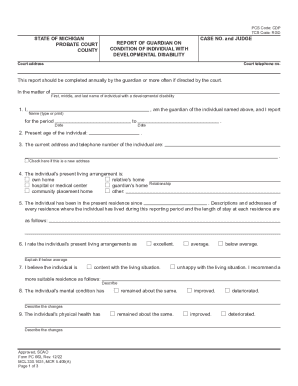
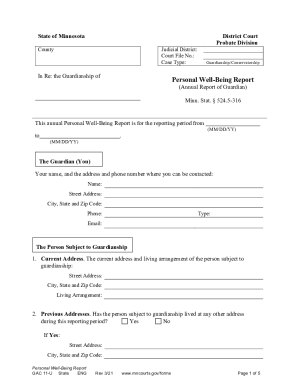
The Michigan Annual Report of Guardian is a legal document used by guardians to annually report on the condition of a legally incapacitated individual.
pdfFiller scores top ratings on review platforms




They were able to help this temporarily disabled vet with completing ************** forms without requiring a 30 day trial membership. I greatly appreciated their prompt and personal customer service and accommodation of my request for help. ******* J in *******, **
Easy to use.
Really easy to use and very affordable compared to mainstream options
Mostly all forms I search is here
Very easy and fast!
It is great
Who needs MI PC 634?
Explore how professionals across industries use pdfFiller.

MI PC 634 is needed by:
-
Guardians of legally incapacitated individuals
-
Probate court officials in Michigan
-
Family members of wards requiring guardianship
-
Legal aid organizations assisting guardians
-
Social workers involved with adults under guardianship
Comprehensive Guide to MI PC 634
What is the Michigan Annual Report of Guardian?
The Michigan Annual Report of Guardian is a legal form essential for guardians in Michigan. This report provides a comprehensive overview of the guardian’s observations and assessments regarding the condition of the legally incapacitated individual. Reporting is crucial as it fulfills the requirements set forth by the Michigan probate court, ensuring that the wards are well cared for and that their rights are upheld.
Understanding this report is imperative for guardians as it directly reflects on their responsibilities and adherence to legal standards. The document serves not just as a record, but as a protective measure for the interests of the individuals under guardianship.
Purpose and Benefits of the Michigan Annual Report of Guardian
This annual report plays a vital role in maintaining transparency and accountability. By completing this report, guardians ensure they are fulfilling their obligations while keeping the court and interested parties informed about the well-being of the legally incapacitated individual.
-
Ensures accountability of the guardian.
-
Informs the court about the individual's health, living situation, and social interactions.
-
Highlights the guardian's role in advocating for and protecting the rights of the incapacitated individual.
Who Needs to Complete the Michigan Annual Report of Guardian?
Only individuals who qualify as guardians under Michigan law need to fill out this report. Guardianship usually arises from a legal determination of incapacity, often necessitating submission of this form on an annual basis.
Responsibilities are significant; guardians must complete and detail their observations accurately to comply with legal requirements. Non-compliance could have serious legal implications, so understanding this obligation is crucial for any guardian.
When and How to File the Michigan Annual Report of Guardian
Filing the Michigan Annual Report of Guardian is not only a legal requirement but also a vital aspect of ensuring continual oversight of the incapacitated individual’s care.
-
The report must be filed annually, with specific deadlines following Michigan law.
-
A step-by-step guide includes completing the form and submitting it through acceptable methods.
-
It's essential to serve the report on the ward and all interested parties promptly after filing.
How to Fill Out the Michigan Annual Report of Guardian Online
Completing this report online can be streamlined with the right tools. The Michigan Annual Report of Guardian includes sections focusing on various aspects, such as the adult's living arrangements, health assessments, and social activities.
Using platforms like pdfFiller can enhance this experience by offering intuitive features that simplify the form-filling process. Users are encouraged to follow field-by-field instructions to ensure accuracy.
Common Mistakes When Completing the Michigan Annual Report of Guardian
Many guardians fall into the trap of making common errors when submitting the report. These mistakes often arise from omissions or inaccuracies that can jeopardize the integrity of the submission.
-
Thorough documentation of the individual’s status is crucial.
-
Reviewing the form thoroughly before submission can prevent these common errors.
Submitting the Michigan Annual Report of Guardian: Delivery and Tracking
The process of submitting the report encompasses various methods designed for convenience. Guardians can choose from online submissions, mailing the document, or delivering it in person, depending on their preference.
To confirm receipt of the report by the court, guardians should seek verification to ensure compliance. Should any issues arise after submission, knowing the next steps can be invaluable.
What Happens After You Submit the Michigan Annual Report of Guardian?
Upon submission, the report undergoes a review process by the probate court, which checks for completeness and adherence to legal standards. The outcomes can vary; the court may respond with acceptance, request further information, or even require revisions if the submission is deficient.
Understanding the possible responses ensures guardians are prepared to take necessary actions following submission.
Ensuring Privacy and Security for Your Michigan Annual Report of Guardian
In an age where data security is paramount, utilizing secure platforms like pdfFiller offers peace of mind. The platform ensures that sensitive information is protected through advanced security features, including encryption and compliance with legal standards.
It is crucial for guardians to prioritize the protection of sensitive personal information, especially when managing critical documents like the Michigan Annual Report of Guardian.
Experience Seamless Filling of the Michigan Annual Report of Guardian with pdfFiller
pdfFiller enhances the process of filling out the Michigan Annual Report of Guardian with cloud-based access and a user-friendly interface. It allows guardians to manage documents securely and effectively without the need for additional downloads or software installations.
Exploring the features of pdfFiller can greatly assist guardians in meeting their legal obligations regarding document management and submission.
How to fill out the MI PC 634
-
1.To access the Michigan Annual Report of Guardian, go to pdfFiller's website and log in or create an account if you don’t have one. Use the search feature to find the specific form by typing 'Michigan Annual Report of Guardian' into the search bar.
-
2.Once the form is open, you will see fillable fields throughout the document. Click on each field to enter the required information. Use the navigation tools on the side to help you move between sections quickly.
-
3.Before filling out the form, gather necessary information about the individual under guardianship. This includes their living arrangement, physical and mental health status, social activities, and any unmet needs. Have previous reports available for reference to ensure consistency.
-
4.After filling out all necessary fields, review the completed report carefully to check for any missing information or errors. Make sure all sections are complete and you have answered all questions accurately.
-
5.Once you are satisfied with the information entered, save your work. pdfFiller offers options to download the completed form as a PDF or to share it directly from the platform, ensuring you can easily submit it to the probate court or provide it to interested parties.

Who is eligible to complete the Michigan Annual Report of Guardian?
Only appointed guardians of legally incapacitated individuals can complete the Michigan Annual Report of Guardian. If you do not hold this designation, you cannot file this report.
What is the deadline for submitting the report?
The Michigan Annual Report of Guardian must be completed and submitted annually. It is advisable to check specific dates with the local probate court as variation may occur based on local rules.
How do I submit the completed report?
After completing the Michigan Annual Report of Guardian, you must file it with the appropriate probate court. You can also serve copies to the ward and any interested parties as required.
Are there any supporting documents needed with the report?
Typically, the Michigan Annual Report of Guardian does not require additional documents. However, it is a good practice to include any relevant information or prior reports that support your current submission.
What are common mistakes to avoid when completing the report?
Common mistakes include leaving fields blank, providing inaccurate information about the individual's status, and missing the submission deadline. Ensure thorough reviews are conducted before finalizing the report.
How long does processing the report take after submission?
Processing times can vary depending on the local probate court's workload. Generally, it can take several weeks to process submitted reports, so it’s advisable to submit the report well ahead of any deadlines.
What should I do if I need assistance with the form?
If you need assistance with the Michigan Annual Report of Guardian, consider contacting legal aid organizations or consulting with an attorney knowledgeable in guardianship laws. Many online platforms, including pdfFiller, also offer customer support.
MI PC 634 Form Versions
Related Content
Related Forms




Get the latest insights from our blog



If you believe that this page should be taken down, please follow our DMCA take down process
here
.
This form may include fields for payment information. Data entered in these fields is not covered by PCI DSS compliance.