
Last updated on
Nov 6, 2026

Which Wich Boxed Lunch free printable template
We are not affiliated with any brand or entity on this form

Fill out
Complete the form online in a simple drag-and-drop editor.

eSign
Add your legally binding signature or send the form for signing.

Share
Share the form via a link, letting anyone fill it out from any device.

Export
Download, print, email, or move the form to your cloud storage.
Why pdfFiller is the best tool for your documents and forms


End-to-end document management
From editing and signing to collaboration and tracking, pdfFiller has everything you need to get your documents done quickly and efficiently.
Accessible from anywhere
pdfFiller is fully cloud-based. This means you can edit, sign, and share documents from anywhere using your computer, smartphone, or tablet.
Secure and compliant
pdfFiller lets you securely manage documents following global laws like ESIGN, CCPA, and GDPR. It's also HIPAA and SOC 2 compliant.
What is Which Wich Boxed Lunch
The Boxed Lunch Order Form is a business document used by customers to customize and order boxed lunches from a menu of available options.
pdfFiller scores top ratings on review platforms




This program is very user friendly. Thank you for making my job a little easier. No more faxing :)
PDF Filler is crisp and fast. It took care of my needs seamlessly and productively. I would recommend and use it again and again!
Who needs Which Wich Boxed Lunch?
Explore how professionals across industries use pdfFiller.

Which Wich Boxed Lunch is needed by:
-
Caterers needing efficient order management
-
Event planners coordinating meal options
-
Businesses organizing group lunches
-
Schools arranging student meals
-
Individuals placing personal lunch orders
Comprehensive Guide to Which Wich Boxed Lunch
What is the Boxed Lunch Order Form?
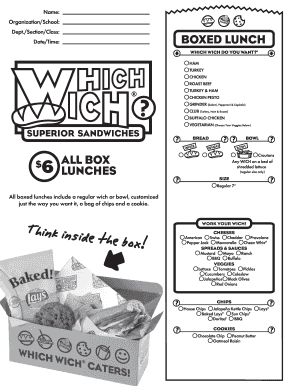
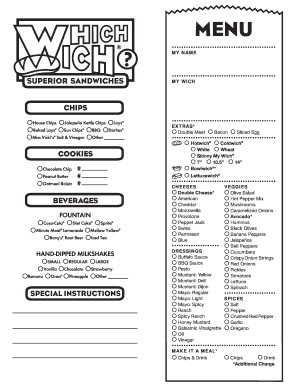
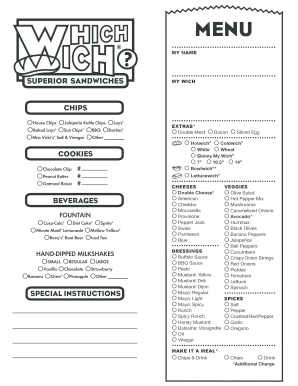
The Boxed Lunch Order Form is designed to facilitate the customization and ordering of boxed lunches from a diverse menu. Users can personalize their meal by selecting from a variety of options, including different types of wiches, bread types, cheeses, spreads, and veggies. Each boxed lunch typically comes with a regular wich or bowl, a bag of chips, and a cookie, providing a complete meal in one convenient package.
Benefits of Using the Boxed Lunch Order Form
Utilizing the Boxed Lunch Order Form streamlines the lunch ordering process, making it both efficient and convenient. Users can pre-select their meal options, which is especially beneficial for accommodating dietary restrictions and preferences. This structured approach enhances organization, particularly for group orders or business events, where meal planning can often become complex.
Key Features of the Boxed Lunch Order Form
This form boasts several user-friendly features that promote efficiency and ease of use. The fillable checkboxes allow for quick selection of meal components. Its clear structure and layout enable swift completion, while the customization options cater to individual or group preferences, ensuring that everyone’s tastes are taken into account.
-
Fillable checkboxes for easy selection
-
Clear structure and layout for quick completion
-
Customization options for personal and group preferences
Who Should Use the Boxed Lunch Order Form?
The Boxed Lunch Order Form is ideal for a variety of users, including businesses, event planners, and individuals organizing gatherings. It simplifies meal planning in scenarios such as corporate lunches, team meetings, and events, ensuring that food can be efficiently catered. Catering services can greatly benefit from this tool, as it allows for precise orders that cater to a range of needs.
How to Complete the Boxed Lunch Order Form Online
Filling out the Boxed Lunch Order Form online is straightforward and user-friendly. Start by accessing the form via the designated platform. Then, select your wiches, sides, and any extra items you wish to include. Before submission, it's advisable to thoroughly review your order for accuracy to avoid any discrepancies.
-
Access the form from the provided link
-
Select your preferred wiches, sides, and extras
-
Review the entire order for accuracy before submitting
Submission Methods for the Boxed Lunch Order Form
Once completed, the Boxed Lunch Order Form can be submitted through several convenient methods. Users can choose to submit digitally via email or an online platform. For those who prefer traditional methods, printing the form and delivering it by hand is also an option. Users will receive confirmation regarding their submission status, ensuring peace of mind.
-
Digital submission via email or online platform
-
Print and hand-delivery options
-
Confirmation and tracking of submission status
Security and Compliance with the Boxed Lunch Order Form
When using the Boxed Lunch Order Form, users can feel secure knowing their personal information is protected. pdfFiller implements robust security measures, including 256-bit encryption, to safeguard data. Additionally, the platform complies with data protection regulations such as HIPAA and GDPR, ensuring that sensitive documents are handled responsibly and securely.
Editing and Managing Your Boxed Lunch Order Form with pdfFiller
pdfFiller offers capabilities that make managing the Boxed Lunch Order Form easy. Users can edit their selections and make necessary changes before final submission. The platform also allows for saving, sharing, and managing previous orders, along with options to export or print the completed form for personal records.
Real-Life Examples of Completed Boxed Lunch Order Forms
Providing visual samples and descriptions of filled-out Boxed Lunch Order Forms can greatly assist users. These examples showcase common choices and customization options, helping users understand how to effectively complete their own forms. Best practices observed in these completed forms can guide new users in making informed selections.
-
Visual samples of completed forms
-
Descriptions of common choices and customization
-
Summary of best practices for filling out forms
Getting Started with pdfFiller for Your Boxed Lunch Order
Getting started with pdfFiller to fill out the Boxed Lunch Order Form is quick and easy. Users can create an account and access the form in just a few simple steps. The cloud-based editing features provide flexibility and ease of use, making the entire process efficient. Feedback and suggestions for improvement are welcome, enhancing the user experience moving forward.
How to fill out the Which Wich Boxed Lunch
-
1.To begin, access the Boxed Lunch Order Form on pdfFiller by searching for it on their platform or using a direct link provided by your caterer.
-
2.Once open, familiarize yourself with the layout of the form, which includes various sections for wiches, bread types, cheeses, spreads, and veggies.
-
3.Before filling out the form, gather all necessary information, including preferences for wiches, dietary restrictions, and any specific requests you may have.
-
4.Click on the first checkbox to select your preferred type of wich. Repeat this action for bread types, cheeses, spreads, and veggies by clicking the corresponding options.
-
5.Ensure that you review any additional items needed, such as bag of chips or cookies, and indicate your preference where applicable.
-
6.Once all fields are completed, carefully review your selections for accuracy to avoid mistakes.
-
7.To finalize, save your work regularly to prevent loss, and utilize the 'Download' or 'Submit' features on pdfFiller to send your order directly to the catering service.

Who can use the Boxed Lunch Order Form?
The Boxed Lunch Order Form is designed for anyone looking to customize and order boxed lunches, including individuals, businesses, and organizations hosting events.
Are there deadlines for submitting the Boxed Lunch Order Form?
Yes, it is advisable to submit your Boxed Lunch Order Form at least 48 hours in advance to ensure your selections can be accommodated.
How do I submit the Boxed Lunch Order Form?
You can submit the form through pdfFiller by downloading it and emailing it to your caterer or using the 'Submit' option available on the platform.
What information do I need before filling out the form?
Before starting, gather details about your lunch preferences, such as wich types, bread choices, and any dietary restrictions or special requests.
What are common mistakes to avoid when filling out the form?
Common mistakes include leaving fields incomplete, not reviewing the order for accuracy, and miscalculating quantities, which could affect your final order.
How long does it take to process my order after submitting the form?
Processing times may vary, but typically you should expect confirmation within 24 hours of submitting your Boxed Lunch Order Form.
What should I do if I change my mind after submitting?
If you need to make changes after submission, contact your caterer directly as soon as possible to update your order based on their policy.
Related Content
Related Forms


Related Catalogs
Get the latest insights from our blog


If you believe that this page should be taken down, please follow our DMCA take down process
here
.
This form may include fields for payment information. Data entered in these fields is not covered by PCI DSS compliance.