
Last updated on
Oct 31, 2026

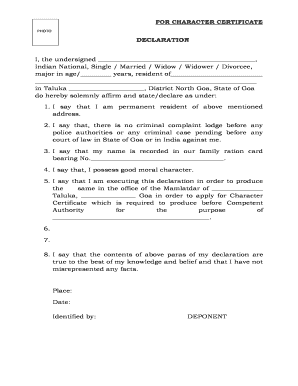
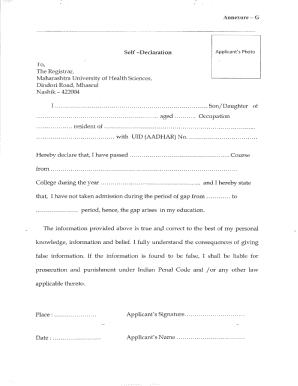
Get the free Self Declaration Form for Residence Certificate Goa
We are not affiliated with any brand or entity on this form

Fill out
Complete the form online in a simple drag-and-drop editor.

eSign
Add your legally binding signature or send the form for signing.

Share
Share the form via a link, letting anyone fill it out from any device.

Export
Download, print, email, or move the form to your cloud storage.
Why pdfFiller is the best tool for your documents and forms


End-to-end document management
From editing and signing to collaboration and tracking, pdfFiller has everything you need to get your documents done quickly and efficiently.
Accessible from anywhere
pdfFiller is fully cloud-based. This means you can edit, sign, and share documents from anywhere using your computer, smartphone, or tablet.
Secure and compliant
pdfFiller lets you securely manage documents following global laws like ESIGN, CCPA, and GDPR. It's also HIPAA and SOC 2 compliant.
What is Goa Residence Certificate
The Self Declaration Form for Residence Certificate Goa is a government document used by residents to declare their residence for voter registration and other official purposes.
pdfFiller scores top ratings on review platforms




I'VE BEEN USING IF FOR A FEW DAYS FOR REAL ESTATE CONTRACTS AND LOVE IT. VERY STRAIGHTFORWARD AND USER-FRIENDLY.
I know that most IRS forms are free and can be saved to my files, however sometimes trying to download the forms is difficult to do. PD Filler is much more user friendly and easy to follow.
Who needs Goa Residence Certificate?
Explore how professionals across industries use pdfFiller.

Goa Residence Certificate is needed by:
-
Goa residents applying for a residence certificate
-
Individuals needing to register to vote in Goa
-
Residents accessing government services
-
Students who need residency proof
-
Property owners in Goa requiring documentation
-
Citizens submitting a self-declaration for legal purposes
Comprehensive Guide to Goa Residence Certificate
What is the Self Declaration Form for Residence Certificate Goa?
The Self Declaration Form for Residence Certificate Goa serves as a crucial document for residents seeking to confirm their residency in Goa. This form is particularly important as it is often required for a variety of official purposes, including voter registration and eligibility for government benefits. By filling out this form, residents can assert their status and gain access to essential services.
Purpose and Benefits of the Self Declaration Form for Residence Certificate Goa
This form provides legal proof of residence in Goa, which is mandatory for accessing several government services. By declaring their residency, individuals streamline their applications for benefits and ensure compliance with local regulations.
-
Acts as a legal verification of residence.
-
Facilitates processes such as voter registration.
-
Enhances access to government assistance programs.
Who Needs the Self Declaration Form for Residence Certificate Goa?
The Self Declaration Form is generally required for various groups within Goa, including homeowners, tenants, and students. Eligibility depends on factors such as the duration of residency and the purpose for which the certificate is needed.
-
Homeowners verifying their permanent residence.
-
Tenants needing to prove residency for applications.
-
Students residing temporarily for educational purposes.
How to Fill Out the Self Declaration Form for Residence Certificate Goa Online
To complete the form online, applicants must follow specific steps to ensure accuracy and compliance. Each field requires careful attention to detail.
-
Access the form on pdfFiller.
-
Fill in all required fields, including your name and date.
-
Add your signature where indicated.
-
Review for completeness to avoid common errors.
Required Documents and Supporting Materials for the Self Declaration Form
Applicants are required to submit several documents alongside the Self Declaration Form to validate their residency. These documents play a crucial role in the processing of the application.
-
Proof of residence, such as utility bills.
-
Valid government-issued identification.
-
Any additional documents as specified by local authorities.
Submission Methods for the Self Declaration Form for Residence Certificate Goa
Once completed, the Self Declaration Form can be submitted through various channels to the relevant government authority in Goa.
-
Online submission via the official portal.
-
In-person delivery to designated offices.
-
Ensure you keep copies of your submission for tracking.
What Happens After You Submit the Self Declaration Form for Residence Certificate Goa?
After submission, applicants can expect specific timelines for processing. Tracking the status of the application is recommended.
-
Processing typically takes several weeks.
-
Applicants can check their submission status online.
-
Outcomes may include approval, requests for more information, or denial.
Common Mistakes and How to Avoid Them When Filling Out the Self Declaration Form
To avoid complications, it’s vital to recognize common pitfalls when filling out the form.
-
Ensure all mandatory fields are filled correctly.
-
Double-check personal information for accuracy.
-
If mistakes are found post-submission, follow the correction process as advised by local authorities.
Security and Privacy Considerations for the Self Declaration Form for Residence Certificate Goa
When handling personal information in the Self Declaration Form, it is essential to prioritize security.
-
Utilize platforms with strong encryption protocols.
-
Ensure compliance with relevant data protection regulations.
-
Be mindful of sharing sensitive information publicly.
Enhance Your Experience: Using pdfFiller to Complete the Self Declaration Form for Residence Certificate Goa
Utilizing pdfFiller for filling out the Self Declaration Form offers a user-friendly way to manage your documents.
-
Access features like electronic signatures and document editing.
-
Enjoy the convenience of cloud-based form filling.
-
Begin using pdfFiller with easy-to-follow steps provided on their platform.
How to fill out the Goa Residence Certificate
-
1.To start, visit pdfFiller and log in to your account. If you don’t have an account, create one for free.
-
2.Search for the 'Self Declaration Form for Residence Certificate Goa' in the template library. Click on the form to open it in the editor.
-
3.Before filling out the form, gather all necessary information, including your personal details, proof of residency, and any required identification documents.
-
4.Using pdfFiller’s interface, click on each fillable field. Start by entering your name in the 'Name' field, followed by the relevant date.
-
5.Next, add your signature in the designated area. You can either draw your signature using a mouse or upload an image of your signature.
-
6.After filling in all required fields, take a moment to review your entries. Ensure there are no typos and all information is accurate to avoid delays.
-
7.Once you are satisfied with your form, you can save and download it. Click on the 'Save' button to store it to your account.
-
8.Finally, print the completed form for submission. Scan and attach any required documents before submitting it to the relevant government office in Goa.

Who is eligible to fill out the Self Declaration Form for Residence Certificate Goa?
Any resident of Goa who needs to declare their residence for purposes such as voter registration or accessing government services is eligible to fill out this form.
What documents do I need to submit with this form?
You may need to provide supporting documents such as proof of residency, identification documents, and other relevant paperwork to validate your residence claim.
How do I submit the Self Declaration Form after filling it out?
Once you have completed the form, you need to print it and submit it to the relevant government authority in Goa. Ensure you check for any additional submission guidelines.
Is there a deadline for submitting this form?
While there may be specific deadlines depending on the purpose of the declaration, it's best to submit the form as soon as possible to avoid delays in services.
Can I complete this form online?
The Self Declaration Form for Residence Certificate Goa must typically be filled out manually and submitted in person; online submissions may not be available.
What is the processing time for this form once submitted?
Processing times can vary, but it usually takes several days to a few weeks. Contact your local government office for more precise information.
What common mistakes should I avoid while filling out the form?
Ensure all required fields are completed, avoid missing signatures, and double-check that your supporting documents are attached to prevent delays.
Related Forms





Get the latest insights from our blog


If you believe that this page should be taken down, please follow our DMCA take down process
here
.
This form may include fields for payment information. Data entered in these fields is not covered by PCI DSS compliance.