
Last updated on
Nov 9, 2026

TX DPS Computerized Criminal History (CCH) Verification 2011 free printable template
pdfFiller is not affiliated with any government organization

Fill out
Complete the form online in a simple drag-and-drop editor.

eSign
Add your legally binding signature or send the form for signing.

Share
Share the form via a link, letting anyone fill it out from any device.

Export
Download, print, email, or move the form to your cloud storage.
Why pdfFiller is the best tool for your documents and forms


End-to-end document management
From editing and signing to collaboration and tracking, pdfFiller has everything you need to get your documents done quickly and efficiently.
Accessible from anywhere
pdfFiller is fully cloud-based. This means you can edit, sign, and share documents from anywhere using your computer, smartphone, or tablet.
Secure and compliant
pdfFiller lets you securely manage documents following global laws like ESIGN, CCPA, and GDPR. It's also HIPAA and SOC 2 compliant.
What is TX DPS Computerized Criminal History (CCH) Verification
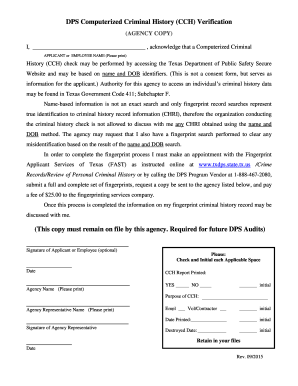
The Texas CCH Verification Form is a document used by individuals and agencies to authorize a computerized criminal history check by the Texas Department of Public Safety.
pdfFiller scores top ratings on review platforms




Who needs TX DPS Computerized Criminal History (CCH) Verification?
Explore how professionals across industries use pdfFiller.

TX DPS Computerized Criminal History (CCH) Verification is needed by:
-
Job applicants needing background checks for employment.
-
Employees undergoing routine criminal history verification.
-
Agency representatives submitting verification requests.
-
Educational institutions conducting background checks on applicants.
-
Volunteers in sensitive roles requiring background assessments.
Comprehensive Guide to TX DPS Computerized Criminal History (CCH) Verification
What is the Texas CCH Verification Form?
The Texas CCH Verification Form is designed to authorize a computerized criminal history check by the Texas Department of Public Safety. This critical document requires essential applicant information, including full name, date of birth, and fingerprints. It also includes sections for information related to the agency, along with signature fields for both the applicant and an agency representative, ensuring proper identification and verification.
Purpose and Benefits of the Texas CCH Verification Form
The Texas CCH Verification Form plays a vital role for applicants and agency representatives. By completing this form, individuals can access employment opportunities, particularly in sectors that require thorough background screening, such as education, healthcare, and law enforcement. Additionally, this form helps maintain compliance with state regulations required for various job positions.
Who Needs the Texas CCH Verification Form?
This form is essential for various roles, especially for applicants seeking employment in regulated industries or agency representatives facilitating background checks. Individuals applying for jobs in education, healthcare, or positions of public trust usually need to complete this form. It is particularly important in situations that involve working with vulnerable populations or handling sensitive information.
How to Fill Out the Texas CCH Verification Form Online
Filling out the Texas CCH Verification Form online is straightforward with the pdfFiller platform. Follow these steps to complete the form:
-
Access the Texas CCH Verification Form on the pdfFiller platform.
-
Fill in personal information, including name, address, and contact details.
-
Provide required fingerprint information as instructed.
-
Ensure all agency representative details are filled accurately.
-
Review the form for completeness before submission.
Required Documents and Supporting Materials
To successfully submit the Texas CCH Verification Form, certain supporting documents and materials must be gathered. Key requirements include:
-
Completed Texas CCH Verification Form with all required fields.
-
Valid fingerprints, which may be collected at designated locations.
-
Proof of identification, such as a driver's license or state ID.
-
Payment of any associated processing fees.
Submission Methods for the Texas CCH Verification Form
Once the form is completed, it is important to submit it through proper channels. The available submission methods include:
-
Digital submission via the Texas Department of Public Safety portal.
-
Mailing the completed form to the designated processing office.
-
In-person submission at authorized locations.
Fees and Processing Time Related to the Texas CCH Verification Form
There are specific fees associated with submitting the Texas CCH Verification Form. Applicants should be aware of the following:
-
Processing fees vary based on the agency's requirements.
-
Applicants can expect processing times ranging from a few days to several weeks.
Post-Submission: What Happens After You Submit the Texas CCH Verification Form?
After submitting the Texas CCH Verification Form, applicants can track their application status. They should be prepared for various outcomes, such as approval or potential rejection. Addressing common issues early is key to avoiding delays in the hiring process.
Security and Compliance in Handling the Texas CCH Verification Form
Security is paramount when handling the Texas CCH Verification Form, as it contains sensitive personal data. pdfFiller implements robust security measures, including 256-bit encryption and compliance with HIPAA and GDPR standards, ensuring that user data remains confidential and secure.
Enhance Your Experience with pdfFiller for the Texas CCH Verification Form
Utilizing pdfFiller to fill out the Texas CCH Verification Form streamlines the process. The platform offers user-friendly features, such as eSigning and document sharing, making the entire experience efficient and secure. Users can edit, complete, and submit their forms conveniently from any browser without the need for downloads.
How to fill out the TX DPS Computerized Criminal History (CCH) Verification
-
1.Access pdfFiller and search for 'Texas CCH Verification Form' to locate the document.
-
2.Open the form; you will see a series of blank fields and sections to fill out.
-
3.Gather essential information such as your full name, date of birth, and any identification numbers before starting.
-
4.Begin by entering your personal details in the specified fields, taking care to ensure accuracy.
-
5.Next, provide the agency's information where requested, which may include the agency name and address.
-
6.Complete the signature fields for both the applicant and the agency representative, as required.
-
7.Review all filled sections for completeness and accuracy; double-check names, dates, and signatures.
-
8.After verifying the form, use pdfFiller’s tools to save your progress if needed.
-
9.Once satisfied, you can either download the completed form or submit it directly through pdfFiller's submission options.

Who is eligible to complete the Texas CCH Verification Form?
The Texas CCH Verification Form can be completed by individuals seeking employment, agency representatives, or any person undergoing a background check through the Texas Department of Public Safety.
What supporting documents are required with the form?
Generally, you will need to provide valid identification, such as a driver's license or state ID, in addition to completing the Texas CCH Verification Form.
How do I submit the Texas CCH Verification Form?
You can submit the completed Texas CCH Verification Form through pdfFiller by utilizing the submission options available, or print and mail it to the relevant agency directly.
What are the common mistakes to avoid while filling this form?
Common mistakes include entering incorrect personal information, forgetting to sign the form, or neglecting to include required supporting documents. Ensure all sections are filled accurately.
How long does it take to process background checks after submission?
Processing times can vary but typically expect anywhere from a few days to several weeks based on the agency's workload and the specifics of the background check.
Is notarization required for the Texas CCH Verification Form?
No, notarization is not required for the Texas CCH Verification Form according to the current guidelines.
TX DPS Computerized Criminal History (CCH) Verification Form Versions
Related Content
Related Forms






Related Catalogs
Get the latest insights from our blog



If you believe that this page should be taken down, please follow our DMCA take down process
here
.
This form may include fields for payment information. Data entered in these fields is not covered by PCI DSS compliance.